
CPQ–ERP integration requires a scope-based estimate in 2026: the work depends on which records move, which system controls them, and what happens when a transaction fails. Budget for data preparation, testing, internal staff time, and ongoing support—not just the connection between applications.
- How much does it cost to integrate CPQ with an ERP system? Estimate the workflow, not just the connector.
- Separate implementation work from recurring licensing, monitoring, support, and change requests.
- Require an approved quote to produce a traceable ERP order before accepting the integration.
- Supplyco revenue operations automation serves manufacturers and distributors managing quoting, order entry, account management, and sales follow-up.
How much does it cost to integrate CPQ with an ERP system?
A useful CPQ–ERP integration estimate separates delivery, recurring operations, and your team's implementation work. A connector estimate alone does not describe the cost of getting an approved quote into the ERP correctly.
Start with the transaction you need to complete. The guide to integrating CPQ software with your ERP system covers the implementation question; the budget should assign responsibility to each part of that workflow.
Ask every supplier to complete the same breakdown for your 2026 project:
| Budget component | Work to specify | Evidence to request |
|---|---|---|
| Discovery and design | Document records, ownership, triggers, and exceptions | Approved workflow and mapping specification |
| Connection setup | Establish authentication, access, and environments | Successful authorized connection in a test environment |
| Data preparation | Resolve identifiers, required fields, and inconsistent records | Agreed mapping and rejected-record handling |
| Workflow configuration | Translate approved quotes into valid ERP transactions | Demonstrated quote-to-order workflow |
| Testing and deployment | Validate business rules, failures, and production release | Signed acceptance results and deployment plan |
| Recurring operations | Monitor transactions, investigate failures, and maintain compatibility | Named support owner and written responsibilities |
| Internal participation | Supply business decisions, test cases, and approvals | Assigned sales, operations, finance, and IT owners |
Request separate treatment of included work, optional work, exclusions, and change requests. Otherwise, estimates with different boundaries look comparable when they are not.
Why this matters
Industrial quoting does not stop at generating a document. The accepted configuration must become an order that operations can process without reinterpreting what sales promised.
A distributor might need customer-specific item references and units of measure. A manufacturer might need configuration details or a bill of materials. Treat these as scope questions to resolve, not capabilities to assume from the phrase “ERP integration.”
For your 2026 business case, define success in operational terms: an accepted quote becomes the intended ERP transaction, exceptions reach an owner, and staff can trace the result. The connection is infrastructure; the completed transaction is the deliverable.
Connector-based integration: best for matching standard workflows
A connector-based approach is a reasonable starting point when its documented records and actions match your requirements. Ask for a demonstration using your ERP edition, required fields, and approval process before treating the connector as a complete solution.
The advantage is an existing starting point for the connection. The limitation is that its supported behavior defines a boundary: unsupported fields, configuration structures, or transaction types still need an explicit solution.
Do not equate a listed ERP name with a tested workflow. Require the supplier to identify what the connector reads, what it writes, and which actions require additional configuration.
Middleware-based integration: best for shared orchestration
Middleware fits a design that needs a separate layer to transform data, route transactions, and coordinate applications. Consider this approach when the workflow crosses CPQ, ERP, CRM, or other business systems rather than moving a single record directly.
The advantage is a distinct place to manage integration logic. The trade-off is another operational component with its own access controls, configuration, monitoring, and support responsibilities.
Ask who maintains the mappings and who diagnoses a failed transaction. A middleware platform does not remove the need for business ownership of incorrect customer data or invalid order details.
Custom integration: best for requirements outside supported mappings
Custom integration fits requirements that existing connectors and configurable mappings do not cover. Define the missing behavior precisely before commissioning development: a custom field is not the same requirement as a custom approval or order-creation process.
The advantage is control over the defined workflow. The limitation is responsibility for maintaining code, deployment procedures, documentation, and tests when either application changes.
Your 2026 statement of work should identify who owns the integration assets and who can maintain them after handover. Access to source code alone does not replace operating instructions or acceptance tests.
Which integration approach should you budget for?
Choose against demonstrated fit, not a promise that one approach is always less expensive. Use the same transaction and exception cases across every demonstration.
| Approach | Best for | Practical advantage | Limitation to budget around |
|---|---|---|---|
| Connector-based | Requirements matching documented connector behavior | Existing connection and mapping foundation | Coverage gaps need separate resolution |
| Middleware-based | Workflows requiring shared routing and transformation | Integration logic sits in a distinct layer | Additional configuration and operational ownership |
| Custom integration | Requirements outside supported connection behavior | Direct control over defined logic | Code maintenance and regression testing |
Select the approach that proves the required workflow with clearly assigned maintenance responsibility. None of these approaches removes data cleanup, business-rule decisions, or user acceptance testing.
Why CPQ–ERP integration scope varies
These factors change the work your supplier must estimate. Make each one an explicit question in the request for proposal rather than leaving it inside a general implementation allowance.
- Record coverage. List customers, ship-to addresses, items, configurations, quote lines, orders, and status updates that the workflow actually needs. Exclude records that have no defined business purpose.
- System ownership. Identify which application controls each shared field. Define how the integration handles a later update or conflicting value.
- Industrial business rules. Specify the relevant units of measure, customer item references, approval rules, and configuration requirements. Confirm their behavior using representative transactions.
- ERP access. Verify the required interfaces, permissions, environments, and supported actions. Ask the ERP owner to confirm access before scheduling development.
- Exception handling. Define what happens when a required field is absent, a record is rejected, or a response does not arrive. Assign recovery responsibility.
- Operational support. Specify monitoring, incident ownership, release testing, and documentation. Separate implementation completion from continuing support obligations.
Record the agreed answers alongside the estimate. A later change to transaction coverage should produce a visible scope decision, not an unexplained invoice adjustment.
How do you build a defensible integration budget?
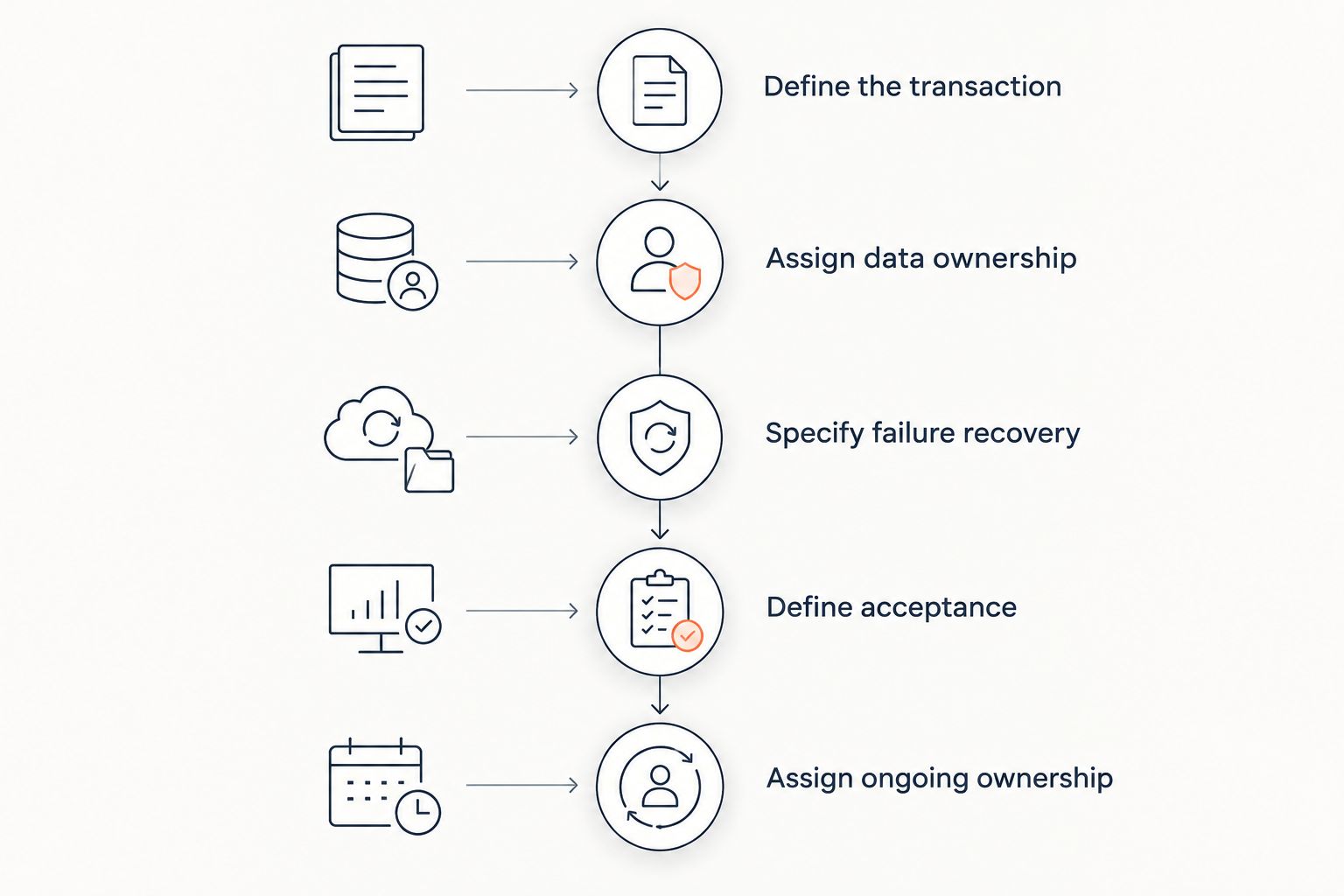
Use this sequence to turn a broad integration request into work a supplier can estimate and your team can accept. Keep business decisions ahead of technical configuration.
1. Define the transaction
Choose a representative approved quote and describe the intended ERP result. Include its customer, ship-to address, item references, quantities, units, and configuration details where relevant.
Start with 1 workflow: an approved quote becoming an ERP order. Add inventory updates, invoice status, or account synchronization only when each has a defined operational purpose and owner.
2. Assign data ownership
Create a field-level mapping showing the source, destination, transformation, and validation rule. Where both applications display the same information, identify the authoritative record rather than allowing silent overwrites.
An ERP-owned item identifier and a CPQ-entered description serve different purposes. Resolve that distinction before testing whether an order transfers successfully.
3. Specify failure recovery
Define how staff identify a rejected transaction, correct its cause, and retry it safely. Include the case where the ERP creates an order but the integration does not receive confirmation.
For that retry test, require 1 ERP order, not an additional order created by resubmitting the same approved quote. This is an acceptance condition, not a claim about a supplier's existing functionality.
4. Define acceptance
Write acceptance criteria before configuration starts. Require a traceable connection between the accepted quote, the integration event, and the resulting ERP record.
Keep 1 approval record associated with the transaction so reviewers can establish what was authorized. Specify who signs off on financial fields, operational fields, and exception handling.
5. Assign ongoing ownership
Name the team responsible for monitoring and the team responsible for correcting business data. Document escalation when a transaction crosses supplier boundaries.
Your 2026 budget review should include release testing and handover, not just launch activities. Ask for operating instructions that someone other than the original implementer can follow.
What should an implementation estimate include?
A usable estimate describes deliverables, not just effort. Ask the supplier to attach a workflow specification, field mapping, acceptance plan, and support boundary to the commercial proposal.
Then check the assumptions. If the supplier assumes clean customer records, available ERP interfaces, or unchanged approval rules, confirm that your team can meet those conditions before approving the work.
Use these questions during procurement:
- Which exact ERP environment and transaction types are included?
- Who resolves missing item references and invalid customer records?
- Does testing include rejected requests, interrupted connections, and safe retries?
- Who approves the production cutover and rollback procedure?
- What documentation and access transfer at handover?
- Which changes require a separate estimate after launch?
Compare proposals only after suppliers answer the same questions. A tightly bounded estimate and a broader delivery commitment are different purchases, even when both use the same integration label.
Is a connector enough to create ERP orders?
A connector is enough only when its supported workflow meets your order-creation and recovery requirements. Require a demonstration of the approved quote becoming a valid ERP order, including the fields your operations team needs.
Test the exception path as well as the successful transfer. A successful connection does not establish that retries are safe or that staff can diagnose a rejected order.
Should you integrate everything at launch?
Launch with the smallest complete workflow that meets your acceptance criteria. A narrow scope is useful only if it includes the records, controls, and recovery steps needed to operate it.
Separate later enhancements from prerequisites. Order-status visibility might be a later phase in one project and a launch requirement in another; decide from the actual workflow rather than a generic integration checklist.
Where revenue operations automation fits
Supplyco revenue operations automation is for industrial manufacturers and distributors automating quoting, order entry, account management, and sales follow-up. That scope makes Supplyco relevant when the integration discussion extends beyond configuring a quote to managing the surrounding sales workflow.
Keep the distinction clear. Revenue operations automation does not, by itself, establish compatibility with your ERP, coverage of your CPQ rules, or a specific integration commitment; require those details in the proposed scope.
For a Supplyco evaluation, bring the same sample transaction, field mapping, and exception tests used elsewhere. The practical benefit to assess is workflow coverage; the limitation to resolve is the exact system and transaction support your implementation requires.
FAQ
How much does it cost to integrate CPQ with an ERP system in 2026?
CPQ–ERP integration requires a scope-based estimate covering connection setup, data mapping, workflow configuration, testing, and ongoing operations. Compare proposals against the same transaction requirements and exclusions rather than treating a connector estimate as the complete implementation.
Is ERP integration included with CPQ software?
Check the specific agreement for ERP integration coverage. Ask whether it includes access to a connector, configuration, data preparation, acceptance testing, deployment, and continuing support.
What work gets overlooked in a CPQ–ERP integration budget?
Include internal staff participation, data preparation, exception handling, documentation, and release testing in the budget. Assign an owner to each activity instead of leaving it inside an undefined implementation allowance.
Is a native connector better than custom integration?
A native connector is the better fit when its documented behavior covers the required workflow. Custom integration fits requirements outside that coverage, but it requires explicit ownership of code, testing, and maintenance.
How do I compare integration proposals fairly?
Give each supplier the same sample quote, required ERP result, field mapping, and failure scenarios. Compare included deliverables, assumptions, exclusions, acceptance criteria, and support responsibilities.
Can Supplyco automate industrial sales workflows?
Supplyco provides revenue operations automation for quoting, order entry, account management, and sales follow-up for industrial manufacturers and distributors. Confirm the proposed ERP connection and transaction coverage during evaluation rather than assuming compatibility.
One last thing
Make the supplier demonstrate a retry after an interrupted response. The ERP might already have accepted the order even though the sending application has not received confirmation.
That test forces a concrete discussion about duplicate prevention, transaction tracing, and recovery ownership. Put the expected result in your 2026 acceptance plan before signing off on implementation scope.