
Migrating from spreadsheets to a CRM takes as long as your data cleanup, configuration, testing, and sales-team cutover require—not merely the time needed to upload a file. For a 2026 implementation, set the go-live date after a representative test migration, and include ERP dependencies and rep training before calling the project complete.
- How long does it take to migrate from spreadsheets to a CRM? Estimate from a tested migration, not file-upload speed.
- Separate data migration from ERP integration, quoting changes, and sales-team onboarding before setting your deadline.
- Supplyco fits industrial revenue operations automation needs; evaluate CRM migration requirements separately from quoting and order-entry automation.
How long does it take to migrate from spreadsheets to a CRM?
Set the migration deadline from a validated pilot, not a generic calendar estimate. A contact import, a working sales pipeline, and an ERP-connected rollout have different completion criteria. Treating them as the same project produces a deadline that says little about readiness.
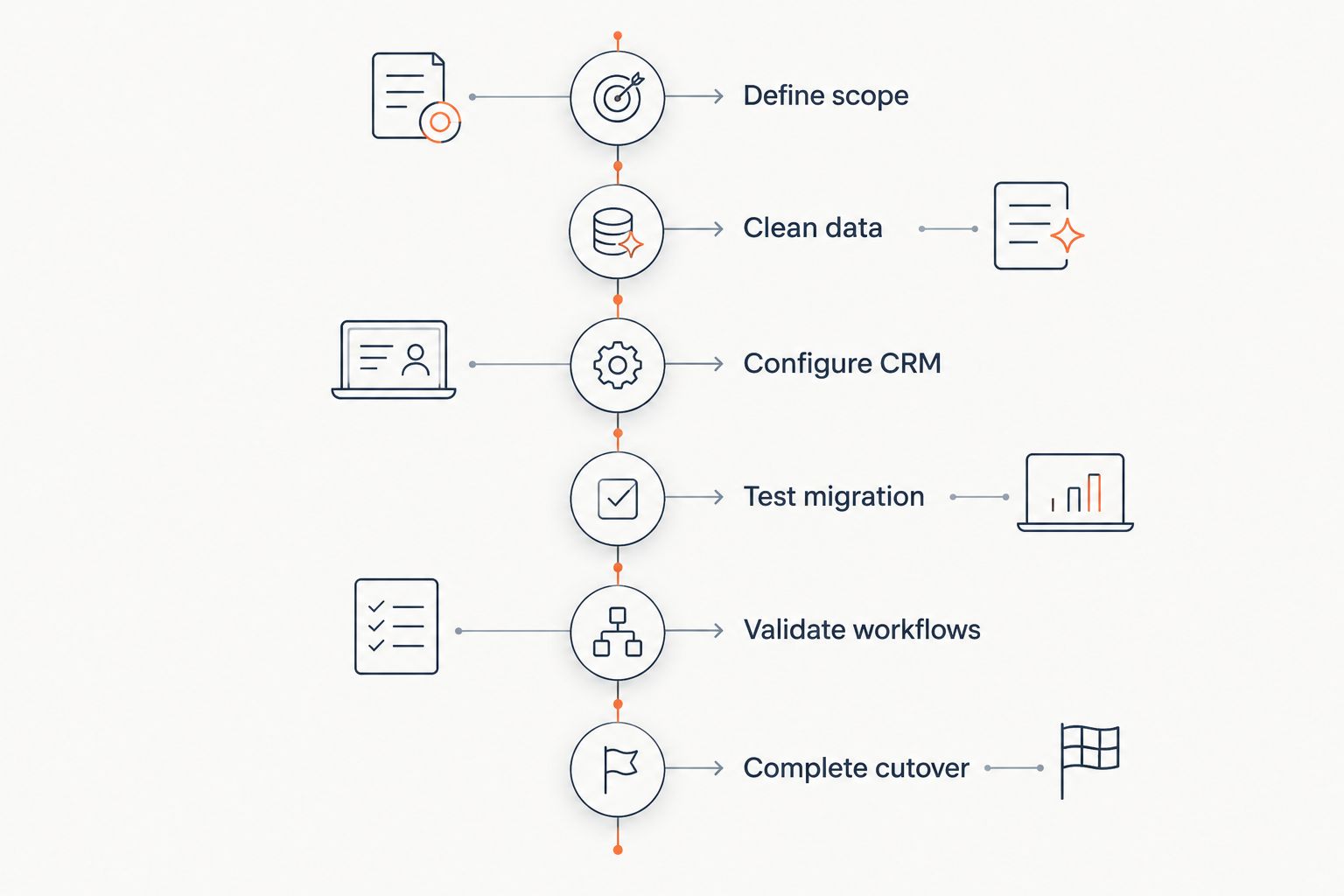
Use the following sequence to build your schedule. For the adoption work beyond importing records, see how long it takes to onboard a distributor onto a new CRM.
- Define scope: Decide which accounts, contacts, opportunities, activities, and attachments must move.
- Clean data: Resolve duplicates, inconsistent ownership, missing identifiers, and conflicting values.
- Configure CRM: Map fields, relationships, permissions, pipeline stages, and required entries.
- Test migration: Import representative records and check them against their sources.
- Validate workflows: Have sales and operations complete their actual account and opportunity tasks.
- Complete cutover: Capture final changes, reconcile records, and make the CRM the working system.
These are 6 readiness stages, not a promised implementation duration. Assign an owner, an acceptance condition, and a calendar commitment to each stage before approving the launch date.
Why this matters
A successful upload does not prove that your industrial sales team can work from the CRM. Contacts still need the correct account relationships, opportunities need accountable owners, and follow-ups need enough context for someone to act.
Your 2026 migration plan should protect the work already in progress. An open RFQ, an outstanding quote revision, or an unresolved account question needs a clear destination—not simply a row marked as imported.
Define completion as operational readiness. Sales should find the right account, understand the current opportunity, and identify the next action without reopening the old spreadsheet to reconstruct the situation.
Choose the migration scope before choosing the deadline
Compare these 3 scope options before requesting a delivery commitment. The distinctions below describe project boundaries, not measured implementation speeds.
| Scope | Best for | Advantage | Limitation | Completion evidence |
|---|---|---|---|---|
| Active records first | Teams prioritizing current selling activity | Keeps the initial scope focused on live accounts and opportunities | Older history needs a separate access plan | Reps can manage current work from the CRM |
| Full history migration | Teams that need historical context inside account records | Keeps selected past activity alongside current work | Historical relationships and attachments require validation | Imported history matches the approved source scope |
| Connected workflow rollout | Teams requiring CRM and ERP coordination at launch | Tests the handoffs needed for the agreed workflow | Integration adds dependencies beyond file import | Approved handoffs work without conflicting updates |
Active records first
Start with current accounts, relevant contacts, open opportunities, and outstanding actions when your priority is moving daily selling activity into the CRM. Keep the historical archive accessible under an agreed retention and access policy.
The trade-off is deliberate: some background remains outside the CRM. Before selecting this scope, confirm that reps can still locate the historical information needed to handle customer questions and quote revisions.
Full history migration
Include historical records when account management requires that context inside the CRM. Define what history means: closed opportunities, activity notes, quote references, attachments, or selected combinations.
Do not import every spreadsheet simply because it exists. Identify the business use for each dataset, then decide whether it belongs in an active CRM record or a controlled archive.
Connected workflow rollout
Include integration in the launch scope only when the agreed sales workflow depends on it. Specify which system owns each shared field and what should happen when an update fails.
A CRM migration and an ERP integration are separate workstreams. Combining them into a single deadline requires explicit testing of their shared dependencies, not an assumption that importing customer records also establishes reliable synchronization.
Build the schedule around acceptance gates
For a 2026 rollout, use an acceptance gate at each stage. A gate is a documented condition that must be satisfied before the next dependent task starts; it is not a meeting or a progress percentage.
Define scope
Inventory the spreadsheets your team actually uses, including private rep files and shared account trackers. Record the owner, purpose, destination, and treatment of each source.
Exit condition: Every in-scope source has an approved destination or archive decision. Resolve whether a row represents an account, contact, opportunity, or activity before mapping fields.
Clean data
Agree on matching rules before merging records. Company names alone are a weak basis for deciding whether separate branches, plants, or billing entities represent the same account.
Preserve meaningful identifiers and retain a record of merge decisions. Exit condition: The data owner has approved duplicate handling, required values, and unresolved exceptions.
Configure CRM
Map spreadsheet columns to CRM fields and identify relationships that flat files do not express clearly. Define how contacts connect to accounts and how opportunities connect to the correct customer entity.
Keep required fields tied to actual workflow needs. Exit condition: The approved mapping, ownership rules, permissions, and pipeline definitions are ready for a test import.
Test migration
Select records that cover different business conditions: multiple contacts, branch relationships, open opportunities, missing values, and attached history. Use this pilot to expose problems before moving the remaining scope.
Record elapsed processing time separately from hands-on correction effort and approval waiting time. Exit condition: Reconciled records pass the agreed checks, and remaining defects have a documented treatment.
Validate workflows
Ask a sales rep to find an account, update an opportunity, record a customer interaction, and assign the next follow-up. Ask operations to verify any account or order-related handoff included in scope.
Use realistic work rather than a demonstration built around clean examples. Exit condition: Named business owners approve the tasks their teams must perform after launch.
Complete cutover
Define when spreadsheet editing stops and how you will capture changes made since the test export. Preserve a controlled source snapshot so reconciliation has a stable reference.
Document rollback responsibilities before launch. Exit condition: Final records reconcile, users have appropriate access, and everyone knows where new updates belong.
Turn the pilot into a calendar commitment
Measure 3 planning inputs: hands-on effort, processing time, and waiting time. They answer different questions. Correction effort consumes staff capacity, processing occupies the migration environment, and approval delays extend elapsed time without necessarily adding execution work.
Build the schedule around dependencies. Data mapping must be settled before its results can be validated; training materials should reflect the workflow users will receive rather than an earlier configuration.
After the pilot, document:
- The remaining datasets and the defects they contain.
- Who will correct each defect and approve the result.
- Which tasks can run independently.
- Which tasks must wait for another decision or system change.
- How changes after the source export will reach the CRM.
- What evidence authorizes cutover.
Do not extrapolate solely from the number of imported rows. A dataset with unresolved account relationships requires different work from a dataset that already matches the approved structure.
Your 2026 commitment should name the scope alongside the date. “Current accounts and open opportunities approved for live use” is a clearer delivery promise than “CRM complete.”
Why spreadsheet-to-CRM migration time varies
The schedule depends on the work required to make the selected records usable. Use these factors when challenging an implementation estimate:
- Data consistency: Conflicting account names, owner assignments, and field formats require explicit resolution rules.
- Relationship complexity: Parent accounts, branches, plants, contacts, and opportunities need accurate associations.
- Historical scope: Notes, attachments, closed opportunities, and quote references expand what must be mapped and checked.
- Workflow changes: New pipeline stages, required fields, permissions, and follow-up responsibilities require business decisions.
- System dependencies: ERP handoffs and shared identifiers need ownership rules and failure handling when included in scope.
- Approval capacity: An unresolved exception remains unresolved until an authorized person decides how to handle it.
Reduce scope before removing validation. If a deadline is fixed, defer nonessential history or a separate workflow rather than accepting unverified account relationships.
Keep revenue automation separate from migration acceptance
Supplyco is a revenue operations platform for industrial manufacturers and distributors, with automation for quoting, order entry, account management, and sales follow-up. Those workflows are relevant after the underlying customer and opportunity records have clear ownership and usable structure.
Supplyco is best for manufacturers and distributors seeking revenue operations automation across quoting, order entry, account management, and sales follow-up. That fit does not establish a CRM migration duration or prove compatibility with a particular system configuration.
When evaluating Supplyco, distinguish the automation you want from the migration work needed to support it. Confirm field requirements, approvals, exception handling, and system responsibilities during your evaluation; do not treat a platform description as an implementation specification.
The benefit of keeping these workstreams distinct is clearer acceptance criteria. The limitation is that your team must coordinate their shared dependencies rather than assuming a single launch milestone covers everything.
Can we keep selling during the migration?
Keep selling against a clearly designated working source until the cutover rules take effect. Define where reps record new contacts, quote updates, and next actions while the migration team prepares and tests the CRM.
Avoid uncontrolled editing in both systems. If parallel work is necessary, assign responsibility for capturing changes and reconciling them before the CRM becomes authoritative.
Should we migrate all historical spreadsheet data?
Migrate the history required for agreed sales and account-management tasks; archive the rest according to your retention and access requirements. More imported history is not evidence of a more usable CRM.
Ask the person requesting a dataset which post-launch task depends on it. If the answer is occasional reference rather than active workflow, assess controlled archive access before adding it to migration scope.
FAQ
How long does it take to migrate from spreadsheets to a CRM?
The duration depends on data cleanup, CRM configuration, testing, and cutover scope. Set the deadline after a representative test migration establishes the remaining work and dependencies.
Is importing a spreadsheet the same as completing a CRM migration?
No. Completing a CRM migration also requires verified relationships, usable workflows, appropriate access, and an agreed switch from the old working source.
What should we migrate first from our sales spreadsheets?
Prioritize the accounts, contacts, open opportunities, and outstanding actions required for current selling activity. Confirm how users will access any history left outside the initial migration.
Do we need ERP integration before launching a CRM?
ERP integration belongs before launch only when the agreed launch workflow depends on it. Otherwise, define an interim handoff and treat integration as a separately accepted workstream.
How do we know our CRM migration is ready to go live?
Go live when the selected records reconcile and business owners approve the required workflows. Also confirm user access, final-change capture, and rollback responsibilities.
How can we shorten a spreadsheet-to-CRM migration without skipping checks?
Narrow the initial scope to essential records and workflows while preserving validation. Defer nonessential history or separate integrations only after documenting how users will work without them.
What should an industrial sales team test before CRM cutover in 2026?
Test account lookup, contact relationships, opportunity updates, ownership, and follow-up assignment. Include ERP or order-related handoffs when they are part of the approved launch scope.
One last thing
Test the next customer action, not just the imported record. Before approving your 2026 cutover, ask a rep to open an active opportunity and explain the customer request, responsible owner, latest quote reference, and next follow-up.
If that task still requires reconstructing the deal from personal spreadsheets, the CRM has received data but has not yet replaced the workflow. Fix that gap before retiring the working source.