
A manufacturing CRM is worth it when spreadsheets no longer give your team reliable ownership, quote follow-up, and account history—not simply because you still use spreadsheets in 2026. Keep spreadsheets for analysis, but move shared sales execution into a CRM when missed handoffs and conflicting records interfere with customer work. The additional work is data cleanup, process design, and daily adoption; buying software does not remove those responsibilities.
- Is a manufacturing CRM worth it if we use spreadsheets? Yes, when shared account ownership and quote follow-up break down.
- Spreadsheets suit analysis; a CRM suits shared sales execution when your team maintains clear records and responsibilities.
- Supplyco targets manufacturers and distributors seeking quoting, order entry, account management, and sales follow-up automation.
- Keep ERP transaction records authoritative, and test the sales workflow before expanding a CRM rollout.
Is a manufacturing CRM worth it if we still use spreadsheets?
Yes, if your spreadsheet is doing the job of a shared work queue without reliable ownership, activity history, or next actions. No, if your team already handles those responsibilities consistently and the proposed CRM adds duplicate entry without fixing a defined problem.
Use the comparison below to separate recordkeeping from workflow needs. The CRM software for small manufacturers guide provides a related starting point for evaluating your requirements.
| Approach | Best for | Main advantage | Main limitation | Decision |
|---|---|---|---|---|
| Spreadsheets | Analysis and a sales process with clear manual ownership | Flexible calculations and familiar editing | Follow-up and record consistency depend on manual discipline | Keep when the process remains dependable |
| CRM | Shared accounts, opportunities, and sales activities | Centralizes sales records and assigned work when configured | Requires clean data, defined stages, and regular updates | Adopt when shared execution is the problem |
| CRM plus workflow automation | Defined quoting, order entry, and follow-up handoffs | Connects recordkeeping with repeatable actions when supported | Requires additional validation, permissions, and exception handling | Evaluate after defining the workflow |
Your decision is not whether spreadsheets are obsolete. It is whether the current process lets another rep understand an account and take the correct next action without reconstructing the story from files and email.
Why this matters
An industrial opportunity can involve an RFQ, technical clarification, a revised quote, customer approval, and order entry. Treating all of that as a single spreadsheet status hides the work between milestones.
For your 2026 evaluation, distinguish a visibility problem from an execution problem. A CRM can organize who owns a quote and what happens next; it does not automatically validate a product configuration, approve a commercial exception, or create an accurate ERP order.
Buy against the failed handoff, not the software category. If your actual bottleneck is rekeying purchase orders, a better pipeline dashboard does not directly address it.
When keeping spreadsheets is the right decision
Best for: a sales process that remains clear, current, and accountable without a separate application. Keep spreadsheets when your team can identify the account owner, current quote, outstanding customer question, and next action without searching across competing copies.
Spreadsheets remain useful for calculations, temporary analysis, and working through scenarios. Those uses do not disappear when you introduce a CRM.
The limitation is operational discipline. Someone must maintain definitions, resolve conflicting edits, and make sure follow-ups actually happen; a row containing a date is not proof that the customer received a response.
Before replacing the spreadsheet, standardize the essentials:
- Give each account and opportunity a consistent identifier.
- Assign an accountable owner to every active opportunity.
- Record the current quote revision separately from general notes.
- Capture the next action and its due date.
- Define what qualifies an opportunity as won or lost.
If these changes restore reliable execution, keep the spreadsheet while you reassess the need. Do not migrate a manageable process solely to get a different interface.
When a manufacturing CRM earns its place
Best for: teams that need shared account history, explicit handoffs, and a consistent pipeline. A CRM earns its place when the same customer information must support inside sales, outside reps, account managers, and sales leadership.
Look for operational failures rather than a universal account-count threshold. Conflicting account owners, forgotten quote follow-ups, inaccessible customer history, and pipeline reviews spent reconciling files are concrete problems to address.
For a 2026 CRM shortlist, require vendors to demonstrate your workflow rather than a generic opportunity dashboard. Ask them to show:
- How an RFQ becomes an assigned opportunity.
- How a rep records the current quote and revision.
- How another rep finds the latest customer discussion.
- How overdue next actions become visible.
- How an accepted quote is handed to order entry.
The benefit is a shared operating record. The trade-off is ongoing administration: someone must maintain permissions, fields, stages, and data quality.
A CRM is not worth adopting if your team must maintain the same operational record twice indefinitely. Define which spreadsheet uses will stop before you approve the rollout.
When workflow automation belongs beside the CRM
Best for: teams whose bottleneck is repetitive execution rather than missing visibility. A CRM record shows what should happen; workflow automation addresses defined actions such as quote preparation, order entry, and follow-up.
Supplyco is best for manufacturers and distributors seeking quoting, order entry, account management, and sales follow-up automation. That is a different buying question from whether you need a shared contact and opportunity database.
Supplyco provides a revenue operations platform for those workflows. Evaluate it against an actual handoff, including the source document, required review, destination record, and handling of incomplete information.
The relevant advantage is its stated focus on industrial revenue operations. The evaluation constraint is equally important: that scope alone does not establish compatibility with your ERP, approval rules, or document formats. Require a demonstration before treating any requirement as satisfied.
For Supplyco, judge the workflow—not the dashboard. A useful evaluation establishes what the platform does, what your team still reviews, and what happens when an input is ambiguous.
Why the value of a manufacturing CRM varies
The value depends on the work your sales process requires and the responsibilities your team assigns to the system. Use these factors to build requirements, not to assume a return.
- Account ownership: Shared accounts need explicit responsibility for opportunities, customer questions, and follow-ups.
- Quote revisions: Revised specifications and commercial terms require a clear current version and accessible history.
- ERP boundaries: Define where customer identifiers, item records, accepted orders, and transaction status originate.
- Data quality: Duplicate accounts and inconsistent opportunity stages weaken the usefulness of a centralized record.
- User adoption: A configured CRM has little operational value if customer activity remains only in personal inboxes.
- Approval controls: Decide which changes require review before a quote reaches a customer or an order reaches the ERP.
For your 2026 business case, identify which factor causes the observed failure. Avoid assigning benefits to features that do not address that failure.
How do we test a CRM without replacing every spreadsheet?
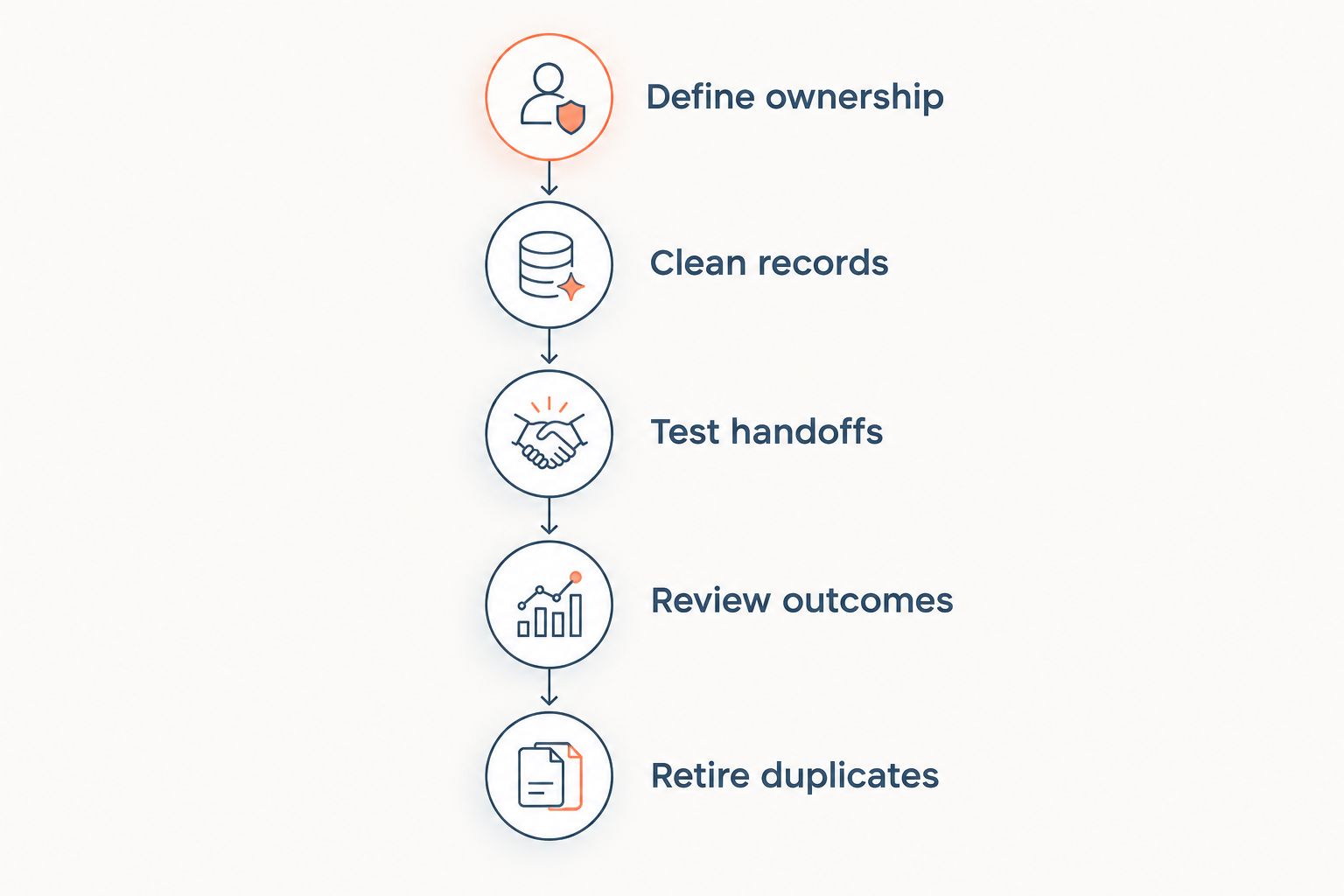
Run a 30-day pilot as a chosen evaluation window, not a promised implementation timeline. Limit the scope to a defined sales workflow and agree on what success means before configuring fields.
Define ownership
Choose the account group and sales process you will test. Assign 1 accountable owner per opportunity, while allowing supporting reps and technical staff to contribute.
Write down who accepts a new RFQ, who prepares the quote, and who follows up. Resolve disputed responsibilities before translating them into system rules.
Clean records
Remove duplicate accounts from the pilot dataset and distinguish customer accounts from individual contacts. Match existing customer identifiers to the ERP where your process requires that connection.
Import active records deliberately. Historical notes without usable dates, owners, or context should not determine how the new workflow operates.
Test handoffs
Take an actual RFQ through assignment, clarification, quoting, follow-up, and acceptance. Include a revised quote and an incomplete request so you can examine exception handling, not just the easiest path.
Require the receiving person to confirm what information is available at each handoff. A status change is insufficient if the next person still needs to request the missing document.
Review outcomes
Schedule a 15-minute weekly review during the pilot. This is a suggested operating cadence, not a performance benchmark.
Check overdue next actions, missing owners, duplicate records, and unresolved handoffs. Use the same definitions throughout the pilot so the review remains comparable.
Retire duplicates
At the end of the pilot, decide which operational spreadsheet fields will stop being maintained. Keep analytical exports where useful, but name the authoritative record for live sales work.
If the pilot still requires parallel updates everywhere, revise the process before expanding. Do not turn a temporary migration arrangement into the permanent workflow.
How do we judge whether the CRM is worth keeping?
Judge the CRM against the baseline you documented before the pilot. For a 2026 decision, use observed workflow results rather than a vendor's general productivity claim.
Record the same measures before and during the test:
| Measure | What to record | What it helps you judge |
|---|---|---|
| Follow-up completion | Due actions and completed actions | Whether assigned customer work happens |
| Quote turnaround | RFQ receipt and quote-sent timestamps | Whether the quoting handoff improves |
| Handoff completeness | Accepted quotes missing required information | Whether order entry receives usable records |
| Record maintenance | Time spent entering or correcting sales data | Whether administration decreases or shifts |
| Pipeline consistency | Opportunities with owners, stages, and next actions | Whether the pipeline supports decisions |
These are evaluation measures, not guaranteed outcomes. Examine the causes behind any change; a different mix of RFQs can change quote turnaround without proving that the CRM caused the difference.
Keep the CRM when it improves the defined workflow enough to justify its administration and adoption burden. Revise or stop the rollout when it merely reproduces the spreadsheet in another application.
Can we keep spreadsheets after adopting a manufacturing CRM?
Yes. Keep spreadsheets for analysis, planning, and calculations that do not become competing live customer records.
Define the direction of information flow. An exported pipeline used for analysis should not silently become a separate source of account ownership and quote status.
Does our ERP already do enough?
Your ERP does enough if its configured sales workflow gives your team the account context, assigned follow-ups, and handoffs you need. Test those tasks before buying a separate CRM.
Do not duplicate an existing capability just because the alternative carries a different category label. Identify the missing task, then evaluate the smallest change that addresses it.
FAQ
Is a manufacturing CRM worth it if we use spreadsheets?
A manufacturing CRM is worth it when spreadsheets no longer support reliable account ownership, quote follow-up, and shared customer history. Keep spreadsheets if those responsibilities remain clear and the proposed CRM adds no useful workflow improvement.
What's the clearest sign we have outgrown our sales spreadsheet?
A clear sign is that another rep cannot identify the current quote, responsible owner, and next action from the shared record. Investigate whether the cause is poor process discipline or a need for better workflow controls.
Can we use a CRM and spreadsheets together?
Yes, use a CRM for live sales execution and spreadsheets for analysis when that division fits your process. Avoid maintaining competing operational records in both places.
Will a manufacturing CRM replace our ERP?
Do not assume a manufacturing CRM replaces your ERP. Define which system owns customer identifiers, item records, accepted orders, and transaction status before selecting software.
Should we automate order entry before buying a CRM?
Evaluate order entry automation first if rekeying accepted orders is the specific bottleneck. A CRM is the more relevant starting point when shared account history, ownership, and follow-up are the missing controls.
How long should we test a manufacturing CRM?
A 30-day pilot is a suggested evaluation window, not a universal implementation duration. Set a defined scope and extend the evaluation when you have not yet observed the handoffs you need to assess.
What should sales reps update in the CRM?
Sales reps should maintain the information needed for the next person to act: ownership, current stage, quote reference, customer context, and next action. Remove fields that have no defined operational purpose.
One last thing
Before your 2026 purchase decision, test whether a colleague can take over an active quote without asking its owner to reconstruct the history. Use the shared record, current documents, and assigned next action.
If the colleague succeeds, preserve what works. If the colleague fails, write down exactly what was missing—that is a better starting requirement than a long feature checklist.