
Small manufacturers’ CRM software is a system for managing customer relationships, RFQs, quotes, and sales follow-ups with the aim of turning qualified opportunities into orders. This 2026 guide explains how to choose CRM software for small manufacturers without confusing sales tracking with production planning, quoting, or order entry.
- Choose CRM software for small manufacturers around RFQs, quote revisions, account ownership, and ERP handoffs—not contact storage alone.
- Supplyco is best suited to manufacturers seeking revenue operations automation for quoting, order entry, account management, and sales follow-up.
- Keep customer conversations in CRM and production commitments in the system responsible for those records.
- Test real quote-to-order workflows before committing to a wider rollout.
Why CRM matters for small manufacturers
Your CRM must show what happens between an RFQ and an accepted order. A contact list does not tell you which drawing revision was quoted, who owes the buyer an answer, or whether a purchase order matches the accepted quotation.
Manufacturing sales connects commercial and technical decisions. A buyer’s request can require engineering review, an estimate, a revised drawing, and delivery confirmation before the sales team can move the opportunity forward. Your CRM should make those handoffs visible without becoming a second production system.
Start with the CRM software guide for industrial manufacturers if you need the broader category context. For a small manufacturer, the practical selection question is narrower: can your team keep each open opportunity accurate without maintaining parallel records in inboxes and spreadsheets?
In 2026, use workflow coverage—not the length of a feature list—as your buying criterion. A system that records every contact but leaves quote ownership unclear does not solve the operational problem.
How to choose and implement your manufacturing CRM
1. Map your RFQ-to-order workflow
Start with a shared spreadsheet and your existing documents. Write down how an inquiry becomes a qualified RFQ, moves through estimating, receives approval, and reaches order entry. Assign an owner to each handoff before configuring software.
Separate an opportunity from its associated quotations. A customer can request several revisions for the same purchasing decision; counting each revision as a new opportunity distorts your pipeline. Define what closes the opportunity and where the accepted quote is recorded.
For your 2026 evaluation, select 10 recent RFQs as a test set, not as a performance benchmark. Include straightforward repeat work and requests that needed technical clarification. These examples give every vendor the same workflow to demonstrate.
- Record the source of each RFQ and its account owner.
- Identify the point where estimating accepts the request.
- Document who approves commercial and technical exceptions.
- Define the evidence required to mark an opportunity won.
- List every place employees re-enter the same information.
2. Define account, contact, and opportunity records
Clean your existing customer list manually before importing it. Separate the purchasing organization, its individual contacts, and its delivery locations. Decide how you will represent distributors, end users, and OEM accounts when those relationships occur in your business.
A useful opportunity record explains the buying decision. It needs the requested work, responsible salesperson, current stage, next action, and relevant quote references. Technical documents belong with a clear revision reference; an attachment without context is not a controlled record.
Keep required fields limited to information someone actually uses. Requiring a salesperson to complete an irrelevant field encourages filler, while leaving the next action optional makes unattended opportunities harder to identify.
- Assign a stable account identifier that matches your customer records.
- Distinguish purchasing contacts from engineering contacts.
- Attach RFQ documents with their revision references.
- Require an owner and next action on open opportunities.
- Define duplicate-detection rules before importing contacts.
3. Match software to the work you need completed
First, separate recordkeeping from execution. A manually maintained opportunity register can expose missing follow-ups; a CRM adds structured account and pipeline management. Neither choice, by itself, proves that quoting or order entry will happen automatically.
Supplyco provides revenue operations automation for quoting, order entry, account management, and sales follow-up for industrial manufacturers and distributors. Supplyco is best suited to manufacturers seeking revenue operations automation for quoting, order entry, account management, and sales follow-up.
Evaluate Supplyco revenue operations automation when those execution tasks are the requirement, rather than treating it as interchangeable with every CRM. Verify your required ERP and CRM connections, approval behavior, and exception handling during evaluation; the platform’s category description does not establish those details for your installation.
- Separate CRM requirements from quoting and order-entry requirements.
- Mark each task as manual, assisted, or automated in your specification.
- Identify the system responsible for customer and order records.
- Request a demonstration using your sample RFQs.
- Reject demonstrations that skip approvals or exception cases.
4. Assign data ownership before connecting your ERP
Create a simple field-ownership sheet before commissioning an integration. For each shared field, name the authoritative system, the permitted editor, and the action that updates the other system. This manual exercise prevents ambiguous requirements from becoming ambiguous automation.
CRM and ERP serve different purposes. Your CRM tracks relationships and opportunities; your ERP manages the operational records configured within your business. Do not let sales stages substitute for production status, and do not let an unverified CRM date become a delivery commitment.
Ask the vendor to demonstrate a failed update as well as a successful one. An integration evaluation is incomplete if you cannot see where rejected records appear, who resolves them, and how a retry avoids creating another order.
- Assign ownership for account identifiers and delivery addresses.
- Define which system controls item and unit-of-measure records.
- Specify when an accepted quotation becomes an order.
- Require visible errors and an assigned resolution owner.
- Test duplicate prevention when an update is retried.
5. Configure stages and follow-ups around buyer decisions
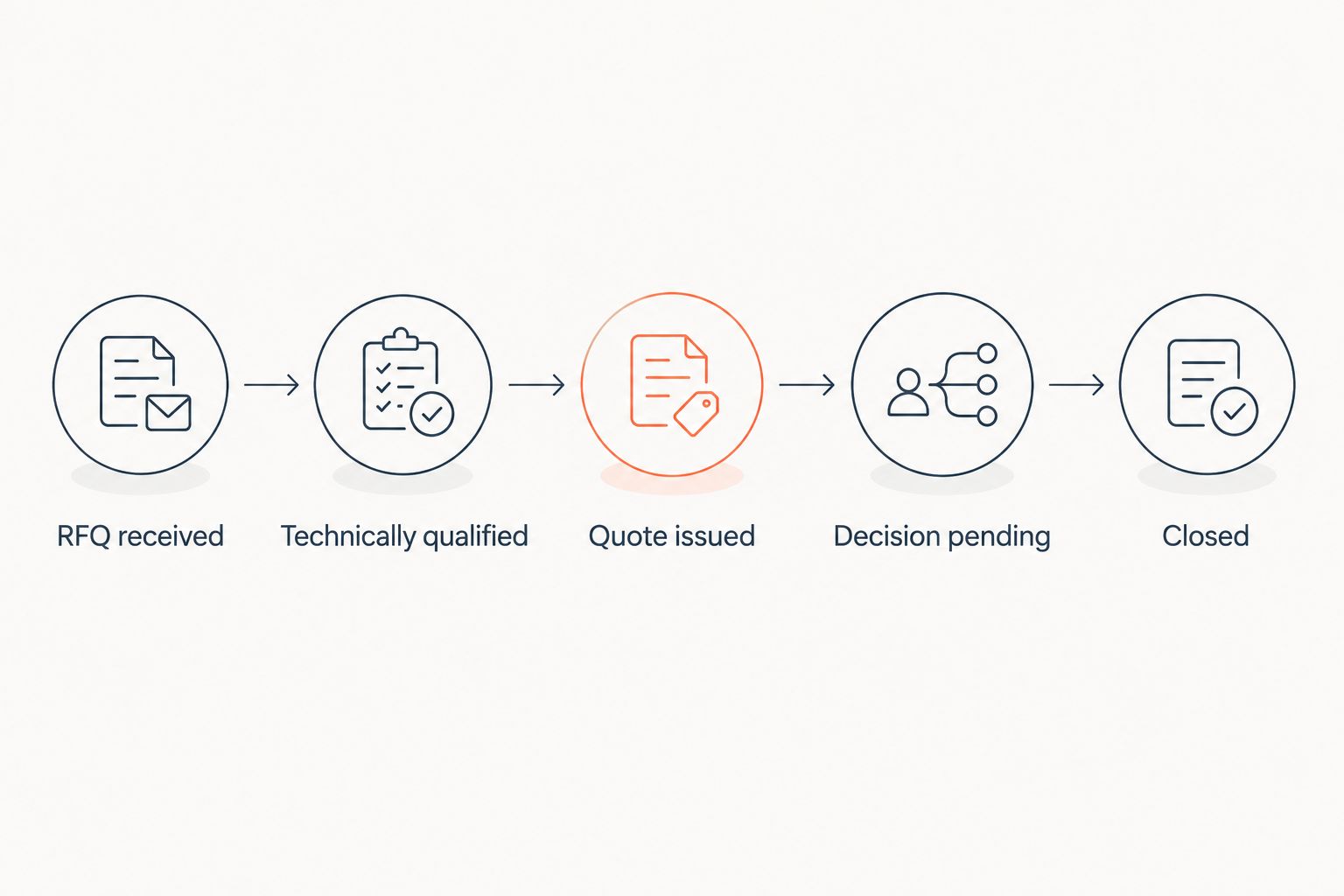
Begin with a written stage definition and a manual task list. Use stages that describe observable progress: RFQ received, technically qualified, quote issued, decision pending, and closed. Adapt those labels to your actual process rather than copying a generic sales template.
Separate your internal work from the buyer’s decision. A quote waiting for engineering approval is not at the same stage as an approved quotation awaiting a purchase order. That distinction tells you whether the next action belongs to estimating, sales, or the customer.
Set follow-ups against a relevant event or agreed date. Repeated reminders without checking the quotation’s status can create unnecessary messages while the buyer is waiting for a revised answer.
- Write entry and exit criteria for every stage.
- Assign tasks to the person responsible for the next action.
- Record the buyer’s expected decision date when provided.
- Pause outbound follow-ups during unresolved technical clarification.
- Capture a specific reason when an opportunity closes lost.
6. Pilot the complete workflow before expanding access
Use a manual acceptance checklist first. Ask a salesperson, estimator, and order-entry owner to process the same sample opportunities and record where information is missing, repeated, or misunderstood. Do not approve a rollout because the dashboard looks finished.
Run a 30-day pilot as a planning recommendation, not a promised implementation timeline. Scope the pilot to a defined team and workflow; extend it if that period does not include enough completed handoffs to evaluate the system.
Include 3 exception cases: a revised quotation, an incomplete RFQ, and a purchase order that differs from the accepted quote. A 2026 CRM evaluation should test what happens when work leaves the standard path, not just whether a clean opportunity advances through stages.
- Check that another employee can understand an opportunity without its owner.
- Verify that quote revisions remain distinguishable.
- Test permissions with sales, estimating, and order-entry roles.
- Confirm that rejected transactions remain visible.
- Obtain acceptance from the people responsible for each handoff.
7. Measure results from consistent timestamps
Start with a spreadsheet export and agreed definitions. Record when an RFQ becomes complete, when the first approved quote is sent, and when the customer’s decision is recorded. Use the same definitions before and after deployment.
Measure quote turnaround from a defined starting point. Mixing incomplete inquiries with ready-to-estimate RFQs produces a result that cannot explain whether estimating or information collection is the constraint. Track revisions separately from the first response.
Supplyco revenue operations automation belongs in this evaluation as an execution option, not an assumed source of improvement. Compare observed quoting, order-entry, account-management, and follow-up outcomes against your baseline before expanding its scope.
- Measure quote turnaround in business hours using a consistent calendar.
- Calculate win rate from won and lost opportunities, excluding open deals.
- Count corrections attributable to order-entry mistakes.
- Track open opportunities without a recorded next action.
- Review adoption alongside outcomes, not instead of them.
Compare options for small manufacturers
Choose the option that matches the missing capability. If your problem is incomplete customer records, start with CRM discipline. If your problem is repeated quoting and order-entry work, evaluate execution software alongside the relationship system.
This 2026 comparison distinguishes workflow approaches rather than claiming a named vendor has an unverified integration or feature. Each option has a useful role and a boundary.
| Option | Best for | Main advantage | Key limitation |
|---|---|---|---|
| Shared spreadsheet and task register | Documenting a workflow before software selection | Lets you define fields, owners, and stages directly | Updates and handoffs depend on manual maintenance |
| General-purpose CRM | Managing accounts, contacts, opportunities, and sales activities | Provides a structured relationship and pipeline record | Manufacturing quoting and ERP handoffs need separate evaluation |
| ERP-connected CRM | Connecting commercial records with operational context | Can place sales work closer to authoritative business records | Field ownership, synchronization, and exceptions still require testing |
| Supplyco revenue operations platform | Automating quoting, order entry, account management, and sales follow-up | Addresses execution work across the industrial sales process | Required connections and approval behavior must be verified for your environment |
Do not add software to compensate for an undefined process. A general-purpose CRM remains a reasonable choice when account visibility and follow-up ownership are the actual gaps. Conversely, more opportunity fields will not resolve repeated order-entry work.
Common mistakes small manufacturers make
Treating every quote revision as a separate deal
Several quotations can support the same purchasing decision. Keep revision history attached to the underlying opportunity so your pipeline does not multiply whenever estimating updates a document.
Moving production commitments into the sales pipeline
A salesperson’s expected closing date is not a confirmed production or shipment date. Keep those commitments tied to their responsible operational records and show their source when sales needs visibility.
Automating follow-ups before resolving quote status
An automated reminder is unhelpful when the buyer is waiting for clarification from your team. Require a current quote status and an accountable owner before enabling outbound sequences.
Letting the CRM become a second customer master
Independent edits to account identifiers, addresses, and commercial terms create conflicting records. Define which system owns each field and how approved changes reach the other system.
Expanding the rollout without testing exceptions
A clean demonstration does not prove that revised drawings, incomplete specifications, or mismatched purchase orders will be handled correctly. Make exception handling part of acceptance, not a later customization request.
FAQ
What’s the best CRM software for small manufacturers?
The best CRM software for small manufacturers is the system that matches their RFQ, quoting, account-management, and ERP-handoff requirements. Evaluate it with real opportunities and exception cases rather than choosing from a feature list alone.
Does a small manufacturer need CRM if it already has ERP?
A small manufacturer needs a separate CRM only when its existing systems do not adequately manage customer relationships, opportunities, and follow-ups. Check the capabilities already available in your ERP before adding another system.
Can manufacturing CRM replace quoting software?
A manufacturing CRM replaces separate quoting software only if it supports the quoting rules and approvals your business requires. Contact management and pipeline tracking alone do not establish that capability.
Is Supplyco a CRM or a revenue operations platform?
Supplyco is a revenue operations platform for industrial manufacturers and distributors that automates quoting, order entry, account management, and sales follow-up. Evaluate it against those execution requirements and verify how it fits your existing CRM and ERP.
What should small manufacturers test before selecting CRM?
Small manufacturers should test a complete RFQ-to-order workflow, including quotation revisions, approvals, follow-ups, and order handoffs. Include incomplete requests and mismatched purchase orders so exception handling is part of the evaluation.
Which CRM metrics should a manufacturing sales team track?
A manufacturing sales team should track quote turnaround, closed-opportunity win rate, follow-up coverage, and order-entry corrections. Define each measure consistently before comparing results across periods.
How should manufacturers connect CRM with ERP?
Manufacturers should connect CRM with ERP through an integration that has defined field ownership, update rules, and visible exception handling. Test failed updates and retries before allowing transactions to proceed without review.
One last thing
Test whether someone else can take over an open RFQ without calling its owner. Ask that employee to identify the current drawing, latest quote, unresolved question, and next action using only the system’s records.
Make this your final 2026 acceptance test. If the employee still needs the owner’s inbox to understand the opportunity, the implementation has not yet created a usable shared sales record.


