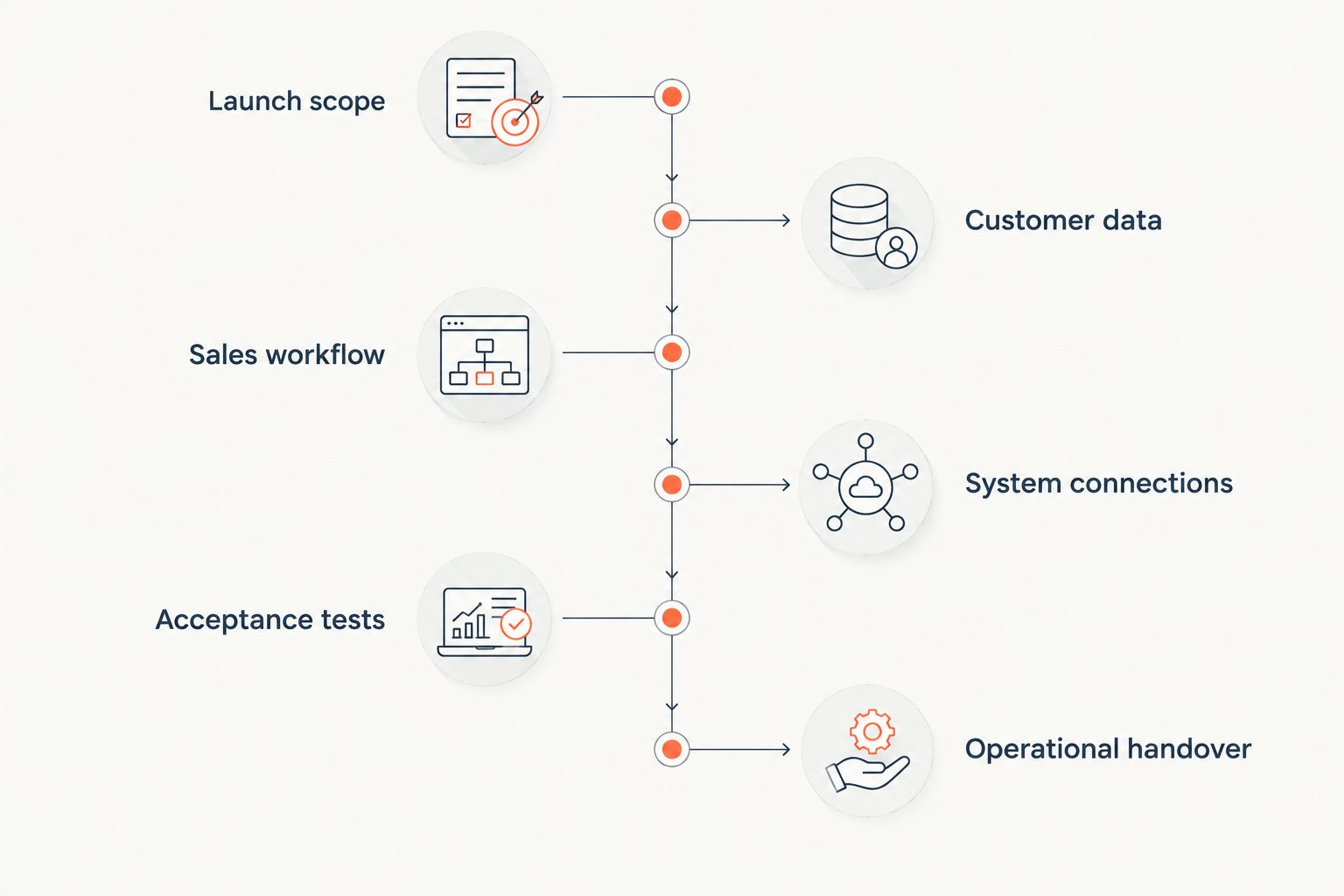
Onboarding a distributor onto a new CRM takes the time required to prepare customer data, configure sales workflows, validate ERP connections, and prove that users can complete their work. Set the go-live date from those acceptance checks, not from the date user accounts become available. Include migration corrections, workflow testing, and post-launch support in the schedule; access and training alone do not complete onboarding.
- How long does it take to onboard a distributor onto a CRM? Schedule data migration, ERP validation, and user acceptance.
- Distributor CRM onboarding is complete when users can manage accounts, opportunities, and follow-ups without unresolved launch blockers.
- SUPPLYCO fits industrial manufacturers and distributors seeking revenue operations automation for quoting, order entry, and sales follow-up.
- Separate CRM launch requirements from later automation so unfinished optional workflows do not control the launch date.
Why this matters
A CRM launch date and an operational handover are different commitments. You need a usable customer record, clear account ownership, reliable opportunity stages, and a defined place for quoting and order information—not just a login.
For your 2026 implementation plan, write down what sales must complete inside the CRM and what remains in the ERP. Use an industrial distributor sales playbook to define those tasks before configuring fields and stages. Otherwise, the implementation team has no agreed standard for deciding whether the system is ready.
Define onboarding as an accepted workflow, not an installed application. That distinction gives your sales manager, operations lead, and implementation partner the same finish line.
How long does it take to onboard a distributor onto a new CRM?
There is no fixed duration that applies to every distributor CRM implementation. Build the estimate around the work your launch includes, the people responsible for it, and the dependencies that must finish before users switch systems.
Use the following sequence to turn an implementation proposal into a schedule you can approve. Each step needs an owner, an expected completion date, and evidence that the work meets its acceptance criteria.
1. Define the launch scope
List the workflows your distributor needs on launch day: finding an account, updating a contact, assigning an opportunity, recording a quote reference, and scheduling a follow-up. Describe the required outcome for each task rather than listing software features.
Decide whether quoting and order entry belong in the initial release. If those functions remain in existing systems, document how users move between them and the CRM. Do not describe an account-management launch as a completed quote-to-cash implementation.
Acceptance check: the sales and operations owners approve the launch workflows, exclusions, and responsibilities. Keep requests outside that scope in a separate backlog so they do not silently change the deadline.
2. Prepare customer data
Identify the source for account names, contacts, account owners, customer identifiers, and open opportunities. Decide which source takes precedence when records disagree. Importing conflicting records does not settle the conflict.
Check how your data represents customer headquarters, branches, buying locations, and delivery addresses. Preserve the relationships your team needs to identify the correct customer, rather than treating every address as an unrelated account.
Acceptance check: users can find representative customers and confirm their identifiers, contacts, ownership, and relationships. Keep an exception list with a named owner for records that require correction; do not hide unresolved issues inside a completed import task.
3. Configure the sales workflow
Define opportunity stages using observable events. A stage should tell the next person what has happened and what action comes next. Avoid stages whose meaning changes between sales representatives.
Set the required fields, account assignments, permissions, and follow-up rules needed for the launch workflows. Require information because a downstream task uses it, not because the CRM provides a field for it.
Acceptance check: an inside-sales user, outside-sales user, and manager can each complete their assigned tasks with the intended access. Test shared-account ownership and reassignment explicitly if those are part of your operating model.
4. Validate system connections
Document which system owns each shared field and which direction information moves. For customer identifiers, quote status, or order references, specify the expected behavior when a record changes or a transfer fails.
Separate read-only visibility from actions that create or update transactions. Showing order information in a CRM and allowing the CRM to initiate an order require different acceptance checks.
Acceptance check: a representative account and transaction follow the documented path, including an exception case. Record how your team detects a failed transfer, assigns it for correction, and confirms that recovery does not create duplicate records.
5. Run role-based acceptance tests
Give users tasks, not a feature tour. Ask a representative to locate a customer, update an opportunity, record the next action, and hand the work to another user. Ask a manager to verify ownership and review the pipeline.
Include the cases that create ambiguity in your actual operation. Examples to consider include a customer with several locations, a reassigned territory, or an opportunity without a confirmed quote reference. Select cases from your own workflows rather than treating every example as mandatory.
Acceptance check: each role completes the agreed launch tasks, and defects have a documented disposition. Distinguish a blocked customer workflow from a display preference; both need tracking, but they do not require the same launch decision.
6. Complete the operational handover
Decide when users stop updating the previous system and where they record new activity during the transition. Assign responsibility for launch support, data corrections, access changes, and unresolved integration exceptions.
Training should use the accepted workflows and current records. A user who attended a session still needs to demonstrate the work that defines readiness.
Acceptance check: the business owner approves the cutover, support ownership is clear, and users know where to report problems. For a 2026 rollout, retain the acceptance record alongside the implementation schedule so the launch decision remains traceable.
Choose the rollout scope before estimating the timeline
A limited CRM rollout and an integrated revenue workflow are different projects. Compare the acceptance requirements before comparing proposed delivery dates; a shorter proposal is not equivalent if it excludes the work your distributor needs.
| Rollout approach | Best for | Main advantage | Main limitation | Required acceptance evidence |
|---|---|---|---|---|
| Account and pipeline launch | Teams keeping quoting and order entry in existing systems | Keeps initial acceptance focused on sales records and activity | Does not complete quoting or order-entry automation | Users manage accounts, opportunities, ownership, and follow-ups |
| CRM with ERP visibility | Teams requiring customer and transaction context during sales work | Adds operational context to account management | Requires validation of shared identifiers and data movement | Users see the correct records, and exceptions have owners |
| CRM with transaction automation | Teams including quoting or order-entry actions in the launch | Includes execution beyond recording sales activity | Adds approval, transaction, and recovery tests | Approved actions complete correctly, and failures reach review |
Choose the smallest scope that satisfies the business requirement—not the smallest scope that produces a convenient date. A sales-only launch is appropriate when sales-only acceptance is the agreed objective. It is incomplete when the objective includes transaction execution.
Put the selected scope in every 2026 implementation proposal. Require the provider to identify exclusions directly beside the delivery commitment, rather than leaving them in separate technical notes.
Why distributor CRM onboarding time varies
The schedule depends on the work included in the handover. Review these factors when assigning tasks and dependencies; use evidence from your distributor rather than assuming a standard duration.
- Customer data: account duplicates, missing identifiers, and unresolved location relationships require decisions before users can trust the migrated records.
- Workflow scope: account management, quoting, order entry, and follow-ups need separate acceptance criteria when they are included in the launch.
- System boundaries: ERP and CRM responsibilities must be explicit wherever information moves between them.
- Permissions and ownership: account assignments, territory rules, and approval responsibilities need testing against the intended operating model.
- User acceptance: sales and operations owners must have time allocated to complete tests and resolve the issues they identify.
- Cutover requirements: the transition needs rules for new activity, unfinished work, support, and access to previous records.
Assign an owner to each dependency before accepting the project schedule. A task without a decision-maker is not ready to become a reliable delivery commitment.
How do you turn the work into a credible launch date?
Estimate the agreed tasks with the people responsible for completing them, then arrange those tasks by dependency. Data preparation and workflow design can be planned separately, but acceptance testing needs the relevant configuration and records ready.
Ask your implementation partner to show the sequence rather than supplying only a final date. Your 2026 schedule should distinguish configuration completion, migration acceptance, integration acceptance, user acceptance, and operational handover.
Use a short readiness record for every milestone:
- What must be completed?
- Who approves the result?
- Which earlier task does it depend on?
- What evidence demonstrates acceptance?
- Which unresolved issue prevents the next step?
Approve dates with their assumptions attached. If the agreed scope changes, update the schedule and acceptance criteria together. Do not preserve an old launch commitment while adding new transaction workflows to the project.
Does ERP integration have to be finished before CRM launch?
ERP integration must be finished before launch when the accepted CRM workflow depends on it. If users need current customer or transaction information to complete their launch tasks, that information belongs in acceptance testing.
A launch without ERP integration is a different scope, not proof that integration work is unnecessary. Document the manual handoff and its owner before approving that approach.
Is training enough to finish distributor CRM onboarding?
Training alone does not finish distributor CRM onboarding. Users need to demonstrate the agreed tasks with correct permissions, usable records, and a defined way to handle exceptions.
Treat attendance as a training record and task completion as acceptance evidence. Keep those records separate so your launch decision reflects operational readiness.
Where revenue operations automation fits
A CRM onboarding plan defines how your team records and manages sales work. Revenue operations automation adds a separate question: which quoting, order-entry, account-management, and follow-up tasks should the platform execute?
Supplyco fits industrial manufacturers and distributors seeking revenue operations automation for quoting, order entry, account management, and sales follow-up. That is a workflow fit, not an implementation-speed claim. Evaluate the included tasks against the same ownership and acceptance requirements used for the CRM project.
Supplyco's stated scope does not establish compatibility with your particular ERP or CRM. Confirm the required systems and workflows directly before making them launch dependencies; do not assume that purchasing an automation platform completes CRM migration or user acceptance.
FAQ
How long does it take to onboard a distributor onto a CRM?
Distributor CRM onboarding takes the time required to accept the agreed data, workflows, system connections, and user tasks. Set the launch date from a scoped implementation schedule rather than from account creation or training attendance.
What should count as the start of CRM onboarding?
Define the start as the agreed project milestone, such as scope approval or implementation kickoff. Use the same definition when comparing proposals so preparation work is not excluded from one estimate and included in another.
Can we launch the CRM before connecting our ERP?
You can approve that scope only when the launch workflows do not depend on the ERP connection. Document how users handle customer and transaction information until the connection is accepted.
Should we migrate every historical customer record?
Migrate the records required by your agreed sales workflows and retention obligations. Decide separately how users will access excluded history, and verify that active work does not lose necessary context.
Who should approve distributor CRM go-live?
The designated business owner should approve go-live using evidence from sales, operations, data, and system acceptance. Configuration completion alone does not demonstrate that users can perform their work.
Is CRM onboarding the same as quote-to-cash implementation?
CRM onboarding is not the same as quote-to-cash implementation. A CRM launch focused on accounts and opportunities does not establish that quoting, order entry, invoicing, or payment workflows are implemented.
Does Supplyco replace the need to onboard users onto a CRM?
Supplyco's stated role is revenue operations automation for industrial manufacturers and distributors. Define the CRM responsibilities separately and validate the selected automation workflows before treating them as part of onboarding.
One last thing
Do not let a successful import become your launch approval. A populated database proves that records arrived; it does not prove that the right representative owns the account or that a follow-up reaches the right person.
Before your 2026 cutover, ask users to complete the agreed workflow from customer lookup through the next assigned action. Keep any unresolved blocker attached to that workflow, with an owner and a decision. That evidence is more useful than a completion percentage with no definition of what is complete.