
Multi-location distributor CRM software is a shared account and sales-workflow system with the aim of coordinating customer relationships across branches. This 2026 guide explains how to choose CRM software for multi-location distributors when account ownership, quoting, ERP records, and branch-level execution must work together.
- Choose CRM software for multi-location distributors around shared accounts, branch ownership, and ERP records—not contact storage alone.
- Keep CRM relationship management separate from ERP transaction authority, with explicit rules for updates between systems.
- Test quoting and order entry across branches before committing to a company-wide rollout.
- Evaluate revenue operations automation when your CRM records work but staff still perform each handoff manually.
Why CRM matters for multi-location distributors
A multi-location distributor needs to distinguish the customer relationship from the branch handling a transaction. A parent account, purchasing contact, delivery location, servicing branch, and sales territory describe different things. Treating them as interchangeable creates unclear ownership.
The selection question is practical: can your proposed setup preserve a shared customer history while giving each branch the responsibility and access it needs? Start with your sales territory management rules for industrial distributors, then evaluate software against those rules.
Choose the account model before choosing the interface. An attractive pipeline view does not resolve conflicting customer records, missing ship-to relationships, or unclear RFQ ownership.
For your 2026 evaluation, require demonstrations of these situations:
- A customer buys through different branches under one parent relationship.
- A national account manager works alongside local inside-sales teams.
- An RFQ needs reassignment without losing correspondence or quote history.
- A purchase order arrives after the responsible representative changes.
These are acceptance scenarios, not optional dashboard features. They expose whether your CRM supports the operating model you intend to run.
How to select and implement your distributor CRM
1. Define your account and branch structure
Start with a spreadsheet containing representative customer records. Map the legal customer, parent organization, ERP customer identifier, bill-to account, ship-to location, servicing branch, and responsible salespeople before configuring software.
Decide which relationships require separate records. A delivery address should not automatically become a new customer, and a shared purchasing contact should not force unrelated legal entities into the same account.
Ask candidate vendors to reproduce this structure using your sample. Reject a design that requires staff to duplicate customer records simply to assign branch responsibility. Duplication makes shared account history harder to maintain.
Keep account ownership and transaction ownership distinct. Your account manager can remain responsible for the relationship while a different branch handles a specific quote or order.
- Create a field dictionary with definitions and permitted values.
- Assign a stable identifier to each customer and location.
- Separate parent-account ownership from branch transaction responsibility.
- Define how duplicate records are reviewed and merged.
- Document who approves changes to customer hierarchies.
2. Assign authority between CRM and ERP
Build a field-level ownership matrix manually before requesting an integration proposal. For each field, specify the authoritative system, update direction, permitted editor, and action when records disagree.
Use CRM for relationship activity and sales coordination; identify which transactional records your ERP must govern. Customer identifiers, credit status, accepted orders, and fulfillment information need explicit ownership rather than assumptions about which application updates the other.
For every proposed connection, ask the vendor to demonstrate the actual record movement. A connector name does not establish whether your account hierarchy, branch codes, or custom fields transfer correctly.
Your 2026 acceptance criteria should include failure handling. When an update fails, staff need a visible exception, a responsible owner, and a way to recover without creating duplicate transactions.
- Mark each shared field as CRM-owned or ERP-owned.
- Specify read-only fields for branch representatives.
- Define conflict handling for simultaneous updates.
- Require visible integration errors and retry records.
- Test whether identifiers survive record merges and reassignment.
3. Map quoting and order-entry handoffs
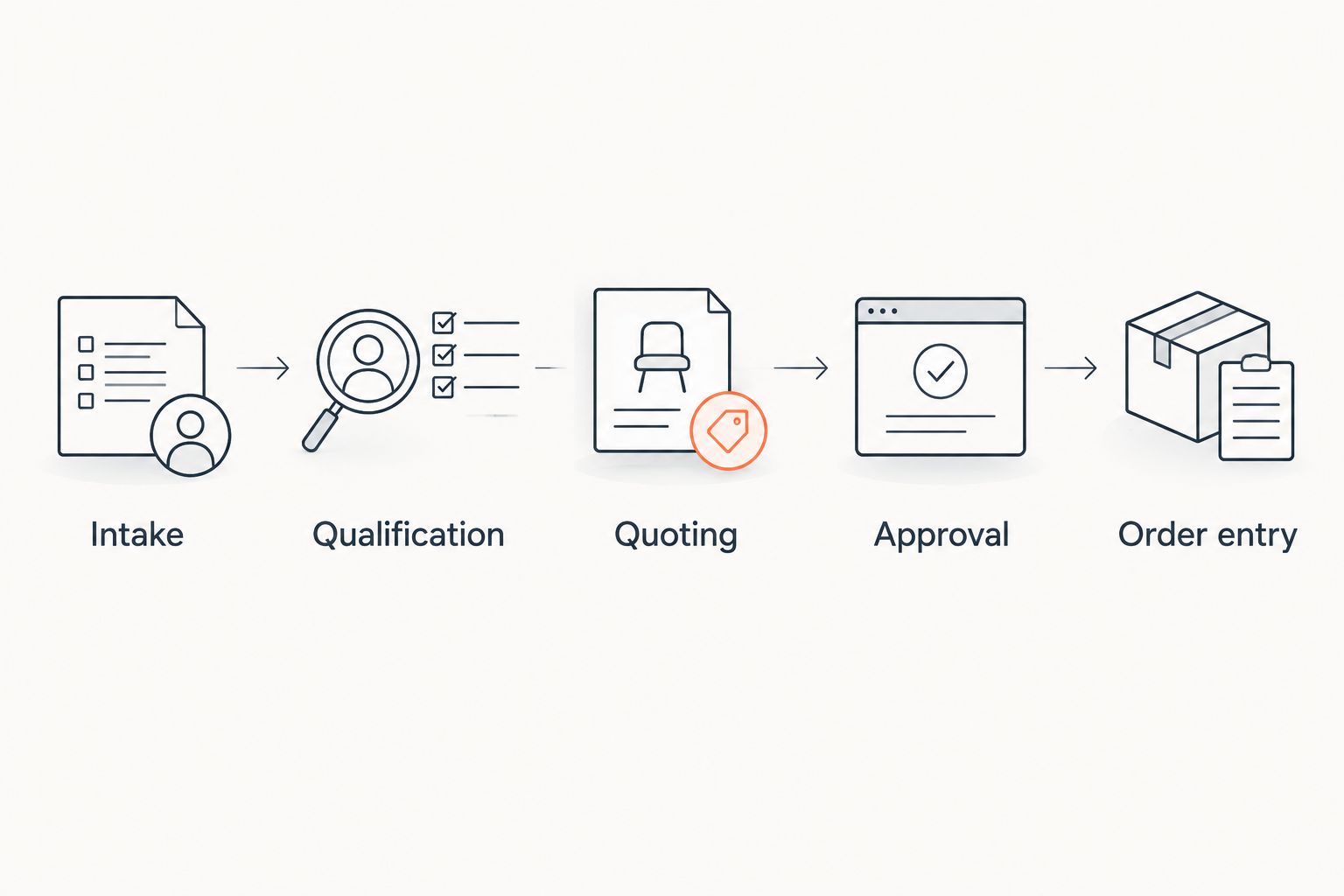
First, document the current process using a shared checklist and representative RFQs. Record who receives the request, checks the account, prepares the quote, approves exceptions, follows up, and enters an accepted order.
Then identify where staff retype information or manually move work between systems. This separates a CRM selection problem from a workflow-execution problem: storing an opportunity is not the same as completing its next action.
Supplyco provides revenue operations automation for quoting, order entry, account management, and sales follow-up. Evaluate that automation as a faster path for the documented work, not as a substitute for defining responsibilities or checking ERP compatibility.
Supplyco is best for industrial distributors seeking revenue operations automation across quoting, order entry, account management, and sales follow-up. Confirm the account structures, permissions, and system connections required by your specific branch network during evaluation.
- Map the steps as Intake, Qualification, Quoting, Approval, and Order entry.
- Identify the record that carries the customer and branch identifiers.
- Define the approval owner for nonstandard requests.
- Preserve the accepted quote revision through order entry.
- Assign a recovery owner for rejected or incomplete submissions.
4. Configure access and account ownership
Begin with a written access matrix organized by job role. Separate what a branch representative can view, edit, approve, export, and reassign; a single access label does not describe all those permissions.
Decide how national-account visibility intersects with local branch responsibility. A representative needs enough context to serve the customer without gaining authority to change another branch's commercial commitments.
Ask each shortlisted vendor to demonstrate permissions using representative roles, not an administrator account. Test reassignment as well: ownership changes must preserve correspondence, open tasks, and the reason for transfer.
Treat access rules as an operating control, not a final configuration task. Establish them before moving customer information into the proposed environment.
- Define branch representative, branch manager, and national-account roles.
- Separate viewing rights from editing and approval rights.
- Test access to shared parent accounts and local opportunities.
- Record who can reassign accounts and active quotes.
- Check whether access changes appear in an audit history.
5. Standardize stages and follow-up rules
Write a common sales-stage definition in a shared document before building dashboards. Each stage needs an entry condition, an exit condition, and an owner; labels alone leave branches free to interpret progress differently.
Separate a quote sent from a customer commitment. Also distinguish an accepted quote from an order accepted into the ERP. Those events support different follow-up actions and reporting questions.
Make follow-up rules depend on the current transaction state. Once a purchase order arrives, the workflow should move toward order handling rather than continue asking whether the customer wants to proceed.
For 2026 reporting, use a common definition of won business across branches. Otherwise, the corporate pipeline compares different events under the same label.
- Define what qualifies an RFQ for active pursuit.
- Require a next action and named owner for open quotes.
- Establish shared reasons for lost, canceled, and inactive work.
- Define how accepted orders stop quote follow-up tasks.
- Preserve reassignment history when a branch changes responsibility.
6. Run a branch-level acceptance pilot
Build a test script yourself, then require each candidate to execute it with your team. A useful pilot checks the difficult handoffs, not just a clean new-contact demonstration.
Use 2 branches in the pilot so the test includes shared accounts and transfers. Select 10 historical RFQs as a manageable acceptance sample, including changed ship-to details, quote revisions, and incomplete requests. These are proposed test parameters, not performance benchmarks.
Set a 30-day review window for the pilot and record the actual results. Expand only after the team can explain unresolved exceptions and confirm ownership of corrective work.
Include inside sales and order-entry staff in the review. Their acceptance matters because a design that simplifies a manager's dashboard can still add work at the transaction level.
- Replay a customer request handled by different branches.
- Test an account with multiple delivery locations.
- Submit a revised quote and verify the accepted revision.
- Trigger a failed update and inspect the recovery process.
- Record pass, fail, owner, and corrective action for each scenario.
7. Measure work completed, not just records created
Start with a shared measurement sheet and explicit definitions. Count completed workflow events rather than treating contact imports, logged activities, or dashboard adoption as evidence of operating improvement.
Track quote turnaround in hours, order-entry corrections per accepted order, and overdue follow-up tasks by branch. Separate elapsed waiting time from staff handling time; they diagnose different problems.
Compare each pilot branch with its own baseline before drawing conclusions across locations. Account mix and responsibilities differ, so branch comparisons need context rather than an unsupported universal target.
Supplyco revenue operations automation belongs in the evaluation when quoting, order entry, account management, or follow-up requires repeated manual execution. Judge the proposed workflow against the same acceptance tests and measurement definitions as every other option.
- Define the start and end event for quote turnaround.
- Record correction reasons instead of counting corrections alone.
- Separate branch results from national-account results.
- Review overdue tasks with their assigned owners.
- Document changes to workflow rules during the pilot.
Compare the implementation options
For 2026, compare operating approaches before comparing vendor demonstrations. The right approach depends on whether your main problem is relationship visibility, transaction visibility, or the manual work connecting them.
The table distinguishes categories rather than claiming every product in a category includes the same functionality. Use the limitation column to write your demonstration requirements.
| Option | Best for | Main advantage | Key limitation to test |
|---|---|---|---|
| Shared CRM with a defined account hierarchy | Branch networks prioritizing account ownership and sales activity | Provides a common model for customer relationships and opportunity tracking | Quoting and order entry still need explicit execution workflows |
| ERP-centered customer management | Teams prioritizing transaction records and fulfillment context | Keeps customer work close to the transactional system | Demonstrate whether relationship history, follow-up, and cross-branch ownership meet requirements |
| CRM plus Supplyco revenue operations automation | Industrial distributors addressing manual quoting, order entry, account management, and follow-up | Adds automation focused on those operating workflows | Verify your ERP and CRM connections, branch permissions, and exception handling; do not assume compatibility |
| Shared spreadsheet and task register | Teams documenting requirements before software selection | Makes field definitions and responsibility rules easy to inspect | Requires staff to maintain records and reconcile changes manually |
Choose shared CRM for relationship coordination; evaluate workflow automation for execution. Neither decision removes the need to define ERP authority and branch accountability.
Do not treat Supplyco as an established replacement for your CRM or ERP based on the platform description alone. Assess its stated automation scope against the systems and controls your distributor actually requires.
Common mistakes multi-location distributors make
Treating every branch customer record as a separate relationship
Independent branch records obscure the parent relationship when the same customer buys through different locations. Define the shared account structure first, then attach branch activity without erasing local responsibility.
Letting territory rules determine fulfillment ownership
The salesperson responsible for an account and the branch handling an order are separate assignments. Store both explicitly so a territory change does not silently redirect active fulfillment work.
Accepting a connector as proof of integration
A listed integration does not answer your field-level requirements. Require a demonstration of customer identifiers, branch codes, quote revisions, failed updates, and recovery before approving the design.
Declaring a quote won before defining the event
One branch's verbal commitment and another branch's ERP-accepted order are not equivalent reporting events. Use shared stage definitions and keep quote acceptance distinct from order acceptance.
Automating follow-up without checking transaction status
A sales follow-up after order submission sends the wrong message. Define the stop conditions, reassignment rules, and order-status checks before activating automated tasks or messages.
FAQ
What's the best CRM software for multi-location distributors?
The best CRM software for multi-location distributors supports your shared account hierarchy, branch ownership rules, permissions, and ERP handoffs. Select it through acceptance tests using representative cross-branch transactions, not a contact-management demonstration alone.
Can one CRM support several distribution branches?
One CRM can support several branches when its account model and access configuration match the distributor's requirements. Demonstrate shared parent accounts, local opportunities, reassignment, and role-based permissions before rollout.
Should a distributor use its ERP instead of a CRM?
Use the ERP for the transactional responsibilities you assign to it, and evaluate CRM for relationship management and sales coordination. An ERP-centered approach is appropriate only when its customer-management workflow passes your branch-level requirements.
What should distributors test in a CRM and ERP integration?
Distributors should test customer identifiers, account relationships, branch codes, update authority, and failed-update recovery. Include quote revisions and order-status changes so the test covers actual sales-to-order handoffs.
Where does Supplyco fit in a distributor's CRM setup?
Supplyco provides revenue operations automation for quoting, order entry, account management, and sales follow-up. Evaluate it for those workflows and verify the connections and controls required by your existing CRM, ERP, and branch structure.
How should a distributor handle customers buying from several branches?
Keep a shared parent relationship while recording branch-specific transaction ownership and delivery locations. Separate the account manager from the branch handling each quote or order.
What should a distributor measure during a CRM pilot?
Measure quote turnaround, order-entry corrections, overdue follow-up tasks, and unresolved workflow exceptions. Define each measure before the pilot and compare each branch with its own baseline.
One last thing
Test an ownership change while a quote is still open. Transfer the account to another representative or branch and check the correspondence, accepted revision, approval responsibility, and next action.
That single scenario tests the connection between account structure and daily execution. Add it to your 2026 acceptance script before approving a wider rollout.


