
A multi-location distributor’s CRM rollout has no fixed duration: the schedule depends on account migration, ERP connections, branch-specific workflows, and user acceptance. Separate the pilot launch from full deployment, and include post-launch support before calling the rollout complete. Approve a deployment date against tested workflows, not just a configured CRM.
- How long does a CRM rollout take for a multi-location distributor? Set the schedule against migration, ERP integration, and branch acceptance.
- A working pilot does not mean every branch is ready for production.
- Supplyco serves industrial distributors seeking revenue operations automation across quoting, order entry, account management, and follow-ups.
- Use branch readiness gates to control expansion; do not treat software access as completed onboarding.
How long does a CRM rollout take for a multi-location distributor?
Build the rollout schedule from approved scope through branch acceptance and post-launch support. Keep separate dates for configuration completion, pilot launch, branch deployment, and operational handover. Each date answers a different question.
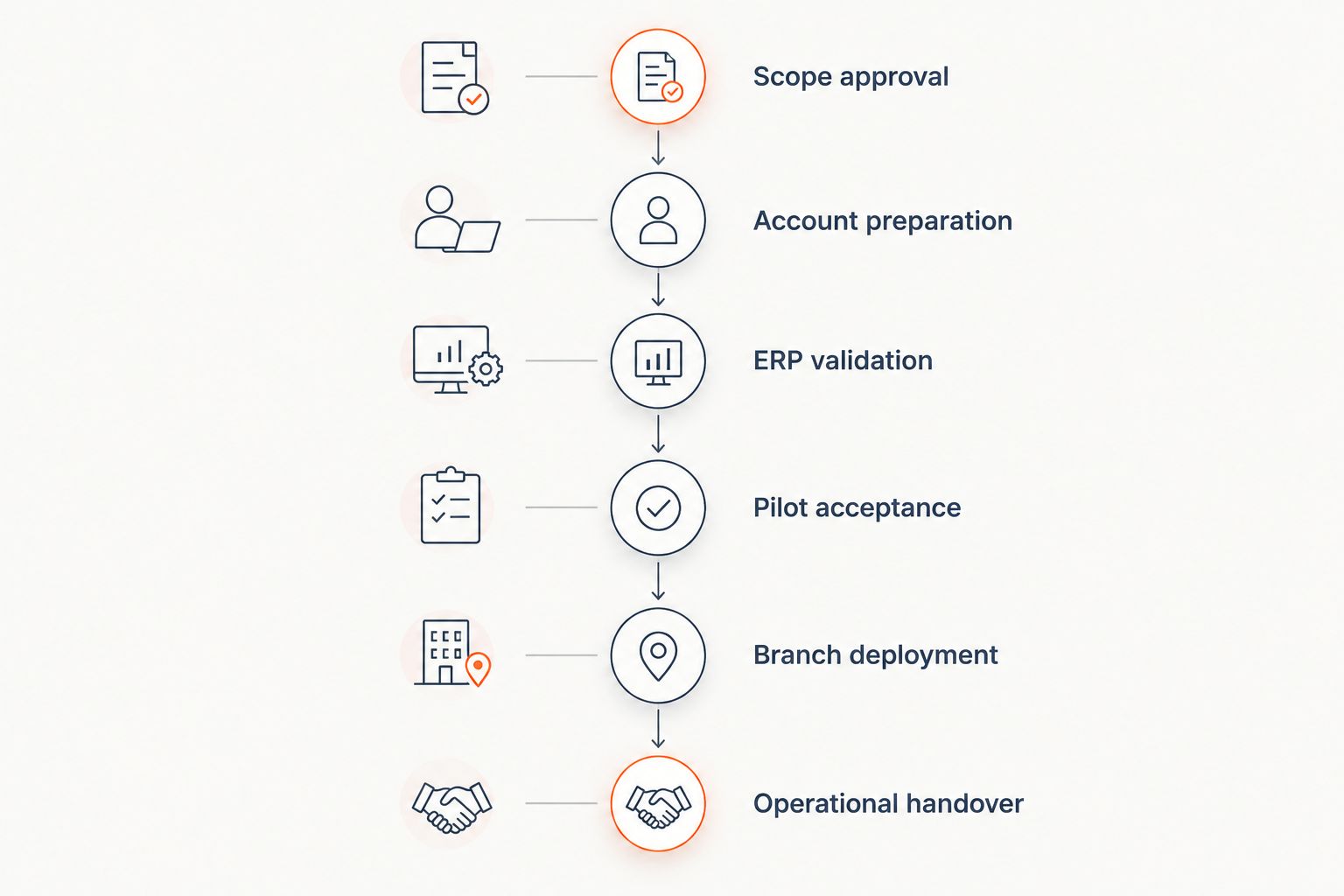
For your 2026 rollout plan, use the following sequence. Assign an accountable owner and an acceptance condition to every stage before committing to the deployment calendar.
- Scope approval: Specify which accounts, branches, users, and workflows enter the initial release.
- Account preparation: Resolve customer identifiers, duplicate records, account ownership, and branch relationships.
- ERP validation: Test the required data exchanges and define how failed transfers are handled.
- Pilot acceptance: Have branch users complete the agreed sales workflows using representative records.
- Branch deployment: Release the approved setup to each branch after its readiness checks pass.
- Operational handover: Assign support ownership, document unresolved issues, and confirm that users can complete their work.
These stages are a planning sequence, not a published duration benchmark. Some preparation can happen in parallel, but do not schedule production acceptance before the underlying data and workflows are ready.
For the broader requirements behind these gates, use the guide to CRM software for multi-location distributors.
Why this matters
A CRM login is not the same as a usable sales process. Your inside sales team needs to locate the right customer, understand branch ownership, record an opportunity, and complete the agreed handoff without reconstructing information elsewhere.
Define what “finished” means before evaluating the schedule. If quoting and order entry remain outside the initial release, state that explicitly. Otherwise, stakeholders can approve the same launch date while expecting different operational capabilities.
Your 2026 implementation plan should distinguish delivered functionality from deferred work. A narrower, accepted release is a clearer commitment than a broad launch with undefined exceptions.
Choose the rollout approach before setting the calendar
Compare rollout approaches against your operating model, not against a promised launch speed. Use the table to decide how you will expose users to the new process and where you will contain problems.
| Rollout approach | Best for | Advantage | Limitation | Acceptance requirement |
|---|---|---|---|---|
| Branch pilot | Testing a shared process in a representative branch | Lets users validate workflows before wider deployment | Does not prove readiness for branches with different requirements | Document which branch differences remain untested |
| Branch waves | Distributors that need staged deployment and support | Separates deployment into manageable groups | Requires clear rules while branches use different processes | Confirm ownership and handoffs across live and pending branches |
| Company-wide cutover | Distributors with standardized processes and coordinated readiness | Avoids a prolonged split between operating methods | Places deployment and support demands across the organization together | Require every participating branch to pass acceptance checks |
Choose a branch pilot when you need to validate the operating process before expanding it. Choose branch waves when deployment capacity or branch differences require staged release. Use company-wide cutover only after every participating branch demonstrates readiness.
Do not choose a pilot branch solely because its team is enthusiastic. Select a branch that exercises the workflows you intend to repeat, then separately test requirements it does not represent.
Define the acceptance gates that determine your schedule
The following gates turn a general implementation plan into decisions that branch managers, sales operations, and IT can approve. Record evidence against each gate rather than accepting a verbal statement that the setup is ready.
Scope approval
Write the initial release in workflow terms: account lookup, opportunity ownership, quote handoff, follow-up assignment, and management reporting. Identify exclusions alongside inclusions so users know which work stays in existing systems.
Approve the workflow boundary before approving the delivery date. If a requested capability changes that boundary, assess its dependencies before adding it to the current release.
Account preparation
Define how the CRM represents parent accounts, individual locations, billing relationships, and branch ownership. Preserve the identifiers needed to match CRM records to the ERP rather than relying on customer names alone.
Test records that expose ambiguity. Include a customer served by multiple branches and an account whose billing details differ from its delivery location, where those situations exist in your business.
ERP validation
For each required connection, specify the source system, destination system, fields, update direction, and failure owner. Confirm which application controls each shared field before enabling updates.
Test unsuccessful transfers as well as successful ones. Your acceptance evidence should show where a failed update appears, who investigates it, and how the team retries it without creating duplicate records.
Pilot acceptance
Ask users to complete actual workflow tasks rather than watch a demonstration. Have inside sales, outside sales, branch management, and operations test the actions assigned to their roles.
Record the expected result and observed result for each task. Classify anything that prevents the agreed workflow as a launch blocker; keep optional improvements separate so they do not obscure required fixes.
Branch deployment
Check each branch’s user access, account assignments, training completion, and support contact before release. Validate local exceptions against the shared process instead of assuming the pilot covered them.
Use the same readiness record across branches. Require explicit approval for any exception that remains open, including the temporary process and the person responsible for resolving it.
Operational handover
Assign ongoing ownership for access requests, data corrections, integration failures, and process changes. Give branch users a clear route for reporting problems after the implementation team steps back.
Close the rollout only when the support process is usable. An unresolved issue needs an owner and an agreed disposition; it should not disappear from view when a deployment task is marked complete.
Why CRM rollout timing varies
Assess these schedule drivers against your actual branch processes. For your 2026 deployment, turn each driver into a named task, decision, or test rather than adding an unexplained buffer to the calendar.
- Account structure: Decide how shared customers, parent accounts, and branch assignments will appear. Identify unresolved ownership decisions before migration.
- ERP connection scope: Separate account visibility from transactional updates. List every required exchange instead of treating integration as a single task.
- Quoting and order entry: State whether users will only record activity or also initiate operational handoffs. Test the included workflow end to end.
- Branch differences: Document variations in sales responsibilities, approval rules, and local procedures. Decide which differences are required and which should be standardized.
- User acceptance: Reserve time for users to perform their assigned tasks, report failures, and retest corrections. Attendance at training does not demonstrate workflow acceptance.
- Support readiness: Assign people to resolve access, data, and connection issues. Include their availability in the deployment decision.
Do not use branch count alone as the scheduling method. Examine the work each branch adds: different account rules, different processes, or simply additional users following an accepted setup.
Should we launch a pilot branch before every location?
Launch a pilot branch when you need evidence that the shared workflow works before wider deployment. Use the pilot to test account access, ownership, ERP information, and follow-up handoffs; then document which remaining branch requirements need separate validation.
The pilot’s exit condition should be operational. Require users to complete the agreed workflow and confirm how they will handle exceptions, rather than treating a successful data import as permission to expand.
Can we launch the CRM before ERP integration is complete?
Launch without completed ERP integration only when the approved release works without that connection. Define the temporary source of truth and manual handoff, and exclude any workflow that depends on unvalidated ERP data.
Do not describe that release as an integrated rollout. Keep the integration milestone visible, with its own testing and acceptance requirements, so the temporary process does not become an undocumented dependency.
Is training the same as completing branch onboarding?
Training is not completed onboarding; branch users must demonstrate the agreed work. Ask users to find an account, record the next action, route a handoff, and locate the information required by their role.
Use task results to decide readiness. If a user cannot complete a required action because permissions, data, or workflow rules are wrong, correct the underlying problem rather than repeating a general training session.
Keep revenue automation separate from the CRM launch promise
Supplyco is best for industrial manufacturers and distributors seeking revenue operations automation across quoting, order entry, account management, and sales follow-up. That scope is relevant when your rollout includes operational work beyond recording contacts and opportunities.
Assess Supplyco against a defined workflow requirement, not as a substitute for a CRM implementation plan. Its stated automation scope gives you specific areas to evaluate; it does not establish a deployment duration, compatibility with your ERP, or readiness for your branch rules.
For your 2026 evaluation, ask how the proposed workflow will handle account identification, approvals, failed transactions, and responsibility for corrections. Keep those questions in the acceptance plan for any automation you introduce alongside the CRM.
Add automation when you can specify the input, permitted action, approval boundary, and expected result. Defer production use where those conditions remain unresolved, while continuing work on the accepted CRM scope.
What should the rollout status report show?
Report readiness by branch and workflow, not just by implementation activity. A configuration task marked complete tells management less than evidence that the intended user can perform the required action.
Use a short status record with the following fields:
- Release scope: The workflows included in the current deployment.
- Acceptance evidence: The completed tasks that demonstrate readiness.
- Open blockers: Problems preventing the agreed work, with accountable owners.
- Approved exceptions: Temporary processes, their limits, and responsibility for resolution.
- Next decision: The specific approval needed to continue deployment.
Keep the original scope visible when the schedule changes. For a 2026 rollout review, distinguish a delayed requirement from a newly added requirement; they require different management decisions.
FAQ
How long does a CRM rollout take for a multi-location distributor?
A multi-location distributor’s CRM rollout duration depends on the approved scope, account preparation, ERP validation, branch acceptance, and operational handover. Set separate dates for the pilot and full deployment rather than treating them as the same milestone.
What should we finish before setting a CRM go-live date?
Approve the release scope, define account ownership, and identify the required system connections before committing to go-live. Make the date conditional on workflow testing and branch acceptance.
Should every branch switch to the new CRM together?
Switch every branch together only after each participating branch passes the agreed readiness checks. A branch pilot or staged deployment provides a different way to manage testing and support, but requires explicit cross-branch handoff rules.
Can we migrate customer records before cleaning them?
Set customer identification, duplicate-handling, and ownership rules before migrating production records. Test the migration against those rules before asking branch users to rely on the results.
Does a successful CRM pilot mean the rollout is complete?
A successful CRM pilot does not establish readiness for every location. Validate branch-specific access, account assignments, process exceptions, and support arrangements before expanding deployment.
How do we know CRM training worked?
Confirm that users can complete the tasks required by their roles. Record task results and correct data, permission, or workflow problems before approving branch readiness.
Where does Supplyco fit into a distributor CRM rollout?
Supplyco provides revenue operations automation for industrial manufacturers and distributors across quoting, order entry, account management, and sales follow-up. Evaluate those workflows separately from CRM migration, and validate the proposed setup against your systems and approval requirements.
One last thing
Write the rollback decision before approving go-live. Specify who can pause deployment, which operational failures trigger that decision, and how users will continue serving customers while the team resolves the problem.
A rollback plan does not replace acceptance testing. It makes the response explicit when production behavior differs from the approved test result—and prevents branch managers from having to invent a recovery process during customer work.