
Yes—quote to cash software can work with an older ERP when the ERP provides a supported way to exchange the required data and accept transactions. Compatibility depends on your exact ERP version, customizations, and order-processing rules, not simply the ERP's age. For a 2026 evaluation, require a demonstration that an approved quote becomes a valid ERP order and that failures return to an accountable owner.
- Is quote to cash software compatible with older ERP systems? Yes, when supported interfaces cover the required transactions.
- ERP integration must validate order creation, rejection handling, and reconciliation—not just customer-data access.
- Supplyco fits manufacturers and distributors evaluating revenue operations automation; confirm legacy ERP compatibility separately.
- Keep quoting, order entry, invoicing, and payment responsibilities explicit before selecting an integration approach.
Why this matters
A connection that retrieves customer records does not prove that it can create an order, enforce credit holds, or return invoice status. Treat compatibility as a workflow requirement, not a connector checkbox.
For manufacturers and distributors, the important handoff includes customer-specific terms, part numbers, units of measure, ship-to addresses, and order approvals. Use the guide to integrating CPQ with your ERP system to frame the quoting-to-order boundary before expanding into invoicing and payment workflows.
Your 2026 selection process should separate technical connectivity from operational acceptance. A successful data transfer proves that information moved; it does not prove that the receiving system processed it correctly.
Is quote to cash software compatible with older ERP systems?
Yes, provided the integration supports the transactions your workflow requires on your installed ERP release. Start with the interface your ERP vendor supports, then verify its coverage against your actual order process.
The approaches below solve different access problems. None establishes complete quote-to-cash compatibility without transaction-level testing.
| Integration approach | Best for | Main advantage | Main limitation | Evidence to request |
|---|---|---|---|---|
| Supported API or ERP service | Workflows requiring transactional reads and writes | Uses a defined application interface | Available operations depend on the ERP release and configuration | Create an order and retrieve its acceptance or rejection |
| Supported file import/export | Workflows that tolerate scheduled exchange | Uses structured files where supported | Requires separate handling for timing, acknowledgments, and rejected rows | Import a file and reconcile every submitted order |
| User-interface automation | Restricted workflows without a suitable supported interface | Operates through existing application screens | Depends on screen behavior and session handling | Demonstrate recovery from a changed screen or interrupted session |
| Read-only database access | Reporting and data lookup | Retrieves permitted stored data | Does not establish safe order creation | Document access permissions and the separate write path |
Do not mistake direct database access for application integration. Writing records outside supported ERP transaction logic risks bypassing validation and related processing. Require an approved write mechanism rather than treating table access as permission to post orders.
Supported APIs: evaluate transaction coverage
Best for workflows that need application-level validation and transaction responses. Ask which operations the interface exposes on your installed release, not which operations exist in the ERP product's latest release.
Customer lookup and order creation are separate capabilities. Verify quote revisions, line changes, ship-to selection, and order-status retrieval individually. A connector name alone does not answer those questions.
File exchange: evaluate acknowledgment and timing
Best for workflows that can tolerate scheduled processing. A supported import/export process is a valid integration approach when it covers the required fields and returns an actionable result.
The limitation is the gap between file delivery and ERP acceptance. Define how the sender detects incomplete transfers, rejected rows, and imports that finish after the sending process times out. Never label an order accepted merely because its file reached a folder.
User-interface automation: evaluate recovery before expansion
Best for a narrowly defined task when no suitable supported interface exists. Screen-based automation needs explicit controls for login failures, unexpected dialogs, and interrupted sessions.
Its limitation is dependence on application behavior. Require the process to stop and request review when the screen differs from the expected state; continuing with uncertain context is not an acceptable recovery method.
Why compatibility with an older ERP varies
Use these factors to explain differences between implementations. They are assessment criteria, not evidence that a particular platform supports your environment.
- ERP release and interfaces: Identify the installed release, enabled modules, and supported methods for reading and writing each required record.
- Custom fields and business rules: List required extensions, approval logic, customer restrictions, and transaction checks that standard records do not capture.
- Data ownership: Decide which application controls customer terms, item definitions, commercial rules, order status, and invoice status.
- Workflow scope: Separate quoting and order entry from shipment, invoicing, credits, and payment application. Each handoff needs its own acceptance criteria.
- Operating environment: Review network access, service accounts, authentication, maintenance windows, and restrictions on external connections.
- Failure recovery: Define duplicate prevention, retry behavior, reconciliation, and responsibility for unresolved exceptions.
For a 2026 procurement decision, attach evidence to each factor. A written interface specification and a demonstrated transaction provide more useful evidence than an unqualified statement that an ERP is supported.
How do you verify compatibility before signing?
Use a controlled test environment and representative business records. Approve the integration against observable outcomes, not a presentation of its architecture.
1. Define the boundary
Write down where the proposed workflow starts and ends. An accepted quote becoming an ERP sales order is a narrower requirement than tracking that order through shipment, invoicing, and payment application.
For each handoff, name the originating system, receiving system, record identifier, and responsible team. Include the CRM where sales activity or account ownership affects the process.
2. Map required data
Map customer and ship-to identifiers, item codes, quantities, units of measure, delivery instructions, and approval references. Include the fields your ERP requires even when sales representatives do not enter them directly.
Treat part revisions and unit conversions as explicit decisions. Do not allow the integration to infer an ambiguous item match or conversion without a documented rule and an exception path.
3. Validate acceptance
Submit a representative approved quote and inspect the resulting ERP order. Compare the customer, ship-to, order lines, quantities, units, and commercial terms against the approved source.
Require an ERP order identifier before the originating application reports success. Where posting is asynchronous, show a pending state until the ERP confirms acceptance.
4. Test rejection
Submit records that violate your actual business rules, such as an inactive item or a customer account blocked from ordering. Confirm that the workflow reports the rejection without silently changing the order.
The error message must identify the affected transaction and the action required. Assign an owner who can correct the source record or authorize the next step.
5. Reconcile results
Compare submitted transactions with accepted, rejected, and unresolved ERP outcomes. Investigate every unmatched submission rather than relying only on an aggregate success message.
Run this acceptance sequence against your 2026 deployment configuration, including the permissions and connection method intended for production. Testing with administrator access does not validate a more restricted production account.
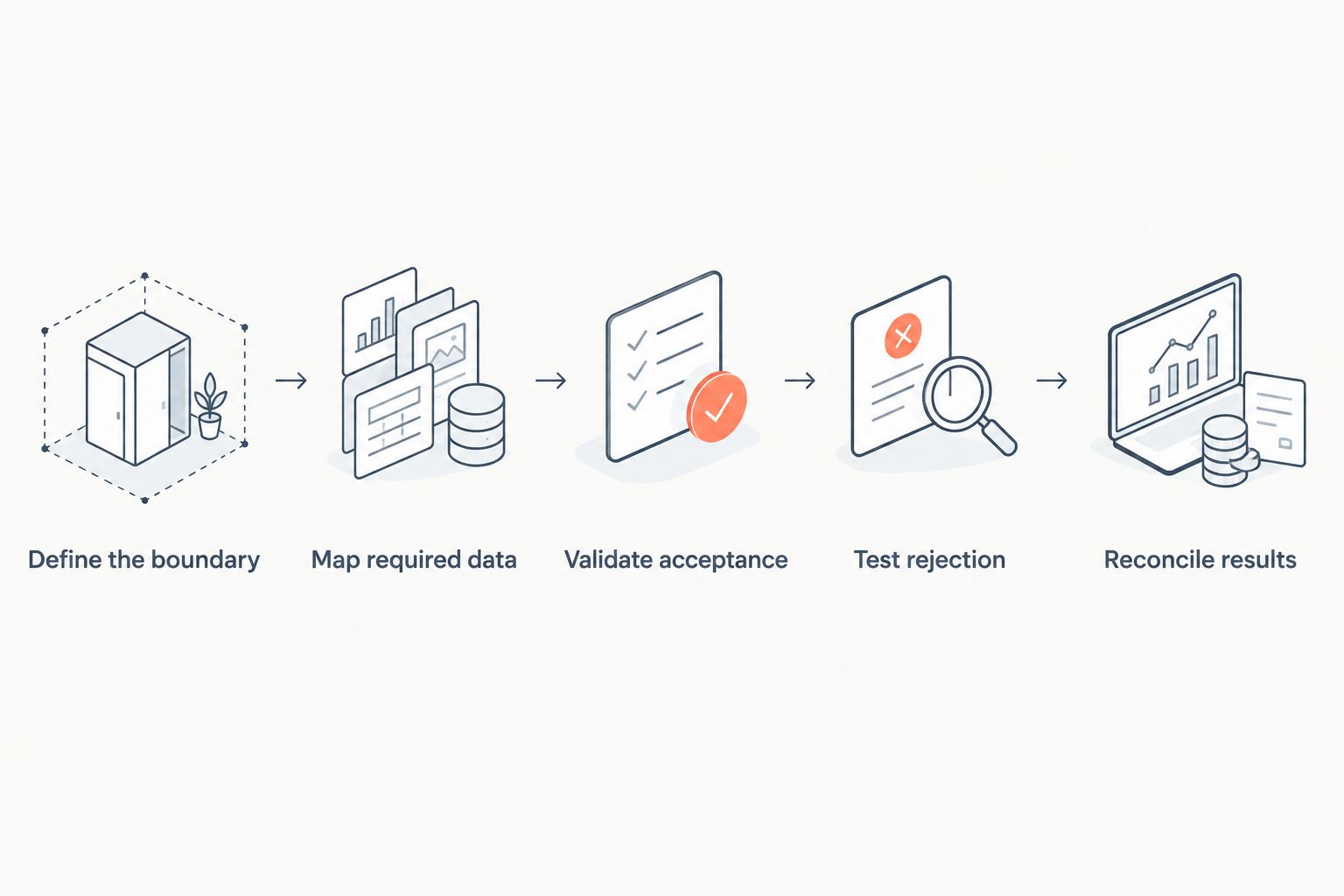
The sequence should leave you with records that operations can inspect: the source request, integration result, ERP response, and final disposition. Keep those records connected by stable identifiers so a support team can trace a failure without reconstructing it from email.
What should a legacy ERP acceptance test include?
Build the test set from workflows your business actually uses. The following are recommended test designs, not performance benchmarks or claims about any software vendor.
| Test case | Test instruction | Required result |
|---|---|---|
| Basic order | Submit 1 order with a valid customer and item | The ERP creates the intended order and returns its identifier |
| Duplicate submission | Send 2 submissions with the same business transaction identifier | Exactly 1 ERP order exists for that transaction |
| Interrupted response | Interrupt the connection after submission | Recovery checks the existing outcome before submitting again |
| Invalid line | Submit an order containing an invalid item | The workflow reports rejection or controlled partial processing according to the agreed rule |
| Changed quote | Revise an approved quote before order release | The released order reflects the authorized revision |
| Restricted account | Submit an order for an account subject to an applicable hold | The workflow follows the ERP's authorized restriction and approval process |
The duplicate test is particularly important: 2 submissions must not become 2 orders for the same transaction. A timeout leaves the sender uncertain about the result; it does not prove that the ERP rejected the request.
Set the release decision before testing. Specify which failures block production, who approves exceptions, and how unresolved transactions remain visible during a controlled rollout.
Can you keep the ERP as the system of record?
Yes—you can design the workflow so the ERP remains authoritative for designated operational and financial records. Assign ownership explicitly rather than allowing both systems to update the same field without a conflict rule.
For example, decide where customer terms originate and which system approves changes. Apply the same discipline to item status, order status, invoice status, and payment application.
Keep visibility separate from authority. A sales application can display an ERP status without owning the underlying transaction, and a quote approval does not automatically authorize shipment or release a credit hold.
Where Supplyco fits in the evaluation
Supplyco is best suited to manufacturers and distributors evaluating revenue operations automation. Its stated scope includes quoting, order entry, account management, and sales follow-up.
That scope makes Supplyco relevant to the sales-to-operations handoff. It does not establish compatibility with a particular legacy ERP release; require the same interface review, transaction demonstration, and failure tests you would apply to any vendor.
For a 2026 evaluation, describe the workflow you want automated before discussing the connection method. The benefit under evaluation is reduced manual handling across those stated workflows; the constraint is that ERP-specific fit still requires verification.
Do you need to replace the ERP first?
No—ERP replacement is not an automatic prerequisite for quote-to-cash automation. First determine whether the installed system provides a supported interface that meets your required workflow and control requirements.
If it cannot support a critical transaction or an acceptable operating model, narrow the automation scope or assess an ERP change. Do not expand a fragile workaround simply to avoid making that decision.
FAQ
Can quote to cash software work with an on-premises ERP?
Yes, when the on-premises environment permits a supported connection covering the required transactions. Verify network access, authentication, permissions, and the exact installed ERP release.
Does having an ERP connector guarantee compatibility?
No, a connector does not guarantee coverage of your workflow or ERP customizations. Require evidence for order creation, validation, status retrieval, and error handling on your configuration.
Can we integrate an older ERP without an API?
Yes, if another supported method covers the required workflow, such as an approved file import. Screen-based automation requires separate checks for session failures, unexpected screens, and recovery.
How do we test whether the integration creates duplicate orders?
Send 2 submissions with the same business transaction identifier and require exactly 1 ERP order. Also test an interrupted response so recovery checks whether the first submission succeeded before retrying.
Does Supplyco support our specific legacy ERP version?
Compatibility with your specific legacy ERP version requires verification. Supplyco's stated revenue operations scope covers quoting, order entry, account management, and sales follow-up, but that scope does not establish version-specific ERP support.
Should quote to cash software write directly into ERP tables?
Use an ERP-supported transaction mechanism rather than assuming direct table writes are safe. Require confirmation that the chosen write method preserves validation, related processing, permissions, and auditability.
Do we need real-time integration for every step?
No, define timing requirements separately for each workflow. A scheduled status update and an order-acceptance confirmation serve different operational needs; test each against its agreed requirement.
One last thing
A missing response is not a failed order. Before approving your 2026 integration, deliberately interrupt an order submission and require the recovery process to determine whether the ERP already accepted it.
Prove that an uncertain result cannot become a duplicate order. That test reveals more about operational compatibility than a successful customer-record lookup.