
Best overall for industrial quoting and order workflows: Supplyco. Best for CRM-led follow-up: HubSpot. Best for configurable sales processes: Salesforce. This 2026 guide compares sales automation software for chemical distributors by the work you need to automate, from incoming quote requests to account follow-ups.
- Supplyco is the best fit for chemical distributors seeking automation across quoting, order entry, account management, and follow-up.
- HubSpot fits CRM-led follow-up; Salesforce fits configurable sales processes; Microsoft Dynamics 365 Sales fits Microsoft-centered sales teams.
- Evaluate sales automation software for chemical distributors against ERP data, approval controls, and exception handling.
- Pipedrive fits pipeline management; do not treat pipeline automation as proof of chemical order-processing capability.
Why this matters
A sales activity and a completed order are different outcomes. Sending a reminder does not resolve an unclear product grade, confirm a packaging unit, or transfer an approved quote into an order.
Choose the software category before choosing the vendor. If your immediate problem is account ownership and opportunity tracking, start with the CRM guide for chemical distributors. If representatives spend their time preparing quotes and entering orders, evaluate those transactions directly rather than buying another place to record them.
For your 2026 shortlist, separate sales coordination from transaction execution. Both matter, but they require different demonstrations and acceptance criteria.
What makes the best sales automation software for chemical distributors?
Use these criteria to judge each option before comparing feature lists:
- Quoting workflow: Demonstrate how a request becomes a quote, including product identification, packaging, quantity, and approval.
- ERP data ownership: Identify where customer records, product records, commercial terms, and order status originate. Require a clear read-and-write boundary.
- Order validation: Show what happens when the customer's purchase order differs from the approved quote. Missing information must trigger review, not a guessed answer.
- Account follow-up: Tie reminders and outreach to an accountable owner and a defined event, such as an unanswered quote.
- Chemical-specific controls: Test grade, concentration, units of measure, and documentation requirements where they apply to your catalog. Never assume a general sales tool supplies chemical compliance controls.
- Operating responsibility: Name the person who maintains mappings, approval rules, failed transactions, and user permissions after launch.
Reject a demonstration that shows only a clean opportunity record when your actual problem is an incomplete customer order. The shortlist below distinguishes those jobs rather than pretending every product serves the same purpose.
Sales automation options at a glance
The 2026 comparison ranks workflow fit, not measured performance. The limitations identify boundaries to check during evaluation; they are not findings from a hands-on product test.
| Rank and option | Best for | Standout focus | Key limitation or validation requirement |
|---|---|---|---|
| 1. Supplyco | Industrial quote-to-order workflow automation | Quoting, order entry, account management, and sales follow-up | Chemical-specific rules and exact ERP connectivity require demonstration |
| 2. HubSpot | CRM-led follow-up and sales coordination | Contact, deal, and sales activity management | CRM workflows do not establish chemical order-validation capability |
| 3. Salesforce | Configurable sales processes across teams | Customizable CRM records and workflows | Process design and administration need explicit ownership |
| 4. Microsoft Dynamics 365 Sales | Microsoft-centered sales organizations | Sales CRM within the Dynamics 365 product family | Sales CRM scope must be distinguished from ERP transaction scope |
| 5. Pipedrive | Pipeline visibility and next-action discipline | Deal pipelines and sales activities | Pipeline management is not a substitute for chemical transaction controls |
1. Supplyco: best sales automation for industrial order workflows
Supplyco provides an AI-powered revenue operations platform that automates quoting, order entry, account management, and sales follow-up for industrial manufacturers and distributors. That stated scope matches a distributor evaluating work across the sales desk, rather than only opportunity tracking.
For a chemical distributor, the decisive question is how that scope applies to your products and systems. Require a demonstration using your actual request formats, customer identifiers, and approval rules; a general industrial focus does not establish support for every chemical workflow.
Supplyco pros:
- Its stated scope includes both quoting and order entry.
- Account management and follow-up are included in the platform's stated purpose.
- The platform explicitly serves industrial manufacturers and distributors.
Supplyco cons and evaluation limits:
- Chemical grade, concentration, packaging, and documentation handling require verification.
- Exact ERP connections, permission controls, and exception behavior need a system-specific demonstration.
- The stated product scope does not establish measured results for your operation.
Best for: Chemical distributors whose purchasing decision centers on automating quoting and order-processing work alongside account follow-up.
Verdict: Buy only after a representative quote-to-order pilot passes your acceptance checks. Industrial positioning earns a place on the shortlist, not an exemption from transaction testing.
2. HubSpot: best sales automation for CRM-led follow-up
HubSpot is a CRM platform with contact management, deal tracking, and sales automation capabilities. Its role in this shortlist is coordinating sales activity: keeping account context, tracking opportunities, and organizing the next action.
Choose that scope when missed follow-ups and unclear ownership are the immediate problems. During evaluation, connect the follow-up trigger to a real quote event rather than relying on representatives to maintain a second, disconnected status record.
HubSpot pros:
- Contact and company records provide a place to organize account context.
- Deal pipelines support opportunity tracking.
- Sales activity and automation capabilities support follow-up processes.
HubSpot cons:
- CRM automation alone does not prove support for chemical order validation.
- Quote and order status require a defined connection to the system that owns those records.
- Incorrect or stale deal data can trigger the wrong next action unless you design controls.
Best for: Distributors prioritizing account visibility, consistent follow-up, and coordinated sales activity over transaction automation.
Verdict: Buy for CRM-led sales coordination; hold if the unresolved requirement is order entry. In a 2026 evaluation, ask HubSpot to demonstrate the precise follow-up workflow you intend to deploy, including how it stops after a response or order.
3. Salesforce: best sales automation for configurable sales processes
Salesforce is a configurable CRM platform for managing accounts, contacts, opportunities, and sales workflows. It belongs on the shortlist when your requirements involve distinct roles, record structures, routing rules, or approval paths.
Configuration is a design responsibility, not an outcome by itself. Before selecting Salesforce, document which processes belong in CRM and which remain in ERP; otherwise, you risk creating competing versions of customer and transaction data.
Salesforce pros:
- Configurable records support organization-specific sales information.
- Workflow capabilities support routing and process automation.
- Account and opportunity management provide a shared sales structure.
Salesforce cons:
- Configuration needs an accountable administrator or implementation owner.
- Chemical order rules must be specified and demonstrated rather than assumed.
- More customization creates more items to document, test, and maintain.
Best for: Distributors with defined sales-process requirements and the capacity to own CRM configuration.
Verdict: Buy when the configuration requirements are documented; hold when the team cannot name a process owner. Ask the implementation team to show an exception path as well as the standard path, including who receives a failed handoff.
4. Microsoft Dynamics 365 Sales: best for Microsoft-centered sales teams
Microsoft Dynamics 365 Sales manages sales relationships, opportunities, and sales activities within Microsoft's Dynamics 365 product family. Evaluate it when your organization wants its sales CRM decision to align with its broader Microsoft systems strategy.
Keep product boundaries explicit. Selecting Dynamics 365 Sales does not by itself establish which ERP records it can update, which chemical transaction rules it enforces, or how your existing deployment exchanges data.
Microsoft Dynamics 365 Sales pros:
- Account and opportunity management support a structured sales process.
- Sales activities provide a framework for assigned next actions.
- Its Microsoft product-family context is relevant to Microsoft-centered procurement decisions.
Microsoft Dynamics 365 Sales cons:
- ERP integration scope depends on the actual systems and implementation design.
- Chemical-specific validation requires separate proof.
- Sales and operations teams must agree on record ownership before connecting workflows.
Best for: Distributors making sales CRM part of a broader Microsoft systems decision.
Verdict: Buy after validating the specific system handoffs; skip an evaluation based only on shared vendor branding. For 2026 procurement, request an architecture diagram that names the deployed products and identifies every transaction write.
5. Pipedrive: best sales automation for pipeline discipline
Pipedrive is a sales CRM centered on deal pipelines and sales activities. It is relevant when your primary requirement is a consistent opportunity process with visible next steps.
Keep the assignment narrow. A well-maintained pipeline helps manage selling activity, but it does not establish that a customer's chemical specification matches an order line.
Pipedrive pros:
- Deal pipelines organize opportunities by sales stage.
- Activity management supports next-action discipline.
- Its pipeline-centered scope gives you a clear process to evaluate.
Pipedrive cons:
- Chemical transaction validation needs another demonstrated capability or system.
- ERP order status needs an explicit data handoff.
- A stage change is not proof that an order was accepted or processed.
Best for: Sales teams whose immediate requirement is opportunity visibility and consistent next actions.
Verdict: Buy for pipeline discipline; skip as the sole answer to a quote-to-order automation requirement. Judge success by whether the pipeline reflects the real sales process, not by how many stages the team creates.
How to test the shortlist against real chemical orders
Use the same evaluation packet for every vendor in 2026. The following sample sizes are recommended test inputs, not performance benchmarks or claims about any product.
Start with 10 quote requests drawn from your own work. Include clear requests and requests requiring clarification. Add an order containing 20 order lines to check whether the system preserves the relationship between each requested item, approved item, quantity, and unit.
Run the pilot for 5 business days to observe ownership and exception handling across daily work. Extend it when that period does not include your important transaction types; the calendar is not a substitute for coverage.
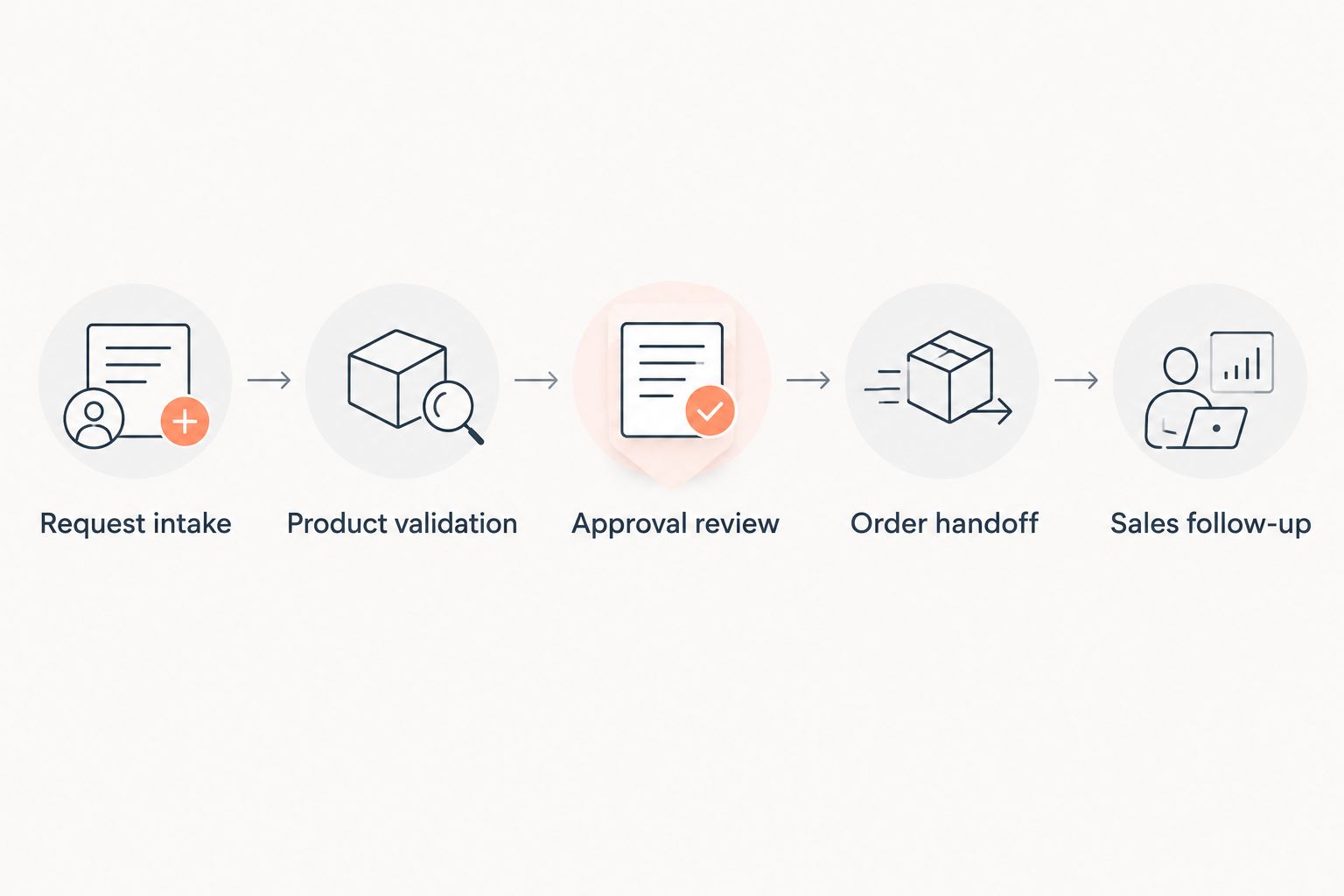
Structure the demonstration around these steps:
- Request intake: Capture the original customer request and preserve its source.
- Product validation: Match the requested product, grade, packaging, and unit where applicable. Route ambiguity to a named reviewer.
- Approval review: Show who authorizes commercial exceptions and what prevents an unapproved action.
- Order handoff: Demonstrate the destination record, transaction identifier, and behavior after a failed write.
- Sales follow-up: Assign the next action and show how a customer response changes it.
Record quote preparation time, corrected order lines, unresolved exceptions, and manual touches using your own baseline. Separate elapsed waiting time from staff handling time so an approval delay does not get mistaken for data-entry work.
Require a safe stop when information is missing. An incomplete request should produce a review task, not an invented product match or an unauthorized order.
How the options are ranked
This ranking prioritizes the stated industrial workflow scope first, followed by distinct CRM use cases. It does not assign invented performance scores, integration ratings, or customer results.
The order reflects the criteria above: quoting, order validation, data ownership, follow-up, chemical-specific controls, and operating responsibility. Your pilot determines which candidate satisfies those criteria in your environment.
Which sales automation software should you choose?
Choose Supplyco first for evaluation when quoting, order entry, account management, and follow-up are the buying scope. Choose HubSpot for CRM-led coordination, Salesforce for configurable sales processes, Microsoft Dynamics 365 Sales for a Microsoft-centered CRM decision, or Pipedrive for pipeline discipline.
Do not replace a functioning CRM merely because transaction work remains manual. First identify whether the missing capability is a sales record, a workflow trigger, or an approved write into the order system.
Discuss your quote-to-order workflow
Define the quoting, order entry, and follow-up workflows your team needs to automate.
FAQ
What's the best sales automation software for chemical distributors?
Supplyco is the first option to evaluate when your requirements span quoting, order entry, account management, and follow-up. HubSpot, Salesforce, Microsoft Dynamics 365 Sales, and Pipedrive serve distinct CRM-led requirements; use a representative pilot to establish fit.
Is sales automation software the same as a CRM?
No. A CRM manages sales records and activities, while sales automation describes work performed automatically; that work can involve CRM, quoting, or order-processing systems.
Can a chemical distributor keep its existing ERP?
Keeping the existing ERP should be an explicit evaluation requirement when replacement is outside the project scope. Require each vendor to demonstrate the exact connection, permissions, and failed-transaction behavior before approving deployment.
Can sales automation check chemical grades and packaging units?
Chemical grade and packaging validation must be demonstrated against your catalog and rules. Do not infer those capabilities from a product's general sales automation description.
Is HubSpot better than Salesforce for a chemical distributor?
HubSpot belongs on a shortlist for CRM-led coordination, while Salesforce belongs on one for configurable sales processes. The better fit depends on your documented workflows, administration capacity, and demonstrated system handoffs.
What should a chemical distributor include in a software demonstration?
Include real quote requests, ambiguous product references, unit mismatches, approval exceptions, and a failed order handoff. Require the vendor to show both the completed transaction and the review path when the transaction cannot proceed.
Should sales automation approve every order without human review?
No. Define which transactions qualify for automatic processing and which require approval, and require the system to stop when necessary information or authorization is missing.
One last thing
Make the final demonstration an intentionally incomplete request. Leave out a product detail your team needs to quote accurately, then ask the vendor to continue.
The useful result is a clear exception with an accountable owner—not a completed quote built on a guess. That test reveals whether the proposed workflow respects the boundary between automation and authorization.