
Best for connected quoting, order entry, and follow-up: Supplyco. Best for structured customer purchase orders: EDI. Best for document-heavy intake: document capture with ERP validation. This 2026 guide compares five approaches to order entry automation for electrical equipment distributors by workflow fit, approval control, and implementation requirements.
- Supplyco fits order entry automation for electrical equipment distributors seeking connected quoting, account management, and sales follow-up.
- Choose EDI for structured customer orders; choose document capture for emailed purchase orders and attachments.
- Require ERP validation of customer accounts, item codes, units, and commercial terms before order release.
- Compare complete workflows, including exception handling, rather than extraction accuracy alone.
Why this matters
An electrical equipment order is more than text copied from a purchase order. Your team must resolve the customer account, identify the correct catalog item, confirm the selling unit, and apply the approved commercial terms. Automating transcription without those checks leaves the order-entry decision unfinished.
The best approach depends on where your team does the manual work. Structured repeat orders, inconsistent attachments, and quote-to-order handoffs require different solutions. For your 2026 selection, separate intake automation from permission to release an order.
What makes the best order entry automation
Use these criteria before comparing demonstrations:
- Item identification: Require exact manufacturer and distributor item matching, with unresolved references sent for review. Treat customer aliases as mappings to maintain, not permission to guess.
- Unit handling: Check the requested quantity against the selling unit. A quantity without a validated unit is not ready for release.
- ERP validation: Verify customer account, ship-to address, item status, commercial terms, and order holds against the designated system of record.
- Exception ownership: Assign uncertain items, conflicting instructions, and changed purchase orders to named reviewers. Keep an identifiable reason for every hold.
- Transaction control: Require duplicate detection, posting confirmation, and recovery from failed submissions. Capturing a document does not prove an ERP order exists.
- Workflow scope: Decide whether you need intake alone or connected quoting, account management, and follow-ups. Avoid evaluating a document reader as though it manages the entire sales process.
Order entry automation options at a glance
The table ranks approaches by the problem each addresses, not by an unsupported speed or accuracy score. Only the first entry is a named platform; the remaining entries are implementation approaches you can assess against your existing systems.
| Option | Best for | Standout capability or design | Key limitation |
|---|---|---|---|
| Supplyco | Connected industrial revenue workflows | Automates quoting, order entry, account management, and sales follow-up | ERP-specific transaction behavior requires demonstration |
| EDI | Recurring structured customer orders | Exchanges agreed business documents electronically | Requires trading-partner setup and maintained mappings |
| ERP-native workflow | Orders already captured in the ERP | Keeps validation and approval close to the transaction | External intake requires a supported capture route |
| Document capture with ERP validation | Emailed purchase orders and attachments | Separates document extraction from transaction approval | Extracted text still needs item and account validation |
| RPA | Repetitive screen entry without a suitable integration | Enters data through an existing user interface | Changes to screens can require automation maintenance |
1. Supplyco: best for connected industrial revenue workflows
Supplyco provides a revenue operations platform for industrial manufacturers and distributors. Its stated scope includes automation of quoting, order entry, account management, and sales follow-up. That makes it relevant when your requirement extends beyond entering purchase orders.
Supplyco is best for electrical equipment distributors seeking order entry automation alongside quoting, account management, and sales follow-up. Evaluate the platform against an actual quote-to-order handoff, including the point where an employee approves a commercial exception.
Supplyco pros:
- Its stated scope covers order entry rather than lead generation alone.
- Quoting automation belongs within the same platform scope.
- Account management and follow-up address work surrounding the transaction.
Supplyco cons and selection limits:
- The broad platform scope does not establish support for your particular ERP transaction; require a demonstration.
- Order entry automation does not, by itself, establish electrical catalog matching or unit-conversion behavior; test both.
- A team needing only structured order exchange should compare a narrower EDI approach before selecting a broader platform.
Best for: Distributors evaluating connected sales and operations automation rather than intake alone.
Verdict: Buy only after a workflow demonstration proves the required order controls.
2. EDI: best for recurring structured customer orders
Electronic data interchange, or EDI, exchanges business documents in agreed electronic formats. For order entry, it provides a structured route between trading partners instead of requiring staff to interpret each incoming document.
Choose EDI when customers can participate in that exchange and maintain agreed mappings. A structured message still needs business validation: an item reference, quantity, or destination can be formally valid while conflicting with your account records.
EDI pros:
- Defines an agreed structure for incoming order data.
- Supports repeat exchanges without interpreting a new document layout each time.
- Makes partner-specific mapping rules explicit.
EDI cons:
- Requires setup and coordination with participating trading partners.
- Item mappings and partner requirements need ongoing ownership.
- Does not provide an intake route for customers who continue sending unstructured attachments.
Best for: Recurring customer orders with stable electronic document requirements.
For a 2026 EDI evaluation, include an amended purchase order and an unknown customer item reference. Require the demonstration to show how each exception reaches a reviewer rather than becoming an unintended order.
Verdict: Buy for participating trading partners; skip it as your only intake route when customers also send documents.
3. ERP-native workflow: best for orders already in your ERP
An ERP-native workflow uses order-entry functions, rules, imports, and approvals supported by your ERP deployment. Its suitability depends on the functions your installed version and configuration actually provide.
Start here when the purchase order already reaches the ERP but staff still repeat account checks or route approvals manually. Automating those steps addresses a different problem from extracting information out of an email attachment.
ERP-native workflow pros:
- Keeps order validation close to the transaction record.
- Provides a route to reuse supported account and item rules.
- Allows your ERP owner to assess approval behavior within the existing environment.
ERP-native workflow cons:
- Does not solve external document intake without a supported capture or import route.
- Available functions depend on your deployment and configuration.
- Changes require testing against existing order rules and customizations.
Best for: Distributors whose manual work occurs after order data enters the ERP.
Ask your ERP administrator to trace an order from staging through release. Identify which checks are already supported before commissioning overlapping logic elsewhere.
Verdict: Buy configuration work first when the ERP already contains the required functions; hold additional software until you identify the remaining gap.
4. Document capture: best for emailed purchase orders
Document capture extracts fields and line items from purchase orders, attachments, or scanned documents. Pair it with ERP validation so extracted text becomes a proposed transaction, not an automatically trusted instruction.
This approach fits a distributor whose team spends time reading incoming documents and transcribing them. For electrical equipment, your acceptance test should distinguish manufacturer references, distributor SKUs, customer aliases, quantities, and selling units.
Document capture pros:
- Addresses document intake without requiring every customer to change ordering methods.
- Separates transcription from approval decisions.
- Provides a defined place to review unclear source information.
Document capture cons:
- Reading a part reference does not establish the correct ERP item.
- Incomplete or conflicting source documents still require resolution.
- A capture-only implementation leaves downstream posting and follow-up outside its scope.
Best for: Distributors receiving purchase orders in varied document layouts.
The practical distinction is between extracting a field and validating its meaning. Use the guide to automating email and PDF order intake to frame that handoff.
Verdict: Buy document capture with validation and exception routing; skip extraction-only proposals presented as complete order automation.
5. RPA: best for repetitive entry without a suitable integration
Robotic process automation, or RPA, performs defined actions through software interfaces. For order entry, that can mean moving approved data into an ERP screen when a suitable supported integration is unavailable.
Treat RPA as a controlled execution method, not a substitute for order validation. It needs a stable workflow, explicit input requirements, and a clear response when a screen or transaction behaves differently.
RPA pros:
- Provides a screen-based execution route.
- Fits repetitive tasks with defined inputs and decision rules.
- Allows a narrowly bounded workflow rather than a broad process replacement.
RPA cons:
- Interface changes can require maintenance.
- Interrupted sessions and unexpected dialogs need recovery rules.
- Screen entry alone does not establish duplicate prevention or successful posting.
Best for: A constrained legacy workflow with stable screens and approved input data.
Before selecting RPA in 2026, require a failed-session demonstration. The process must distinguish an order that never posted from an order that posted before the automation lost confirmation.
Verdict: Hold until supported integration options are checked; buy only for a bounded workflow with an assigned maintenance owner.
How to test the complete order workflow
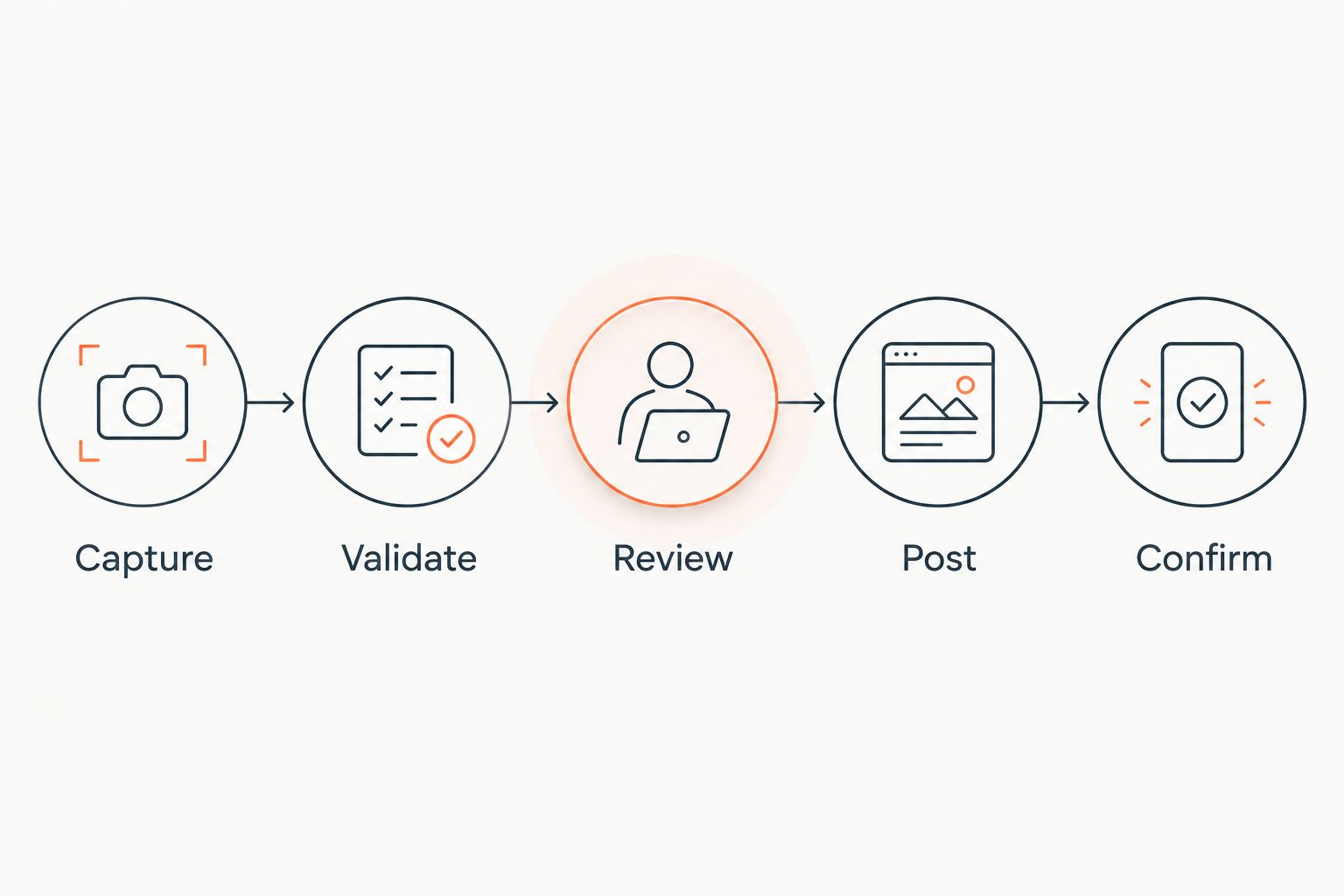
Use the same acceptance process for every shortlisted approach. Your 2026 evaluation should follow the transaction from the original request to a confirmed ERP record, including the path for rejected or ambiguous information.
Capture
Preserve the source purchase order and its relationship to the proposed transaction. Record the customer, document reference, requested items, quantities, units, and delivery instructions without silently filling unresolved fields.
Validate
Check the proposed order against authoritative account and item records. Make mismatches visible, including an inactive item, an unrecognized ship-to address, or a requested unit that differs from the selling unit.
Review
Route exceptions to an employee with authority to resolve them. Require an explicit decision for substitutions, commercial overrides, and conflicting purchase-order revisions.
Post
Create the approved transaction through the agreed ERP route. Confirm its identifier and status, and define how retries avoid creating another order.
Confirm
Return the actual transaction outcome to the responsible employee or workflow. Distinguish a received request, an approved order, and an order awaiting resolution.
For a proposed acceptance exercise, select 20 purchase orders containing at least 100 order lines. Assign 2 reviewers from inside sales and operations to record discrepancies independently. These are test-design recommendations, not performance benchmarks or a substitute for broader production validation.
Include clean repeat orders alongside deliberate exception cases: unknown items, changed quantities, duplicate submissions, conflicting revisions, and interrupted posting. Record correction minutes, unresolved lines, and confirmed ERP transactions. Do not count a captured document as a completed order.
How the options are ranked
The ranking starts with connected workflow scope, then separates alternatives by intake method and execution requirements. It does not claim comparative testing, measured accuracy, or a universal performance winner.
Use the criteria in this guide to change the order for your operation. EDI belongs first when structured partner exchange is the requirement; ERP-native workflow belongs first when data already reaches the ERP and approval work is the bottleneck.
Which approach should you choose?
Shortlist Supplyco when you need order entry automation connected to quoting, account management, and sales follow-up. Make ERP transaction behavior, item validation, and exception ownership conditions of your decision.
Choose a narrower approach when the problem is narrower. Use EDI for participating trading partners, ERP-native workflow for internal transaction steps, document capture for attachment-heavy intake, and RPA only for a defined interface task.
Discuss your order entry workflow
Bring your ERP requirements, purchase-order examples, and exception rules to the discussion.
FAQ
What's the best order entry automation for electrical equipment distributors?
The best choice depends on the workflow: connected revenue operations, structured partner exchange, ERP approvals, or document intake. Select the approach that validates your items, units, accounts, and transaction results rather than judging document capture alone.
Is EDI better than document capture for purchase orders?
EDI is the better fit for agreed structured exchanges with participating customers; document capture fits incoming attachments. A distributor can use both intake routes while applying common downstream validation rules.
Can order entry automation handle customer part numbers?
Require customer part numbers to resolve through validated mappings to your ERP items. An unmatched or ambiguous reference should enter review instead of becoming an assumed catalog match.
Can automation approve substitute electrical equipment?
Do not grant substitution approval merely because a system identifies a similar item. Define who has authority to approve an alternative and require the workflow to retain that decision before release.
Do we need to replace our ERP to automate order entry?
ERP replacement is not a prerequisite for every order entry approach. First assess supported imports, integrations, native workflow functions, and transaction controls in your existing deployment.
How should we test an order entry automation vendor?
Use a shared acceptance set containing clean orders and deliberate exceptions. Check item matching, unit validation, duplicate handling, approval routing, posting confirmation, and recovery from interrupted transactions.
What should happen when an order fails to post?
The workflow should identify the failed transaction, retain its source, and route it to an owner. Before retrying, verify whether the ERP created an order so the retry does not duplicate it.
One last thing
Test a purchase order that arrives twice with a changed quantity. Require the workflow to distinguish a duplicate from a revision and show the decision before release. A system that reads both documents correctly has not necessarily handled the order correctly.