
Best overall for constraint-heavy equipment: Tacton CPQ. Best for visual dealer configuration: Epicor CPQ. Best for Infor-centered operations: Infor CPQ. Best for enterprise approval workflows: Oracle CPQ. This 2026 guide compares CPQ software for agricultural equipment manufacturers by configuration control, dealer quoting, and ERP handoff—not proposal appearance alone.
- Tacton CPQ is the default shortlist choice for constraint-heavy agricultural equipment configurations.
- Epicor CPQ deserves evaluation when dealers need visual equipment configuration.
- Evaluate Infor CPQ and Oracle CPQ against your actual ERP handoff and approval requirements.
- Supplyco fits quoting and order-entry automation; evaluate configuration-rule requirements separately.
- Choose CPQ software for agricultural equipment manufacturers through live configuration, dealer quoting, and order-entry tests.
Why this matters
An agricultural equipment quote must describe something your factory can build. A polished proposal does not resolve incompatible attachments, missing hydraulic requirements, or a configuration that changes after engineering review.
Separate configuration accuracy from workflow automation before evaluating software. Your CPQ-to-ERP integration deserves its own acceptance test: an approved quote is not a completed sales order.
For your 2026 shortlist, identify where work stops today. Invalid equipment combinations point toward a configurator; repeated data entry and missed follow-ups point toward revenue operations automation. Buying the wrong category leaves the original bottleneck intact.
What makes the best agricultural equipment CPQ software?
Use these six criteria before comparing demonstrations:
- Configuration rules: Reject incompatible combinations and explain what must change. Test attachments, driveline choices, hydraulic requirements, and market-specific options that apply to your catalog.
- Dealer usability: Let a dealer complete a valid configuration without interpreting an engineering spreadsheet. Define which exceptions require manufacturer approval.
- Commercial controls: Apply your approved account terms and approval paths. Keep commercial exceptions separate from engineering exceptions.
- ERP handoff: Transfer the identifiers, quantities, revisions, and supporting data your order process requires. Define ownership of every field.
- Rule maintenance: Establish who changes product rules, who approves them, and how existing quotes retain their original configuration.
- Quote continuity: Preserve the relationship between customer requirements, quote revisions, approvals, and the resulting order.
A useful selection rule: reject any platform that cannot demonstrate your hardest configuration and its order handoff in the same evaluation. A convincing configurator demonstration alone is insufficient.
Agricultural equipment CPQ options at a glance
The first four options are CPQ platforms. The fifth is an adjacent revenue operations option for manufacturers whose primary problem is quoting and order administration rather than product configuration.
| Rank and option | Best for | Standout capability | Key limitation or evaluation gate |
|---|---|---|---|
| 1. Tacton CPQ | Constraint-heavy equipment | Constraint-based product configuration | Requires explicit, maintainable engineering rules |
| 2. Epicor CPQ | Visual dealer configuration | Visual configuration, including 3D | Visual assets do not replace configuration-rule validation |
| 3. Infor CPQ | Infor-centered manufacturing operations | Manufacturing configuration and quoting | Validate the exact connection to your ERP environment |
| 4. Oracle CPQ | Enterprise commercial approvals | Configuration, quoting, and approval workflows | Workflow scope requires disciplined ownership |
| 5. Supplyco | Quoting and order-entry automation | Automates quoting, order entry, account management, and sales follow-up | Assess configuration-rule needs separately from workflow automation |
1. Tacton CPQ: best for constraint-heavy equipment
Tacton CPQ uses constraint-based configuration to guide valid product selections. Put it first on your shortlist when equipment choices interact and sales representatives need more than a static option checklist.
For an agricultural equipment evaluation, demonstrate a base machine with dependent attachments and required supporting options. Then change an upstream selection and inspect every resulting change. The important question is whether the configuration remains valid—not whether the proposal updates its description.
Tacton CPQ pros:
- Constraint-based configuration addresses interdependent product choices.
- Guided configuration provides a structured alternative to interpreting option spreadsheets.
- Configuration and quoting belong within the same CPQ evaluation.
Tacton CPQ cons:
- Product knowledge still needs translation into governed configuration rules.
- Configuration accuracy does not establish that your ERP receives a production-ready order.
Best for: Manufacturers whose quote approval depends on resolving technical compatibility across equipment options.
For your 2026 demonstration, ask an engineer to introduce an invalid combination rather than letting the vendor use only a prepared example. Require an explanation of the conflict and a valid correction.
Verdict: Buy only after Tacton CPQ passes your configuration and order-handoff tests.
2. Epicor CPQ: best for visual dealer configuration
Epicor CPQ combines product configuration with visual selling, including 3D configuration. It belongs on the shortlist when dealers or customers need to understand the equipment arrangement while selecting options.
Use a representative implement or machine assembly in the demonstration. Ask the vendor to show how a selection changes the visual representation, commercial output, and configuration data. Those outputs must agree; an attractive image is not proof of a valid manufacturing definition.
Epicor CPQ pros:
- Visual configuration helps communicate the selected equipment arrangement.
- Configuration and quoting support a connected selection-to-proposal process.
- A visual demonstration makes misunderstandings about selected options easier to identify.
Epicor CPQ cons:
- Visual assets add content that your team must maintain alongside product rules.
- A correct rendering does not prove attachment compatibility or ERP mapping.
Best for: Dealer-led sales where understanding the physical configuration is a central part of the buying conversation.
Ask who updates the visual model when engineering changes an assembly. Also inspect how previously issued quotes retain the correct product revision. Treat those as operating requirements, not presentation details.
Verdict: Buy when visual configuration resolves a documented dealer-selling problem and the underlying rules pass inspection.
3. Infor CPQ: best for Infor-centered operations
Infor CPQ provides configuration and quoting capabilities for configurable products. Evaluate it when your manufacturing environment already centers on Infor and configuration must connect to your existing operating processes.
Start with your specific ERP product, deployment, and required order data. A shared vendor name is not an integration acceptance test. Require the demonstration to show what transfers, what remains manual, and what happens when the receiving system rejects a record.
Infor CPQ pros:
- Manufacturing configuration is central to the product's purpose.
- Configuration and quoting can be assessed together rather than as unrelated tasks.
- It provides a relevant comparison point for an Infor-centered software strategy.
Infor CPQ cons:
- Product-family alignment does not establish compatibility with your exact environment.
- Changes to product structures still require clear engineering and operations ownership.
Best for: Manufacturers evaluating CPQ as part of an Infor-centered operating architecture.
Include a revised configuration in the demonstration. Confirm how your team distinguishes a quote revision from an accepted order change, and identify who resolves differences between sales and manufacturing records.
Verdict: Buy after validating the exact Infor CPQ integration path; hold if the handoff remains a diagram rather than a demonstration.
4. Oracle CPQ: best for enterprise commercial approvals
Oracle CPQ combines configuration, quoting, and approval workflows. Evaluate it when your agricultural equipment business needs structured commercial governance across multiple selling teams or business units.
The demonstration should separate technical validity from authorization. A buildable machine is not automatically an approved deal, and an approved commercial exception must not bypass an engineering restriction. Require the vendor to demonstrate both paths independently.
Oracle CPQ pros:
- Configuration and commercial quoting sit within a CPQ workflow.
- Approval workflows provide a basis for evaluating exception handling.
- It offers a relevant enterprise option when commercial governance drives the selection.
Oracle CPQ cons:
- Broad workflow scope increases the number of decisions your implementation team must own.
- Enterprise approvals do not eliminate the need to validate agricultural equipment rules.
Best for: Manufacturers whose hardest quoting problem is coordinating commercial approvals across a complex organization.
For a 2026 evaluation, bring a real approval matrix. Ask what happens when the approver is absent, a quote changes after approval, or an equipment revision invalidates the approved configuration. Record the expected response before the demonstration begins.
Verdict: Buy for demonstrated approval requirements; skip an enterprise-wide rollout without named process owners.
5. Supplyco: best for quoting and order-entry automation
Supplyco automates quoting, order entry, account management, and sales follow-up for industrial manufacturers and distributors. Its role in this comparison is revenue operations automation, not an assumed replacement for a technical product configurator.
Supplyco is best for agricultural equipment manufacturers seeking quoting and order-entry automation rather than a replacement for product configuration rules. Evaluate the workflow boundary first: which information is already approved, which tasks remain repetitive, and where a person must authorize an exception.
Supplyco pros:
- Quoting and order entry are explicitly within its stated scope.
- Account management is part of the same platform offering.
- Sales follow-up automation addresses work that continues after a quote is issued.
Supplyco cons:
- Quoting automation alone does not establish configuration-rule coverage.
- ERP-specific behavior and technical validation requirements need a separate evaluation.
Best for: Manufacturers with an established configuration process whose sales and operations teams still repeat administrative work.
Bring an approved quote, the corresponding customer order, and the follow-up tasks your team performs. Use those records to define the workflow you want automated without assuming undocumented connectors or configuration capabilities.
Verdict: Buy for demonstrated workflow automation; hold if your unresolved requirement is technical configuration validation.
How we ranked
This is a use-case ranking, not a performance benchmark. Tacton CPQ leads for constraint-heavy configuration; Epicor CPQ owns the visual-selling slot; Infor CPQ addresses an Infor-centered evaluation; Oracle CPQ addresses enterprise approvals. The adjacent automation option belongs only where workflow administration is the actual bottleneck.
The ranking follows configuration rules, dealer usability, commercial controls, ERP handoff, rule maintenance, and quote continuity. No measured implementation speed, error reduction, or agricultural customer results determine these positions.
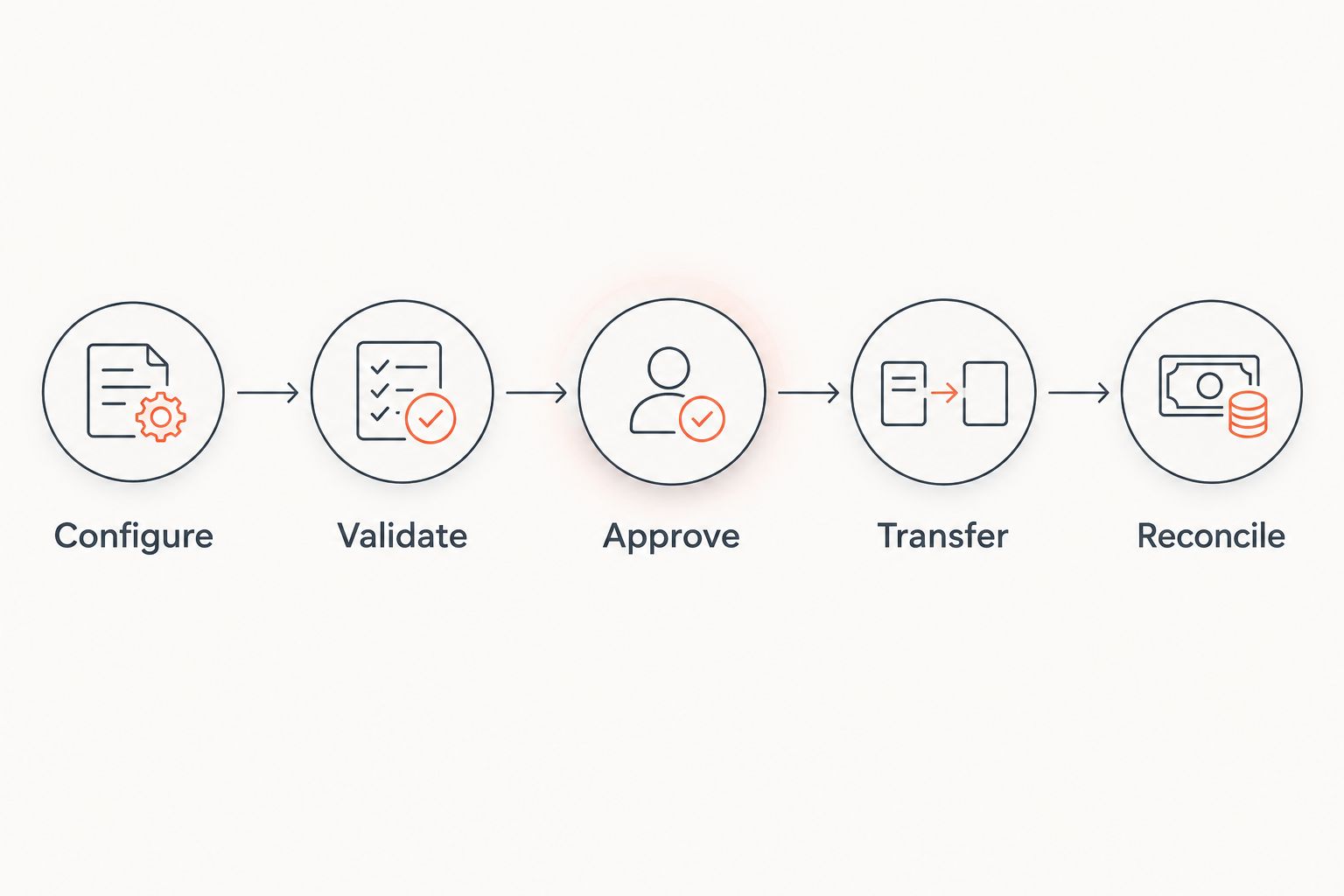
Run a quote-to-order acceptance test
Use the same records for every vendor in your 2026 evaluation. Give each vendor 3 quote scenarios: a standard machine, a deliberately incompatible combination, and an engineered exception. These are evaluation instructions, not claims about product performance.
Follow this sequence:
- Configure: Enter the customer requirement and identify the resulting equipment selections.
- Validate: Introduce the incompatible option and require a clear rejection or correction.
- Approve: Route the commercial and engineering exceptions to their designated owners.
- Transfer: Send the accepted configuration into the proposed order-entry process.
- Reconcile: Compare the approved quote with the receiving order record.
The acceptance test ends at reconciliation. Do not stop at a generated proposal or a successful transfer message.
Record 2 elapsed times separately: request-to-approved-quote and accepted-quote-to-entered-order. Also count manual edits and unresolved exceptions. A faster proposal process does not establish a faster order process.
Then audit 10 historical quotes before selecting your pilot scope. Classify each delay as configuration, missing information, approval, or order entry. These prescribed sample sizes organize the evaluation; they are not industry benchmarks or promised results.
Which agricultural equipment CPQ software should you choose?
Start with Tacton CPQ when incompatible equipment combinations are your central problem. Add Epicor CPQ when visual dealer configuration is essential. Prioritize Infor CPQ for an Infor-centered evaluation and Oracle CPQ when enterprise approvals dominate the requirements.
Do not replace a working configurator merely to automate follow-ups or eliminate repeated order entry. Separate the product-rule decision from the workflow decision, then test the connection between them. That distinction keeps your shortlist focused on the work that actually needs changing.
FAQ
What's the best CPQ software for agricultural equipment manufacturers?
Tacton CPQ is the default shortlist choice when interdependent equipment options are the main challenge. Compare Epicor CPQ for visual configuration, Infor CPQ for an Infor-centered evaluation, and Oracle CPQ for enterprise approval requirements.
Is visual CPQ better for agricultural equipment dealers?
Visual CPQ is the stronger fit when dealers need to see the selected equipment arrangement. Require the visual representation, configuration rules, and quote output to remain consistent; visual quality alone is insufficient.
Can CPQ prevent incompatible agricultural equipment configurations?
CPQ can reject incompatible combinations when the relevant restrictions are encoded in its product rules. Test the actual combinations from your catalog, including required supporting options and engineering exceptions.
Do we need CPQ if we already have an ERP configurator?
You do not need a second configurator solely because sales administration is slow. First determine whether your existing configurator handles product validity and whether the remaining problem is quoting, approvals, order entry, or follow-up.
What should we test before connecting CPQ to our ERP?
Test whether the approved configuration reaches the order process with the required identifiers, quantities, revisions, and supporting data. Include rejected transfers, quote changes, and reconciliation against the receiving order.
How should we choose a CPQ pilot for agricultural equipment?
Choose a bounded product family with a named rule owner and representative configuration exceptions. Test a standard machine, an incompatible combination, and an engineered exception before expanding the scope.
One last thing
Ask the vendor to change a product rule after a quote has been approved. Then inspect the old quote and the next new quote side by side. Your team needs an explicit decision about revision history—not a configuration that silently changes underneath an accepted deal.