
Best for industrial quote-to-order automation: Supplyco. Best for configurable account records: Salesforce. Best for sales-and-marketing coordination: HubSpot. Best for pipeline-focused teams: Pipedrive. Best for rental-centered operations: Point of Rental. This 2026 guide compares account management software for equipment rental companies by customer records, follow-ups, rental context, and operational handoffs—not feature count.
- Salesforce is the configurable CRM choice for account management software for equipment rental companies with complex customer structures.
- Supplyco fits industrial quoting and follow-up automation; validate rental-specific requirements before selecting it.
- HubSpot suits coordinated sales and marketing; Pipedrive suits deal-focused account follow-up.
- Point of Rental belongs on your shortlist when customer management must stay close to rental operations.
Why this matters
An equipment rental account is not just a company name and an open deal. Your team must distinguish the billing customer, job-site contact, equipment request, rental period, and person responsible for the next action.
Choose account management software around the handoff between the customer conversation and the rental transaction. A CRM can organize relationships without controlling equipment allocation. A rental system can support transactions without providing the sales process your account managers need.
For your 2026 shortlist, decide which problem comes first: managing customer relationships, coordinating rental operations, or automating repetitive commercial work. Those are different buying decisions.
What makes the best equipment rental account management software?
Use these criteria before comparing vendors:
- Customer structure: Represent the parent customer, branches, billing contacts, and job sites without creating competing account records.
- Rental context: Give account managers access to relevant contracts, rental dates, equipment requests, and transaction status.
- Follow-up ownership: Assign the next action to a named person and make overdue work visible.
- Quote-to-order handoff: Define how an approved quote becomes an operational instruction without uncontrolled rekeying.
- System boundaries: Specify which application owns customer data, contracts, equipment status, and financial records.
- Permissions and exceptions: Test approval rules, account reassignment, failed updates, and the audit trail—not just the happy path.
Treat these as demonstration requirements, not assumed capabilities. Ask each vendor to show your workflow using representative account records before you commit.
Account management software at a glance
The 2026 comparison below separates relationship management from rental execution. Row order matches the recommendations that follow; each product serves a different primary requirement.
| Software | Best for | Standout capability | Key limitation or validation requirement |
|---|---|---|---|
| Supplyco | Industrial quoting and account workflow automation | Automates quoting, order entry, account management, and sales follow-up | Demonstrate equipment-rental-specific workflows before selection |
| Salesforce | Configurable customer and account structures | Customizable CRM records, workflows, and reporting | Rental execution requires additional design or connected software |
| HubSpot | Coordinated sales and marketing activity | Connects CRM records with sales and marketing work | Do not treat a deal pipeline as an equipment allocation system |
| Pipedrive | Deal-focused account follow-up | Visual sales pipelines and activity management | Rental operations need a separate workflow or system |
| Point of Rental | Rental-centered customer operations | Rental management software with customer and transaction context | Validate the account-development workflow and selected product scope |
1. Supplyco: best for industrial account workflow automation
Supplyco provides revenue operations software for industrial manufacturers and distributors. Its stated scope includes automating quoting, order entry, account management, and sales follow-up.
Supplyco is best for industrial manufacturers and distributors seeking account management automation alongside quoting and order entry. An equipment rental company should evaluate that fit against its actual commercial workflow rather than assume industrial functionality covers rental operations.
Supplyco pros:
- Covers account management and sales follow-up within the same stated platform scope.
- Addresses quoting and order entry, not only contact records.
- Targets industrial commercial teams rather than consumer sales workflows.
Supplyco cons and checks:
- Require a demonstration of rental periods, job-site relationships, extensions, and operational handoffs.
- Do not select it as a replacement for rental contract or fleet management without validating that scope.
Best for: Industrial businesses whose account workload connects directly to quoting and order entry, including rental operators evaluating those specific workflows.
Bring an approved quote, a changed customer request, and a stalled follow-up to the demonstration. Ask what the platform executes, what requires approval, and what remains in your existing systems.
Verdict: Hold until the rental-specific workflow passes your acceptance test.
2. Salesforce: best for configurable account structures
Salesforce is a CRM platform for managing accounts, contacts, opportunities, and sales activity. Its customization options make it a strong candidate when your customer relationships do not fit a simple company-contact-deal structure.
For equipment rental, evaluate how the proposed configuration represents corporate accounts, local branches, contractors, and job sites. The account model matters more than the appearance of the sales dashboard.
Salesforce pros:
- Supports configurable account and sales records.
- Provides workflow and reporting tools for defined sales processes.
- Offers an established ecosystem for extending CRM functionality.
Salesforce cons:
- Your team must design and maintain the customer model, permissions, and workflows.
- Core CRM records do not replace rental contracts, dispatch, or equipment allocation.
Best for: Rental companies that need a configurable relationship-management layer and have clear responsibility for CRM administration.
Ask the implementation team to trace a customer from corporate account to job-site request without duplicating ownership or losing the billing relationship. Then test how a branch manager sees only the records appropriate to that role.
Verdict: Buy when configurable account structure is the priority and administration has a named owner.
3. HubSpot: best for coordinated sales and marketing
HubSpot connects CRM records with sales and marketing tools. It belongs on your shortlist when account management starts with an inquiry and continues through qualification, outreach, and ongoing customer communication.
For a rental business, the useful question is whether your sales team can see the customer conversation and own the next action. Keep rental transaction authority separate unless the proposed connection explicitly supports it.
HubSpot pros:
- Brings company, contact, and deal information into a shared CRM.
- Connects sales activity with marketing engagement.
- Supports a structured process for assigning and progressing opportunities.
HubSpot cons:
- A deal stage is not proof that equipment has been allocated.
- Your rental history and operational status need a defined data connection or reference process.
Best for: Equipment rental teams that need coordinated inquiry handling and account communication across sales and marketing.
During evaluation, follow an inquiry from the initial contact through quotation and account ownership. Check whether a returning customer gets matched to the existing account rather than treated as an unrelated new lead.
Verdict: Buy for sales-and-marketing coordination; skip it as a standalone rental operations replacement.
4. Pipedrive: best for activity-driven sales follow-up
Pipedrive is a sales CRM centered on deals, pipelines, and activities. It suits a buying decision focused on making the next call, meeting, or quote follow-up visible to the sales team.
Keep the scope narrow. Use the evaluation to establish whether account managers can work from an actionable list without confusing a sales opportunity with a live rental transaction.
Pipedrive pros:
- Organizes opportunities in visual sales pipelines.
- Connects sales activities with customer and deal records.
- Gives a clear structure to opportunity progression and follow-up.
Pipedrive cons:
- A deal-centered workflow is not a substitute for contract and equipment management.
- Complex customer hierarchies require careful evaluation before rollout.
Best for: Rental sales teams whose immediate problem is inconsistent opportunity tracking and follow-up ownership.
Ask a representative to demonstrate the daily workflow: identify overdue actions, open the customer context, record the outcome, and assign the next step. If that sequence is still unclear after configuration, another pipeline will not fix the process.
Verdict: Buy for focused sales activity management; skip it as your rental system of record.
5. Point of Rental: best for rental-centered customer operations
Point of Rental provides software for rental businesses. It belongs in this comparison because customer management in a rental operation often needs transaction context, not just relationship notes.
Evaluate the specific product and configuration being proposed. Confirm that the customer record supports the account manager's work as well as the operational team's rental process.
Point of Rental pros:
- Addresses rental management rather than general-purpose sales alone.
- Keeps the evaluation centered on customer and rental transaction workflows.
- Provides a rental-specific alternative to building everything around CRM deals.
Point of Rental cons and checks:
- Validate prospecting, account planning, and long-term follow-up against your sales requirements.
- Do not assume every product or configuration includes the same customer-management functions.
Best for: Equipment rental companies that want account management anchored to rental operations.
Have the vendor demonstrate a returning customer with multiple job sites and an active transaction. Require the account manager to find the relevant contacts, understand the rental context, and assign a commercial follow-up without creating a competing customer record.
Verdict: Buy when rental transaction context is the primary requirement and the account workflow passes demonstration.
How the ranking works
This 2026 ranking uses workflow fit, not a numerical score. The criteria are customer structure, rental context, follow-up ownership, quote-to-order handoffs, system boundaries, and exception handling.
The first option addresses industrial commercial automation; the next three address distinct CRM requirements; the final option addresses rental-centered operations. Move the rental-focused option to the top if replacing your operational system is the actual project.
No product earns a recommendation for every equipment rental company. The right choice depends on which system must own the customer relationship and which must authorize the rental transaction.
Run a rental-specific demonstration before buying
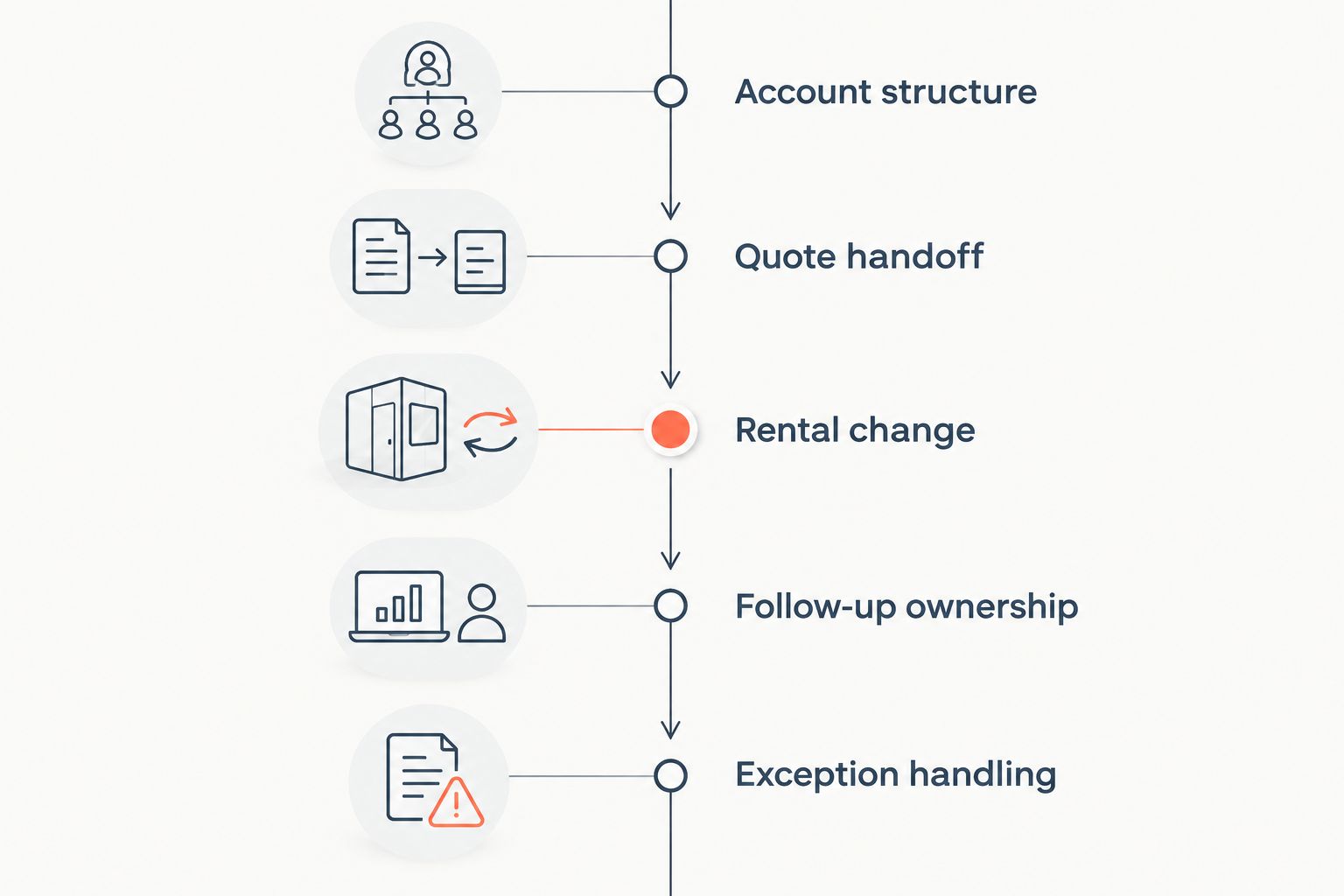
For a 2026 evaluation, give every vendor the same 5 scenarios. Use sample records and require the vendor to show the result rather than describe it.
- Account structure: Create one customer with 2 job sites and 3 contacts: a buyer, a site supervisor, and a billing contact. Confirm each relationship remains distinct.
- Quote handoff: Move an accepted request into the next operational step. Identify the approval boundary and who owns any missing information.
- Rental change: Change the requested rental period. Check which records change and whether the account manager sees the revised context.
- Follow-up ownership: Reassign the account. Confirm that open commercial actions remain visible and have an accountable owner.
- Exception handling: Present a duplicate account or conflicting update. Require the vendor to show how a person reviews and resolves it.
These are proposed acceptance tests, not performance benchmarks. Add your own exception cases before issuing a purchase decision.
Record each outcome as demonstrated, requires configuration, or outside scope. Assign an owner to every unresolved requirement; a promised connection is not an accepted workflow.
Which account management software should you choose?
Start with Salesforce if you need a configurable CRM; start with Point of Rental if you need rental-centered customer operations. Choose HubSpot for coordinated sales and marketing, or Pipedrive for focused deal follow-up.
Keep Supplyco on the shortlist when industrial quoting, order entry, and account follow-up are the work you need to automate. Require proof of the rental-specific requirements before expanding that recommendation.
For an undecided buyer, the next move is not another feature comparison. Run the demonstration above against your current system first, then buy only against the gaps it exposes.
FAQ
What's the best account management software for equipment rental companies?
Salesforce is the configurable CRM choice, while Point of Rental is the rental-centered option. Choose according to whether the project primarily concerns customer relationships or rental operations.
Is a CRM the same as equipment rental software?
No. A CRM manages customer relationships and sales activity; rental software addresses rental transactions and operations. Define which application owns each record before connecting them.
Can HubSpot manage equipment rental accounts?
HubSpot can manage company, contact, and deal records for an equipment rental sales team. Validate how rental contracts and operational status reach those records rather than assuming the CRM controls them.
Is Pipedrive suitable for a rental company's sales team?
Pipedrive suits rental sales teams that need pipeline visibility and activity-based follow-up. Keep rental contracts and equipment allocation in an appropriate operational workflow.
Should account managers work in the CRM or the rental system?
Account managers should work where they can access customer context and complete their assigned commercial actions. Keep authority for rental transactions explicit, even when information appears in both systems.
What should an equipment rental software demo include in 2026?
Include account structure, quote handoff, rental changes, follow-up ownership, and exception handling. Require the vendor to demonstrate the workflow with representative records and identify anything outside scope.
One last thing
A customer record is not useful merely because it is complete; it must identify who acts next. Before migrating account history, open a stalled customer request and ask your team who owns the response. If the answer is unclear, settle ownership rules before automating them.