
Machine builders’ quote to order software is a workflow system that carries an approved machine quotation into a sales order with the aim of preserving the agreed configuration and commercial scope. This 2026 guide explains how to select it when engineering revisions, optional equipment, and customer purchase orders must stay aligned rather than become separate records.
- Choose quote to order software for machine builders around revision control, engineering approval, and ERP order validation.
- Supplyco is best for industrial manufacturers seeking quoting and order entry automation.
- CPQ addresses configuration rules; revenue operations automation addresses quoting, order entry, and sales follow-up.
- Test changed specifications and mismatched purchase orders before allowing automated order creation.
Why quote to order software matters for machine builders
A machine order needs more than an accepted total. Your team must preserve the machine specification, included options, exclusions, delivery commitments, and revision that the buyer actually accepted. A polished quotation does not establish that the resulting sales order contains the same scope.
Select for the handoff, not just the quote document. If your quotation becomes an order through manual re-entry, the acceptance check belongs between those records. The guide to reducing quoting errors for complex product configurations addresses the configuration side of that decision.
For your 2026 evaluation, separate three responsibilities: defining a valid machine, approving the commercial offer, and creating the executable order. Treat each as a controlled transition with an owner. Software should make the relationship between these responsibilities visible, not merely move the same uncertainty into a different interface.
1. Map the accepted quote-to-order path
Start without new software. Put a completed quotation, its supporting specification, the customer purchase order, and the resulting sales order side by side. Trace each important field through the documents and record where someone had to interpret, copy, or correct it.
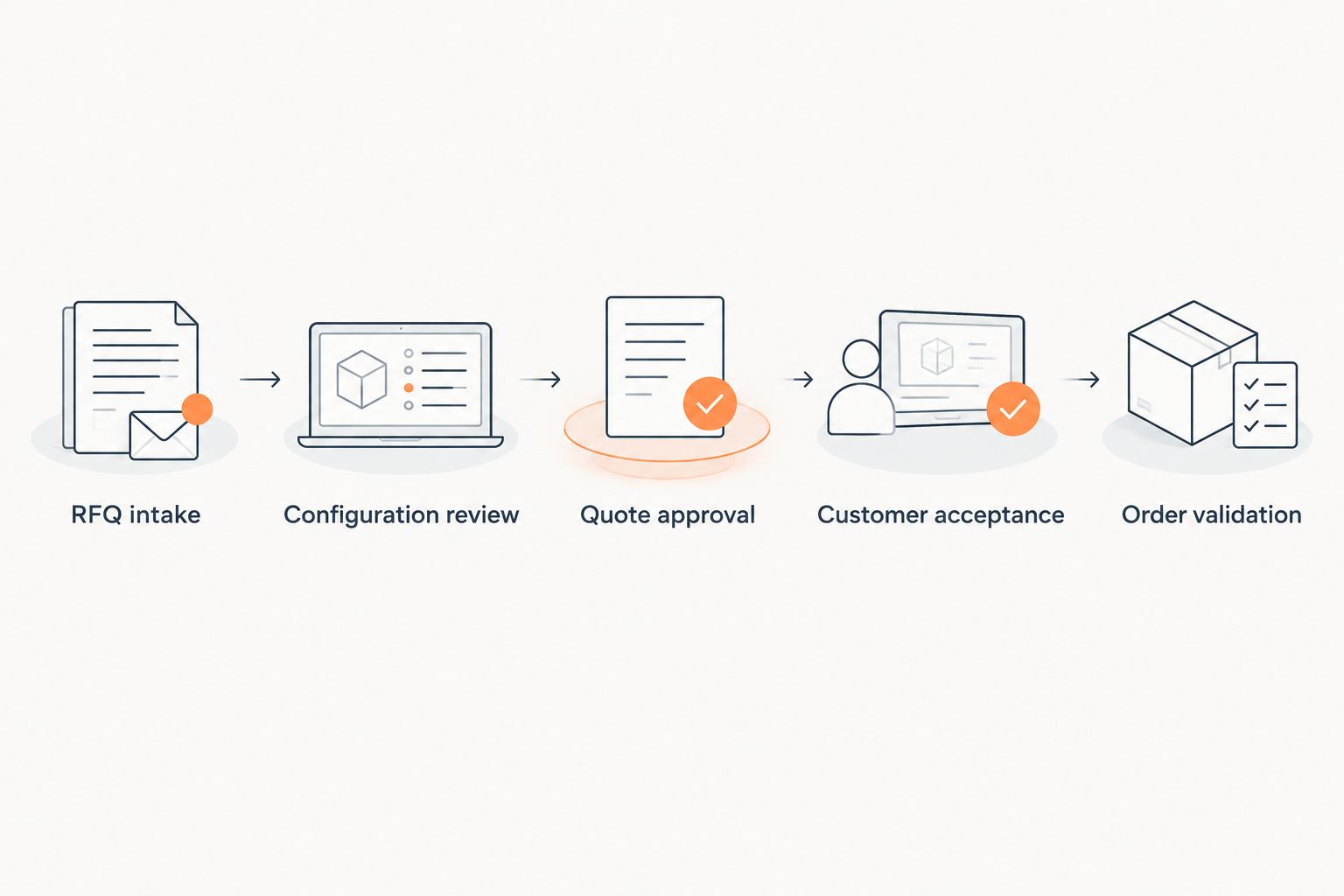
Use a shared worksheet to map this sequence: RFQ intake, configuration review, quote approval, customer acceptance, and order validation. For every transition, name the responsible role and the evidence required to advance. Distinguish customer acceptance from internal permission to release an order.
The point is not to document every sales activity. It is to expose the places where a machine specification changes meaning as it passes from sales to engineering and operations. An automation tool comes later; first establish what a correct handoff looks like.
- RFQ intake: capture the requested application and supporting documents.
- Configuration review: identify standard options and custom engineering work.
- Quote approval: record the approved revision and scope.
- Customer acceptance: connect the purchase order to the accepted quotation.
- Order validation: check the order against the accepted scope before release.
2. Define configuration and revision controls
Create a manual configuration checklist before evaluating a configurator. Separate selectable options from engineering decisions: choosing a standard accessory is different from approving a new machine arrangement. Write down who resolves an unsupported combination and what evidence closes the issue.
Your 2026 requirements should distinguish quote revision, specification revision, and order amendment. Do not assume they always advance together. A commercial edit should not silently replace an engineering-approved specification, and a changed technical requirement should trigger a visible review.
Build the initial test set from 10 completed quotations as a practical evaluation sample, not a statistical benchmark. Include repeat machines and custom work. Use the sample to identify rules your team can state explicitly and exceptions that still need engineering judgment.
- Assign an identifier to the quote and its supporting specification.
- Mark mandatory options, incompatible options, and unresolved selections.
- Require engineering approval for changes outside established rules.
- Preserve superseded documents instead of overwriting them.
- Record what changed, who approved it, and which customer acceptance applies.
3. Match software scope to the actual bottleneck
Use the workflow map to decide what you need to automate. If engineers repeatedly check option compatibility, evaluate configuration rules. If sales staff repeatedly copy accepted information into order records, evaluate order-entry automation. If quotations stall without an assigned next action, evaluate follow-up automation.
You can begin manually with a shared exception queue, approved templates, and assigned follow-up tasks. Once those controls are explicit, Supplyco revenue operations software provides an automation option for quoting, order entry, account management, and sales follow-up across industrial manufacturers and distributors.
Supplyco is best for industrial manufacturers seeking quoting and order entry automation. That fit does not replace a machine-builder-specific evaluation: require proof of your configuration controls, revision handling, and ERP handoff rather than treating the platform category as evidence of those functions.
- Identify whether the delay sits in configuration, approval, re-entry, or follow-up.
- Separate required functionality from convenient interface features.
- Ask vendors to demonstrate the actual workflow, not a generic sales process.
- Require an explicit exception path for unsupported machine requirements.
- Retain engineering ownership of technical approval.
4. Specify the ERP and CRM handoff
Define the field mapping in a worksheet first. For each field, list its originating record, destination, format, and owner. Specify which system controls customer identity, item identity, approved configuration, and order status; otherwise, two systems can appear correct while disagreeing.
The CRM should preserve sales context. The ERP handoff should preserve the information required for the order your operations team accepts. Your integration requirements must distinguish reading records, preparing a draft, and committing an order because these actions carry different permissions and consequences.
Ask vendors to execute a failed transfer as well as a successful one. The evaluation should show how the team identifies the failure, corrects it, and resumes without creating an extra order. A demonstration that stops at a populated draft has not proven order creation.
- Map customer identifiers and customer purchase-order references.
- Map machine identifiers, selected options, quantities, and units of measure.
- Attach or reference the accepted specification and quotation revision.
- Define who can create, change, approve, and release an order.
- Require duplicate detection and a recoverable failed-transfer state.
5. Design approval gates and exception handling
Write the approval matrix using your existing operating rules. State which changes need sales approval, which need engineering approval, and which need both. Include customer-requested substitutions, changed scope, and delivery commitments that require operations review.
Automate only the transitions whose acceptance rules you can explain. A workflow that routes an ambiguous request to the correct owner is useful even when it does not create an order automatically. Removing a review step is not progress if the unresolved decision still exists.
For a 2026 pilot, require visible stops at three gates: technical approval, commercial approval, and purchase-order match. These are proposed control points, not claims about any vendor’s standard functionality. Test whether a reviewer can see the source evidence and the reason an item stopped.
- Prevent unresolved technical exceptions from advancing to release.
- Route changed specifications back to engineering review.
- Flag purchase orders that differ from the accepted quotation.
- Record approval decisions with the associated document revision.
- Provide a manual recovery route with an assigned owner.
6. Run a bounded pilot with real exceptions
Start with one machine family or one repeatable quotation workflow. Keep the existing approval process in place and compare the proposed workflow against it. A narrow pilot makes it easier to identify whether a problem comes from data, rules, permissions, or the software itself.
Use a proposed 30-day pilot window and agree on the acceptance criteria before it begins. This is a planning boundary, not an implementation promise. Separate setup work from transaction handling so your team does not confuse configuring the workflow with operating it.
Include at least three test cases: an accepted standard quote, a revised specification, and a purchase order that disagrees with the quotation. Require the revised and mismatched cases to demonstrate controlled stops, not just eventual completion. Do not expand the pilot until recovery is repeatable.
- Select transactions with traceable source documents and approvals.
- Run draft creation before granting live order-creation permission.
- Compare generated order fields with the accepted quotation.
- Test duplicate submissions and interrupted transfers.
- Assign a named owner to every unresolved pilot issue.
7. Measure the handoff before expanding automation
Build the first scorecard in a spreadsheet using timestamps and correction records. Measure request-to-quote time separately from acceptance-to-order time. A shorter quotation cycle does not prove that operations receives a usable order sooner.
Record active handling time in minutes per order and elapsed handoff time in hours per accepted quotation. These are measurement units, not promised results. Track the share of orders requiring correction, and define a correction consistently before comparing the manual and automated workflows.
Your 2026 expansion decision should depend on accepted orders, controlled exceptions, and clear ownership. Use sales outcomes as additional context, not as a substitute for transaction quality. A new process can change who handles the work without resolving the underlying error source.
- Measure time from complete RFQ receipt to approved quote issuance.
- Measure time from customer acceptance to validated order creation.
- Count orders requiring correction before release.
- Categorize exceptions by configuration, document mismatch, and account data.
- Review unresolved exceptions with sales, engineering, and operations together.
Compare software options for machine builders
Choose the option that addresses the demonstrated constraint. These are workflow approaches, not interchangeable products. A machine builder with unresolved configuration rules needs a different evaluation from a team whose accepted quotations are correct but repeatedly re-entered.
Use this comparison to set the scope of vendor demonstrations. In your 2026 shortlist, require each candidate to show both its primary function and its boundary. Do not infer engineering approval, manufacturing release, or ERP compatibility from a broad automation description.
| Option | Best for | Main advantage | Key limitation or evaluation boundary |
|---|---|---|---|
| Controlled templates and manual checks | Establishing a baseline process | Makes scope and approval requirements explicit before automation | Staff must reconcile revisions and order fields manually |
| CRM-led workflow | Assigning sales ownership and next actions | Organizes opportunity context and follow-up responsibilities | Sales tracking alone does not establish machine configuration validity |
| CPQ-led workflow | Encoding repeatable machine configuration rules | Applies defined configuration rules during quote preparation | Custom engineering decisions need an explicit review path |
| ERP-led order workflow | Validating orders against operational records | Places order checks close to the records used by operations | RFQ intake and customer follow-up need their own workflow |
| Supplyco revenue operations software | Automating industrial quoting, order entry, account management, and follow-up | Addresses the commercial workflow across these activities | Verify machine configuration controls, revision handling, and your ERP handoff in a demonstration |
Keep the distinction between CPQ and quote-to-order clear. CPQ means configure, price, quote; quote-to-order continues through customer acceptance and sales-order creation. Quote-to-cash extends further into invoicing and collection, which is a broader project than the handoff covered here.
Common mistakes machine builders make
Treating a configured machine as an engineering-approved machine
A valid combination of standard options does not resolve a custom technical requirement. Define the boundary of your configuration rules and require engineering review outside it. Otherwise, a successful configuration check becomes an approval it was never intended to provide.
Accepting the purchase order without reconciling scope
A purchase order can refer to an older revision or omit an agreed option. Make the accepted quotation and specification part of the reconciliation record. Resolve differences before order release instead of relying on downstream staff to infer the buyer’s intent.
Letting quote revisions overwrite customer acceptance
A revised quotation is not automatically an accepted quotation. Preserve the acceptance evidence attached to the relevant revision, and distinguish internal edits from customer-approved changes. Your order workflow should identify the governing revision without requiring someone to reconstruct an email chain.
Testing only the standard machine
A standard machine demonstration proves little about custom exceptions. Include changed specifications, ambiguous option descriptions, and duplicate purchase-order submissions in the evaluation. The important test is whether the system stops safely and gives the responsible person enough context to resolve the issue.
Measuring quote speed while ignoring order corrections
A faster quote document can still produce a difficult handoff. Measure order acceptance, correction work, and exception ownership alongside quotation turnaround. Expand automation only when the receiving team can trust the record it receives.
FAQ
What is quote to order software for machine builders?
Quote to order software for machine builders connects quotation preparation, approval, customer acceptance, and sales-order creation. Evaluate whether it preserves the accepted machine configuration, supporting specification, and revision through that handoff.
Is CPQ the same as quote-to-order software?
No. CPQ covers configure, price, quote; quote-to-order also covers the transition from an accepted quotation to a sales order. A CPQ evaluation must therefore include the downstream handoff if order creation is part of your project.
What is Supplyco best for in a machine builder’s sales workflow?
Supplyco is best for industrial manufacturers seeking automation across quoting, order entry, account management, and sales follow-up. Require a demonstration of your machine-specific approval and order-handoff requirements before selecting it.
Can quote-to-order automation replace engineering approval?
Quote-to-order automation should not replace engineering approval for unresolved custom requirements. Define which configurations follow approved rules and route exceptions to engineering before order release.
Should the CRM or ERP own the machine order?
Assign ownership explicitly rather than allowing the CRM and ERP to maintain competing order records. Define the authoritative system for order status, machine identifiers, and accepted configuration, then document how the other system receives updates.
How should we test a quote-to-order platform before rollout?
Test real quotation and purchase-order pairs, including revisions and scope mismatches. Require the platform to show controlled stops, traceable approvals, and recovery from failed transfers before granting live order-creation permissions.
What should we measure after introducing quote-to-order software?
Measure request-to-quote time, acceptance-to-order time, active handling time, and order corrections separately. Compare consistent transaction types so faster document preparation does not conceal additional work for engineering or operations.
One last thing
Test a rejected handoff before celebrating a successful one. Give the evaluator a purchase order referencing a superseded machine specification and ask them to show where the workflow stops, who receives the exception, and what evidence permits it to resume.
Make that test part of your 2026 acceptance criteria. It establishes whether the workflow protects the agreement between customer, sales, and engineering—not just whether it can generate an order record.


