
Telecom manufacturers’ order entry automation is the conversion of customer purchase orders into validated sales orders, with the aim of reducing rekeying and preventing incorrect production or shipment instructions. This 2026 guide explains how to preserve part revisions, configuration details, customer references, and delivery schedules while moving orders into your ERP.
- Order entry automation for telecom manufacturers should validate customer orders before creating ERP records.
- Supplyco suits industrial teams seeking order entry automation alongside quoting, account management, and sales follow-up.
- Use approved part mappings and explicit revision checks; never treat document extraction as order approval.
- Start with repeat orders, retain exception review, and measure corrections after ERP entry.
Why order entry automation matters for telecom manufacturers
A purchase order can contain a recognizable part number and still lack enough information to release an order. Customer aliases, hardware revisions, configuration requirements, and delivery instructions need separate checks. Successful automation preserves the customer's intent; it does not merely copy text into fields.
Your workflow must distinguish an accepted quote from a new specification request. If a customer changes a connector, firmware requirement, or delivery schedule on the purchase order, the order needs review against the approved commercial and technical record.
The broader order entry guide for manufacturing sales teams covers the same intake-to-ERP boundary. For telecom manufacturing, make revision control and configuration matching explicit acceptance criteria in your 2026 implementation plan.
Start by separating three activities: reading the document, validating the requested order, and authorizing the ERP transaction. A system that performs the first activity has not necessarily completed the other two.
How to automate telecom manufacturing order entry
Map your intake and approval workflow
Start manually with a shared worksheet. Record where each order arrives, who checks it, which source documents support it, and who creates the ERP record. Follow the actual handoffs rather than the process described in a policy document.
For your initial review, inspect 20 purchase orders as a working sample, not a statistical benchmark. Include straightforward repeat orders and orders that required clarification. Trace both through acknowledgment so you can identify where missing information first becomes visible.
Separate requests for quotation from purchase orders. An email asking whether a configuration is feasible should not enter the same release path as an order against an approved quote.
- List intake channels, including email attachments, portals, and EDI where used.
- Identify the owner of customer, technical, and commercial checks.
- Record each handoff from receipt through ERP acknowledgment.
- Distinguish new orders, amendments, cancellations, and quote requests.
- Capture the reason for every clarification request in the sample.
Standardize the order data you require
Create an order checklist before selecting software. Your sales operations team can maintain the first version in a spreadsheet, with separate columns for customer-provided information and internally verified values.
Do not flatten everything into an order header. A requested delivery date can apply to an individual line or scheduled release rather than the entire purchase order. Preserve that distinction when it appears in the source document.
For telecom equipment and components, define how you will handle customer part numbers, internal SKUs, revisions, and configuration references. Keep technical requirements separate from ordinary shipping notes so a reviewer can locate them without rereading an entire email thread.
- Require the customer account, purchase order reference, and ship-to location.
- Capture part number, quantity, unit of measure, and revision per line.
- Preserve requested dates and delivery schedules at the correct level.
- Reference the approved quote or technical configuration when applicable.
- Assign an owner to each unresolved or conflicting field.
Separate extraction from validation
Use manual entry against the checklist first to establish what a correct draft looks like. Then evaluate automated extraction using the same documents and acceptance rules. Compare the resulting order fields with the source, not just with a polished demonstration screen.
Supplyco provides order entry automation within a revenue operations platform that also automates quoting, account management, and sales follow-up. Evaluate that broader workflow when clarification and account context are part of your intake process; require a demonstration against your own documents and ERP requirements.
Your 2026 acceptance test should follow this sequence: Capture documents, Match accounts, Validate lines, Review exceptions, Create drafts. These are separate controls, even when a platform presents them in one interface.
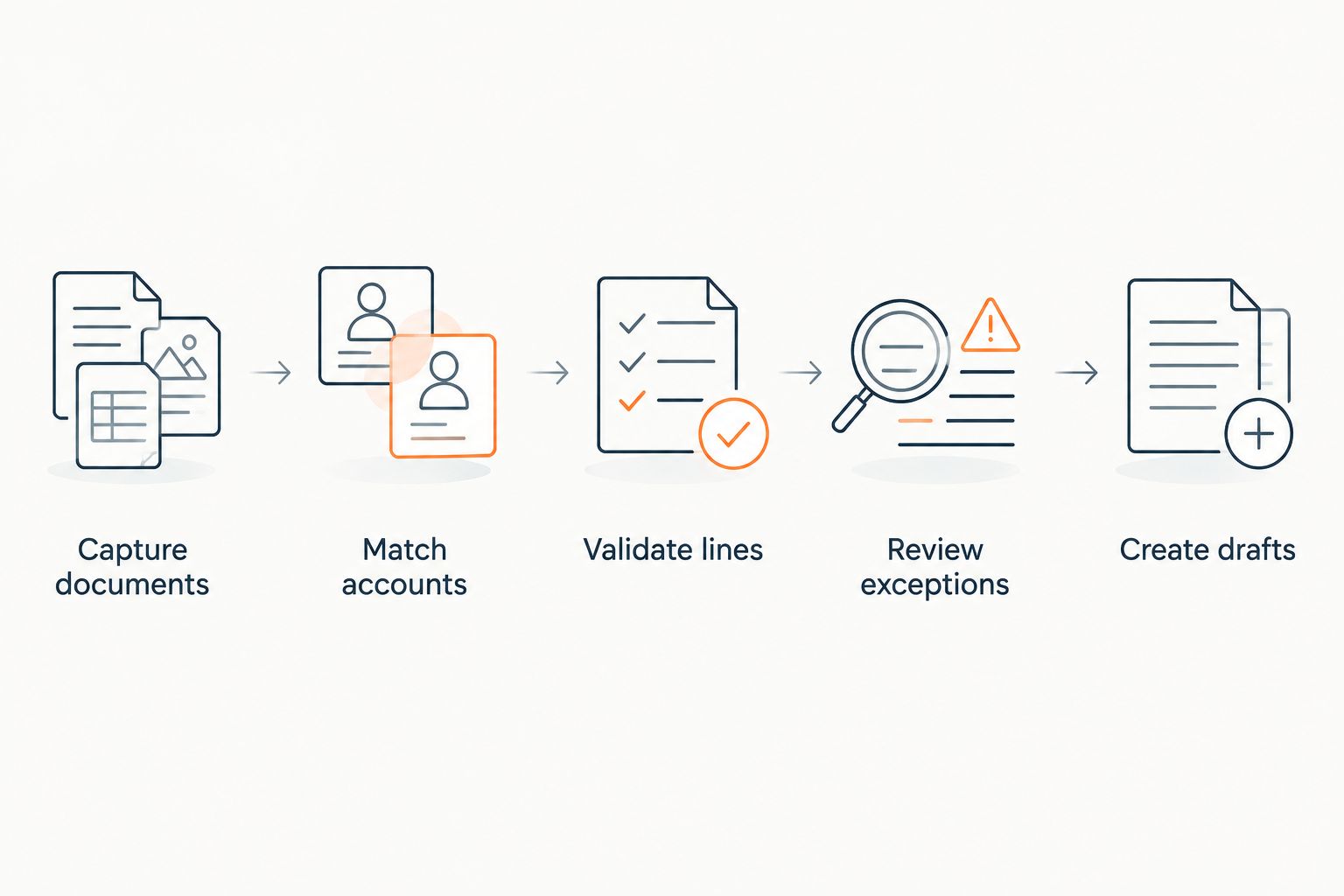
Keep the original document available beside the extracted fields. A reviewer needs to resolve ambiguity without reconstructing the source from a generated summary.
- Compare extracted line items with the original purchase order.
- Match customer identities using approved account records.
- Validate customer part aliases against maintained mappings.
- Route unreadable or contradictory fields to review.
- Preserve document references with the resulting order draft.
Validate revisions and configurations before release
Start with an approved mapping table maintained by sales operations and engineering. For each customer part alias, record the internal part and the revision or configuration constraints that determine whether a match is acceptable.
Treat resemblance as a search aid, not authorization. Similar part descriptions do not establish that two assemblies, connectors, or revision levels are interchangeable. When the purchase order conflicts with the accepted quote, stop the affected line and ask the responsible owner to resolve it.
Keep amendments distinct from replacements. A revised purchase order needs a comparison with the existing order so unchanged lines are not recreated and changed lines receive the correct review.
- Reject ambiguous matches instead of selecting the nearest description.
- Check requested revisions against approved product records.
- Compare configuration references with the accepted quote.
- Route substitutions and technical changes to engineering.
- Record approval evidence for each resolved discrepancy.
Control ERP creation and acknowledgments
Document the manual ERP procedure before automating it. Identify required fields, permitted statuses, account restrictions, and the difference between a draft and a released order. Your automation should follow those boundaries rather than bypass them.
For a 2026 rollout, require a test showing what happens when the ERP rejects a transaction or accepts it without returning a timely confirmation. A retry must not create a second order. Check the customer account, purchase order reference, and amendment context before deciding whether a record already exists.
Order acknowledgment is a separate control. Requested delivery dates should remain distinct from confirmed dates, and customer messages should reflect the actual accepted order status.
- Create orders in an approved draft or review status where supported.
- Check for existing orders before creating or retrying transactions.
- Log validation failures and ERP responses for investigation.
- Keep customer-requested dates separate from confirmed commitments.
- Send acknowledgments only after the relevant approval checks pass.
Route exceptions to accountable owners
Begin with a shared exception queue and named owners. Software can accelerate routing, but an unresolved item still needs a person authorized to decide what happens next.
Avoid a single miscellaneous bucket. A missing customer reference belongs with sales operations; a revision conflict belongs with the technical owner; an account restriction belongs with the responsible finance team. Assign ownership by the decision required, not by who first opened the email.
Make customer clarification specific. Identify the affected purchase order line and the conflicting information. Do not send an acknowledgment that implies acceptance while a technical or commercial question remains open.
- Categorize exceptions by missing data, technical conflict, or account restriction.
- Assign each category a primary owner and an escalation contact.
- Include the source document and affected line in every review task.
- Record the resolution and its supporting approval.
- Keep unresolved lines outside automatic release.
Measure results before expanding the workflow
Use a manual log or existing reporting tools to establish your baseline. Record elapsed time from receipt to validated draft, human handling time, corrections, and unresolved exceptions. Keep those measures separate: elapsed time includes waiting, while handling time measures active work.
Run a 30-day pilot across 2 order types: repeat orders with approved mappings and amended orders requiring comparison. These are proposed pilot boundaries, not performance claims. Retain review throughout the pilot so you can inspect errors before they affect downstream work.
Your 2026 expansion decision should depend on validated output and controlled failures. Faster draft creation does not justify expansion if corrections increase or exceptions lose ownership.
- Compare pilot orders with the same order types in the baseline.
- Count corrections discovered before and after ERP creation separately.
- Measure handling time in minutes per order.
- Track unresolved exceptions by reason and owner.
- Expand only after the workflow meets your documented acceptance criteria.
Compare order entry options for telecom manufacturers
Choose the option that addresses your intake bottleneck, not the one with the broadest feature list. Structured electronic orders, document extraction, and broader revenue operations automation solve different parts of the workflow.
Use this comparison to define your evaluation scope. Keep your ERP as the order system of record and assess each option against the documents, validation rules, and approval boundaries you actually use.
| Option | Best for | Main advantage | Key limitation or evaluation requirement |
|---|---|---|---|
| Manual checklist and ERP entry | Establishing a controlled baseline or handling unusual orders | Reviewers can resolve ambiguity directly from the source | Requires human entry and consistent checklist use |
| EDI order intake | Customers that exchange structured electronic purchase orders | Receives structured order data without document transcription | Still requires account, part, revision, and amendment validation |
| Document extraction workflow | Email and PDF orders that require transcription | Converts document content into fields for review | Extraction alone does not approve configurations or authorize ERP release |
| Supplyco | Industrial teams connecting order entry with quoting, account management, and follow-up | Covers these activities within a revenue operations platform | Require proof of your ERP workflow, revision checks, exception routing, and audit requirements |
Supplyco is best for industrial teams seeking order entry automation alongside quoting, account management, and sales follow-up. A telecom-specific deployment still needs acceptance tests for your product data and approval process; category fit is not evidence that a particular ERP transaction or configuration rule works.
Evaluate your order entry workflow
Assess quoting, order entry, account management, and follow-up against your industrial sales process.
Common mistakes telecom manufacturers make
Treating customer part aliases as universal identifiers
A customer reference needs account context. Maintain approved customer-to-internal mappings, and send ambiguous matches to review rather than accepting a similar description.
Letting a repeat order bypass revision checks
A familiar part number does not resolve a changed revision or configuration requirement. Compare the new purchase order with the current approved record, not only with the previous order.
Converting requested dates into confirmed commitments
Keep the customer's requested schedule separate from your accepted schedule. An extracted date is an input to review, not authorization to promise delivery.
Handling amendments as new orders
Compare an amended purchase order with the existing ERP record before creating anything. Preserve the relationship between the original order, the changed lines, and the approval history.
Measuring only extraction speed
Measure whether the order was entered correctly and whether exceptions reached the right owner. A rapid extraction step followed by manual reconstruction has not removed the bottleneck.
FAQ
What is order entry automation for telecom manufacturers?
Order entry automation for telecom manufacturers converts customer purchase orders into validated sales order data. The workflow should check account identity, part mappings, revisions, configurations, and delivery instructions before ERP creation or release.
What's the best order entry automation approach for telecom manufacturers?
The best approach matches your intake format and approval requirements. Use structured intake for electronic orders, document extraction for attachments, and explicit validation controls for both; Supplyco fits teams also seeking quoting, account management, and sales follow-up automation.
Can we automate email and PDF purchase orders?
Yes, document extraction can convert email and PDF order content into fields for review. Require source-document access, line-item checks, and exception handling before those fields become an approved ERP order.
Does EDI remove the need for order validation?
No, EDI provides structured data but does not replace your business approval rules. Customer identities, part references, revisions, amendments, and account restrictions still need validation.
Should automated order entry replace our ERP?
No, order entry automation should feed your ERP through an approved transaction workflow. Keep the ERP responsible for the authoritative sales order record and verify how drafts, releases, failures, and retries are handled.
How should we handle a purchase order with a different revision?
Hold the affected line for technical review when the requested revision conflicts with the approved record. Resolve the discrepancy with the responsible owner and retain the approval evidence before release.
How do we measure whether an order entry pilot works?
Compare handling time, receipt-to-draft time, corrections, and exception resolution against a baseline for the same order types. Separate corrections caught before ERP creation from errors discovered afterward so faster entry does not conceal downstream rework.
One last thing
Test an amended purchase order before expanding automation to clean repeat orders. Ask the workflow to distinguish unchanged lines, changed revisions, and canceled quantities without creating a duplicate ERP record. That test examines validation, record matching, and transaction control together—the boundaries that a simple extraction demonstration does not establish.


