
Co-packers’ order entry automation is the conversion of customer purchase orders into validated order records with the aim of reducing rekeying without losing control of packaging specifications, quantities, or delivery requirements. This 2026 guide explains how to handle customer-specific item codes, packaging revisions, and approval gates before orders reach production.
- Order entry automation for co-packers should validate customer items, packaging revisions, and units before creating ERP orders.
- Supplyco suits industrial manufacturers seeking order entry automation alongside quoting and sales follow-up.
- Use ERP validation and an exception queue; document extraction alone does not establish production readiness.
- Start with repeat orders, retain human approval, and measure corrections after order creation.
Why order entry automation matters for co-packers
A co-packer’s purchase order is not just a list of products. Your intake process must connect the customer’s requested item to the correct internal record, packaging specification, quantity basis, and delivery instructions. A readable document is not necessarily an executable order.
Automate the transfer of information, not the assumption that the information is correct. A customer’s description can match an existing item while referencing different artwork, a different pack configuration, or a revised specification. Treat those differences as approval decisions rather than text-entry problems.
The broader manufacturing order entry workflow provides the foundation. For co-packers, add explicit checks for customer-owned materials, specification revisions, and the distinction between requested dates and accepted commitments.
Your 2026 starting point should be your own order history. Categorize the work that actually reaches customer service: repeat purchase orders, amended orders, new configurations, and incomplete requests. Prioritize a category only after you understand its required checks and its route into the ERP.
Build a controlled order entry workflow
Define your intake boundary
Start manually with a shared intake register and a documented checklist. Record where each order arrived, who owns it, and which documents establish the customer’s request. This separates incoming correspondence from an order your team has accepted.
Use this sequence as your operating model: Capture orders, Map accounts, Validate specifications, Approve exceptions, Create drafts, Verify results. Each stage needs an owner and a clear exit condition. Do not make the inbox, CRM, and ERP competing sources of order status.
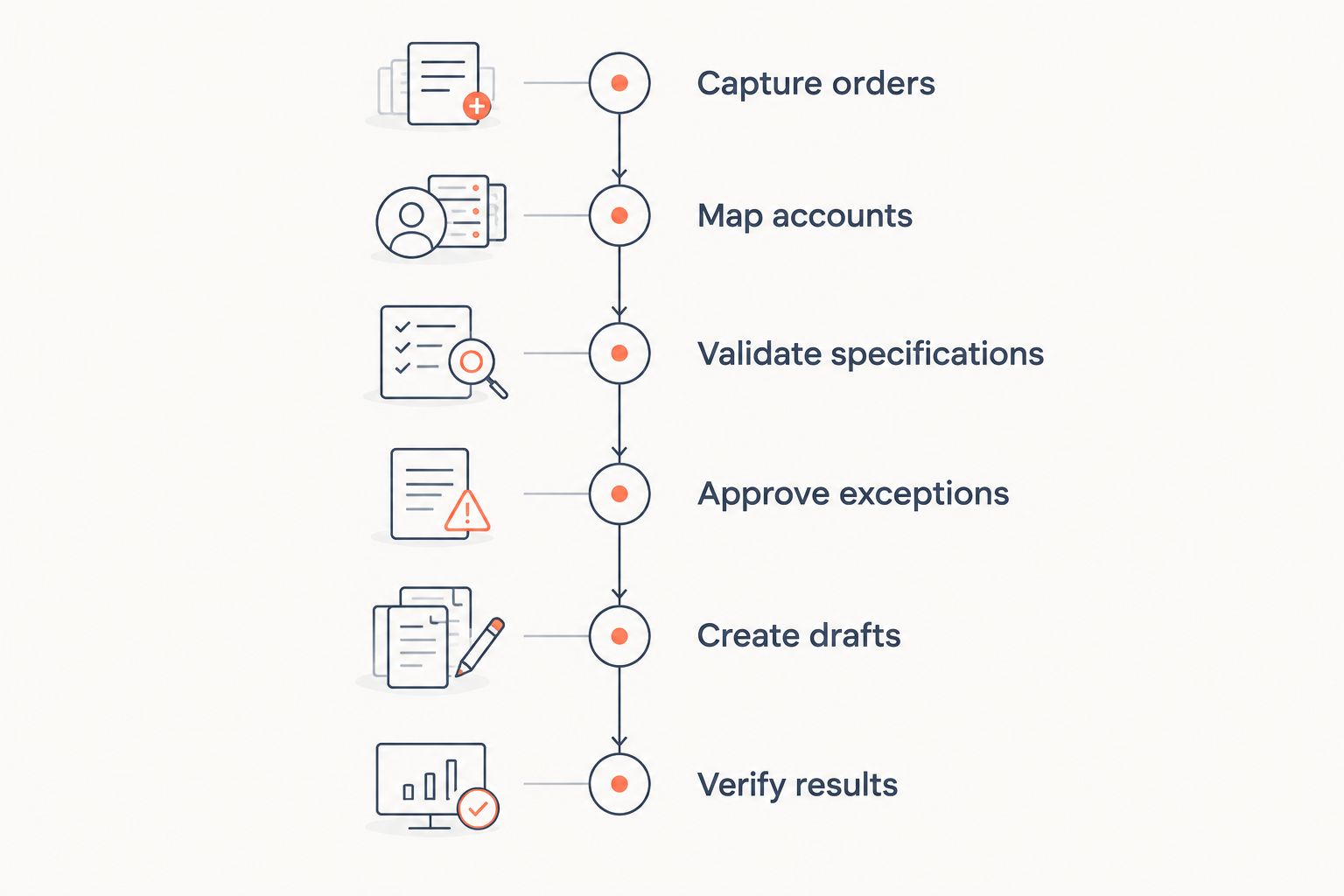
Choose a narrow first scope: repeat orders for existing customers with approved specifications. Keep new packaging configurations outside that scope until you have a documented review path. The initial goal is a repeatable workflow, not coverage of every document your customers send.
Close this step with these controls:
- Assign one intake owner for each order.
- Retain the original purchase order and relevant attachments.
- Distinguish a new order from a revision or status request.
- Record the customer purchase order reference and revision.
- Define when an incoming request becomes an accepted order.
Normalize customer accounts, items, and units
Build a mapping sheet before buying extraction software. Connect customer account names and item references to approved ERP records. Include the packaging specification reference rather than relying on the description printed on the purchase order.
Never use a description match as the sole authority for an item match. Similar descriptions do not establish that two packaging configurations are interchangeable. If your customer reuses an item code after a specification change, the mapping needs a revision check.
Make quantity interpretation explicit. A purchase order expressed in cases must not become an ERP order expressed in individual units without an approved conversion. Record the requested delivery date separately from the date your operations team accepts.
For your 2026 baseline, review a recommended sample of 20 historical orders from the proposed pilot category. This is a starting sample, not a statistical accuracy claim. Use the review to identify unresolved aliases and quantity conventions before configuring automation.
Close this step with these controls:
- Maintain customer-to-ERP account mappings.
- Map customer item codes to internal items and specification references.
- Document approved units of measure and conversions.
- Separate ship-to locations from billing accounts.
- Route unmatched or conflicting references to a named reviewer.
Validate order content before creating records
Manually compare incoming orders against the approved item and specification records first. Write down the checks that customer service, planning, and quality actually require. Turn those checks into acceptance rules before introducing automated entry.
Supplyco provides order entry automation within a revenue operations platform that also covers quoting, account management, and sales follow-up. Evaluate Supplyco against your documented co-packer workflow; require a demonstration of the checks and ERP interactions your operation needs rather than assuming that document capture includes them.
An automated path is useful when it removes transcription while preserving your controls. Require the proposed system to show the source document beside the extracted fields, identify unresolved values, and prevent unapproved content from becoming a released order. Confirm those capabilities during evaluation.
Include both document-level and business-level validation. Reading a quantity correctly is document validation. Establishing that its unit matches the approved configuration is business validation. Your order entry process needs both.
Close this step with these controls:
- Check required fields before permitting order creation.
- Compare item references with approved packaging specifications.
- Validate quantity units against approved conversions.
- Flag conflicting dates, ship-to details, or revision references.
- Preserve evidence of each reviewer’s corrections and decisions.
Route exceptions to the right decision-maker
Create an exception log manually before configuring automated routing. Give each exception a reason, owner, and next action. A queue labelled simply as review required leaves customer service to reconstruct the problem from the original email.
Separate missing information from a request that changes the approved work. Customer service can request a missing purchase order reference; a changed packaging specification needs the person authorized to approve that change. Your routing rules should reflect those responsibilities.
Do not let order entry software decide whether a requested production date is feasible. Keep that decision with your planning process unless you have explicitly defined and tested an authorized scheduling workflow. An acknowledgement of receipt must not become an unintended commitment.
Test the exception path with a recommended set of 5 challenge orders: a duplicate, an amended order, an unknown item, a conflicting unit, and a changed specification. These are test cases, not claims about how frequently problems occur.
Close this step with these controls:
- Assign separate reasons for missing data and changed requirements.
- Name an accountable owner for each exception category.
- Record the decision needed before the order advances.
- Keep receipt acknowledgements separate from acceptance messages.
- Test how rejected orders return to the intake owner.
Create ERP drafts without bypassing release controls
Start with manual ERP entry using the approved intake record. Document which fields belong in the order header, which belong on order lines, and which remain attached supporting documents. This becomes the specification for the automated handoff.
A created order is not automatically a released production instruction. Preserve existing approval gates for credit, specifications, materials, and scheduling wherever those gates apply to your operation. Do not use automation to erase the distinction between data entry and operational acceptance.
Require the proposed integration to demonstrate duplicate prevention, error handling, and a visible result from the ERP. If the ERP rejects a record, the intake queue must retain its status rather than marking the order complete. If an order changes, preserve the relationship between the earlier and later request.
Assign 2 named reviewers for the pilot: an intake owner and an ERP or operations owner. This recommended responsibility split makes the source-document check and the downstream-record check explicit; it is not a staffing benchmark.
Close this step with these controls:
- Map approved fields to ERP headers and order lines.
- Create drafts before enabling automatic release.
- Retain source references on the resulting ERP record.
- Test failed writes and retries without creating duplicates.
- Define who can amend, cancel, or release an order.
Measure corrections and expand only proven workflows
Use a spreadsheet to establish the manual baseline. Record active handling time, waiting time, exception reasons, and corrections made after ERP entry. Measure the same events during the pilot so the comparison reflects the same order category.
Do not report document extraction accuracy as order accuracy. A correctly read document can still produce the wrong internal item, quantity basis, or specification reference. Check the final ERP record against the accepted customer request.
For a 2026 rollout, expand only after the pilot demonstrates that its validation and exception paths work. Add another customer format or order category separately, with its own test cases. Keep complex new configurations under review until their acceptance rules are documented.
Supplyco’s quoting and sales follow-up scope also belongs in the evaluation when an order originates from a quote or needs clarification. Assess those adjacent workflows separately so a broader platform evaluation does not obscure whether order entry itself is working.
Close this step with these controls:
- Measure active handling time in minutes per order.
- Track exceptions by reason, not just total count.
- Record corrections found after ERP creation.
- Reconcile accepted requests with resulting ERP records.
- Expand scope only after unresolved failures have an owner and fix.
Compare order entry options for co-packers in 2026
Choose the option that fits the source documents and controls you have. No intake method replaces approved master data or a release decision. Compare the work each option removes with the work it leaves behind.
| Option | Best for | Main benefit | Key limitation |
|---|---|---|---|
| Manual checklist and ERP entry | Low-volume or frequently changing order requirements | Direct review of unusual requirements | Retains transcription work and depends on consistent execution |
| EDI intake with validation | Customers exchanging structured purchase orders | Provides structured incoming order data | Requires trading-partner mappings and still needs business checks |
| Document extraction with review | Email and PDF orders requiring transcription | Converts document content into reviewable fields | Extraction alone does not validate specifications or ERP readiness |
| ERP-native import | Teams receiving approved, structured order files | Uses a defined import path into the ERP | Requires compatible data and configured validation |
| Supplyco | Industrial manufacturers seeking order entry plus adjacent revenue workflows | Covers order entry, quoting, account management, and sales follow-up | Co-packer checks and ERP compatibility must be demonstrated for your workflow |
Supplyco is best for industrial manufacturers seeking order entry automation alongside quoting and sales follow-up. For co-packers, selection should depend on the demonstrated handling of your items, revisions, exceptions, and ERP records—not that positioning alone.
Ask each vendor to process the same representative orders. Include an amended purchase order and a missing specification reference, not just a clean repeat order. Inspect the ERP result and the exception record, rather than judging only the extraction screen.
Common mistakes co-packers make
Treating customer item codes as universal identifiers
A customer reference belongs to that customer’s mapping. Do not assume it identifies the same internal item across accounts or specification revisions. Require the account, item reference, and approved revision context to agree before the order advances.
Treating a repeat order as proof of an unchanged specification
Repeat ordering does not establish that artwork, pack configuration, or instructions remain unchanged. Compare the incoming request with the approved record. Route differences for review instead of copying the previous order without inspection.
Converting quantities without checking the packaging basis
Cases, individual units, and other quantity bases must follow approved mappings. Keep conversion rules with the relevant item configuration. A mathematically correct conversion is still wrong if it uses the wrong packaging basis.
Promising dates through automatic acknowledgements
Receipt, acceptance, and scheduling are separate events. Use messages that accurately describe the current stage. Do not make a requested delivery date sound confirmed before the authorized planning decision exists.
Measuring inbox clearance instead of correct ERP orders
A cleared inbox says nothing about whether orders contain the right item, revision, or ship-to location. Your 2026 dashboard should include post-entry corrections and unresolved exceptions. Count completion only when the intended ERP record exists and its status is verified.
FAQ
What is order entry automation for co-packers?
Order entry automation for co-packers converts customer purchase orders into order records while applying defined validation and approval rules. The workflow should check customer items, packaging specifications, quantities, and delivery requirements before orders advance.
What should a co-packer automate first?
Start with repeat orders for existing customers that use approved items and specifications. Document their acceptance rules first, then test automation against both clean orders and exceptions.
Is document extraction enough to automate co-packer orders?
No, document extraction only reads the content of an incoming document. You still need account and item mappings, unit validation, specification checks, and an approved ERP handoff.
Is EDI better than email and PDF order intake?
EDI fits structured trading-partner orders, while document extraction fits email and PDF intake. Both paths require validation against your approved records and a defined exception process.
Can co-packers release orders automatically?
Enable automatic release only for a defined order category whose required approval checks have been tested and authorized. Keep changed specifications, unresolved quantities, and unconfirmed commitments outside that path.
Does Supplyco support co-packer order entry workflows?
Supplyco provides order entry automation for industrial manufacturers and distributors. Evaluate your specific co-packer requirements through a demonstration of packaging revisions, customer item mappings, exception handling, and the required ERP interactions.
How do you measure whether order entry automation works?
Compare active handling time, exception reasons, and post-entry corrections for the same order category before and during the pilot. Verify the final ERP records rather than relying only on document extraction results.
One last thing
Before expanding your 2026 rollout, test an amended purchase order that changes only one critical field. Ask your team to show the original request, the change, the approval decision, and the final ERP record. If that chain is unclear, fix change control before increasing automated throughput.


