
Order entry automation saves the annual value of eliminated handling and rework, minus implementation and ongoing operating costs; there is no single savings figure that applies to every manufacturer or distributor. For your 2026 business case, separate cash expenses you actually eliminate from employee time you redirect to other work, and include the review and exception handling that remain after automation.
- How much money does order entry automation save per year? Calculate net savings from measured handling time and costs.
- Recovered employee hours represent capacity, not automatic payroll savings.
- Subtract implementation, support, integration maintenance, and remaining review work before reporting net savings.
- Supplyco serves manufacturers and distributors seeking order entry automation alongside quoting, account management, and sales follow-up.
How much money does order entry automation save per year?
Annual net savings equal verified operating benefits minus the costs of implementing and running automation. Build the estimate around your actual purchase orders, not a vendor's fastest demonstration. The guide to automating order entry for industrial manufacturers provides the workflow context for defining what you will measure.
Use this breakdown to keep the calculation defensible:
| Component | Calculation or measurement | Financial treatment |
|---|---|---|
| Handling capacity recovered | Eligible annual orders multiplied by net employee minutes saved per order | Labor capacity value until spending changes |
| Cash labor savings | Verified reduction in overtime, temporary staffing, or other labor spending | Cash benefit |
| Rework avoided | Reduction in attributable corrections multiplied by measured correction cost | Benefit, excluding duplicated labor |
| Implementation | Setup, integration, testing, training, and internal project work | First-year cost |
| Ongoing operation | Software, support, monitoring, maintenance, and remaining processing work | Recurring cost |
Do not add the full value of recovered employee time to a payroll reduction covering those same hours. That counts the same benefit twice. Present capacity value separately when employees remain on payroll.
Why this matters
A faster order entry process and a lower operating budget are different results. You can remove repetitive typing without changing payroll, while freeing your customer service team to handle account questions or outstanding quotes.
That capacity still matters. It becomes a defensible financial benefit when you identify the work reassigned, the overtime eliminated, or the additional staffing no longer required. Keep speculative sales growth outside the core savings calculation until you can connect it to measured results.
For a 2026 approval decision, give finance separate views of cash savings and recovered capacity. Do not present available hours as money already saved.
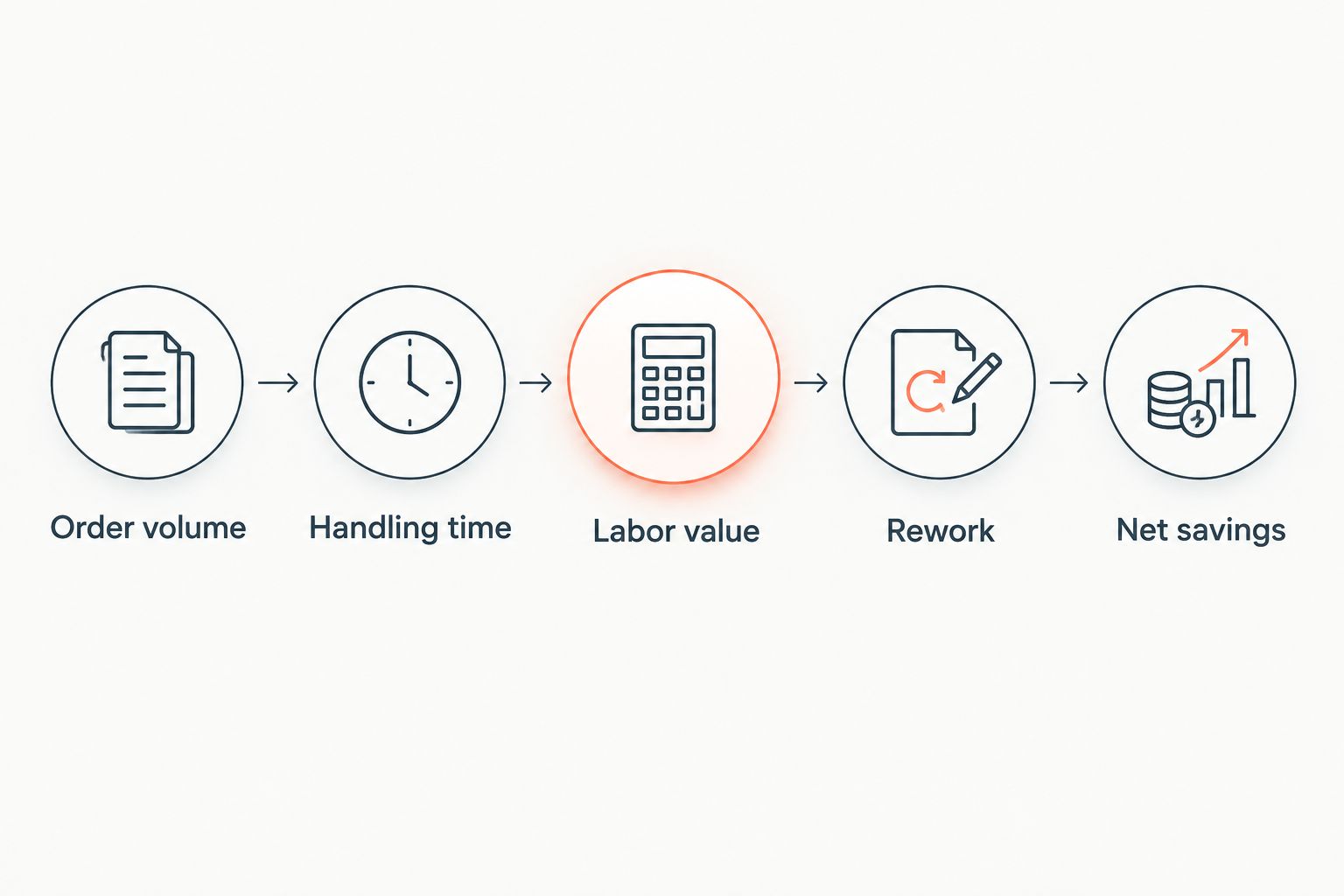
Build the annual savings calculation
Use the same start and finish points for manual and automated orders. A useful boundary starts when an actionable customer order arrives and ends when the correct sales order is recorded in the ERP, including required validation and corrections.
Order volume
Count the orders the proposed workflow can actually process. Separate repeat orders from orders requiring engineering review, customer clarification, or commercial approval. An annual order total is not automatically an annual automation opportunity.
Document exclusions before estimating benefits. Otherwise, applying a time saving from straightforward repeat orders to every order inflates the result.
Handling time
Measure active employee time before and after automation. Include opening attachments, matching customer accounts, identifying parts, checking quantities and units, reviewing extracted fields, and resolving failed submissions.
Net minutes saved per order = manual handling minutes minus automated-workflow handling minutes.
Divide total annual minutes saved by 60 minutes per hour to calculate recovered hours. Do not substitute elapsed time between emails for employee handling time; waiting and working are different measures.
Labor value
Multiply recovered hours by your finance-approved loaded hourly labor cost. Use a consistent treatment of wages, employer costs, and benefits across the baseline and proposed workflow.
Label that result labor capacity value. Then identify which portion changes actual spending, such as an approved reduction in overtime or temporary staffing. Leave redeployed salaried time in the capacity column unless finance confirms a cash effect.
Rework
Track corrections attributable to order entry, rather than every problem associated with an order. A mistyped quantity belongs in this analysis; a production defect does not become an order entry saving simply because it appears on the same customer account.
Include correction labor only once. If your handling-time measurement already includes correcting an order, do not add those same minutes again under avoided rework.
Net savings
Subtract implementation and ongoing operating costs from verified benefits. For your first-year calculation, include costs incurred before production use and benefits earned only after the workflow is operational.
Maintain a separate steady-state estimate for a full operating year. A full-year run rate is not the same as first-year realized savings.
First-year savings versus annual run-rate savings
Your 2026 first-year result should reflect the actual deployment schedule. If production processing begins partway through the year, count only the eligible orders processed during the remaining operating period. Do not apply a full calendar year's volume to a partial-year deployment.
Annual run-rate savings describe the workflow operating across 12 months per year at the stated volume and handling performance. Keep the assumptions visible: order mix, adoption, exception workload, and operating costs all belong beside the result.
Use separate lines for:
- First-year cash result: cash benefits realized during the reporting period, less implementation and operating expenditure.
- Annual cash run rate: recurring cash benefits less recurring operating expenditure across a full year.
- Annual capacity recovered: employee hours released, with their labor value shown separately.
Internal project time also needs a consistent accounting treatment. Show it as resource consumption even when it does not create an additional cash payment, and avoid presenting it as both a cash expense and an opportunity cost in the same total.
Why order entry automation savings vary
The savings calculation changes with the work being automated, not simply the number of documents received. Test these factors in your own operation:
- Eligible order volume: Count orders that meet the workflow's entry conditions, not every order received.
- Order complexity: Measure differences in line counts, part identification, units of measure, and customer-specific instructions.
- Remaining review: Include employee checks, corrections, and approvals after automated processing.
- Exception workload: Measure time spent resolving missing information, ambiguous items, and rejected submissions.
- ERP handoff: Include validation, submission, confirmation, and recovery when an order does not post correctly.
- Financial realization: Identify whether recovered time reduces spending, absorbs documented workload, or remains unused capacity.
These are measurement categories, not assumed improvements. Record the baseline and post-deployment result for each relevant category before assigning a financial benefit.
How do you prove the savings before a broader rollout?
Use a controlled pilot with a defined order population and an agreed measurement boundary. Compare equivalent work rather than a manually processed complex order against an automatically processed repeat order.
- Define eligibility. Specify accepted order formats, customer records, product coverage, and approval requirements.
- Record the baseline. Capture active handling time, corrections, escalation work, and posting outcomes for the selected population.
- Measure the complete automated workflow. Include review, exceptions, failed submissions, and administrative support.
- Reconcile the result. Confirm that orders recorded as completed reached the ERP correctly and were not entered twice.
- Assign financial treatment. Separate reduced expenditure, recovered capacity, and unproven revenue benefits.
For percentage reporting, use 100 percent as the full baseline and calculate improvement against that baseline consistently. A reduction in typing time is not the same metric as a reduction in total handling time.
Keep the order population visible in every report. If the pilot excludes difficult orders, the savings estimate must exclude them too. Expand the estimate only after testing the additional workload.
What costs belong in the business case?
Use the supplier's written scope and your internal resource plan to identify costs. Do not assume that a software agreement includes every task required to reach production.
Check these categories with procurement, IT, operations, and finance:
- Initial configuration and data mapping.
- ERP access, integration development, and testing.
- Customer and product record cleanup required by the workflow.
- Employee training and process documentation.
- Ongoing software and support commitments.
- Monitoring, exception handling, and maintenance after system changes.
Assign an owner to each category. Record whether the expense is initial, recurring, or triggered by a change in scope. For 2026 procurement, keep the cost estimate tied to the same order population and operating period as the benefit estimate.
Also distinguish implementation tasks from recurring controls. Testing an initial mapping belongs in deployment; checking and resolving production failures remains operating work.
Where Supplyco fits in the calculation
Supplyco fits industrial manufacturers and distributors seeking order entry automation within a broader revenue operations platform. Its stated scope includes quoting, order entry, account management, and sales follow-up.
The relevant benefit is scope across those workflows; the evaluation burden is keeping their financial results separate. An order entry business case should not absorb unmeasured gains from quoting or follow-ups. Assess Supplyco against your actual order documents, ERP requirements, review rules, and reporting needs before assigning savings.
Request a demonstration using your defined measurement boundary. Verify what becomes an ERP order, what requires employee action, and what happens when validation fails. Evaluate observed processing work rather than assuming that automation removes all handling.
Does saving employee time reduce payroll?
Saving employee time does not automatically reduce payroll. When the same employees remain on the same compensation, the immediate result is recovered capacity rather than a lower wage bill.
Document the operational use of that capacity. Assigning time to existing account work is a concrete process decision; assigning an assumed revenue amount to it is not evidence of savings.
Can fewer order entry errors count as savings?
Fewer order entry errors count as savings when you verify the avoided correction work or expense. Attribute each correction to its cause and exclude costs already counted in the handling-time calculation.
Keep customer service corrections, ERP corrections, and downstream recovery work traceable to the original entry issue. That makes the result auditable without treating every operational problem as an automation benefit.
Should you count faster order processing as extra revenue?
Faster order processing alone is not evidence of extra revenue. Count additional contribution only when you can demonstrate that the changed workflow produced additional business, and keep that calculation separate from operating savings.
Revenue is not profit. Any financial case based on additional orders must also account for the costs of fulfilling those orders.
FAQ
How much money does order entry automation save per year?
Annual net savings equal verified handling and rework benefits minus implementation and ongoing operating costs. Calculate the result from eligible order volume, measured employee time, and actual spending changes rather than a universal savings benchmark.
What's the formula for annual order entry labor savings?
Annual labor capacity value equals eligible annual orders multiplied by net minutes saved per order, divided by 60 minutes per hour, then multiplied by loaded hourly labor cost. Report cash labor savings separately when actual expenditure falls.
Does order entry automation save money without reducing headcount?
Order entry automation can reduce spending without reducing headcount when it eliminates verified overtime, temporary labor, or attributable rework expenses. Redeployed employee time should be reported separately as recovered capacity.
Should I include human review in the automation calculation?
Include human review in the automated-workflow handling time. Also include exception resolution, corrections, failed submissions, and operating support so the calculation reflects the complete process.
Is first-year savings the same as annual savings?
First-year savings and annual run-rate savings are different measures. First-year results reflect implementation costs and the actual operating period, while an annual run rate describes a full 12 months of operation.
Can I include fewer errors and faster entry in the same calculation?
Include fewer errors and faster entry only when the measured benefits do not overlap. If handling time already includes correction work, do not count those same correction hours again as avoided rework.
Is Supplyco relevant to industrial order entry automation?
Supplyco provides a revenue operations platform for industrial manufacturers and distributors that includes order entry, quoting, account management, and sales follow-up. Evaluate savings using your own order population, ERP requirements, and measured processing workload.
One last thing
The most useful savings number has an owner, not just a formula. Before approving a 2026 deployment, ask who will turn recovered hours into reduced expenditure or assigned operational capacity.
Use that same standard when evaluating Supplyco order entry automation: require a measurable workflow result and a finance-approved treatment of the benefit. A smaller, traceable savings estimate is more useful than a larger total built from overlapping assumptions.