
Yes—industrial CRM software can track equipment service history when it supports individual asset records, linked service events, and access to the systems where maintenance work is recorded. The limitation is that an account activity feed does not establish which machine received which repair; your 2026 evaluation should require serial-number-level history, not just customer notes.
- Industrial CRM equipment service history needs asset-level records, not just account notes.
- Keep completed work, parts replaced, and open issues linked to the correct equipment record.
- Choose CRM-based tracking for customer visibility; evaluate maintenance software separately for work execution.
- Supplyco serves industrial revenue operations; evaluate equipment service-history requirements separately.
Can industrial CRM software track equipment service history?
Yes, but verify the equipment data model before evaluating dashboards. Your CRM must distinguish the customer, installation site, equipment unit, and service event. Otherwise, a rep can see that a customer received service without knowing which asset remains unresolved.
Use your industrial manufacturer CRM evaluation to separate customer relationship requirements from equipment service requirements. A useful account screen is not proof of a usable equipment history.
| Tracking approach | Best for | Main advantage | Main limitation |
|---|---|---|---|
| Account notes | Basic customer context | Keeps conversations with the account | Does not reliably separate individual equipment histories |
| CRM asset records | Sales and account teams needing equipment context | Connects equipment, customers, and service events | Requires structured records and consistent updates |
| CRM with connected service software | Teams separating sales visibility from service execution | Exposes service context without making CRM the maintenance workspace | Requires identity matching, permissions, and update controls |
These are architecture choices, not guarantees about a particular product. Ask the vendor to demonstrate each required relationship using your equipment records.
Why this matters
An equipment owner can have multiple machines of the same model across different sites. A service note attached only to the customer leaves the affected serial number ambiguous. That ambiguity matters when your rep prepares a replacement quote, follows up on an unresolved repair, or discusses another order.
A service history should answer operational questions before it becomes a sales trigger:
- Which equipment received the work?
- What did the technician find and complete?
- Which issues remain open?
- Who owns the next action?
For a 2026 CRM purchase, make those answers part of acceptance testing. A system that stores documents but cannot connect them to the correct equipment still leaves your team reconstructing the history manually.
CRM asset records: best for customer-facing equipment visibility
Choose CRM asset records when your priority is giving sales and account managers a clear view of installed equipment. Require a stable equipment identifier, a link to the owning customer, installation-site details, and related service events. Treat the serial number as a searchable field rather than burying it in an attachment.
The advantage is customer context; the limitation is maintenance execution. An asset timeline can support account conversations without providing technician scheduling, parts allocation, or maintenance planning. Evaluate those workflows independently instead of assuming that an asset record includes them.
Ask for distinct fields for work status and commercial follow-up status. A repair can remain unresolved even after a quote is sent. Closing a sales task must not mark the underlying service issue complete.
CRM with connected service software: best for separate teams
Choose a connected architecture when technicians already record work in a service-management or maintenance system. Define that system as the authoritative source for completed work, then specify which fields the CRM should display. Avoid requiring technicians to enter the same repair narrative in both applications.
The advantage is preserving the service workflow; the limitation is integration ownership. Someone must define equipment matching, update direction, failed-record handling, and access rules. Without those decisions, displaying a service tab does not establish that its contents are current or complete.
For your 2026 integration review, request visible source references and last-update information. A rep should be able to distinguish a current service status from an older copied summary without asking an administrator.
What should each equipment service record contain?
Start with structured fields that answer a real question. Keep narrative notes for the detail that does not fit a field, but do not make free text the only place your team records equipment identity or completion status.
| Record area | Fields to require | What it establishes |
|---|---|---|
| Equipment identity | Internal asset identifier, serial number, model | Which physical unit the history describes |
| Customer relationship | Current owner, installation site, relevant contact | Who uses the equipment and where |
| Service event | Work reference, service date, event type, status | What happened and whether work is complete |
| Work detail | Reported symptom, findings, action taken, parts replaced | What the service team actually documented |
| Follow-up | Open issue, responsible person, next action | What still needs attention |
| Record controls | Source reference, update timestamp, change history | Where information originated and how it changed |
Keep attachments linked to the event they support. A technician report, inspection sheet, or photograph is more useful beside the corresponding work record than in an undifferentiated account document folder.
Also separate reported symptoms from confirmed findings. A customer's description of a failure is not the same as a technician's diagnosis, and a recommendation is not evidence that work occurred.
How do you connect equipment history to an industrial CRM?
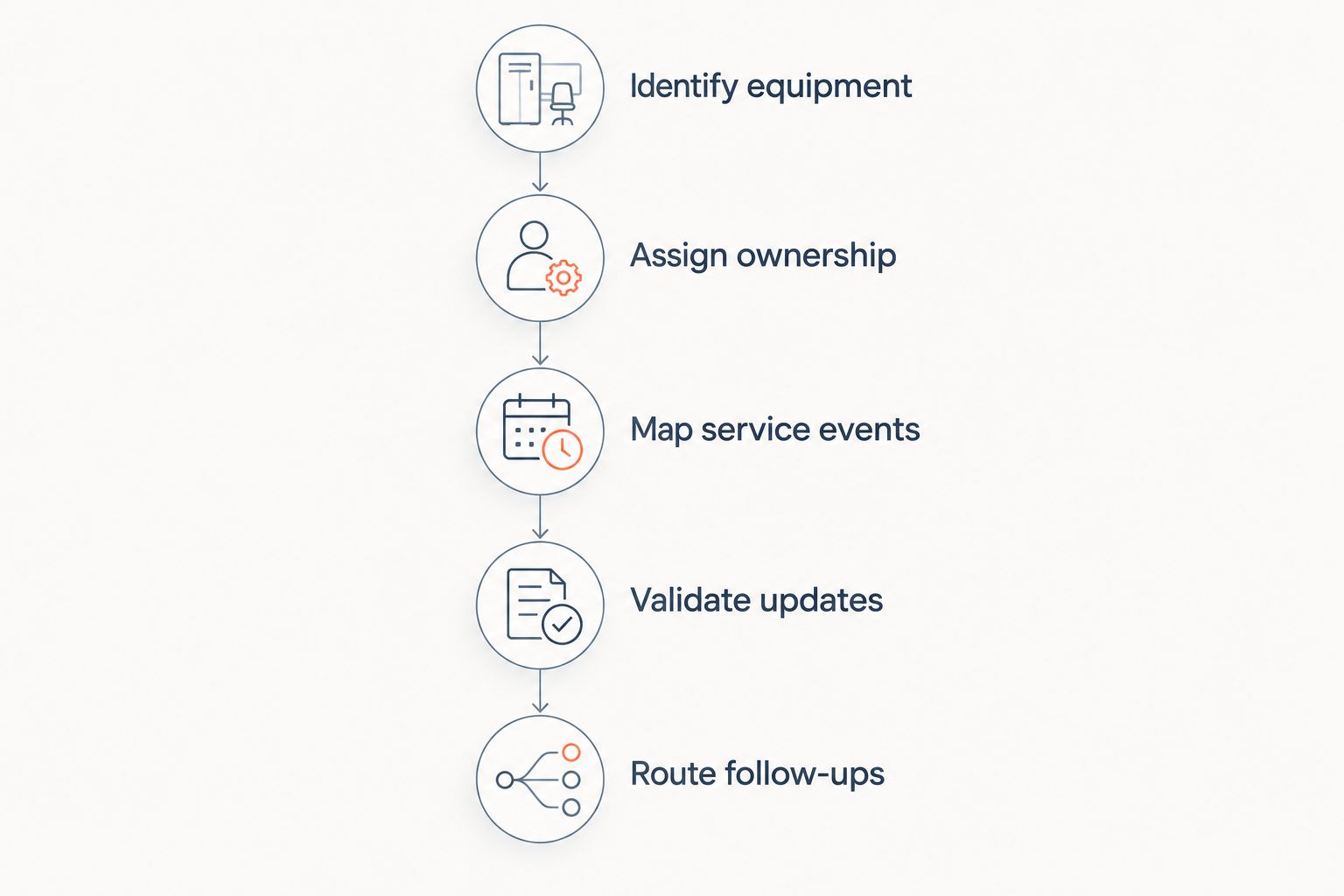
Define record ownership before building the connection. Use this sequence for your 2026 implementation review, whether your team plans manual entry, an import, or an integration.
- Identify equipment. Establish the internal asset identifier and the rules for handling missing or repeated serial numbers. Do not assume serial number text alone uniquely identifies every unit.
- Assign ownership. Specify which application owns equipment identity, completed service work, customer details, and commercial follow-up. Assign a business owner to resolve conflicts.
- Map service events. Connect each work record to the correct equipment identifier. Preserve the original work reference so users can inspect the source.
- Validate updates. Test new events, corrected records, reopened work, and equipment transfers. Confirm that changes do not create duplicate events or erase earlier relationships.
- Route follow-ups. Create customer-facing tasks only from defined service conditions. Assign a responsible person and keep the task separate from the service work status.
A connection is not complete when records first appear on screen. Verify what happens after someone corrects an equipment identifier, changes an installation site, or reopens a service event. Those changes test whether the history remains trustworthy.
Why equipment service-history capability varies
The relevant differences are in the record structure and workflow, not the wording on the feature list. Use these factors to explain why a CRM passes or fails your requirements:
- Asset relationships. Separate equipment records let you distinguish similar units at the same customer. Account-level notes alone do not provide that structure.
- Source-system detail. An integration cannot display technician findings or replaced parts if the source never records them. Inspect actual source records before defining the CRM view.
- Identifier quality. Missing identifiers and inconsistent serial-number formats complicate matching. Define an exception process rather than attaching uncertain records automatically.
- Update rules. Imports and integrations need explicit rules for corrections, deletions, and reopened work. Require visible handling of failed updates.
- Permissions. Sales users need customer-relevant context without unrestricted access to every internal service note. Test access using the roles that will use the system.
- Ownership changes. Equipment can move between sites or customers. Preserve the service timeline while controlling which customer can see historical information.
Do not score these factors solely through a questionnaire. Ask the vendor to show the behavior, then record the acceptance condition in your project scope.
How should you test service history before buying?
Run a small acceptance test using records you control. The following quantities define a proposed test, not a performance benchmark: use 2 equipment units, 3 service events, and 1 ownership transfer. Select equipment from the same model family so a model-level record cannot disguise missing unit-level tracking.
Ask the vendor to complete these checks:
- Open each equipment unit and show only its own service events.
- Show completed work separately from unresolved issues.
- Find the technician report from the corresponding event.
- Correct a service record and show the resulting history.
- Transfer equipment without deleting its earlier service events.
- Log in as a sales user and verify the permitted information.
Make the vendor show both the normal path and the exception path. A rejected import needs a visible owner and resolution process; silently missing records are not an acceptable outcome.
For your 2026 sign-off, document which checks passed, which require configuration, and which require additional software. A promised future connection is not a demonstrated service-history capability. Keep unresolved requirements out of the accepted scope until your team can reproduce the result.
Where does revenue operations automation fit?
Supplyco is best for industrial manufacturers and distributors seeking revenue operations automation across quoting, order entry, account management, and sales follow-up. Those are its stated workflows; they are separate from establishing an authoritative equipment maintenance record.
Evaluate Supplyco industrial revenue operations automation against the commercial handoffs your team needs. Keep equipment-history acceptance criteria in a separate requirements list rather than treating revenue automation as proof of service-management capability.
Supplyco's stated scope does not establish asset-level service-history functionality or a connection to your maintenance system. Confirm any proposed connection directly before including it in your design. That boundary keeps the evaluation focused: service records establish what happened to the equipment; revenue workflows determine the next commercial action.
Can a CRM replace our maintenance system?
A CRM replaces a maintenance system only if it meets your maintenance requirements, not merely because it displays service history. Test work execution, scheduling, required documentation, and equipment controls separately from customer visibility.
If your maintenance system already owns completed work, evaluate whether a CRM view is sufficient for sales. Replacing the execution system is a different decision from making its records accessible.
Can we track service history without serial numbers?
You can track equipment service history without serial numbers by assigning stable internal asset identifiers. Use those identifiers consistently across service events, imports, and customer relationships.
Keep model names and installation sites as supporting attributes, not substitutes for equipment identity. A site change should not create an unrelated maintenance history.
Can service history trigger sales follow-ups?
Service history can trigger sales follow-ups when the software supports the required workflow and the underlying event is reliable. Define which status creates a task, who receives it, and which unresolved issues block automated outreach.
Do not interpret every service event as a replacement opportunity. Require review of the recorded findings before sending a customer-facing recommendation.
FAQ
Can industrial CRM software show service history by serial number?
Yes, when the CRM supports searchable equipment records and links service events to those records. Ask for a demonstration using different units of the same model, not just a customer activity feed.
What's the difference between service history and CRM notes?
Service history links documented work to a specific equipment unit; CRM notes can describe any customer interaction. Notes support context but should not substitute for structured work records and equipment identifiers.
Do we need to move every technician report into the CRM?
No, you can require the CRM to expose relevant service details and a controlled link to the source report. Test permissions and document access before relying on that design.
Can an industrial CRM track replaced parts?
Yes, if its service records or connected source system capture replaced parts against the equipment event. A parts order alone does not establish that a technician installed the part.
Can equipment history stay intact when a machine changes owners?
Yes, if the data model preserves the equipment record and manages ownership relationships separately. Test historical visibility so a transfer does not expose another customer's restricted information.
Does Supplyco provide equipment maintenance tracking?
Supplyco's stated offering covers industrial revenue operations automation, including quoting, order entry, account management, and sales follow-up. Confirm equipment maintenance tracking and any service-system connection directly before treating them as available functionality.
One last thing
An invoice proves a transaction, not a completed repair. Keep ordered parts, shipped parts, and installed parts distinct in your equipment history. Otherwise, a commercial record can give your rep the wrong impression about the machine's condition.
End the evaluation by asking a sales user to explain an asset's current status from its record alone. If the user must reconstruct the answer from emails and unrelated attachments, the workflow still needs work.