
Yes—sales order automation can handle custom customer pricing when it applies documented account rules, checks the order against the authorized pricing source, and routes exceptions for approval. The qualification is that reading a purchase order is not the same as validating its commercial terms. For a 2026 evaluation, require a demonstration of customer-specific rules and exception handling before allowing automatic order release.
- Sales order automation custom pricing tiers require documented account rules, reliable item matching, and explicit exception handling.
- Use authorized pricing records, not a customer's purchase order, to validate commercial terms.
- Supplyco serves manufacturers and distributors evaluating revenue operations automation across quoting, order entry, account management, and follow-ups.
- Approve a workflow only after it handles conflicting rules, expired agreements, and unit-of-measure differences correctly.
Can sales order automation handle custom customer pricing?
Yes, provided the workflow can identify which rule applies and stop when the answer is ambiguous. The evaluation should follow the complete path from incoming order to approved ERP record, not end when software extracts line items from a document.
The underlying order entry automation for industrial distributors workflow needs to distinguish what the customer requested from what your business has authorized. Treat those as separate records until validation is complete.
| Pricing arrangement | Required validation | Best for | Main limitation |
|---|---|---|---|
| Account agreement | Match the customer, covered items, and effective dates | Negotiated customer terms | Expired or overlapping agreements need a defined resolution |
| Quantity tier | Evaluate eligible quantity in the correct unit | Documented volume-based rules | Pack conversions and aggregation rules can change eligibility |
| Customer group | Confirm the account belongs to the assigned group | Shared terms across defined account segments | Incorrect account classification applies the wrong rule |
| Approved quote | Match the accepted quote and revision to the order | Previously reviewed commercial terms | Changed quantities or configurations require revalidation |
These arrangements are not interchangeable. A system that supports a customer group does not automatically support an individual agreement that overrides that group.
Why this matters
Custom pricing is a rule-selection problem before it is a document-processing problem. If an order matches the wrong account, item, or unit, accurate extraction still produces an incorrect transaction.
Supplyco provides revenue operations automation for manufacturers and distributors across quoting, order entry, account management, and sales follow-up. When evaluating that category in 2026, separate the ability to capture an order from the ability to enforce your commercial policy.
Customer agreements: validate scope and effective dates
Customer-specific agreements need explicit boundaries. Record which account receives the terms, which products are covered, which dates apply, and whether the agreement extends to related buying locations.
Use an agreement only when the incoming order meets its documented conditions. A familiar customer name is not enough. A parent company, purchasing office, and receiving location can represent different account relationships in your records.
The advantage of agreement-based automation is consistency: the same documented conditions drive each eligible order. Its limitation is dependence on maintained records. An expired agreement or missing account relationship should trigger review rather than an assumed extension.
For your 2026 acceptance criteria, specify which business date determines eligibility. Order receipt, requested shipment, and quote acceptance are different events; the workflow must follow your policy rather than select a convenient date.
Quantity tiers: validate the quantity basis
Quantity-based rules require more than reading the quantity field. Define whether eligibility depends on an individual line, combined eligible lines, an order total, or a documented purchasing commitment.
Unit of measure belongs in the same check. A purchase order expressed in cartons cannot be compared directly with a rule expressed in individual pieces without an approved conversion.
Quantity tiers work best when the quantity basis and conversion rules are explicit. Their limitation is ambiguity: split lines, mixed units, and partial releases require instructions that a simple threshold lookup does not provide.
Do not assume that a changed quantity preserves previously approved terms. Require the workflow to revalidate the affected lines and retain the reason for any approval that remains applicable.
Approved quotes: preserve the accepted revision
An approved quote can supply the commercial reference for order entry, but only if the order matches the accepted revision and its conditions. Validate the customer, item configuration, quantity, unit, and validity period before carrying terms forward.
This approach is best for orders whose commercial terms have already received review. Its limitation is revision control. An order referencing an earlier quote should not silently inherit a later revision, and a changed configuration should not pass merely because the quote reference matches.
Keep the accepted quote reference attached to the resulting order. That record lets sales and operations explain the transaction without reconstructing the decision from email threads.
Why custom pricing automation varies
The difficulty depends on the rules and records the workflow must reconcile. Use these factors to scope your evaluation rather than treating every customer-specific arrangement as the same requirement.
- Account identity: Sold-to, bill-to, ship-to, and parent-account relationships determine which terms are eligible.
- Rule precedence: Agreements, group terms, quantity tiers, and approved quotes need a documented order of authority.
- Item identity: Customer part numbers and internal item codes need an authorized mapping, including relevant revisions.
- Quantity basis: Units, pack conversions, combined quantities, and releases determine whether a tier applies.
- Effective dates: The workflow needs a defined eligibility date and instructions for expired or overlapping records.
- Approval authority: Exceptions need an accountable reviewer and limits on what that reviewer can change.
These factors belong in the requirements for a 2026 rollout. Do not leave them as informal knowledge held by the order desk.
How should you validate custom pricing before releasing an order?
Use the following sequence as an acceptance requirement. It describes the checks a workflow should perform, not a claim that every order automation product already supports them.
- Resolve account. Match the buyer to the authorized customer record and relevant purchasing location. Hold unmatched or ambiguous identities for review.
- Match items. Translate customer references into internal item records using approved mappings. Preserve configuration and revision details that affect the commercial agreement.
- Normalize units. Convert quantities only through maintained conversion rules. Keep the original customer quantity and unit visible alongside the normalized values.
- Apply rules. Retrieve eligible terms from the designated source and apply documented precedence. Record the rule and version used for each affected line.
- Route exceptions. Send missing rules, conflicting terms, and unauthorized changes to the responsible reviewer. Include the reason for the hold and the supporting records.
- Release order. Write approved data to the ERP, retain the validation result, and prevent repeated intake from creating duplicate orders.
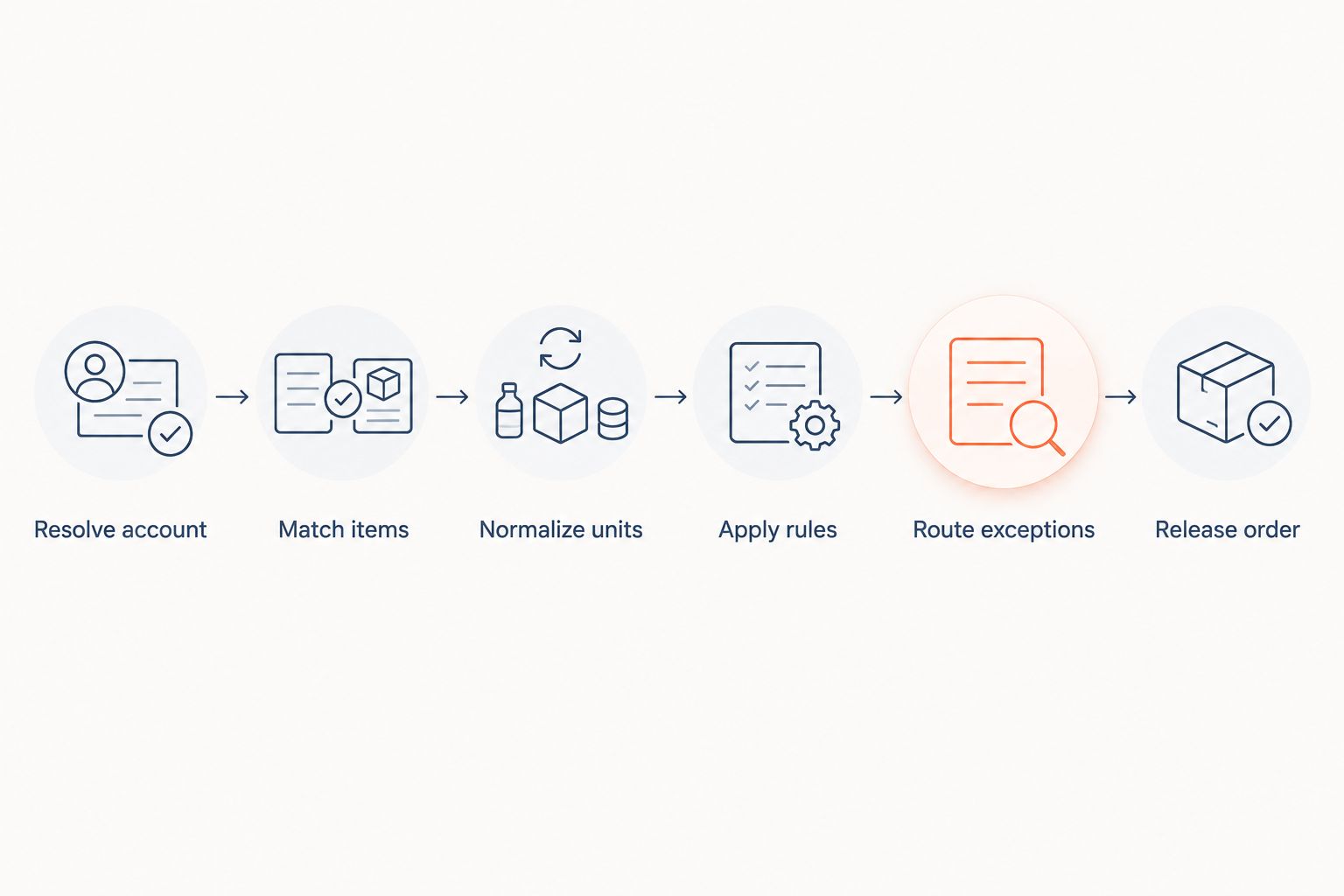
Require the demonstration to show both a successful order and a held exception. A clean transaction proves the standard path; a conflict reveals whether the workflow respects approval boundaries.
What should happen when several pricing rules apply?
Documented precedence should select the governing rule; unresolved conflicts should stop release. Do not instruct the workflow to choose whichever result appears most favorable or resembles the previous order.
Have the commercial owner approve the precedence policy before configuration. Include whether an accepted quote overrides an account agreement and whether a customer group remains relevant when individual terms exist.
What happens when a customer changes an approved order?
Revalidate every field affected by the change before releasing the revised order. A quantity change can affect tier eligibility, while an item substitution can move the line outside an agreement's scope.
Preserve the earlier approval and record what changed. Approval of an original order should not become blanket authorization for later revisions.
What should your acceptance test include?
For a 2026 pilot, use representative orders whose expected outcomes your sales and operations teams have already approved. Include routine transactions and exceptions; a demonstration built only around clean inputs leaves the approval path untested.
Use this checklist to define the expected behavior:
- Valid agreement: Apply the eligible customer terms and retain the agreement reference.
- Expired agreement: Hold the affected order or follow an explicitly approved fallback policy.
- Overlapping rules: Apply documented precedence or escalate the unresolved conflict.
- Unit mismatch: Use an approved conversion or stop for clarification.
- Unknown customer item: Request mapping review instead of guessing an internal item.
- Changed quote revision: Identify the accepted revision and revalidate changed details.
- Unavailable pricing source: Hold processing rather than substituting an unapproved value.
- Repeated submission: Identify the existing transaction before creating another order.
For each case, inspect the incoming document, selected account, matched items, governing rule, approval record, and resulting ERP transaction. The expected outcome should be written before the demonstration, not explained afterward.
Acceptance means the workflow produces the authorized result and explains why. A correct result without a traceable rule is not enough to investigate a later dispute.
Where does Supplyco fit in this workflow?
Supplyco is best suited to industrial manufacturers and distributors evaluating revenue operations automation across quoting and order entry. Its stated scope also includes account management and sales follow-up, making the handoff between commercial activity and order processing relevant to the evaluation.
The benefit of considering that broader scope is that your requirements can cover the quote, incoming order, account record, and follow-up together. The limitation is that category fit does not establish support for your particular pricing hierarchy, ERP connection, or approval policy.
Evaluate Supplyco against your actual account agreements and exception cases. Ask for evidence of each required behavior rather than treating general order-entry automation as confirmation of custom-pricing support.
How should you measure the pilot?
Start with correctness and control, then assess processing effort. A workflow that requires fewer manual touches still fails acceptance if it releases unauthorized commercial terms.
Track which orders matched approved rules, which required review, and which received corrections after release. Separate document-reading errors from account-matching errors, rule-selection errors, and approval failures so the result points to a specific fix.
Also record why reviewers intervene. Missing master data calls for record maintenance; conflicting policy calls for a commercial decision. Repeatedly correcting either issue inside individual orders leaves the underlying problem unchanged.
For a 2026 rollout decision, compare the pilot against the same transaction types in your manual process. Do not assign a savings claim or release target until your own results support it.
FAQ
Can sales order automation apply different terms to different customers?
Yes, when the workflow identifies the customer and retrieves the applicable authorized rules. Require a demonstration using your account structure, including buying locations and exceptions.
Can sales order automation handle custom pricing tiers?
Yes, when tier eligibility is defined and the workflow evaluates the correct quantity basis and unit of measure. Split lines, conversions, and purchasing commitments need explicit rules.
Should automation trust the terms on a customer's purchase order?
No, a customer's purchase order records requested terms, not your authorization. Validate those terms against the governing agreement, accepted quote, or other designated pricing source.
Does custom pricing require CPQ software?
Not necessarily; the requirement depends on where your authorized rules reside and how they are calculated. Evaluate whether your existing ERP can supply the required result before adding a separate pricing engine.
What should happen if an agreement has expired?
An expired agreement should trigger review or an explicitly approved fallback policy. The workflow should not extend the agreement simply because earlier orders used it.
Can an order release automatically when its pricing source is unavailable?
It should not release using an unapproved substitute. Require a hold or a documented fallback policy that defines the permitted source and approval conditions.
How do I know whether custom pricing automation works correctly?
Test representative orders against outcomes approved before the demonstration. Inspect the selected rule, exception behavior, approval history, and final ERP record, not just the extracted document fields.
One last thing
Test the order that should not be released. Give the evaluator an unresolved account match or conflicting agreement and require the workflow to stop with a clear reason.
A fast successful order demonstrates processing. A correctly held order demonstrates that your commercial controls remain in force.