
Yes—AI for distributors can check inventory in real time when it queries an authorized inventory system that exposes current records. The result is only as current as the underlying transactions and connection; the AI must not substitute a prediction, an old export, or a previous conversation for a fresh system response.
- An AI for distributors real time inventory check requires current ERP data, explicit permissions, and a traceable response.
- Supplyco serves manufacturers and distributors seeking revenue operations automation; verify inventory connectivity separately.
- Use live queries for transactional checks; identify cached records clearly and stop when freshness cannot be established.
- Keep inventory lookup separate from reservation, order entry, and shipment commitments.
Can AI for distributors check inventory in real time?
Yes, but the inventory system—not the language model—must supply the answer. A useful 2026 evaluation follows the entire path from the customer's request to the source record, rather than judging whether the assistant produces a convincing sentence.
Require these 5 workflow stages in your demonstration:
- Identify the item. Resolve the requested part number, manufacturer reference, revision, and unit of measure against your item master.
- Select the location. Apply the branch, warehouse, or fulfillment scope relevant to the request.
- Query the source. Retrieve the permitted inventory fields through the approved connection.
- Validate the result. Check the response timestamp, transaction status, and applicable business rules.
- Return the evidence. Present the source, lookup time, item identity, and any restrictions on interpreting the result.
For an ERP-specific workflow, see the guide to NetSuite real-time inventory sync. Evaluate the actual connection rather than assuming that an ERP name establishes how the integration behaves.
Why this matters
Your inside sales team needs a defensible answer while handling an RFQ, not another screen that repeats yesterday's export. An incorrect item match or an unrecorded warehouse movement undermines the response even when the assistant queries the system immediately.
Treat the assistant as an interface to inventory records. Let your ERP, warehouse system, and approved business rules determine what those records mean for quoting and order entry.
Which inventory connection should you use?
Compare 3 access patterns before selecting an implementation. Each supports a different purpose, and each has a limitation that belongs in the operating procedure.
| Access pattern | Best for | Advantage | Limitation | Recommendation |
|---|---|---|---|---|
| Live source query | Transactional inventory questions | Retrieves the source response at request time | Depends on source access, response quality, and connectivity | Prefer for current-record checks |
| Synchronized data layer | Consolidated reporting and repeated lookups | Provides a shared structure across connected systems | Synchronization introduces a separate freshness question | Use with visible update status |
| Scheduled file export | Reference lookup and controlled analysis | Works from a defined snapshot | Does not establish a current source response | Keep outside real-time claims |
A live query is not proof that every physical movement has been recorded. It establishes when the system was asked, not when every underlying warehouse event occurred.
For your 2026 requirements document, distinguish lookup time, record update time, and synchronization time. These timestamps answer different questions; presenting one as another hides the actual data boundary.
How should an inventory check move through your systems?
Use a controlled sequence: Item match, Location scope, Source query, Rule check, then Audit record. Keep the sequence visible in the implementation specification so sales, operations, and IT agree on where each decision occurs.
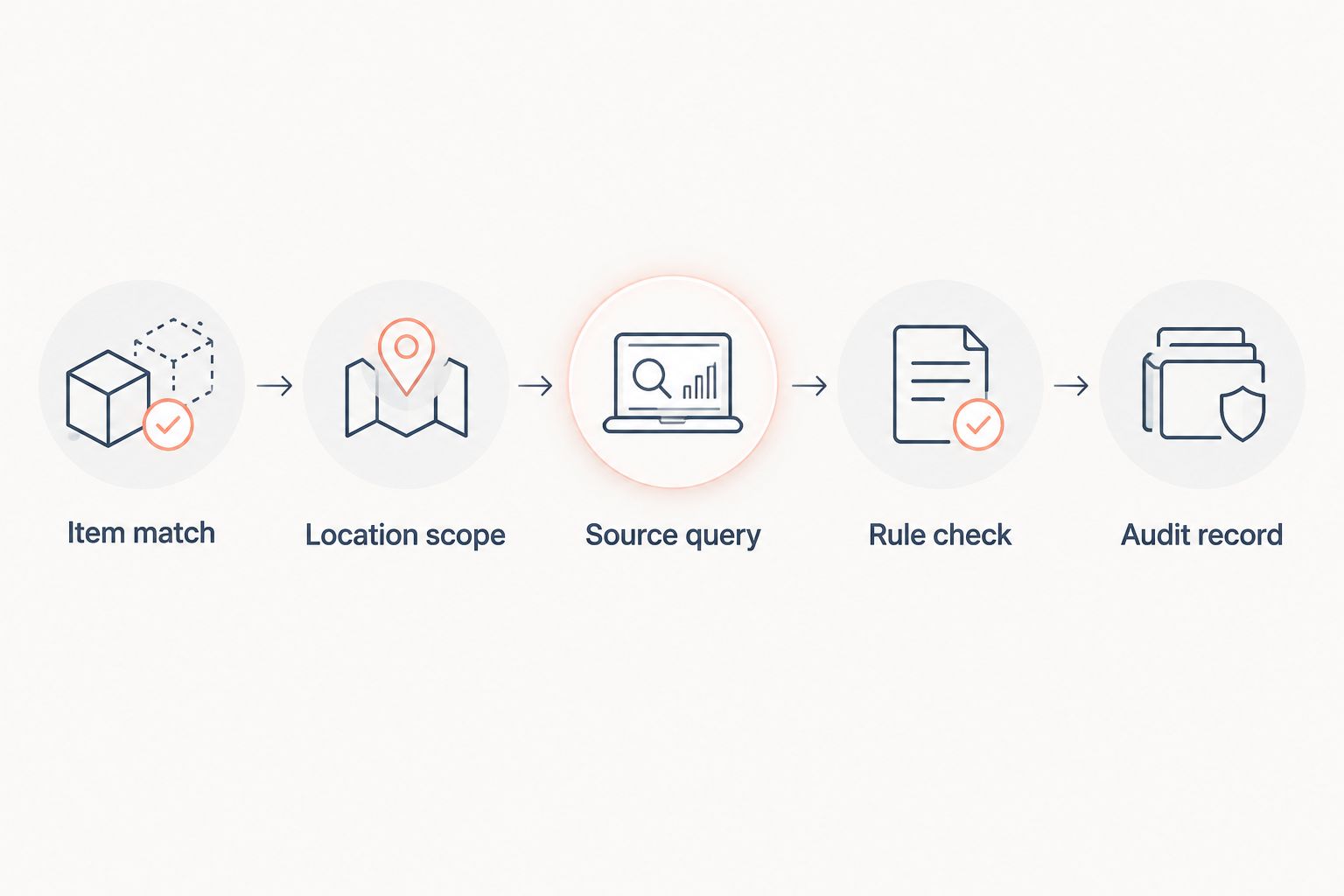
Item match
Require an exact item identifier before a transactional lookup. Customer descriptions, abbreviations, and manufacturer references need an approved mapping to your item master.
If a request matches multiple records, ask for clarification. Do not let a plausible description substitute for a confirmed part number.
Location scope
Define whether the request concerns a specific branch, warehouse, or permitted group of locations. Preserve that scope in the returned answer and the audit record.
Do not silently replace a local lookup with an enterprise-wide total. A broader result answers a different operational question.
Source query
Specify the authoritative source and permitted fields. If your architecture uses an ERP and a warehouse system, document which system governs each field rather than asking the assistant to resolve disagreements conversationally.
A failed query must produce a failed-check status. It must not trigger an answer assembled from an earlier conversation.
Rule check
Apply your approved definitions for inventory quantities, holds, allocations, and other transaction states. Preserve distinctions between physical counts and quantities interpreted under business rules.
Keep those rules in controlled application logic or the source system. A prompt is not a substitute for an inventory policy.
Audit record
Record the requesting user, resolved item, location scope, source response, and lookup time under your retention policy. Include errors and blocked actions, not only successful requests.
The audit record should let an authorized reviewer reconstruct the check without guessing which question the assistant sent to the source.
Why real-time inventory accuracy varies
Accuracy depends on the operational chain behind the answer. Use these factors to structure a technical review, not as assumptions about any particular distributor's systems.
- Transaction recording: A current query reads recorded transactions. Establish how receipts, picks, returns, and adjustments reach the source system.
- Connection design: A direct query and a synchronized copy have different freshness boundaries. Document which path each request uses.
- Item identity: Part references, revisions, packaging, and units of measure must resolve consistently before quantities are interpreted.
- Location definitions: Branch, warehouse, bin, and company boundaries determine the scope of a result.
- Business rules: Holds, allocations, and other restrictions require explicit interpretation rather than a generic inventory total.
- Access permissions: The assistant must return only the records and fields the requesting user is authorized to see.
For a 2026 deployment, assign an owner to each factor. Sales operations can define the customer-facing workflow, but inventory ownership and access control need named operational and technical owners as well.
What should the assistant return after a check?
An inventory response should be structured enough to inspect. Require the resolved item identifier, unit of measure, location scope, source system, lookup timestamp, and check status.
Separate source fields from interpretation. If the assistant summarizes a record, the application should retain the underlying response so an authorized user can inspect what the summary represents.
A short answer without its source boundary is not a complete transactional check. Avoid responses that hide whether the assistant read a live source, a synchronized copy, or a file.
Use explicit failure states for unresolved items, denied access, unavailable connections, and stale synchronized records. Each failure needs a next action: clarify the request, obtain authorization, retry through an approved process, or route the check to operations.
Do not convert technical failure into a positive-sounding answer. Silence about a failed lookup leaves the sales rep unable to distinguish evidence from generated text.
Can an inventory lookup also reserve inventory?
An inventory lookup and a reservation are separate operations. Reading a source record does not establish that the system has written a reservation or accepted an order.
If you authorize write actions, require a separate permission check and an explicit source-system confirmation. Record the transaction identifier and failure status using the same controls as other order-entry activity.
Keep read access separate from write authority. This lets you test the lookup workflow without granting the assistant permission to change transactional records.
A later order-entry step should validate the relevant source records again under your business rules. Do not treat an earlier conversational response as authorization for a subsequent transaction.
What happens when the inventory connection fails?
The assistant should stop the inventory check and identify the failed connection. It should not describe a cached result as a fresh response or fill the gap with an estimate.
If you permit fallback snapshots, label them as snapshots and show their recorded update time. Keep that fallback outside workflows that require a fresh transactional check.
Build escalation into the workflow before deployment. The sales rep needs a defined route to the inventory owner, not an instruction to keep asking the assistant until it produces an answer.
How do you test the workflow before rollout?
Use 6 acceptance tests in your 2026 pilot. These are recommended test cases, not performance benchmarks or claims about a vendor's results.
- Exact match: Submit an approved item identifier and confirm that the query uses the expected item and unit of measure.
- Ambiguous match: Submit a reference that maps to multiple items and require clarification before the query proceeds.
- Location boundary: Request a scoped lookup and confirm that the response preserves the authorized location boundary.
- Source change: Change a permitted test record in the source and inspect how the next lookup reflects the recorded change.
- Connection failure: Interrupt the approved connection in a test environment and require a clear failure state.
- Permission boundary: Use a restricted test account and confirm that the assistant neither reads nor discloses prohibited records.
Save the source response alongside the assistant's output for each test. That comparison separates retrieval errors from interpretation errors and gives the responsible team a specific defect to fix.
Approve the workflow only after your operations and IT owners accept the results. A polished demonstration is not an acceptance record.
Where does Supplyco fit in this workflow?
Supplyco is best suited to industrial manufacturers and distributors seeking revenue operations automation. The platform's stated scope includes quoting, order entry, account management, and sales follow-up.
That scope makes an inventory-check requirement relevant to evaluating Supplyco, but it does not establish a particular ERP connector, refresh interval, reservation function, or inventory workflow. Require the proposed implementation to demonstrate those details against your systems and permissions.
The practical fit is the surrounding sales process: connecting a verified source response to the next authorized quoting or order-entry step. The evaluation boundary is equally important—do not infer inventory functionality from a general automation description.
Review your revenue operations workflow
Evaluate quoting and order entry requirements alongside your inventory controls.
FAQ
Can AI check distributor inventory without an ERP connection?
AI needs access to an authoritative inventory source to perform a current-record check. That source need not be the ERP, but an isolated model or uploaded document does not establish a fresh transactional response.
Does real time mean the warehouse record is always correct?
No. A fresh query establishes when the source was checked, not whether every physical movement has been recorded correctly. Transaction discipline and inventory controls remain necessary.
Is a live query better than a synchronized inventory copy?
A live query is the preferred approach when the workflow requires a source response at request time. A synchronized copy serves a different purpose and needs its own visible update status.
Can an AI inventory check reserve items automatically?
An inventory check does not itself reserve items. Reservation requires a separate authorized write operation and confirmation from the transaction system.
What should the assistant do if a part number is unclear?
The assistant should request clarification before performing a transactional lookup. It should not choose between multiple matching items based only on conversational plausibility.
What should I require in a 2026 inventory automation pilot?
Require item matching, location scoping, source traceability, explicit failure states, and permission tests in a 2026 pilot. Compare the assistant's response with the underlying source record before approving the workflow.
Does Supplyco provide real-time inventory checks for every ERP?
Supplyco's stated revenue operations scope does not establish real-time inventory support for every ERP. Confirm the proposed connector, source fields, permissions, and failure behavior in an implementation demonstration.
One last thing
Test the failure path before you approve the successful one. Ask the implementation team to disconnect the inventory source during a controlled demonstration, then submit an ordinary lookup request.
The useful result is a clear refusal to claim a fresh check, an inspectable error, and a defined next action. An assistant that stops correctly protects the distinction between a retrieved record and a generated answer.