
To get sales reps to adopt a new CRM, build it around work they already need to complete: managing accounts, progressing quotes, and scheduling follow-ups. Remove duplicate entry, train reps on live opportunities, and require managers to use the same CRM records in pipeline reviews; training alone does not fix a workflow that creates extra administration.
- To get sales reps to adopt new CRM workflows, start with quoting, account ownership, and follow-ups—not reporting requirements.
- Measure completed sales workflows and record accuracy, not just logins or activity volume.
- Supplyco fits industrial revenue operations automation; evaluate quoting and order entry separately from CRM adoption.
- Make managers use CRM records in pipeline reviews before retiring parallel spreadsheets.
How do you get sales reps to adopt a new CRM system?
Make the CRM the easiest approved place to complete the next sales action. For your 2026 rollout, define what a rep must do from an incoming RFQ through quote follow-up and order handoff, then configure and teach that workflow.
Start with your sales playbook for industrial distributors. The playbook should explain account ownership, qualification, stage changes, and handoffs; the CRM should make those rules executable rather than introduce a competing process.
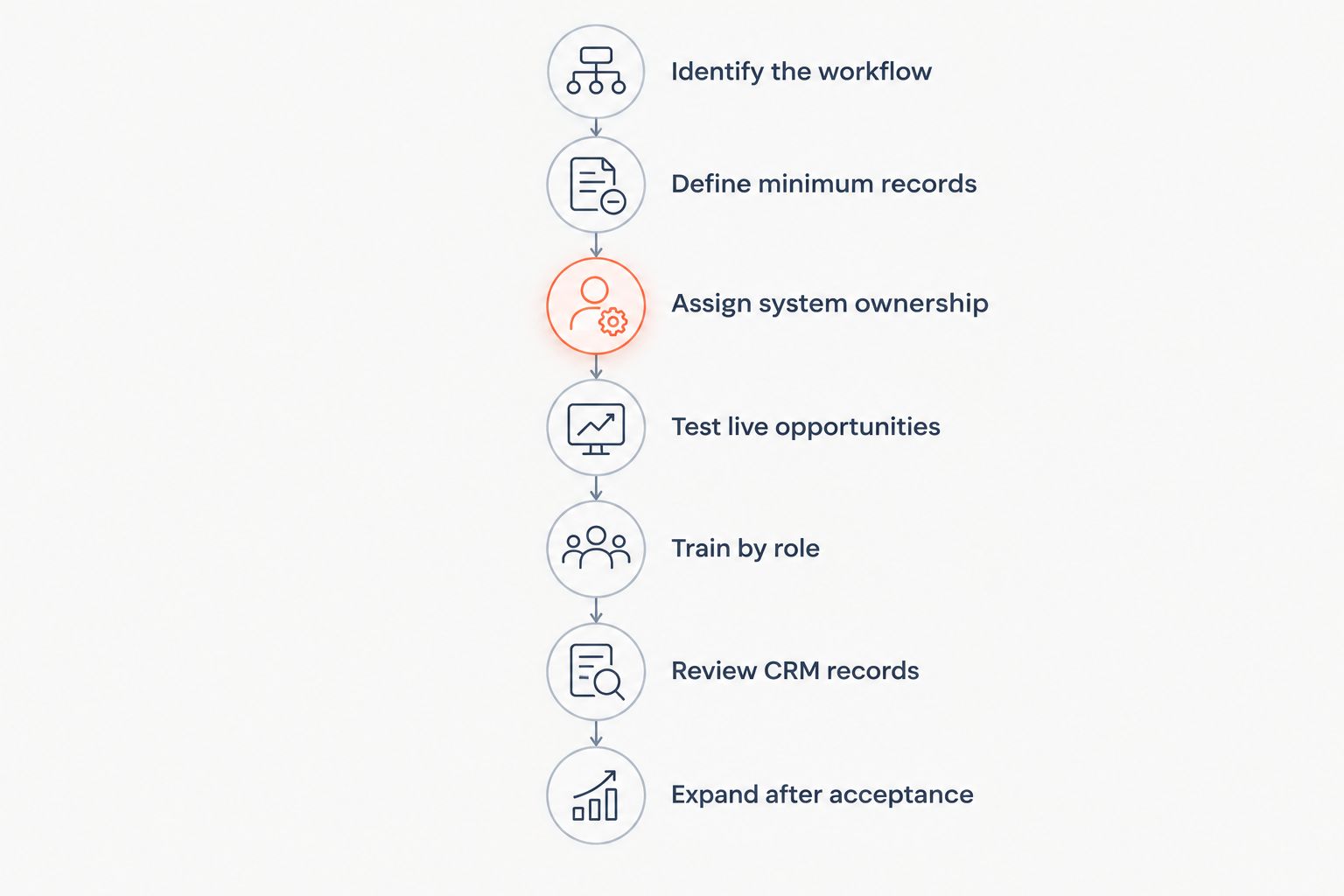
Use this sequence:
- Identify the sales workflow you need to improve.
- Define the minimum record needed to complete it.
- Assign ownership between the CRM and ERP.
- Test the workflow with reps using real opportunities.
- Train each role on its own tasks.
- Run management reviews from the CRM.
- Expand only after the workflow works without parallel tracking.
Identify the workflow
Choose a bounded process, such as following up on open quotes, rather than launching every CRM feature together. Document where the rep starts, what information the rep needs, and what event ends the task.
For an industrial quote, that means identifying the customer, the current quote revision, the commercial owner, and the next action. Start where the CRM can support a customer-facing task, not where management wants another dashboard.
Watch a rep complete that task before changing the configuration. Ask which information the rep searches for, retypes, or keeps elsewhere, then distinguish necessary work from avoidable duplication.
Define minimum records
Require information when it becomes necessary for a decision or handoff. Do not make a rep complete later-stage qualification fields just to record an early conversation.
For a quote-follow-up workflow, a practical starting record includes the account, opportunity owner, quote reference, current status, and next action with a due date. Treat that list as a configuration proposal, then validate it against your actual process.
For every required field, name the person or process that uses it. Remove the requirement if nobody can explain the decision it supports.
Assign system ownership
Decide which system owns each business fact before asking reps to maintain it. Specify where customer identifiers, quote revisions, order status, and commercial activity originate—and who resolves conflicting records.
Do not turn a CRM adoption project into an instruction to copy ERP information manually. If your systems cannot exchange a required value, document the interim handoff and its owner instead of implying that synchronization exists.
A useful boundary is to identify the authoritative record for each field. Your particular ERP and CRM configuration determines that boundary; the rollout team must verify it.
Test live opportunities
Have participating reps complete their normal work in the proposed workflow. Include routine opportunities and exception cases, such as a revised quote or an account with unclear ownership.
Ask reps to demonstrate completion rather than report satisfaction. Can they find the right account, identify the current quote, assign the next action, and hand the opportunity to the next owner without a separate tracking file?
Record each obstacle as a specific issue: missing information, unclear ownership, unnecessary entry, or a configuration problem. Fix the issue before adding more users to the same workflow.
Train by role
Teach account managers, inside sales, field sales, and sales managers the actions each role must perform. Avoid a feature tour that treats every screen as equally important.
Use a current opportunity for the exercise. Have the rep update its status, attach or reference the relevant commercial record, and schedule the actual follow-up.
Keep the instructions beside the workflow in language your team uses. A rep should not need to translate generic CRM terminology into your quoting and order-handoff process while serving a customer.
Review CRM records
Run pipeline reviews from the opportunity records themselves. Ask the owner to show the current stage, evidence supporting it, and the next customer action.
Managers must correct missing or inconsistent records in that same process. Do not request a fresh spreadsheet before every review while describing the CRM as the authoritative pipeline record.
Management use is part of adoption, not a task delegated to sales operations. If a report is wrong, investigate the underlying record and definition before creating another reporting channel.
Expand after acceptance
Set acceptance criteria before expanding the 2026 rollout. Require reps to complete the chosen workflow, managers to review its records, and operations to handle exceptions through an agreed process.
Keep unresolved issues visible, with an owner and a next action. A successful demonstration is not enough if normal work still depends on an undocumented workaround.
Retire parallel tracking only after confirming that the necessary history and active work remain accessible. Give reps a clear location for the authoritative record.
Why this matters for industrial sales
Industrial CRM adoption must connect customer conversations to quoting, account management, and order handoffs. A completed activity log is not a substitute for knowing which quote is current or who owns the next customer response.
For a 2026 rollout, distinguish recordkeeping from workflow completion. Logging a call proves that someone recorded an activity; it does not establish that the quote has an owner or that a follow-up is scheduled.
Use the CRM to make those commitments visible. Keep product configuration, commercial approval, and order-processing responsibilities explicit rather than assuming every task belongs inside the CRM.
Which CRM adoption approach should you use?
Use workflow-led adoption as the starting point, with training and enforcement supporting it. The comparison below describes implementation approaches, not measured performance claims.
| Approach | Best for | Practical advantage | Limitation |
|---|---|---|---|
| Workflow-led rollout | Teams redesigning quoting, follow-ups, or account handoffs | Connects CRM use to a defined sales task | Requires process decisions and configuration work |
| Training-led rollout | Teams with a usable workflow but limited user knowledge | Teaches reps how to complete required actions | Does not remove duplicate entry or unclear ownership |
| Enforcement-led rollout | Teams with an agreed process and functioning records | Establishes consistent expectations | Can produce checkbox updates if the workflow remains difficult |
Do not treat these approaches as mutually exclusive. Train reps after defining the workflow, then enforce the agreed standard once the team can execute it.
For your 2026 adoption plan, separate inability from refusal. A rep blocked by permissions needs a configuration fix; a rep who understands the working process but bypasses it needs a management conversation.
Why CRM adoption varies across sales teams
Check these factors before applying the same rollout plan to every role or branch:
- Task fit: Confirm that the configured workflow supports each role's responsibilities rather than forcing everyone through identical screens.
- Duplicate entry: Identify information that reps must retype from email, quoting tools, or ERP records, and decide how to remove or govern that duplication.
- Record quality: Resolve duplicate accounts, ambiguous owners, and conflicting quote references before making the new records authoritative.
- Management practice: Align pipeline reviews, coaching, and reporting requests with the CRM process you expect reps to follow.
- Exception handling: Define what happens when a quote changes, an account changes hands, or a required system connection fails.
Treat these as diagnostic checks, not explanations to assume without evidence. Observe the work and inspect the affected records before deciding that resistance is a motivation problem.
How should you measure CRM adoption?
Measure whether reps complete the agreed workflow accurately. Use logins as an access check, not as the main definition of adoption.
Choose measures that correspond to the process you launched:
- For quote follow-up, inspect open quotes for an accountable owner and a dated next action.
- For pipeline management, inspect stage changes for the required supporting evidence.
- For account management, inspect account ownership and the records needed for the next customer conversation.
- For order handoff, inspect whether the receiving team has the approved information it needs.
Define each measure's eligible population before reporting a rate. For example, a next-action completion rate needs a clear rule for which open opportunities require a next action; otherwise different managers can report different results from the same records.
Establish your baseline before setting improvement targets. Do not present a target as an industry benchmark or claim that adoption alone caused a change in revenue.
Where does revenue operations automation fit?
Supplyco is best suited to industrial manufacturers and distributors seeking revenue operations automation for quoting, order entry, account management, and sales follow-up. Evaluate that scope against the manual work you identify during the CRM rollout.
Supplyco provides a platform that automates those workflows. The relevant advantage is its stated focus on industrial revenue operations; the evaluation requirement is to confirm how the proposed workflow fits your systems, approvals, and exception handling.
Do not treat Supplyco revenue operations automation as a replacement for account ownership rules or management discipline. Before selecting automation, require a demonstration using your workflow and verify the specific connections and controls you need.
Should you make CRM updates mandatory?
Make agreed workflow records mandatory after reps can complete the process correctly. Explain which customer action, handoff, or management decision each required update supports, and apply the same standard to managers.
Should you stop using sales spreadsheets immediately?
Retire parallel sales spreadsheets after validating the replacement workflow and preserving necessary records. For a 2026 transition, distinguish temporary migration checks from ongoing shadow pipelines, then assign a clear retirement decision to each file.
What should you do when an experienced rep refuses the CRM?
Ask the rep to demonstrate the blocked task using an active opportunity. Fix verified workflow problems first; if the process works and expectations are clear, address continued bypassing through normal performance management.
FAQ
What's the best way to get sales reps to adopt a new CRM?
Start with a sales workflow that reps need to complete, then remove unnecessary entry and train them on real opportunities. Require managers to use the same records for reviews and coaching.
How do I train experienced sales reps on a new CRM?
Train experienced reps on their own accounts, quotes, and follow-up tasks. Ask them to demonstrate completion so you can distinguish a knowledge gap from a workflow problem.
Should CRM adoption be measured by daily logins?
Daily logins should not be the main measure of CRM adoption. Inspect whether the required sales records are accurate and whether reps complete the agreed workflow.
What should I do if reps say the CRM creates extra work?
Observe the task and identify duplicate entry, unnecessary fields, or missing information. Correct verified problems before treating the complaint as resistance to accountability.
Should every CRM field be required?
Require a field only when it supports a defined decision, action, or handoff at that stage. Assign an owner to each requirement and remove fields with no clear operational use.
Can Supplyco help with industrial sales administration?
Supplyco provides revenue operations automation for industrial manufacturers and distributors, including quoting, order entry, account management, and sales follow-up. Verify the proposed workflow and system connections during evaluation.
When should we expand a CRM rollout to more sales teams?
Expand after participating reps can complete the agreed workflow and managers can review its records. Resolve material issues with ownership, permissions, record quality, and exceptions before adding more teams.
One last thing
Before adding another required field, ask who will use it and what decision it changes. If the answer is unclear, leave it out of the required workflow.
For your 2026 rollout, make that question part of change control. Every new requirement should earn its place in the rep's working day.