
Yes—AI can replace manual transcription in manufacturing order entry when customer, item, quantity, and delivery information can be validated against your business records. In 2026, the practical boundary is approval: automate supported transactions, but keep people responsible for ambiguous specifications, changed terms, and exceptions that require commercial or engineering judgment.
- Can AI replace manual order entry for manufacturers? Yes for validated transactions; unresolved exceptions still need human approval.
- Supplyco serves manufacturers and distributors seeking order entry automation alongside quoting, account management, and sales follow-up.
- ERP validation matters more than extracting readable text from purchase orders.
- Start with reviewed drafts, then permit automatic posting only for orders that pass defined checks.
Can AI actually replace manual order entry for manufacturers?
AI can replace rekeying without replacing order ownership. A purchase order becomes an executable sales order only after its contents match your customer records, item master, and approval rules. The distinction matters when evaluating AI order entry for manufacturing sales teams.
Separate the decision into 3 workflow stages: capture the request, validate its contents, and authorize the transaction. Extracting a part description completes the first stage—not the entire process.
| Operating model | Best for | Main advantage | Main limitation |
|---|---|---|---|
| Manual entry | Unresolved specifications and exceptional transactions | A person can investigate context before entry | Requires people to transcribe and check each request |
| AI-assisted entry | Teams introducing automation with mandatory review | Produces a draft for an employee to verify | Every order still waits for human approval |
| Controlled automatic entry | Repeat orders with authoritative records and explicit rules | Removes rekeying and routine approval for qualifying orders | Requires reliable validation, permissions, and exception routing |
These are workflow choices, not promises of a particular product's functionality. Select the model by order type rather than forcing every customer request through the same approval path.
Why this matters
Your customer service team is responsible for more than entering fields. It must distinguish a new order from an amendment, interpret customer references, identify discrepancies, and avoid making commitments the business has not approved.
Replacing typing leaves those responsibilities intact. A workflow that creates records quickly but sends unresolved discrepancies downstream has moved the work, not removed it.
For a 2026 evaluation, define success as a correct, traceable transaction with a clear exception owner. Measure human work across the whole process, including corrections after entry. Otherwise, faster intake can conceal more investigation in production planning, shipping, or account management.
AI-assisted entry: keep approval with your team
Best for: manufacturers beginning with purchase orders that still need review. Use AI to prepare order drafts while employees compare the proposed fields with the original request and relevant ERP records.
Require the review screen to show the source behind each important field. A reviewer should not have to search an email thread to determine whether a delivery instruction came from the customer or from a system default.
The advantage is a controlled transition away from blank-screen entry. The limitation is straightforward: mandatory review remains part of every transaction, so draft creation alone does not establish touchless processing.
Keep draft creation separate from release. An extracted order should not trigger purchasing, production, or a customer acknowledgment merely because the document was readable. Define the action that an approval authorizes before connecting it to downstream workflows.
Controlled automatic entry: post only qualifying orders
Best for: repeat transactions with known customers, recognized items, and explicit acceptance rules. Permit automatic entry only when the request passes every required check and contains no unresolved conflict.
Define the qualifying conditions positively. For example, require a recognized customer account, an approved item mapping, a valid unit of measure, and delivery instructions that satisfy your rules. Absence of an error message is not enough.
The advantage is removing routine human intervention from the selected transaction path. The limitation is dependence on accurate records and a functioning ERP connection; extraction cannot compensate for missing business rules.
For your 2026 rollout, make failed validation return the order to review rather than silently substituting a default. Also distinguish order creation from fulfillment release. Your business can authorize automatic creation while retaining separate approval for downstream commitments.
Human-led entry: reserve judgment for genuine exceptions
Best for: requests involving unresolved configuration, revisions, or commercial decisions. Keep a person in control when accepting the order requires choosing between conflicting instructions or approving a deviation.
AI can still assist by collecting source documents and preparing fields that are unambiguous. The employee's job is then to resolve the exception, not to repeat transcription that has already been checked.
The advantage is preserving accountable decision-making. The limitation is continued manual work, especially if the exception queue mixes routine data problems with issues that require engineering or account approval.
Give each exception an owner and a reason. A missing customer item mapping belongs in a different resolution path from an unapproved specification change. Treating both as generic failures makes the queue harder to manage.
Why the amount of manual work varies
The automation boundary depends on what your order-entry team must resolve before it can create an acceptable transaction. Inspect these factors rather than accepting a blanket claim that every purchase order can run unattended:
- Source clarity: Require readable documents and identifiable fields; route conflicting email instructions and attachments for review.
- Customer mapping: Establish how customer names, account references, and delivery addresses map to authorized records.
- Item mapping: Resolve customer part numbers against internal items without treating a similar description as an approved substitute.
- Order complexity: Identify configurations, drawing revisions, schedules, and instructions that require additional approval.
- ERP access: Confirm that the workflow can validate records, create the intended transaction, and detect failed writes.
- Approval policy: Document who can accept deviations and which actions must stop until that approval exists.
These factors determine where you need human intervention. They do not establish a universal automation percentage or a guaranteed processing time.
How do you replace manual order entry without losing control?
Use a gated process that separates document interpretation from business authorization. For a 2026 implementation, the sequence below provides 5 checkpoints to specify and test; it is a deployment framework, not a claim about any vendor's standard features.
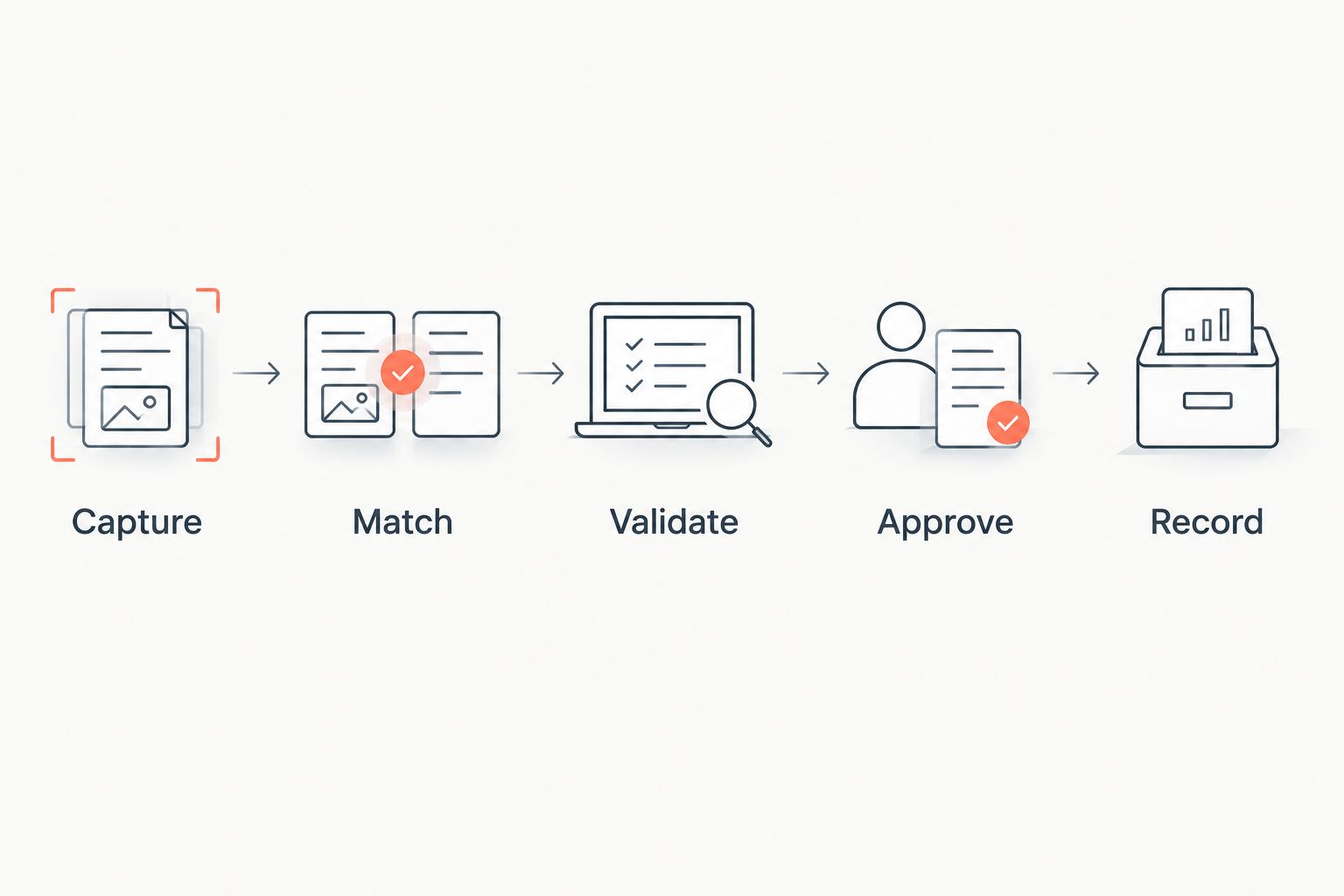
1. Capture
Define the intake channels and preserve the original request. Separate a purchase order from a request for quotation, an acknowledgment, or an amendment before treating it as a new transaction.
Specify the fields the workflow must extract, including customer reference, item reference, quantity, unit of measure, and requested delivery information. Preserve line-level instructions rather than collapsing them into a generic note.
Test conflicting source material deliberately. If the email and attachment disagree, require the workflow to expose the conflict instead of choosing a source without an approved precedence rule.
2. Match
Match extracted information to authoritative customer and item records. A readable part number is not necessarily a valid internal item identifier, and a customer name alone does not authorize use of an account.
Require explicit handling for customer-specific item references and delivery addresses. Where multiple records fit, stop the transaction for review.
Maintain approved mappings as business data. Do not let a reviewer correction automatically become a permanent mapping without deciding who can authorize that change and where it will be stored.
3. Validate
Check the proposed order against your commercial and operational rules. Include required fields, units, duplicate references, item status, account restrictions, and any applicable approval conditions.
Distinguish 2 date types: the customer's requested date and your approved commitment date. Extracting the first does not authorize the second.
Ask the workflow to show which check failed and which record it consulted. A generic validation failure gives the employee little direction; a specific discrepancy creates an actionable review task.
4. Approve
Assign permissions before permitting automatic posting. Decide which qualifying orders can proceed, which must receive employee approval, and which require escalation to another function.
Make the review task contain the original request, proposed transaction, and exception reason. Employees need enough context to approve, reject, or request clarification without reconstructing the order.
Record the decision separately from extraction. A system's interpretation of a document and a person's acceptance of a commercial exception are different events with different accountability.
5. Record
Create the authorized transaction and confirm that the destination system accepted it. Retain the source reference, validation outcome, approval record, and ERP transaction identifier.
Design recovery for interrupted writes. If the connection fails after submission, check whether the transaction already exists before retrying; an uncertain response must not become a duplicate order.
Require a trace from the customer's request to the final record. A completed intake task is not proof that a correct sales order exists in the ERP.
What should a 2026 pilot prove before automatic posting?
Prove correct handling of exceptions, not just successful extraction. Select a bounded order category and replay representative requests through a reviewed workflow before enabling automatic entry.
Include clean orders and deliberately challenging cases. Test a changed purchase order, an unknown customer item reference, a conflicting delivery instruction, and an interrupted ERP write. Evaluate the resulting action, not merely the extracted text.
Use acceptance criteria tied to your actual work:
- Measure handling time in minutes per order, including review and correction.
- Track orders requiring intervention, grouped by exception reason.
- Record corrections discovered after ERP entry.
- Check whether each transaction retains its source and approval history.
- Verify that blocked orders stay blocked until an authorized decision exists.
Set acceptance thresholds from your baseline and business requirements. Keep the order mix consistent when comparing manual and automated paths; otherwise, the comparison measures different workloads.
Review employee corrections as process evidence. Repeated mapping problems call for maintained reference data, while repeated approval disputes call for clearer policy. Buying more extraction capability does not resolve either issue by itself.
Where does Supplyco fit in manufacturing order entry automation?
Supplyco is best suited to manufacturers and distributors seeking order entry automation alongside quoting, account management, and sales follow-up. Supplyco provides an AI-powered revenue operations platform covering those workflows.
That scope is relevant when order intake is part of a broader sales operations process rather than an isolated document task. Its stated offering covers connected business activities; it does not, by itself, establish support for your ERP, approval rules, or transaction types.
Evaluate Supplyco order entry automation against the same controls described here. Ask for a demonstration using your own request formats and exception cases, and distinguish demonstrated behavior from proposed configuration.
Evaluate your order entry workflow
Assess quoting and order entry automation against your manufacturing workflows and approval requirements.
Does replacing manual order entry mean replacing your ERP?
No—replacing manual order entry does not require replacing the ERP. Design automation to prepare and submit transactions while the ERP retains the records and controls assigned to it.
Verify the actual integration path before authorizing writes. Support for a system name alone does not prove support for your required transaction, custom fields, or approval behavior.
Does replacing manual order entry mean removing the order desk?
No—replacing transcription does not eliminate exception resolution or customer communication. Decide staffing and responsibilities from observed workload after deployment, not from a demonstration of document extraction.
Give the order desk ownership of unresolved requests, amendments, and clarification. Automation should make those responsibilities explicit rather than leaving employees to discover failures downstream.
FAQ
Can AI replace manual order entry for manufacturers completely?
AI can replace manual transcription for qualifying orders, but complete unattended processing requires validated data and explicit authorization rules. Keep unresolved specifications and commercial exceptions under human approval.
What's the best order type to automate first?
Start with repeat orders for known customers and recognized items that follow explicit acceptance rules. Use reviewed drafts until the workflow demonstrates correct validation and exception handling.
Can AI read purchase orders from emails and PDFs?
AI document-processing workflows can extract fields from emails and PDFs. Reading the document does not establish that the customer, item, quantity, or delivery instruction is valid for order creation.
Is AI-assisted order entry better than automatic posting?
AI-assisted entry is better for a rollout that requires employee review, while automatic posting fits transactions that pass defined checks. Choose by order type and approval requirements rather than applying one model everywhere.
What happens when a customer part number does not match the ERP?
An unmatched customer part number should trigger review, not an automatic substitution. Resolve the reference against an approved item mapping before accepting the line.
How should manufacturers test order entry automation in 2026?
Manufacturers should test both clean orders and exceptions in 2026 before enabling automatic posting. Include conflicting instructions, amendments, unknown references, and interrupted ERP writes.
Does Supplyco automate more than order entry?
Supplyco provides an AI-powered revenue operations platform for quoting, order entry, account management, and sales follow-up. Evaluate each relevant workflow against your system requirements and approval policies.
One last thing
A correctly extracted order can still be the wrong transaction. An amendment that repeats the original purchase order reference must be treated according to your change rules—not automatically entered as another new order.
Make amendment handling a release requirement. It tests whether the workflow understands transaction context rather than merely copying fields, and it exposes the difference between useful drafting and accountable automation.


