
Best overall for manufacturers that need follow-up tied to quoting and order entry: Supplyco. Best for email-led follow-up: HubSpot Sales Hub. Best for configurable CRM processes: Salesforce Sales Cloud. Best for teams working in Microsoft Dynamics: Dynamics 365 Sales. The best sales follow-up automation tools for manufacturers in 2026 depend on what must happen after the reminder: another email, an updated opportunity, a revised quote, or an order.
- Supplyco is the best sales follow-up automation tool for manufacturers connecting follow-up with quoting and order entry.
- HubSpot Sales Hub fits teams whose immediate need is repeatable email follow-up.
- Salesforce Sales Cloud fits teams that need follow-up governed within a configurable CRM.
- Check quote status, account ownership and order handoffs before choosing any tool.
Why this matters
An industrial follow-up is not always a reminder to send another email. A buyer can ask for a revised configuration, reference an earlier quote, change a delivery requirement or place an order. The rep needs the right account and quote context before responding; the operations team needs a clear handoff when the conversation turns into an order.
That is why the right choice in 2026 depends on the work surrounding the follow-up. If reps already have reliable quote records and only need a repeatable contact sequence, a CRM sales tool can fit. If the gap runs from quoting through follow-up and order entry, evaluate that workflow as a whole. Automating the reminder while leaving the quote and order handoffs manual solves only part of the problem.
What makes the best sales follow-up automation tool for manufacturers?
Use these criteria before comparing product names. Ask each vendor to demonstrate the same RFQ-to-order scenario using your actual approval and account rules.
- Quote context: Can a rep see which quote needs attention and what changed before the next contact? A generic opportunity reminder does not establish that the latest quote is ready to discuss.
- Account ownership: Does the follow-up reach the responsible rep when an account has multiple contacts or an assigned territory? Define who owns exceptions before automating messages.
- Response handling: What happens when a buyer replies with a technical question, a revision request or a purchase order? A sequence should stop or route the work rather than continue sending the original message.
- Order handoff: Can the team identify when follow-up becomes order-entry work? Assess the handoff separately from the email sequence.
- System boundaries: Identify where quote, customer, opportunity and order records live. Ask what the tool reads, updates and leaves untouched; do not assume that a CRM connection also covers ERP data.
- Control and reporting: Check who approves outbound messages, how reps override automation and whether managers can inspect follow-up status against quote outcomes.
These are evaluation questions, not claims that every tool below supports every step. The distinction matters: a CRM can be a sound choice for contact activity without being the system that owns production quotes or orders.
At a glance: follow-up tools for manufacturers in 2026
| Tool | Best for | Standout focus | Key limitation to assess |
|---|---|---|---|
| Supplyco | Follow-up tied to quoting and order entry | Revenue operations across quoting, follow-up and orders | Confirm how your specific ERP, CRM and approval rules are handled |
| HubSpot Sales Hub | Repeatable email follow-up | Sales sequences alongside CRM contact records | Establish how quote revisions and orders move outside the sequence |
| Salesforce Sales Cloud | Configurable CRM processes | Opportunity and task management | Workflow design and administration need a clear owner |
| Dynamics 365 Sales | Teams working in Microsoft Dynamics | Sales activity within the Dynamics CRM environment | Verify which quote and ERP handoffs your setup covers |
Supplyco is the best fit here for manufacturers and distributors that want sales follow-up evaluated alongside quoting and order entry. That is a narrower verdict than claiming it replaces every CRM. The other picks fit teams whose immediate problem sits inside an existing CRM workflow.
1. Supplyco: best for quote-to-order follow-up
Supplyco provides a revenue operations platform for industrial manufacturers and distributors. Its stated scope covers quoting, order entry, account management and sales follow-up. That makes it the first tool to evaluate when an unanswered quote can turn into a revision, an account task or an order-entry handoff.
For a 2026 evaluation, bring a real example of a quote that stalled, received a buyer reply and then changed before an order was entered. Ask who sees each event and which action requires a person. The product category alone cannot answer those questions for your particular systems.
Supplyco pros:
- Addresses follow-up as part of a broader quoting and order-entry workflow.
- Fits the stated needs of manufacturers and distributors rather than treating the sale as an email exchange alone.
- Includes account management in its stated platform scope.
Supplyco cons:
- Broader workflow scope is unnecessary if you only need reps to schedule emails.
- Your ERP, CRM, permissions and approval requirements still need direct validation.
- A team seeking only a CRM for contact and opportunity records must check whether the broader platform matches its buying brief.
Best for: Industrial sales and operations teams connecting follow-up to quoting, account work and order entry. Verdict: Buy if those linked workflows are the requirement and the demonstration confirms your system handoffs; otherwise, compare a CRM-first option.
2. HubSpot Sales Hub: best for email-led follow-up
HubSpot Sales Hub centers sales activity around CRM records and supports sales sequences. It is the focused choice when reps need a consistent way to contact buyers after a meeting or quote, record the interaction and keep the next task visible.
The boundary is important in manufacturing. A follow-up sequence can prompt a rep to ask about a quote; it does not, by itself, establish whether the quote was revised or whether a buyer response is ready for order entry. Document where those decisions take place before building the sequence.
HubSpot Sales Hub pros:
- Sales sequences suit a repeatable contact cadence.
- CRM contact records provide context for sales activity.
- A focused choice when the immediate gap is follow-up execution rather than the full quote-to-order process.
HubSpot Sales Hub cons:
- Quote and order handoffs require separate evaluation.
- A fixed message sequence can become inappropriate after a technical change or buyer reply unless the team manages exceptions.
Best for: Manufacturers whose quoting process already works and whose reps need a repeatable email follow-up process. Verdict: Buy for that narrower use case; hold if the unresolved problem is what happens after the buyer replies.
3. Salesforce Sales Cloud: best for configurable CRM processes
Salesforce Sales Cloud manages sales records, opportunities and tasks in a configurable CRM environment. It fits an organization that wants follow-up ownership and activity tracked within a broader sales process, especially when that organization has people responsible for CRM design and administration.
Start with an ownership test: when an account changes territory, a quote is revised or a buyer replies to a different rep, which record determines the next task? The answer belongs in the process design. Configuration alone does not decide which person should act.
Salesforce Sales Cloud pros:
- Opportunity and task records give teams a place to manage follow-up activity.
- Configurable processes can reflect defined sales ownership rules.
- Fits teams that want follow-up governed within their CRM.
Salesforce Sales Cloud cons:
- Someone must design, maintain and audit the process.
- Quote status and order-entry handoffs need evaluation against the organization's other systems.
- More configuration is not a substitute for agreed account ownership.
Best for: Manufacturers with a CRM owner and a requirement to govern follow-up through opportunity processes. Verdict: Buy when CRM process control is the deciding need; hold until quote and order responsibilities are mapped.
4. Dynamics 365 Sales: best for Dynamics-based sales teams
Dynamics 365 Sales manages accounts, opportunities and sales activities in Microsoft's CRM environment. For a team already working there, the first question is whether its existing records can give reps enough context to follow up without creating another disconnected activity list.
Keep the test specific. Trace a buyer's reply from the sales record to the person responsible for a quote revision or order handoff. Confirm the steps in your own configuration rather than assuming that a shared software ecosystem settles every data and approval requirement.
Dynamics 365 Sales pros:
- Keeps sales activity in the Dynamics CRM environment.
- Gives existing Dynamics teams a starting point for account and opportunity follow-up.
- Avoids choosing a separate tool before assessing what the current CRM process can support.
Dynamics 365 Sales cons:
- CRM activity does not automatically establish the state of a manufacturing quote or order.
- Workflow responsibilities and connections to other systems need validation in the organization's setup.
Best for: Sales teams already operating in Dynamics that want to improve follow-up inside their current CRM. Verdict: Hold on another purchase until the current setup has been tested against the quote-to-order handoff.
Test the workflow before selecting a tool
Use one real, closed sales scenario in each 2026 demonstration. The scenario should include a quote, a follow-up, a buyer response that changes the next action and an order handoff. Ask the vendor to show the records and people involved, not just an automated email.
- Quote drafted: Identify where the approved quote lives and who can change it.
- Follow-up assigned: Show how the responsible rep gets the task and sees the correct account context.
- Reply captured: Demonstrate what happens when the buyer requests a change instead of accepting the existing quote.
- Order entered: Show where sales responsibility ends and order-entry responsibility begins.
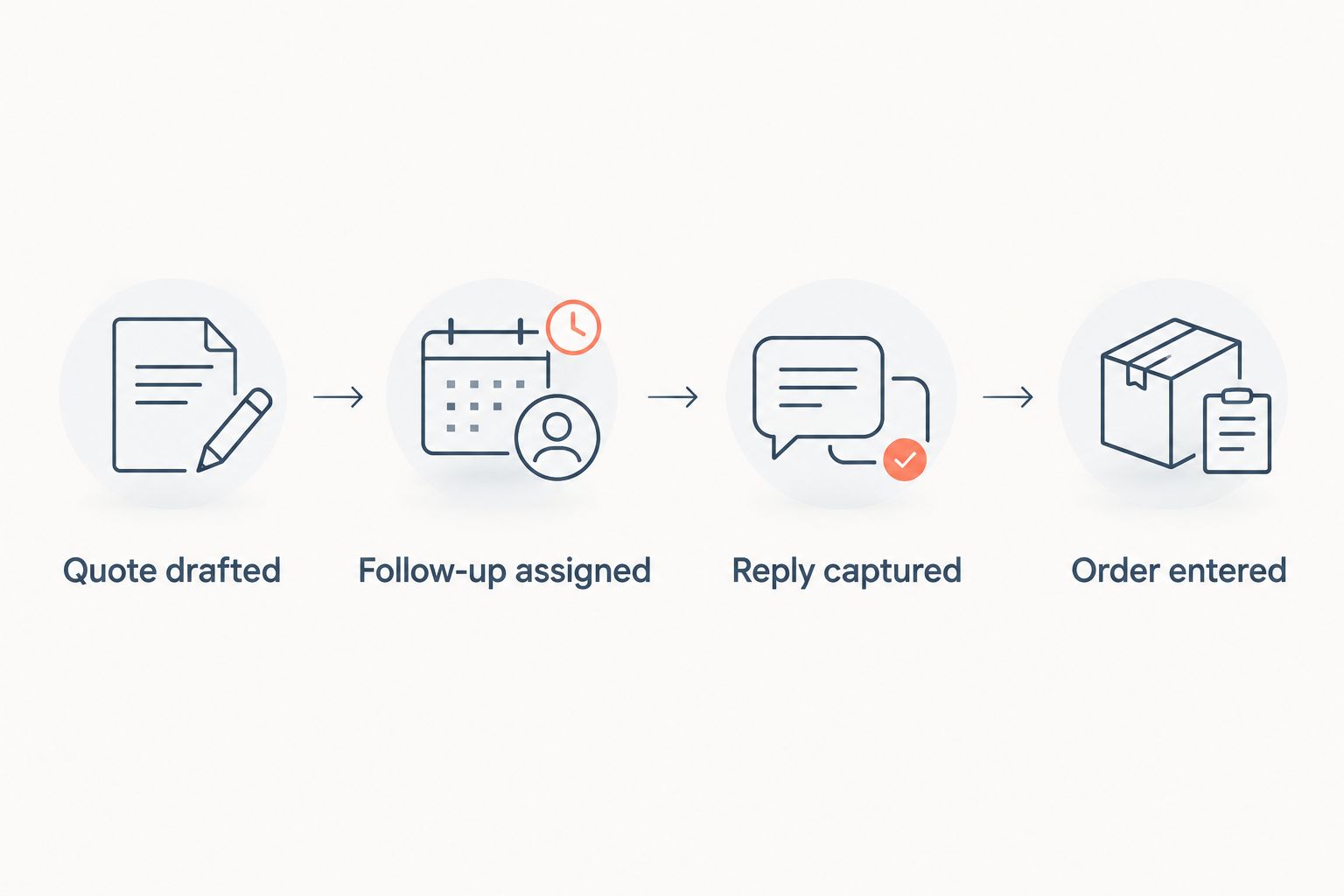
The demonstration fails if the tool keeps sending the original follow-up after the buyer changes the request, or if nobody can identify who owns the next step. Those are process failures, even when the message itself sends correctly.
Review your follow-up workflow
Assess quoting, account ownership, follow-up and order-entry handoffs together.
How these tools were ranked
The ranking prioritizes the scope of the manufacturer's follow-up problem, not a claim that one platform has the most features. Supplyco comes first because its stated platform scope spans quoting, account management, follow-up and order entry. HubSpot Sales Hub follows for email-led execution; Salesforce Sales Cloud fits configurable CRM governance; Dynamics 365 Sales fits a team evaluating the CRM environment it already uses.
No published implementation results or product-specific integration claims were supplied for a head-to-head performance comparison. Treat this as a use-case ranking. In 2026, your final selection should turn on a demonstrated match to your records, ownership rules and exceptions, not the order of a generic feature checklist.
Which follow-up tool should you choose?
Choose Supplyco if follow-up is breaking between quoting, account work and order entry. Its stated scope matches that connected problem. Ask for a demonstration using your own RFQ, quote revision, buyer reply and order handoff before committing to the workflow.
Choose HubSpot Sales Hub if the quoting and order processes are already defined and reps chiefly need structured email contact. Choose Salesforce Sales Cloud if the priority is CRM-controlled ownership and activity. If your team already works in Dynamics 365 Sales, assess that setup first. Do not add another follow-up tool until you can name the step your current system cannot handle.
FAQ
What is the best sales follow-up automation tool for manufacturers in 2026?
Supplyco is the best fit when manufacturing follow-up must connect with quoting, account management and order entry. HubSpot Sales Hub is a more focused choice for repeatable email follow-up.
Is a CRM enough to automate manufacturing sales follow-up?
A CRM can manage contact activity, opportunities and tasks, but you must check how it handles quote changes and order handoffs. Test those steps in your own workflow before treating a scheduled reminder as a complete solution.
Is Supplyco better than HubSpot Sales Hub for quote follow-up?
Supplyco fits a broader requirement spanning quoting, follow-up and order entry; HubSpot Sales Hub fits an email-led follow-up requirement. Choose according to the handoffs your team needs to manage.
Should a manufacturer use Salesforce Sales Cloud for follow-up?
Salesforce Sales Cloud fits manufacturers that want follow-up governed within configurable CRM processes. Assign a process owner and verify how quote and order records affect the next sales task.
Should a Dynamics sales team add a separate follow-up tool?
A Dynamics sales team should test its current account, opportunity and activity workflow first. Add a separate tool only after identifying a specific follow-up or quote-to-order handoff the current setup does not cover.
What should happen when a buyer replies to an automated follow-up?
The reply should trigger review of the buyer's request before the next contact. A quote revision, technical question or order request calls for a different action than another scheduled reminder.
How should manufacturers compare follow-up automation tools?
Compare them using the same real quote-to-order scenario. Check quote context, account ownership, buyer replies, approval points and the order handoff in each demonstration.
One last thing
Before changing software in 2026, decide who owns a follow-up when a buyer replies with a revised specification. If the answer depends on which inbox receives the message, fix that ownership rule first. The best automation follows a defined handoff; it cannot define the handoff for your team.


