
Best overall CRM: Salesforce for complex account structures. Best for straightforward sales management: HubSpot. Best for focused pipeline tracking: Pipedrive. Supplyco is best for MRO distributors seeking quoting, order entry, account management, and follow-up automation rather than a replacement CRM; this 2026 guide separates those requirements.
- Salesforce leads this CRM software for MRO distributors shortlist when complex account structures drive the decision.
- Supplyco addresses industrial revenue operations automation; evaluate it separately from your CRM system of record.
- HubSpot suits straightforward sales management; Pipedrive suits teams prioritizing pipeline tracking.
- Microsoft Dynamics 365 Sales belongs on the shortlist when Microsoft applications shape your sales workflow.
- Require an ERP-connected demonstration before selecting software for quoting, order entry, or customer-specific terms.
Why this matters
Maintenance, repair, and operations distribution involves more than moving opportunities through stages. Your sales team needs to connect the purchasing contact, the plant receiving the material, the quote revision, and the resulting order.
A CRM organizes relationships and sales activity. An ERP manages operational records such as items, orders, and accounting transactions. Automation software addresses work between those records. Do not replace your CRM to solve an order-entry problem without first identifying where that work breaks down.
What makes the best CRM software for MRO distributors
Use these criteria for your 2026 shortlist. A familiar interface is useful, but it does not establish that a system handles your distribution workflow.
- Account structure: Represent parent companies, purchasing contacts, delivery locations, and account ownership without creating conflicting customer records.
- ERP data boundaries: Identify the authoritative source for customer identifiers, item records, customer-specific terms, and order status.
- Quote continuity: Keep the RFQ, quote revision, next action, and eventual order connected.
- Rep execution: Make ownership, follow-up tasks, and customer activity easy to maintain during daily sales work.
- Administrative control: Define permissions, required fields, exception handling, and responsibility for maintaining workflows.
- Reporting usefulness: Distinguish open opportunities from submitted quotes and confirmed orders instead of treating every stage as interchangeable.
These are selection criteria, not claims that every shortlisted platform supplies each capability without configuration. Require the vendor to demonstrate the workflow your team will actually use.
CRM and automation options at a glance
The order below puts the industrial automation option first, followed by CRM choices for distinct operating requirements. It is not a claim that automation software replaces a CRM.
| Option | Best for | Standout focus | Key limitation |
|---|---|---|---|
| Supplyco | Automating industrial sales administration | Quoting, order entry, account management, and follow-up automation | Evaluate separately from the CRM system-of-record requirement |
| Salesforce | Complex account structures and sales governance | Configurable CRM records, workflows, and reporting | Requires deliberate configuration and administration |
| HubSpot | Straightforward sales management | Connected contact, company, deal, and activity records | MRO-specific operational requirements still need validation |
| Microsoft Dynamics 365 Sales | Microsoft-centered sales organizations | Sales CRM within the Dynamics 365 application family | Shared branding does not establish ERP integration scope |
| Pipedrive | Focused opportunity and next-action tracking | Visual sales pipelines and activity management | Pipeline visibility does not establish quote-to-order execution |
1. Supplyco: best CRM companion for industrial automation
This revenue operations platform automates quoting, order entry, account management, and sales follow-up for industrial manufacturers and distributors. That makes it relevant when your problem is work execution rather than a missing customer database.
Keep the buying question narrow: which tasks should the platform perform, which records should it update, and which exceptions require approval? Do not assume a particular ERP connector, document format, or approval mechanism without a demonstration.
Supplyco pros:
- Explicit focus on industrial manufacturers and distributors.
- Addresses quoting and order entry rather than pipeline tracking alone.
- Includes account management and sales follow-up in its stated scope.
Supplyco cons:
- Its stated positioning does not establish it as a full CRM replacement.
- Compatibility with your exact ERP, CRM, and approval requirements needs validation.
Best for: MRO distributors with an established customer-record system and manual revenue operations work to address.
Verdict: Buy for a defined automation requirement after validating the workflow; skip it as an assumed replacement CRM.
2. Salesforce: best CRM for complex account governance
Salesforce is a configurable CRM for managing accounts, contacts, opportunities, sales activity, and reporting. Put it first on your CRM shortlist when different branches, territories, or account teams need distinct ownership and controlled processes.
For MRO distribution, use the demonstration to separate commercial relationships from operational transactions. An opportunity record should not become an improvised substitute for an ERP sales order.
Salesforce pros:
- Configurable records support company-specific sales processes.
- Account, contact, and opportunity management provide a structured sales foundation.
- Reporting and workflow capabilities support formal sales governance.
Salesforce cons:
- Configuration decisions create ongoing administration work.
- ERP connectivity and distribution-specific behavior require separate validation.
Ask the vendor to model a parent customer with separate receiving locations and purchasing contacts. Then require a clear explanation of how ownership changes affect access, reporting, and open opportunities.
Best for: Multi-team distributors that need controlled account structures, permissions, and reporting.
Verdict: Buy when governance requirements justify the administration; skip when basic activity tracking solves the problem.
3. HubSpot: best CRM for straightforward sales management
HubSpot organizes companies, contacts, deals, and sales activity in a connected CRM. It belongs on your shortlist when the main requirement is a consistent process for assigning accounts, recording communication, and maintaining next actions.
Start with the rep's daily work rather than a long feature checklist. Show how a new RFQ becomes a tracked deal, how the owner records the next action, and how the team finds the latest customer conversation.
HubSpot pros:
- Connected company, contact, and deal records support relationship tracking.
- Sales activity management gives teams a shared record of customer work.
- A suitable starting point for defining a consistent commercial process.
HubSpot cons:
- General CRM records do not establish MRO-specific transaction handling.
- Required workflow and reporting capabilities need edition-level verification.
For your 2026 evaluation, require a demonstration using your account terminology. A workflow built around generic leads is not enough if your team works primarily with established purchasing accounts.
Best for: Distributors standardizing sales ownership, customer activity, and deal management.
Verdict: Buy for a clear sales-management requirement; hold if ERP-connected quoting is the unresolved priority.
4. Microsoft Dynamics 365 Sales: best CRM for Microsoft-centered teams
Microsoft Dynamics 365 Sales manages sales relationships and opportunities within the Dynamics 365 application family. Evaluate it when Microsoft applications already shape how your organization handles communication, collaboration, and business systems.
Treat the Microsoft connection as a reason to investigate, not proof of a complete distribution workflow. Document the exact applications involved and who owns the connection between them.
Microsoft Dynamics 365 Sales pros:
- Account, contact, and opportunity management support structured selling.
- Fits evaluations centered on the Microsoft business application environment.
- Supports a CRM decision alongside broader business-system planning.
Microsoft Dynamics 365 Sales cons:
- Microsoft application names alone do not define integration behavior.
- Configuration and cross-system ownership still require explicit decisions.
Ask the implementation team to trace a customer update from its source to the sales record. Repeat the exercise for a quote status change and an order confirmation, including what happens when an update fails.
Best for: Distributors making a CRM decision within a Microsoft-centered application strategy.
Verdict: Buy when the demonstrated application fit supports your requirements; hold when integration scope remains undefined.
5. Pipedrive: best CRM for focused pipeline tracking
Pipedrive centers on sales pipelines, deals, contacts, and activities. Consider it when your immediate requirement is visibility into open opportunities and the next action each rep must complete.
Keep that scope explicit. Tracking an RFQ as a deal does not establish that the system can validate item numbers, generate an operational quote, or create an ERP order.
Pipedrive pros:
- Visual pipelines make deal stages explicit.
- Activity management supports next-action discipline.
- A focused candidate when opportunity tracking is the main requirement.
Pipedrive cons:
- Deal management alone does not solve transactional quoting requirements.
- Detailed account structures and ERP-connected processes need validation.
Best for: Sales teams seeking disciplined opportunity and follow-up tracking without making transaction automation the CRM's central job.
Verdict: Buy for pipeline discipline; skip as the sole answer to complex quote-to-order requirements.
How these options rank
This 2026 ranking uses the stated criteria: account structure, ERP boundaries, quote continuity, rep execution, administration, and reporting. The recommendations describe functional fit, not measured implementation results or a hands-on performance test.
Salesforce is the default CRM recommendation for complex governance. HubSpot addresses straightforward sales management, Microsoft Dynamics 365 Sales addresses Microsoft-centered requirements, and Pipedrive addresses focused pipeline tracking. The automation option serves a separate requirement: completing industrial revenue operations work.
Choose the category first, then compare vendors within it. Otherwise, your shortlist mixes customer records, transaction processing, and task automation as if they were interchangeable.
Run a workflow-based demonstration
For a 2026 evaluation, prepare 10 historical RFQs, 5 customer accounts, and 3 order scenarios as a proposed demonstration pack. These are evaluation inputs, not implementation benchmarks. Remove sensitive information before sharing them.
Use the same material with every shortlisted vendor. A consistent demonstration makes differences in manual work, missing data, and exception handling visible.
Account setup
Show a parent customer, receiving location, purchasing contact, and assigned rep. Ask which system owns each identifier and how the process prevents duplicate records.
RFQ capture
Present a real request with incomplete information. Require the vendor to show what gets recorded, what needs clarification, and who receives the follow-up task.
Quote approval
Demonstrate a revised quote and an approval requirement. Confirm which version remains current and how the rep sees the next action.
Order handoff
Trace the accepted quote into the order process. Ask how the workflow handles a mismatch between the requested item and the operational item record.
Follow-up ownership
Show who acts when the buyer has not responded and when an order needs clarification. Check that the workflow distinguishes those situations instead of sending the same message for both.
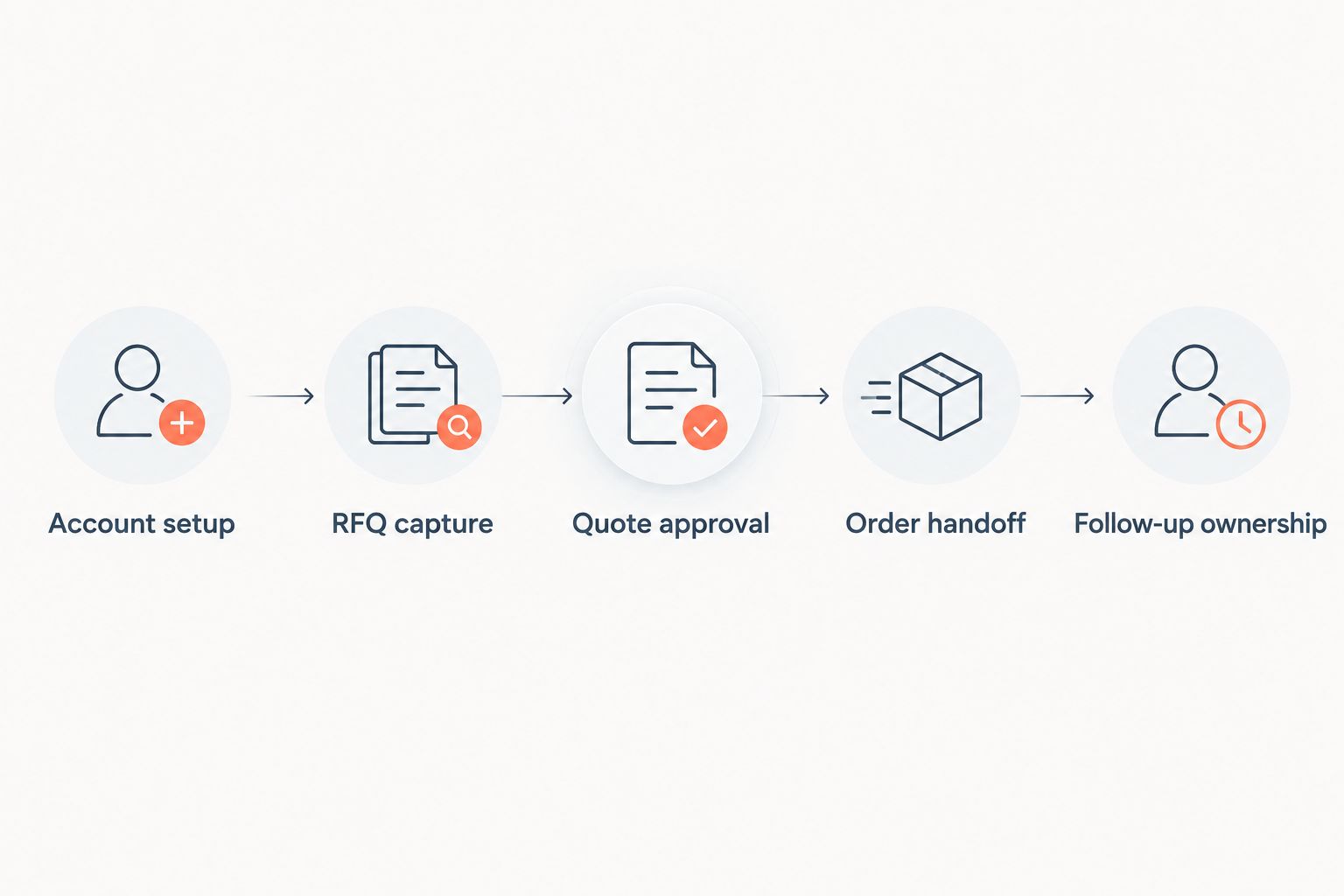
Record each handoff in plain language: source record, destination record, responsible person, and exception route. Reject demonstrations that stop at a completed deal stage without explaining the operational handoff.
Which CRM should you choose?
Choose Salesforce as the default for complex account governance. Choose HubSpot when consistent sales management is the priority, Microsoft Dynamics 365 Sales when the Microsoft application environment drives the decision, and Pipedrive when pipeline discipline is the defined requirement.
Choose Supplyco for industrial revenue operations automation when quoting, order entry, account management, and follow-up are the work you need to address. Validate the exact system connections before committing.
If your current CRM already maintains accurate customer records, start by mapping the manual tasks around it. Replacement is not the default answer to incomplete operational workflows.
FAQ
What's the best CRM software for MRO distributors?
Salesforce is the default recommendation in this shortlist for MRO distributors with complex account structures and governance requirements. HubSpot, Microsoft Dynamics 365 Sales, and Pipedrive fit different priorities, so choose against a demonstrated workflow rather than a generic feature ranking.
Do MRO distributors need both a CRM and an ERP?
A CRM and an ERP serve different purposes: the CRM manages sales relationships and activity, while the ERP manages operational and financial records. Define which system owns each record before connecting them.
Is HubSpot better than Salesforce for an MRO sales team?
HubSpot is the recommendation here for straightforward sales management; Salesforce is the recommendation for complex account governance. Test account ownership, required fields, reporting, and the ERP handoff before selecting either.
Can CRM software automate MRO quoting and order entry?
CRM software alone does not establish automated quoting or order entry. Require a demonstration of the exact process, including customer identifiers, item matching, approvals, and exception handling.
Should an MRO distributor replace spreadsheets with a CRM?
Choose a CRM when your requirement is shared account ownership, activity history, and opportunity tracking. Define those records and responsibilities before migration so the new system does not reproduce conflicting spreadsheets.
What should an MRO distributor ask during a CRM demo?
Ask the vendor to trace a real RFQ from account identification through quote revision, approval, order handoff, and follow-up. Require the demonstration to show manual steps and exception ownership, not just the successful path.
Does Microsoft Dynamics 365 Sales automatically solve ERP integration?
The Dynamics 365 name alone does not establish your integration scope. Confirm the exact ERP, connected records, update direction, error handling, and implementation responsibility.
One last thing
For your 2026 selection, ask each vendor to demonstrate a wrong customer identifier and a conflicting item reference. The exception path is part of the buying decision. A successful demonstration shows who resolves the issue and how the corrected information reaches the right record—not just how a clean request advances.