
Best overall for complex account structures: Salesforce Sales Cloud. Best for straightforward pipeline management: HubSpot. Best for Microsoft-centered teams: Microsoft Dynamics 365 Sales. For your 2026 shortlist, treat Supplyco as a revenue operations automation companion, not an interchangeable replacement for a CRM.
- The best CRM software for HVAC equipment distributors depends on account structure, ERP integration, and quoting responsibilities.
- Salesforce Sales Cloud is the default shortlist choice for complex account relationships and configurable sales processes.
- HubSpot suits straightforward pipeline management; Microsoft Dynamics 365 Sales suits Microsoft-centered sales teams.
- Supplyco is best for industrial distributors seeking quoting, order entry, account management, and sales follow-up automation.
Why this matters
An HVAC equipment distributor needs to connect contractor relationships, project opportunities, quotes, and orders. A contact database alone does not establish who owns the next action or whether an accepted quote became an order.
Choose the CRM around account ownership and sales visibility; evaluate automation around the work between systems. Keep inventory, financial records, and order authority explicitly assigned rather than assuming a new CRM should own everything.
Before comparing software, document your handoffs in a sales playbook for industrial distributors. Specify what changes when a contractor requests equipment, revises a quote, accepts a proposal, or places a repeat order.
What makes the best CRM for HVAC equipment distributors?
Use these criteria for your 2026 evaluation. A vendor demonstration should show each requirement using your account relationships and transaction examples, not a generic sales presentation.
- Account relationships: Represent contractor headquarters, branch offices, purchasing contacts, and individual projects without creating disconnected duplicates.
- ERP boundaries: Identify where customer records, product data, commercial terms, credit status, and orders originate. Require an explicit synchronization design.
- Quote visibility: Associate quote revisions and decision-makers with the correct opportunity. Distinguish a submitted quote from an accepted order.
- Follow-up ownership: Assign a responsible rep and next action. Separate project follow-ups from routine replenishment conversations.
- Administrative fit: Match configuration and maintenance requirements to the people who will actually operate the system.
- Reporting discipline: Define opportunity stages and loss reasons before building dashboards. A forecast is only useful when reps apply stages consistently.
CRM options at a glance
These options serve different jobs. The first three are CRM platforms; the fourth addresses operational automation around industrial sales.
| Option | Best for | Standout capability | Key limitation |
|---|---|---|---|
| Salesforce Sales Cloud | Complex account structures and sales processes | Configurable CRM records, workflows, and reporting | Requires deliberate configuration and ongoing administration |
| HubSpot | Straightforward pipeline and activity management | Connected company, contact, deal, and activity records | Industrial transaction requirements still need separate validation |
| Microsoft Dynamics 365 Sales | Microsoft-centered sales teams | Sales management within the Dynamics and Microsoft ecosystem | Microsoft alignment does not establish compatibility with your ERP |
| Supplyco | Automating industrial sales operations | Quoting, order entry, account management, and follow-up automation | Evaluate separately from the decision about your core CRM |
1. Salesforce Sales Cloud: best CRM for complex account structures
Salesforce Sales Cloud manages accounts, contacts, opportunities, and sales activities in a configurable CRM. Put Salesforce Sales Cloud first on your shortlist when your equipment business needs a detailed account model and distinct sales processes.
An equipment project can involve a contractor, multiple contacts, and successive quote revisions. Your evaluation should establish how those relationships appear together without making reps recreate the same project across unrelated records.
Salesforce Sales Cloud pros:
- Account and contact records support structured relationship management.
- Opportunity management provides a defined place to track project pursuits.
- Configurable fields and workflows support business-specific sales processes.
- Reporting supports analysis of pipeline and sales activity.
Salesforce Sales Cloud cons:
- Configuration creates an ongoing administration responsibility.
- Inventory, credit controls, and order execution require a separately designed system boundary.
- More customization creates more definitions and rules for your team to maintain.
Best for: Distributors that need configurable account relationships and can assign a CRM owner.
In the demonstration, ask the vendor to represent a contractor with multiple purchasing locations and a shared project. Then ask the vendor to show how a rep finds the current opportunity, the responsible contact, and the next action without searching through duplicate records.
Do not approve the selection based on dashboards alone. Require the account model and sales workflow to work before adding more reports.
Verdict: Buy Salesforce Sales Cloud when relationship complexity justifies dedicated administration.
2. HubSpot: best CRM for straightforward pipeline management
HubSpot connects company, contact, deal, and activity records for sales teams. Shortlist HubSpot when your immediate requirement is a consistent pipeline and a clear record of customer communication.
Keep the initial scope focused. If reps currently track project opportunities through separate spreadsheets and inboxes, start by defining deal stages, required ownership, and next actions rather than reproducing the ERP inside the CRM.
HubSpot pros:
- Company and contact records organize customer relationships.
- Deal pipelines provide a shared view of active opportunities.
- Activity records keep sales conversations associated with customer records.
- A focused CRM rollout can separate sales tracking from transactional system changes.
HubSpot cons:
- A general-purpose deal pipeline does not establish HVAC equipment configuration rules.
- ERP synchronization and order handoffs require their own evaluation.
- Additional fields will not solve inconsistent stage definitions or missing ownership.
Best for: Distributors prioritizing pipeline discipline over an extensively customized account model.
Ask a rep to record a quote request, assign the opportunity, log the next action, and find the previous customer conversation. Have the rep repeat that sequence without help from the demonstrator.
Your acceptance test should also distinguish a lost project from a quote that remains open. Otherwise, a simpler interface still produces an unreliable forecast.
Verdict: Buy HubSpot when clear deal tracking is the main requirement; hold if transaction automation is the actual problem.
3. Microsoft Dynamics 365 Sales: best CRM for Microsoft-centered teams
Microsoft Dynamics 365 Sales manages customer relationships, opportunities, and sales activities within Microsoft's business application ecosystem. Shortlist Microsoft Dynamics 365 Sales when your organization wants its CRM strategy aligned with existing Microsoft tools and administration.
Treat ecosystem fit as a selection criterion, not an integration guarantee. Your exact ERP, deployment, data model, and required transaction flows determine the implementation work.
Microsoft Dynamics 365 Sales pros:
- Account, contact, and opportunity management cover core CRM requirements.
- Microsoft ecosystem alignment provides a relevant evaluation path for existing Microsoft users.
- Configurable sales processes support organization-specific record requirements.
- Sales reporting provides a basis for pipeline review.
Microsoft Dynamics 365 Sales cons:
- A shared vendor name does not prove an end-to-end order workflow.
- Configuration and administration still require assigned ownership.
- ERP integration must be assessed against the specific applications involved.
Best for: Distributors with a Microsoft-centered application strategy and clear internal ownership of business systems.
Ask the implementation team to show which application owns the customer record and which owns commercial transactions. Require an explanation of record matching, update direction, and failed synchronization handling.
If your ERP is not a Microsoft product, keep Microsoft Dynamics 365 Sales on the shortlist only when the proposed connection satisfies your actual workflows. Familiar tools do not remove the need for transaction testing.
Verdict: Buy Microsoft Dynamics 365 Sales for Microsoft alignment, not assumed ERP compatibility.
4. Supplyco: best companion for industrial sales automation
Supplyco provides a revenue operations platform that automates quoting, order entry, account management, and sales follow-up for industrial manufacturers and distributors. Evaluate this option when your primary issue is operational work rather than the absence of CRM records.
Supplyco is best for HVAC equipment distributors seeking to automate quoting, order entry, account management, and sales follow-up. Keep the core CRM decision separate: a system for managing relationships and a platform for executing work answer different requirements.
Supplyco pros:
- Addresses quoting and order entry rather than only opportunity tracking.
- Includes account management automation within its stated scope.
- Includes sales follow-up automation within its stated scope.
- Targets industrial manufacturers and distributors.
Supplyco cons:
- Its stated revenue operations role does not establish a replacement for your full CRM.
- Your exact ERP connection, approval controls, and exception handling require demonstration.
- Automation does not remove the need to define record ownership and permitted actions.
Best for: Distributors evaluating automation across established sales and order workflows.
Request a demonstration using a real quote-to-order example. Specify what the platform is allowed to draft, what requires approval, and what happens when the requested equipment or customer information does not match your records.
Verdict: Buy Supplyco for demonstrated workflow automation; skip it as an assumed CRM replacement.
How the ranking works
This 2026 shortlist ranks options by their stated role and established CRM capabilities, not by claimed performance gains. Salesforce Sales Cloud leads for configurable relationship management; HubSpot serves a focused pipeline requirement; Microsoft Dynamics 365 Sales serves Microsoft alignment.
The automation companion occupies a separate slot because quoting and order entry are not interchangeable with CRM recordkeeping. No ranking here establishes compatibility with a particular ERP or proves an implementation outcome.
Your deciding evidence is a working demonstration of your process. Account structure, ERP boundaries, quote visibility, follow-up ownership, administration, and reporting should determine the final choice.
Run a workflow pilot before selecting a CRM
For a 2026 evaluation, use a recommended 30-day pilot with 10 customer accounts and 5 quote examples. These are starting parameters for your evaluation, not vendor benchmarks or promised results.
Include a repeat-order customer, a contractor with multiple locations, and a project involving quote revisions. Use the same cases for every shortlisted option so your comparison measures workflow differences rather than presentation quality.
Account mapping
Identify the relationship between the buying company, purchasing location, project, and individual contact. Assign one responsible owner and check how duplicate records are identified.
Quote handoff
Show where the quote originates and where its accepted version becomes an order. Include a revision so the demonstration proves that superseded information does not silently become the operational record.
Exception handling
Introduce incomplete customer details or an unmatched equipment reference. Require a visible review queue, a named reviewer, and a defined resolution path before any transaction proceeds.
Acceptance review
Have sales and operations approve the complete workflow together. Record elapsed quote-handling time, manual corrections, and unresolved handoffs using your own pilot results.
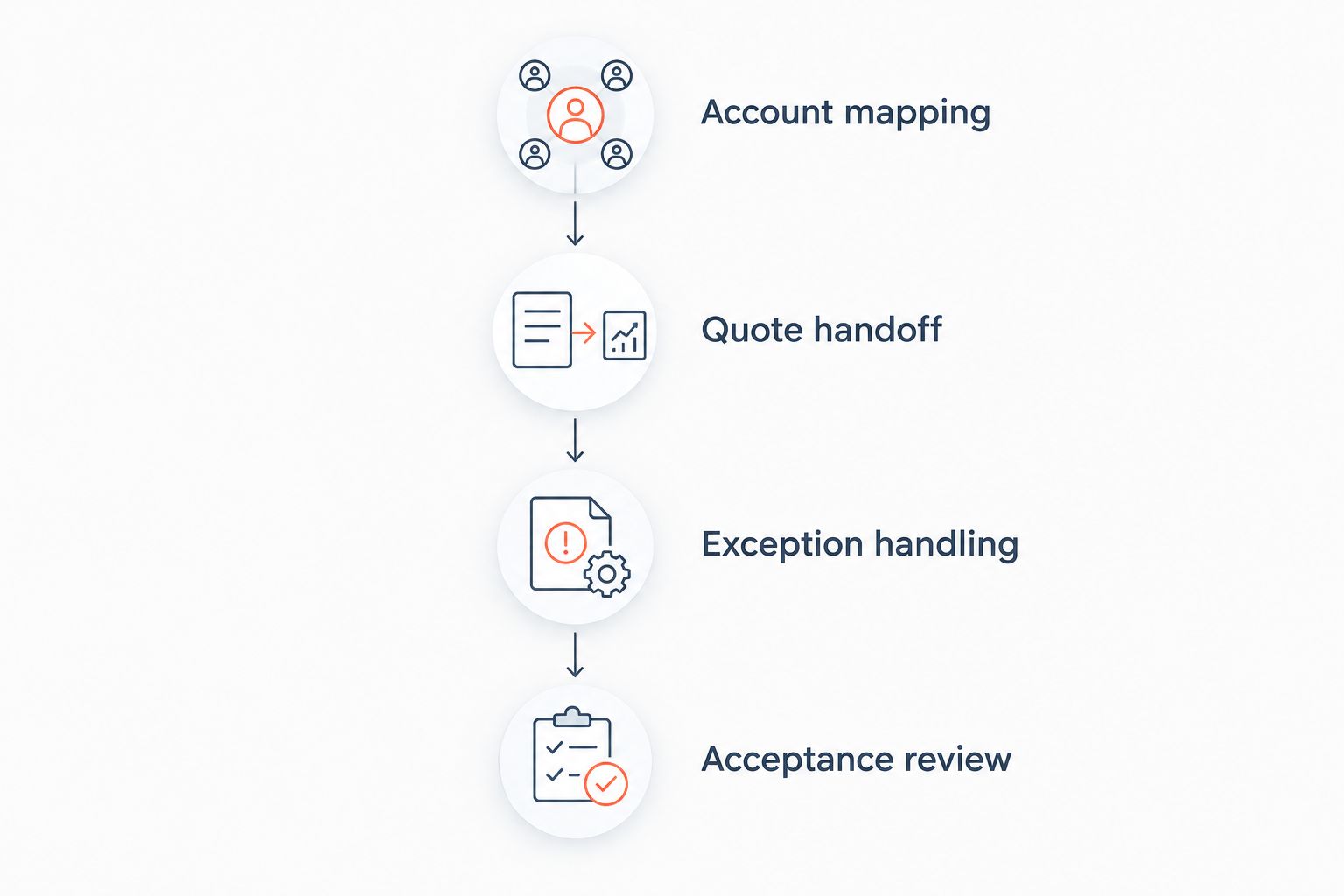
A successful pilot ends with documented responsibilities, not merely populated records. If sales can update an opportunity but operations cannot identify the approved quote, the handoff remains unresolved.
Which CRM should you choose?
Start your 2026 shortlist with Salesforce Sales Cloud if you need a configurable CRM for complex contractor and project relationships. Choose HubSpot for a more focused pipeline requirement, or Microsoft Dynamics 365 Sales when Microsoft alignment is a central requirement.
Keep your current CRM if relationship management already works and the unresolved problem is quoting, order entry, or follow-up execution. A replacement CRM is the wrong first move when it leaves the same manual handoffs intact.
Before signing, assign an owner for account data, an owner for transactions, and an owner for exceptions. Require those people to approve the pilot together.
FAQ
What's the best CRM software for HVAC equipment distributors?
Salesforce Sales Cloud is the default shortlist choice for complex account structures and configurable sales processes. HubSpot suits straightforward pipeline management, while Microsoft Dynamics 365 Sales suits Microsoft-centered teams. Confirm the choice through a workflow pilot using your actual ERP and account relationships.
Is HubSpot better than Salesforce for an HVAC distributor?
HubSpot is the more relevant shortlist option when straightforward pipeline management is the main requirement; Salesforce Sales Cloud is the stronger starting point for extensive configuration. Compare the account model, administrative responsibilities, and quote handoff rather than choosing by brand recognition.
Can a CRM replace our distribution ERP?
Do not select a CRM as an assumed replacement for your distribution ERP. Assign inventory, financial records, credit controls, and order execution to an explicitly defined system, then establish how the CRM exchanges the required information.
Is Supplyco a CRM replacement?
Supplyco is described as a revenue operations platform for quoting, order entry, account management, and sales follow-up automation. Evaluate that scope separately from the requirements for your core CRM and require demonstrations of any additional functionality you need.
Will Microsoft Dynamics 365 Sales connect to our ERP automatically?
Do not assume automatic ERP connectivity from Microsoft ecosystem alignment. Confirm the exact applications, supported records, synchronization direction, and exception process in a working demonstration.
How should an HVAC distributor test CRM software?
Use the same customer accounts and quote scenarios across every shortlisted platform. Test account relationships, revised quotes, ownership changes, accepted-order handoffs, and incomplete information before approving the workflow.
Should we choose HVAC field-service software instead of a CRM?
Choose according to the work your team performs: equipment distribution requires account, opportunity, quote, and order coordination, while field-service requirements concern service execution. If your business performs both roles, document both workflows instead of treating the software categories as interchangeable.
One last thing
Ask every finalist to demonstrate a quote that changes after the initial submission. Then ask the sales rep and the order-entry team to independently identify the approved version.
If they cannot identify the same approved quote, do not automate the handoff yet. Fix the ownership and version rules first; otherwise, the new system preserves the ambiguity.