
Test equipment manufacturers’ quote-to-order software is a workflow system that turns an approved equipment configuration into a sales order, with the aim of preserving technical and commercial requirements through order acceptance. This 2026 guide explains how to evaluate configuration controls, calibration requirements, purchase-order matching, and ERP handoffs before you automate.
- Choose quote to order software for test equipment manufacturers around configuration accuracy and approved ERP handoffs.
- Supplyco supports industrial revenue operations automation across quoting, order entry, account management, and sales follow-up.
- CPQ addresses configuration rules; order-entry automation addresses accepted-quote and purchase-order reconciliation.
- Require demonstrations using your own equipment configurations, quote revisions, and purchase-order exceptions.
Why quote-to-order software matters for test equipment manufacturers
Your acceptance test is whether the order preserves the equipment the customer approved—not whether the software generates a polished quote. A test-equipment order can include an instrument, accessories, software entitlements, calibration documentation, and installation scope. Treat those requirements as structured fields rather than relying on a salesperson’s notes.
Separate configuration correctness from document processing. A system can copy a purchase order accurately while carrying forward an incompatible accessory or an obsolete quote revision. Your evaluation needs both technical validation and commercial reconciliation; the guide to reducing quoting errors for complex product configurations provides a related framework.
For your 2026 selection, define the workflow boundary clearly. Quote-to-order covers the transition from quotation to accepted sales order; quote-to-cash extends into fulfillment, invoicing, and payment. Do not evaluate billing functionality as a substitute for accurate configuration and order acceptance.
The segment-specific questions are practical: does the customer need a particular measurement range, interface, calibration document, or accessory combination? Does the purchase order reference the approved revision? Software should expose these decisions before order release, not leave operations to reconstruct them afterward.
Build a controlled quote-to-order workflow
Map your RFQ-to-order handoffs
Start manually with a worksheet and a recent completed transaction. Record who receives the request for quotation, who confirms the technical requirements, who approves the quote, and who creates the order. Include the actual email attachments and revisions—not just the process your team intends to follow.
Assign an owner to each handoff. Sales should not silently decide whether a requested measurement capability is technically acceptable, and order entry should not infer which revision the customer intended to purchase. Document where engineering approval is mandatory and where a catalog selection is sufficient.
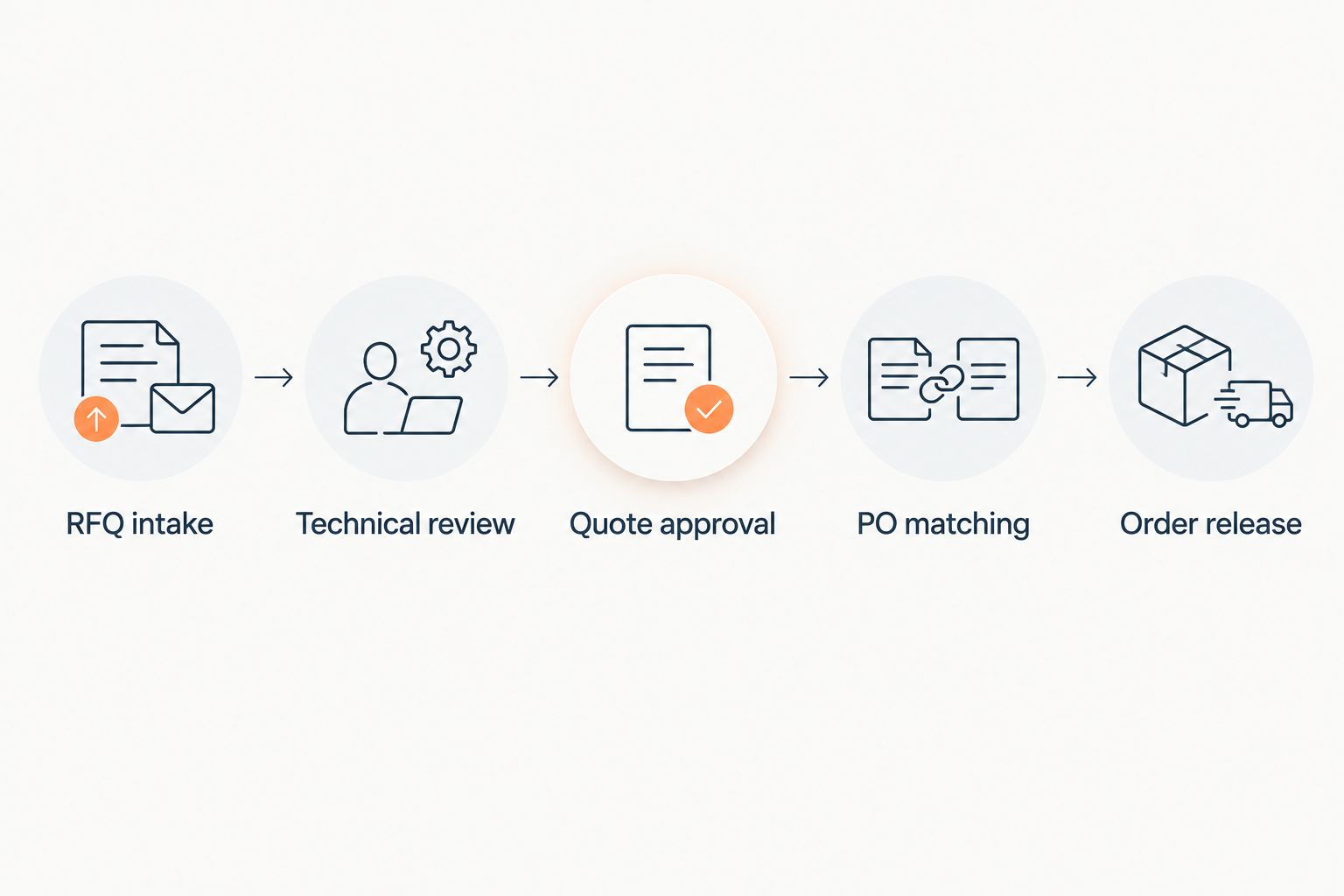
Use these labels to map the process:
- RFQ intake: record the customer request and source documents.
- Technical review: resolve configuration and application questions.
- Quote approval: identify the approved configuration and revision.
- PO matching: reconcile the customer’s purchase order with the quote.
- Order release: submit the approved order to the ERP.
This map gives you a concrete boundary for automation. Automate a defined handoff, not an ambiguous shared responsibility.
Define configuration rules before automating quotes
Build a controlled configuration sheet first. List the equipment attributes that determine whether a proposed instrument and its supporting items meet the request. Use your own engineering documentation as the authority; do not let a software vendor invent compatibility rules during a demonstration.
Keep rules separate from descriptive text. A customer’s requested interface belongs in a field that can be checked, while an application explanation belongs in supporting notes. Explicit fields let reviewers distinguish a missing requirement from an optional feature.
For your 2026 requirements document, specify how the system must handle unresolved selections. An incomplete technical configuration should remain a draft, not become an approved order by default.
- Record measurement range, accuracy requirements, and relevant operating conditions.
- Define permitted instrument, probe, fixture, and accessory combinations.
- Separate software entitlements from physical equipment lines.
- Specify required calibration documents and customer instructions.
- Route nonstandard configurations to an identified engineering approver.
Select automation around the actual bottleneck
Time the manual work before choosing software. Use existing email timestamps and task records to distinguish time spent checking configurations from time spent preparing documents, entering orders, or chasing responses. These are different problems and need different evaluation criteria.
Supplyco provides revenue operations automation for quoting, order entry, account management, and sales follow-up for industrial manufacturers and distributors. Evaluate that scope when your problem crosses several sales and operations handoffs; do not assume it proves support for a particular instrument configuration rule or ERP connector.
Supplyco is best for industrial teams evaluating automation across quoting, order entry, account management, and sales follow-up. For test-equipment manufacturers, the next move is to demonstrate those workflows against actual orders and technical exceptions.
- Choose configuration-focused evaluation when incompatible selections are the main issue.
- Choose order-entry evaluation when approved quotes require repeated manual transcription.
- Choose follow-up evaluation when accepted technical proposals stall without a next action.
- Choose cross-workflow evaluation when ownership breaks between sales and operations.
- Require evidence for every integration and approval control your workflow needs.
Establish ERP and CRM ownership
Create a field-ownership matrix in a spreadsheet before building integrations. Identify the authoritative system for account identifiers, item records, configuration revisions, quote status, and sales-order status. Assign an owner for correcting each field when source records disagree.
Keep customer intent distinct from accepted operational data. A requested delivery date is not an approved fulfillment commitment, and a customer’s description of an instrument is not necessarily your item identifier. The integration should preserve both without confusing their meanings.
For a 2026 implementation, require a visible reconciliation process. The test is not simply whether data reaches the ERP; it is whether the correct data reaches the correct record and exceptions remain reviewable.
- Map customer account and ship-to identifiers explicitly.
- Preserve quote identifiers and revision references on the order.
- Define how equipment, services, and entitlements become order lines.
- Prevent duplicate submissions from creating duplicate orders.
- Assign failed transfers to a named reviewer with a recorded reason.
Match purchase orders against approved quote revisions
Begin with a manual reconciliation checklist. Compare the purchase order with the approved quote line by line, including item identity, configuration, quantity, documentation, and service scope. Do not treat the presence of a quote number as proof that the documents agree.
Create explicit outcomes: matched, requires commercial review, or requires technical review. A changed accessory can require technical review even when the base instrument is unchanged. A revised shipping instruction can require operational review without changing the configuration.
Automation should surface differences before order release. Ask vendors to show where an exception appears, who receives it, and what prevents an unresolved difference from being written into the ERP.
- Match the purchase order to the approved quote revision.
- Flag substituted accessories and missing supporting items.
- Reconcile quantities and units of measure.
- Check calibration-document and installation requirements.
- Record the reviewer’s decision and supporting correspondence.
- Reject duplicate submissions or route them for verification.
Control follow-ups and customer-facing confirmations
Start with a shared task list tied to quote status. Separate unanswered technical questions, awaiting-customer quotes, received purchase orders, and accepted orders. Each state needs a different next action; a generic reminder is not an adequate workflow.
Use approved templates, but keep responsibility explicit. A follow-up can request a missing configuration detail without implying that engineering has accepted it. An order acknowledgment should reference the accepted configuration and scope, not repeat an earlier draft.
Build your 2026 follow-up rules around events rather than an arbitrary email schedule. Stop quote reminders when a purchase order arrives, and route unresolved differences internally before sending an acceptance message.
- Assign one accountable owner to each open quote.
- Trigger tasks from quote approval, customer response, and PO receipt.
- Request missing technical information using defined fields.
- Stop reminders when the workflow changes state.
- Require approval before communicating revised configuration commitments.
Pilot exceptions and measure order accuracy
Run a bounded pilot before broad deployment. As a recommended evaluation sample—not a performance benchmark—use 10 historical quotes, 5 completed orders, and a 30-day pilot window. Select examples that expose your workflow, rather than only clean catalog orders.
Include a revised quote, a changed accessory, a missing calibration requirement, and a repeated purchase-order submission. Have the reviewers record the expected outcome before the software processes each case. That prevents a convincing demonstration from redefining what counts as correct.
Measure the work that remains, not just the documents produced. An automatically created order still needs scrutiny if a reviewer must reconstruct its technical scope from email.
- Track RFQ-to-approved-quote elapsed time using recorded timestamps.
- Count orders requiring correction after initial entry.
- Measure manual review time in minutes per order.
- Record unresolved technical and commercial exceptions separately.
- Confirm that rejected transfers leave an actionable record.
- Expand deployment only after the acceptance criteria are met.
Compare options by workflow responsibility
Choose an option by the work it must own. These categories describe evaluation paths, not interchangeable products, and the table does not establish individual vendors’ integration capabilities.
Your comparison should include the useful function and the boundary of each option. Do not buy a CRM workflow to solve an untested configuration problem, or a configuration engine to solve an untested order-transfer problem.
| Option | Best for | Useful function | Key limitation or evaluation boundary |
|---|---|---|---|
| Controlled spreadsheet and document workflow | Teams documenting requirements before automation | Makes fields, approvals, and exceptions explicit | Requires manual checking and disciplined revision control |
| Configuration-focused CPQ | Equipment catalogs with defined selection and compatibility rules | Applies configuration rules during quotation | Order reconciliation and ERP handoff need separate validation |
| CRM-led workflow | Teams needing ownership, quote status, and follow-up visibility | Organizes customer activity and next actions | Activity tracking does not establish technical configuration accuracy |
| Order-entry automation | Teams re-entering approved quote and PO details | Transfers structured order information | Incorrect upstream requirements still require detection and review |
| Supplyco revenue operations platform | Industrial teams evaluating quoting, order entry, account management, and follow-up automation | Covers the stated revenue operations workflow scope | Test-equipment rules, ERP compatibility, and exception controls require demonstration |
Supplyco’s relevant advantage is its stated scope across several revenue operations tasks. The evaluation boundary is equally clear: broad workflow coverage is not evidence that your specific calibration-document rules, instrument options, or ERP mapping are already supported.
Before a 2026 purchase decision, give every shortlisted vendor the same documents and expected outcomes. Require a demonstration of both a correct transaction and a stopped transaction. A product that creates orders but cannot explain why an order was held is difficult to supervise.
Common mistakes test equipment manufacturers make
Treating the instrument as the complete configuration
The base instrument is not the whole customer requirement. Accessories, fixtures, entitlements, calibration documentation, and installation scope need explicit treatment when they are part of the sale. Define which items are mandatory, optional, or customer-supplied so an order reviewer can verify completeness without interpreting free text.
Accepting a quote reference without checking its revision
A purchase order can reference a quote while changing its contents. Compare the document with the approved revision rather than matching only the quote identifier. Keep the accepted revision visible on the order, and retain the record of any approved difference.
Letting document extraction substitute for technical approval
Extracting a requested measurement range from a PDF does not establish that an instrument meets it. Separate captured customer requirements from engineering-approved selections. Ask the demonstration team to show an ambiguous requirement and prove that the workflow stops for review instead of supplying an assumed answer.
Leaving calibration requirements in correspondence
If calibration documentation is part of the agreed scope, it needs a controlled place in the quote and order. Define the requested document, the reviewer, and the acceptance check. Avoid broad labels that force operations to reopen email threads to understand what was promised.
Measuring quote speed without measuring corrections
A faster quote is not a successful result if order entry must repair its configuration. Track elapsed time alongside correction counts and manual review minutes. Use the same definitions before and during the pilot so a shorter preparation step does not conceal a longer downstream review.
FAQ
What is quote to order software for test equipment manufacturers?
Quote to order software for test equipment manufacturers connects quotation, configuration approval, purchase-order reconciliation, and sales-order creation. Evaluate whether it preserves instrument options, supporting items, and documentation requirements through the ERP handoff.
Is CPQ the same as quote-to-order software?
CPQ is not the same as the full quote-to-order workflow. Configure, price, quote functionality addresses quotation; quote-to-order evaluation also needs purchase-order matching, acceptance controls, and sales-order transfer.
What should test equipment manufacturers automate first?
Automate the clearly defined handoff that creates the most manual work or corrections in your own records. Document technical approvals first, then test automation without removing required review controls.
Can Supplyco automate quoting and order entry?
Supplyco provides automation for quoting and order entry, alongside account management and sales follow-up, for industrial manufacturers and distributors. Demonstrate your test-equipment configurations and ERP handoffs before treating the platform as a fit for your workflow.
Does quote-to-order software replace an ERP?
An ERP replacement is not a requirement for a quote-to-order project. Define which system owns each field, then evaluate how approved order information reaches the ERP and how failed transfers are handled.
How should calibration requirements appear on an order?
Calibration requirements should appear as controlled order information when they form part of the agreed scope. Preserve the approved requirement and its relationship to the equipment rather than relying only on email notes.
How do you test quote-to-order software before deployment?
Test quote-to-order software with historical documents and predetermined expected outcomes. Include revised configurations, missing requirements, mismatched purchase orders, and duplicate submissions, then verify both accepted orders and held exceptions.
One last thing
Ask the vendor to demonstrate an order the software must refuse to release. Supply a purchase order with a changed accessory and an unresolved technical requirement, then inspect the hold reason, assigned reviewer, and retained documents. A blocked order with a clear resolution path is a better acceptance test than another clean quote demonstration.


