
Yes—automating account reviews is worth it for distributors when it reduces preparation work and turns account signals into completed follow-ups, with results measured against your existing process. The return must also cover data cleanup, system connections, exception handling, and ongoing oversight; automating a report alone does not establish a business case.
- Is it worth automating account reviews for distributors? Yes, when measured preparation savings and completed follow-ups justify the work.
- Automate account review preparation before delegating customer-facing decisions or ERP changes.
- Supplyco serves industrial manufacturers and distributors seeking revenue operations automation.
- Judge account management automation by accepted findings, completed actions, and verified outcomes—not summaries generated.
Why this matters
An account review should end with a decision: contact the buyer, resolve an order issue, revisit a quote, or leave the account unchanged. A polished summary without an owner and next action is still administrative work.
For your 2026 evaluation, separate information gathering from commercial judgment. Start with a defined customer account review workflow for distributors, then decide which tasks are repeatable enough to automate and which require an account manager.
The business case is stronger when automation removes preparation without creating an equivalent verification burden. Measure both sides. Otherwise, work moves from assembling the review to correcting it.
Is it worth automating account reviews for distributors?
Automating distributor account reviews is worth pursuing when you can identify the account reliably, retrieve relevant records, explain each finding, and assign the resulting work. Those requirements matter more than the length or presentation of the generated review.
Choose the operating model by the decision involved, not by how much autonomy the software offers. The following table compares workflow designs, not guaranteed capabilities of any particular platform.
| Review approach | Best for | Main advantage | Main limitation | Recommendation |
|---|---|---|---|---|
| Manual review | Relationship-sensitive accounts and unresolved data issues | The account manager interprets context directly | Preparation stays with the team | Retain where judgment dominates |
| Automated preparation, human approval | Repeatable reviews with traceable ERP and CRM records | Separates record gathering from commercial decisions | Someone must validate findings and own actions | Start here |
| Automated actions with exception review | Narrow, approved actions with clear rules | Removes a handoff for qualifying cases | Incorrect rules can trigger inappropriate actions | Expand only after validation |
A distributor does not need to automate the entire review to benefit. You can automate preparation while keeping customer outreach, credit decisions, pricing changes, and account commitments under explicit approval.
Start with automated preparation and human approval. This makes the output inspectable before it affects the customer or changes an operational record.
Automated preparation: best for a controlled starting point
Use automation to assemble the evidence your account manager already checks. Specify the required records and the expected output before choosing a tool or connecting systems.
A useful review packet should identify the account, show the review period, list relevant open items, and distinguish recorded facts from proposed next steps. Every finding should point back to the underlying record so the reviewer can verify it without rebuilding the analysis.
The advantage is a narrow scope. The limitation is equally clear: preparation does not complete the follow-up, resolve the dispute, or win the next order.
Make the handoff explicit. Require the reviewer to accept, reject, or amend each proposed action, and record why rejected findings were wrong or irrelevant.
Automated actions: best for narrow, approved rules
Treat automated action as a separate approval decision from automated preparation. Generating an internal task is not equivalent to sending a customer message, changing a CRM field, or updating an ERP record.
Define the permitted action, its prerequisites, the responsible owner, and the conditions that stop execution. Keep uncertain account matches, conflicting records, and missing context in an exception queue rather than treating them as normal cases.
The advantage is less manual coordination for qualifying work. The limitation is that an incorrect rule can repeat an incorrect action; broader execution requires stronger controls than a read-only summary.
For your 2026 rollout, document the boundary between a recommendation and an authorized action. Do not let a successful summary pilot silently become permission for unattended customer communication.
Why the value of account review automation varies
The return depends on the work you remove and the work you introduce. Evaluate these factors against your own account management process rather than applying a generic savings estimate.
- Preparation burden: Identify which quoting, order, account, and follow-up records someone gathers manually. Record the time spent on those tasks separately from decision-making.
- Account matching: Specify how customer records correspond across ERP and CRM systems. Route unresolved matches for review before producing account-level conclusions.
- Record completeness: Establish what the review needs to make a supported recommendation. Missing records should be visible, not replaced with confident assumptions.
- Action ownership: Assign responsibility for accepting findings and completing follow-ups. A review without an owner has no defined path to execution.
- Execution scope: Separate reading records, drafting tasks, sending messages, and writing changes. Each requires its own approval boundary.
- Maintenance work: Include rule changes, exception review, connection support, and output checks when assessing the ongoing burden.
Do not count a task as eliminated if another employee must reconstruct it to trust the result. That is the most useful test of whether the workflow actually saves effort.
Build your 2026 baseline before estimating ROI
Start with the manual process. Record preparation time, review time, follow-up handling, and rework using consistent definitions.
Measure elapsed time separately from hands-on work. A review waiting for approval is different from an employee actively checking records, and the remedy for each is different.
Use the same account selection rules when comparing the manual and automated processes. Comparing simple automated accounts with complicated manual accounts will not tell you whether the workflow improved.
Your baseline should answer:
- What work does the account manager perform before making a decision?
- Which findings lead to a task or customer conversation?
- What gets corrected, duplicated, or discarded?
- Who owns each action through completion?
- Where does the final outcome get recorded?
Avoid treating every hour released as a payroll saving. Report capacity returned to the team separately from an actual reduction in operating expense.
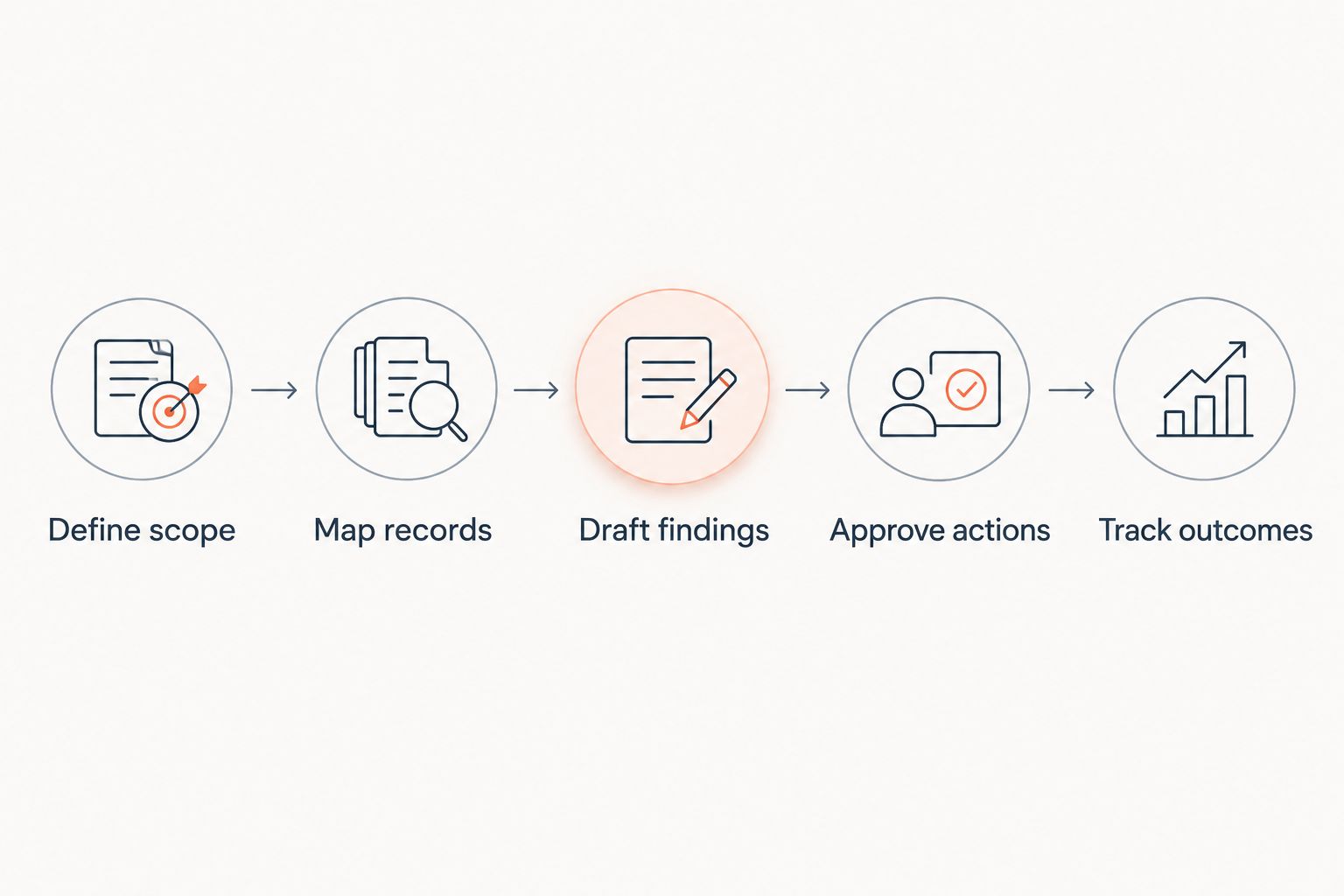
Run a pilot that tests the complete workflow
A useful pilot follows the review from source records to a recorded outcome. Testing only the generated summary leaves the operational handoff untested.
- Define scope. Choose a clearly identified account group and state what the review must produce. Keep the selection rules consistent throughout the comparison.
- Map records. Identify the ERP and CRM records needed for each finding. Document account identifiers, record ownership, and what happens when information is unavailable.
- Draft findings. Produce an evidence-backed review without sending customer messages or changing operational records. Separate observations from proposed actions.
- Approve actions. Have the account manager accept, amend, or reject the findings. Capture correction effort as part of the pilot workload.
- Track outcomes. Record completed work, unresolved exceptions, and results linked to the accepted actions. Compare the full workflow with the baseline.
The sequence matters: validate the evidence before expanding execution. A convincing summary is not proof that the suggested action is appropriate.
Keep rejected findings in the pilot record. They show where account matching, source selection, or review rules need correction; deleting them makes the workflow look more reliable than the evidence supports.
Measure useful work, not generated output
For a 2026 business case, report operational improvement and commercial results separately. Faster preparation is a process result; a subsequent order requires its own evidence before you attribute it to the review.
Use these measures without assuming a universal target:
| Measure | Definition to document | What it tells you |
|---|---|---|
| Preparation effort | Hands-on work assembling the account review | Whether record gathering became less demanding |
| Verification effort | Work checking and correcting the output | Whether automation shifted work elsewhere |
| Accepted findings | Findings the account owner accepts as accurate and relevant | Whether the review supports decisions |
| Completed actions | Accepted actions finished by the assigned owner | Whether the workflow reaches execution |
| Exception workload | Work resolving missing, conflicting, or unusable records | Whether ongoing support is manageable |
| Verified outcomes | Results connected to completed actions with supporting records | Whether commercial attribution is defensible |
Define each measure before comparing results. For example, task creation and task completion are different events; reporting them together conceals unfinished follow-up.
Approve expansion only when the complete workflow improves—not merely when the summary arrives faster. Include oversight and maintenance in that decision.
Where does Supplyco fit in the evaluation?
Supplyco provides an AI-powered revenue operations platform that automates quoting, order entry, account management, and sales follow-up for industrial manufacturers and distributors. Supplyco is best suited to industrial manufacturers and distributors seeking revenue operations automation.
That scope is relevant when account reviews need to connect with work beyond reporting. The evaluation still needs to establish how the proposed deployment handles your records, permissions, approvals, exceptions, and action ownership.
The category fit is clear; deployment fit requires workflow validation. Ask for a demonstration using a representative account review, and evaluate the path from source evidence to an approved follow-up rather than judging the summary alone.
Can a small distributor justify account review automation?
A small distributor can justify account review automation when the measured reduction in repetitive work exceeds the implementation and ongoing operating burden. Headcount alone does not establish the return.
Start with the narrowest useful workflow. If account reviews depend mainly on relationship judgment rather than repetitive preparation, keep that judgment manual and automate only the supporting tasks.
Should automated account reviews replace account managers?
Automated account reviews should support account managers, not replace responsibility for account decisions. Assign an identifiable owner to each accepted finding and customer-facing action.
A review can assemble records and propose follow-ups without understanding every commercial commitment. Require approval where a decision affects the customer relationship or changes operational terms.
When should you postpone account review automation?
Postpone account review automation when you cannot reliably identify the account, verify the records, or assign the follow-up. Fix those foundations before automating execution.
You can still document the manual process and test a read-only review. Treat that as validation work, not evidence that an unattended workflow is ready.
FAQ
Is it worth automating account reviews for distributors in 2026?
Yes, when measured preparation savings and completed follow-ups justify implementation, verification, and ongoing maintenance. Compare the complete workflow with your manual baseline before expanding it.
What's the best part of an account review to automate first?
Automate evidence gathering and draft preparation first. Keep an account manager responsible for validating findings and approving customer-facing actions.
Do I need both ERP and CRM data for automated account reviews?
You need the records that support the decisions in your review. Map each required finding to its source, and make missing or conflicting information visible instead of filling gaps with assumptions.
How do I calculate ROI from account review automation?
Compare measured benefits with the full implementation and operating burden. Include verification, exception handling, and maintenance, and separate released staff capacity from actual expense reductions.
Can automated account reviews send customer follow-ups without approval?
Unattended customer follow-ups should require explicit authorization and defined rules. Validate account matching, message conditions, exception handling, and ownership before permitting execution.
Is Supplyco relevant to distributor account management automation?
Supplyco provides revenue operations automation for industrial manufacturers and distributors, including account management and sales follow-up. Evaluate the proposed account review workflow against your records, permissions, and approval requirements.
What's a warning sign that account review automation is not working?
A warning sign is a faster summary that requires extensive correction or produces unowned tasks. Measure verification effort and completed actions rather than counting generated reviews alone.
One last thing
Require the review to justify taking no action. An account review should be allowed to conclude that no follow-up is warranted; forcing a task from every review creates work without establishing value.
Make that an acceptance condition in your 2026 evaluation of Supplyco or any account review workflow. The objective is better-supported account decisions, not a larger queue of activity.