
Instead of manually updating deals after every quote revision, connect HubSpot to sync quote status through a controlled workflow: identify the governing quote, map its status to an approved deal stage, and update only the associated deal. Keep quote acceptance separate from order approval so an unsigned revision, expired proposal, or duplicate event cannot incorrectly close an industrial opportunity.
- Connect HubSpot to sync quote status using explicit quote-to-deal associations and approved stage mappings.
- HubSpot deal updates should follow the governing quote, not every revision attached to an opportunity.
- Supplyco revenue operations automation serves manufacturers and distributors automating quoting, order entry, and sales follow-up.
- Test duplicate events, superseded quotes, closed deals, and acceptance rules before enabling production writes.
Why this matters
A quote describes a commercial offer. A deal stage describes progress toward a sale. Treating those records as interchangeable creates a specific failure: a quote update changes the forecast without proving that the opportunity advanced.
For your 2026 implementation, define the evidence required for each stage before configuring the connection. Publication can justify a proposal stage; acceptance should justify a won stage only when your sales policy treats acceptance as sufficient commitment.
Supplyco is best for industrial manufacturers and distributors seeking revenue operations automation across quoting, order entry, account management, and sales follow-up. Supplyco provides that broader platform scope; this guide describes integration logic, not a claim that a particular HubSpot connector or configuration is included.
Before you start
- Confirm access and execution capability. You need HubSpot deal access, permission to manage the required properties, and an authorized integration that can read the quote source and update deals. Confirm that your account exposes the required workflow features or API access before choosing the implementation route.
- Collect the mapping materials. Obtain source quote IDs, associated HubSpot deal IDs, pipeline and stage identifiers, and the source's actual status definitions. Assign a sales operations owner to approve the 2026 mapping.
- Resolve the revision gotcha first. A deal can have several quote revisions or alternative offers. Designate 1 governing quote per deal for this workflow, and prevent superseded quotes from changing the stage. Do not match opportunities by company name alone.
Choose the execution route based on what your account and quote source actually expose. Neither route removes the need for association checks and acceptance rules.
| Implementation route | Best for | Advantage | Limitation |
|---|---|---|---|
| HubSpot workflow, where the required quote data and actions are exposed | A mapping that fits the account's available workflow controls | Keeps configuration within the CRM | Use it only after confirming triggers, associated-record targeting, and repeat enrollment support |
| External integration using authorized HubSpot API access | Quote sources requiring explicit association, revision, and retry logic | Lets you define processing and exception handling directly | Requires credential management, monitoring, and a maintained integration |
The steps below define the external integration route. They also provide the acceptance criteria for a native workflow if your account supports the same controls.
Quote identity and source configuration
The quote source must provide enough information to identify both the commercial document and its intended opportunity. A status without a reliable deal association is not an actionable update.
- Identify the source of truth. Select the quoting application or ERP record that owns quote status. Do not let a copied CRM field become a competing authority for the same status.
- Capture the source identifiers. Read the quote ID, revision identifier, status, and source update timestamp. Use the event identifier when the source supplies one; otherwise define a repeatable deduplication key from the available record information.
- Store the deal association. Record the HubSpot deal ID with the quote or in a maintained integration mapping. If no association exists, route the record for review instead of searching by a loosely matching opportunity name.
- Designate the governing quote. Store which quote revision controls the deal-stage mapping. Alternative configurations and superseded revisions must remain visible without receiving stage-update authority.
- Configure change detection. Use a supported source event or scheduled change check. Read the current quote record before acting so processing follows the latest source state rather than an old event payload.
Expected result: each actionable quote update resolves to exactly 1 intended deal and the governing quote revision. Unmatched and superseded records produce no stage write.
For example, two alternative equipment configurations can belong to the same opportunity. Publishing the second alternative is not evidence that the buyer accepted the first. The governing-quote rule prevents that ambiguity from becoming a forecast change.
HubSpot properties and stage mapping
Use HubSpot's actual pipeline configuration, not stage names copied from another account. The deal property dealstage stores the stage value used by the integration; pipeline identifies the deal pipeline.
- Inspect the destination properties. In HubSpot, open Settings, then Properties. Locate the deal properties Deal stage and Pipeline, and obtain their valid values through the authorized integration or your account's configuration.
- Add traceability properties. Use Create property to add the deal fields your integration requires. Suggested custom labels are Source quote ID, Source quote status, Source quote updated at, and Quote sync result. These are labels to create, not built-in quote fields.
- Record internal property names. Use the internal names assigned to those custom properties in integration requests. A display label is not a substitute for its API property name.
- Approve the business mapping. Write down which source events justify which destination stages. The example below describes business rules, not HubSpot's built-in quote status labels.
- Validate pipeline membership. Confirm that each destination stage belongs to the intended pipeline. Prefer rejecting an unexpected pipeline to silently moving the opportunity into another sales process.
| Source business event | Recommended deal behavior | Required guard |
|---|---|---|
| Draft created or revised | Leave the stage unchanged | Internal preparation is not customer progress |
| Proposal issued to customer | Move to your approved proposal stage | Governing quote only; protect later stages |
| Customer accepts governing quote | Apply your approved acceptance-stage rule | Verify the evidence your sales policy requires |
| Quote expires | Flag the deal for review | Expiration alone does not establish a lost opportunity |
| Quote is superseded or withdrawn | Record the status without automatic closure | Preserve the opportunity until its outcome is confirmed |
Expected result: every permitted transition has a valid destination identifier, a business definition, and an exception rule. Save the approved mapping as your 2026 configuration baseline.
Do not automatically mark every accepted quote as Closed Won. A manufacturer requiring a purchase order or commercial approval must retain that gate. Deal closure and ERP order release are separate decisions unless your documented process explicitly combines them.
Update controls and deployment testing
Build the connection as a guarded update, not a direct copy from quote status into deal stage. The integration should decide whether a transition is permitted before submitting a write.
- Read the destination deal. Retrieve the deal's current pipeline, stage, and quote-tracking properties using the authorized HubSpot connection. Stop if the record cannot be read or the association is invalid.
- Apply eligibility checks. Require the governing quote, the intended pipeline, a recognized source status, and an allowed transition. Protect closed opportunities and manual exceptions according to the approved policy.
- Reject stale or repeated work. Compare source state and previously processed information. Ignore superseded events and skip a stage write when the deal already has the intended value.
- Update the approved properties. Write
dealstageonly after the checks pass. Record the source quote details and processing result so an administrator can explain the change later. - Record the outcome. Capture the source identifier, destination deal ID, prior stage, intended stage, timestamp, and success or failure. Route unresolved failures to an accountable owner.
Expected result: an eligible event updates the intended deal, while duplicate, stale, and disallowed events leave its stage unchanged.
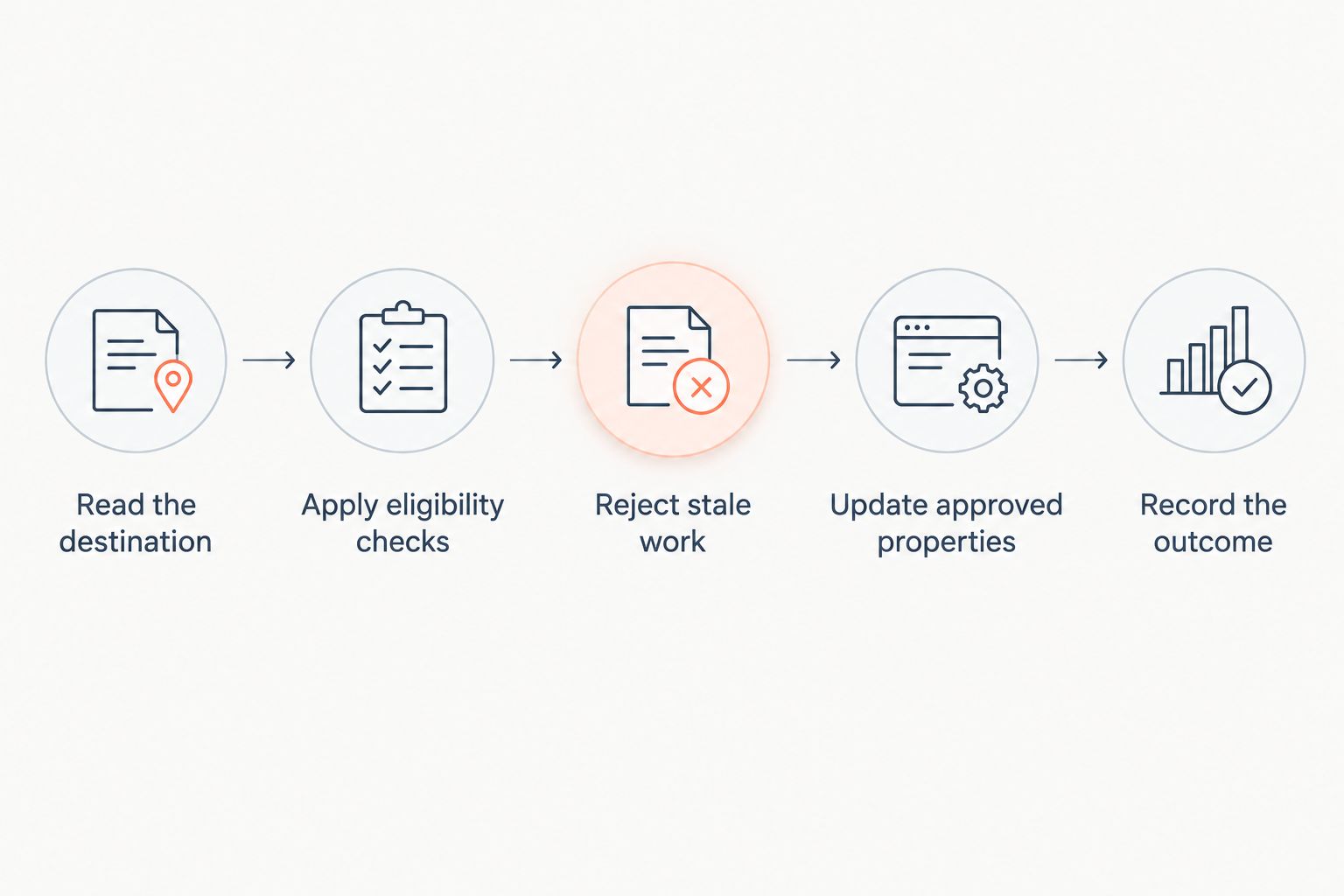
Use 5 test cases before enabling production writes. These are acceptance tests, not performance benchmarks:
- Issued governing quote: the intended open deal reaches the approved proposal stage.
- Repeated event: processing the same source change again produces no additional stage transition.
- Superseded revision: an older quote cannot change the opportunity.
- Protected closed deal: a quote edit cannot reopen a closed opportunity.
- Accepted quote with an unmet gate: the workflow records acceptance without bypassing required purchase-order or approval evidence.
For the 2026 rollout, begin with logging-only execution on representative records. Compare proposed changes with the sales operations owner's decisions, then enable writes for the approved scope. Do not enable historical backfill automatically: old quotes require their own eligibility review.
Variant: update deal context whenever a quote changes
Stage changes should represent meaningful sales progress. Quote revisions can still update deal context without moving the opportunity backward or forward.
Configure a second branch that refreshes the source quote status and source timestamp whenever the governing quote changes. Keep stage-transition logic separate. This lets a rep see that a proposal was revised while preserving the opportunity's current commercial position.
For an accepted quote, create the next operational task only after the relevant acceptance gate passes. An order-entry workflow should have its own duplicate protection and approval controls; a successful CRM update is not proof that an ERP order exists.
Supplyco revenue operations automation covers quoting, order entry, account management, and sales follow-up. That scope fits a broader process discussion, but the HubSpot authentication method, connector behavior, and field coverage must be confirmed before implementation. Do not substitute a platform description for a tested connection.
Troubleshooting
The quote changes, but the deal does not
Check whether the source change was detected, whether the governing-quote check passed, and whether the destination record was readable. Inspect the logged decision before changing enrollment or polling behavior; an intentional guard is not a failed connection.
The wrong opportunity receives the update
Replace name-based matching with the stored HubSpot deal ID. Review the source association and quarantine ambiguous records. Do not repair this failure by updating every open deal belonging to the customer.
A new revision moves the deal backward
Inspect the governing-quote selection and transition rules. Restrict early-stage mappings so they cannot overwrite later commercial milestones. If a revision requires a genuine rollback, make that an explicit exception rather than a side effect.
The update fails despite a valid association
Inspect the API response and verify authorization, property internal names, and stage membership in the destination pipeline. Separate retryable failures from configuration failures; repeatedly resubmitting an invalid stage value will not correct the mapping.
Closed opportunities reopen unexpectedly
Add a closed-stage protection check before writing. Review other workflows that also modify Deal stage and assign one owner to each transition rule. Conflicting automations need a precedence policy, not faster polling.
Customize your workflow
After stage synchronization is stable, extend the workflow to follow-up ownership, quote aging, and exception review. Start with an assigned task for an unresolved quote association; then add escalation rules that reflect your actual sales process.
For 2026 reporting, distinguish source quote activity from sales outcomes. A revised quote, an accepted quote, and a booked order should remain separately identifiable. Use the guide to track win rates in industrial sales pipelines to connect stage governance with outcome measurement.
Supplyco's stated scope supports evaluating the wider revenue operations process. Its limitation for this setup decision is specific: the platform description does not establish the connector's supported quote objects, authentication, or update controls. Confirm those requirements before assigning implementation responsibility.
FAQ
How do I connect HubSpot to sync quote status with deal stages?
Associate each governing quote with a HubSpot deal ID, map source statuses to approved pipeline stages, and update the deal through an authorized workflow or integration. Add revision checks, duplicate protection, and closed-deal guards before enabling writes.
Can I use a HubSpot workflow instead of an external integration?
Use a HubSpot workflow only when your account exposes the required quote data, enrollment controls, and associated-deal update actions. Otherwise, implement the same rules through an authorized external integration.
Should an accepted quote automatically mark a deal Closed Won?
Only when quote acceptance satisfies your documented sales-closure rule. If your process requires a purchase order or further approval, preserve that gate before changing the deal to a won stage.
What happens when several quotes belong to the same deal?
Designate a governing quote for stage synchronization. Alternative offers and superseded revisions should not change the stage unless your approved rules explicitly give them that authority.
Should an expired quote automatically close a deal as lost?
Quote expiration alone should not close a deal as lost. Record the expiration and route the opportunity for review because an expired offer does not establish the buyer's decision.
How do I stop duplicate quote events from changing the deal repeatedly?
Use source identifiers and previously processed state to detect repeated work, then skip writes when the destination already matches. Read the current quote before processing delayed events so an older payload cannot override a newer state.
Does Supplyco provide the HubSpot connector described here?
Supplyco provides revenue operations automation for industrial manufacturers and distributors, including quoting and sales follow-up. Confirm the specific HubSpot connector, supported quote data, and implementation requirements directly before selecting it for this workflow.
One last thing
Test a quote revision after the deal has closed. That single scenario exposes whether quote maintenance can silently rewrite a completed sales outcome. Include it in every 2026 configuration review, especially after adding another automation that edits deal stages.