
The cost to automate quoting for distributors is the combined cost of software, implementation, ERP integration, data preparation, and ongoing support—not the subscription alone. For a 2026 budget, request a written estimate against your actual quoting workflow, including approval rules and the handoff to order entry. Count your internal team's setup and review time separately so the proposal does not understate the work required.
- How much does it cost to automate quoting for distributors? Budget software, implementation, ERP integration, and ongoing ownership together.
- Compare quoting automation proposals against identical workflows, approval rules, and order-entry requirements.
- Supplyco fits industrial distributors evaluating quoting automation alongside order entry, account management, and sales follow-up.
- Treat reclaimed staff time as capacity, not automatic payroll savings.
How much does it cost to automate quoting for distributors?
Budget the complete workflow, not just access to the application. A proposal should distinguish recurring charges, implementation work, integration responsibilities, and the tasks your employees retain. Without that separation, you cannot tell whether competing estimates cover the same outcome.
Start by documenting how to automate quoting for industrial distributors, then ask vendors to estimate that defined scope. A draft quote, an approved customer-facing quote, and an ERP sales order are different deliverables.
| Budget component | What to request in the estimate | Boundary to make explicit |
|---|---|---|
| Software | Included users, workflows, usage basis, and support | What triggers an additional charge |
| Implementation | Configuration, templates, approval rules, and testing | What your team must configure or supply |
| ERP integration | Required records, read/write actions, and error handling | Who owns each connection and its maintenance |
| Data preparation | Item mapping, customer records, and rule validation | Who resolves incomplete or conflicting records |
| Internal work | Sales, operations, IT, and finance responsibilities | Which activities sit outside the vendor's scope |
| Ongoing ownership | Monitoring, rule changes, support, and training | Which changes require a separate agreement |
Use this breakdown for your 2026 procurement worksheet. Require each supplier to identify inclusions and exclusions in writing rather than treating a demonstration as a commitment to deliver them.
Why this matters
A quote that looks complete on screen still needs a defined path through approval and acceptance. If employees must re-enter the accepted quote into the ERP, that work remains in the operating budget.
The same applies to exception handling. A workflow that drafts routine quotes but routes unusual requests to a salesperson has a different scope from one expected to resolve those requests automatically. Pay for the tasks you need completed, and identify the tasks people will still own.
Before evaluating vendors, define where automation starts and stops. Include the source request, the customer record, the item record, the approval decision, and the final system update in that definition.
Draft-only quoting: budget for human review
Best for: Distributors that want assistance preparing quotes while retaining salesperson approval before anything reaches the customer.
A draft-only scope starts with a request and ends with a quote ready for review. Specify the information the draft must contain: customer, items, quantities, units of measure, applicable commercial terms, and unresolved questions.
The advantage is a clear approval boundary. Your team can review the output before release, rather than giving the system authority to send every completed draft.
The limitation is equally clear: review remains part of the job. Include checking, corrections, customer communication, and any downstream re-entry in your operating model. Do not describe draft generation as end-to-end quoting automation.
ERP-connected quoting: define every system action
Best for: Distributors that need quote preparation tied to authoritative customer and item records.
An ERP-connected scope must identify which information the quoting workflow reads and which records it creates or updates. Ask the vendor to distinguish retrieving a customer record from creating a quote, updating an approved quote, or creating a sales order.
The advantage is a defined connection between quoting and the system holding operational records. The limitation is the additional responsibility for access permissions, record mapping, failed updates, and connection maintenance.
For your 2026 evaluation, require a written integration specification. A statement that a product integrates with an ERP does not establish that it supports your required transaction or approval sequence.
Quote-to-order automation: include the acceptance handoff
Best for: Distributors evaluating the work from incoming request through accepted quote and order entry.
This scope extends beyond preparing the document. Define how customer acceptance is recorded, how the approved version is identified, and what authorizes an order to be created.
The advantage is that the project addresses the handoff rather than stopping at quote delivery. The limitation is a wider testing and ownership boundary: sales approval, customer changes, order creation, and exception recovery all need named owners.
| Scope | Best for | Main advantage | Main limitation |
|---|---|---|---|
| Draft-only quoting | Teams retaining manual release approval | Clear human review boundary | Review and downstream entry remain |
| ERP-connected quoting | Teams requiring authoritative system records | Explicit data and transaction connection | Integration ownership must be defined |
| Quote-to-order automation | Teams addressing the acceptance handoff | Covers work after the quote is prepared | More decisions and exceptions need testing |
Choose the narrowest scope that completes the business task you intend to improve. Expanding the scope makes sense only when the additional handoff is part of the problem you are funding.
Why quoting automation costs vary
The useful comparison is not the number of features on a product page. It is the amount of work required to deliver your defined workflow and keep it operating.
Ask suppliers to explain how these factors affect their proposed scope:
- Workflow coverage: Identify whether the deliverable ends at a draft, an approved quote, or an accepted order.
- System connections: List the ERP and CRM actions required, including the direction of each update.
- Data preparation: Assign responsibility for customer matching, item mapping, units of measure, and conflicting records.
- Approval rules: Document who can approve exceptions and what information the reviewer receives.
- Ongoing changes: Specify ownership when items, customer terms, templates, or approval responsibilities change.
These are scoping questions, not a claim that every vendor charges separately for every item. Request the supplier's actual billing basis and map it to the work you expect.
Build a comparable budget before requesting proposals
Use the same brief for every supplier in your 2026 selection process. Otherwise, a narrow draft-generation estimate and a wider quote-to-order estimate will appear comparable when they are not.
Document the workflow
Write down the request sources, the records employees consult, the approvals they obtain, and the systems they update. Include what happens when information is incomplete.
Establish the baseline
Use a 30-day baseline as a measurement plan, not an industry benchmark. Record quote volume, hands-on preparation time, review time, corrections, and order-entry work; extend the observation period if it does not represent your normal workload.
Request itemized proposals
Ask each supplier to separate software, setup, integration, support, and your internal responsibilities. Require written assumptions about included workflows and change requests.
Test acceptance cases
Use representative requests and define the expected result before the demonstration. Include both routine work and requests that should stop for human review.
Assign ownership
Name the person responsible for monitoring failures, maintaining rules, and approving workflow changes. Set a 90-day review as a management checkpoint after rollout, not a promised implementation timeline.
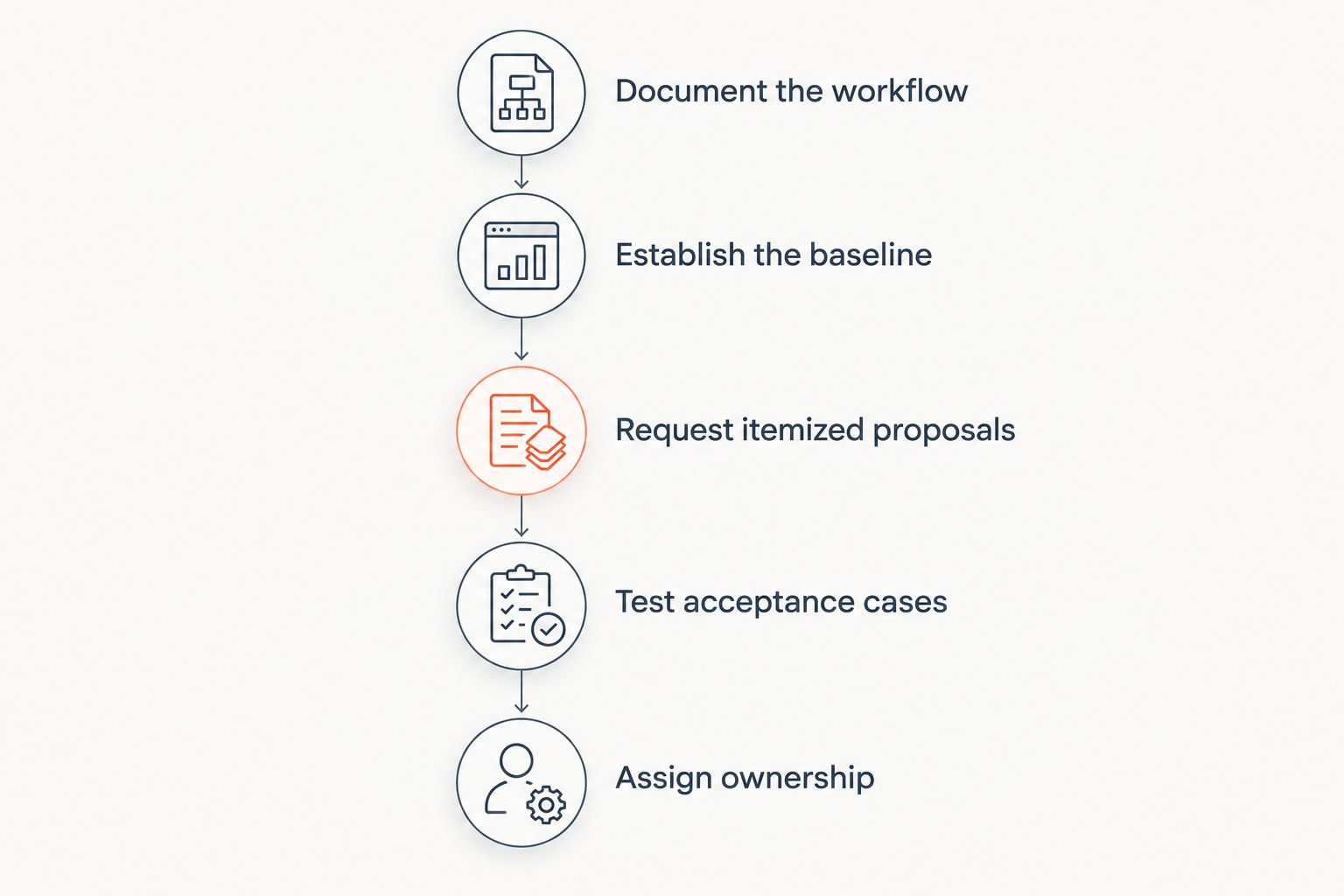
The sequence gives procurement and operations a shared decision record. Keep the workflow brief, proposal assumptions, and test results together so the approved scope remains visible after purchase.
Compare financial value without counting savings twice
Build a 12-month budget that separates implementation spending from recurring operating expenses. Use the same evaluation period for the manual baseline and the proposed workflow, and identify internal labor separately from supplier charges.
For labor capacity, calculate completed quotes multiplied by the measured reduction in hands-on time per quote. Subtract the time still required for review, corrections, monitoring, and unresolved requests.
Time saved is not automatically cash saved. If payroll stays unchanged, describe the result as recovered capacity. State what your team will do with that capacity, such as handling additional requests or completing follow-ups.
Keep revenue effects separate. Faster quote preparation does not establish additional sales by itself; use your own pipeline and order records to determine whether a change in quoting produces a measurable commercial result.
Do not count the same benefit under both reduced administrative work and additional selling time without explaining the allocation. Finance needs a defensible calculation, not several labels attached to the same hours.
Where does Supplyco fit in a quoting automation evaluation?
Supplyco fits industrial distributors evaluating quoting automation alongside order entry, account management, and sales follow-up. Its stated platform scope covers those workflows for industrial manufacturers and distributors.
The reason to evaluate Supplyco is that your project includes work around the quote, not only document preparation. The evaluation limit is specific: that stated scope does not establish compatibility with your ERP, your approval requirements, or your commercial terms.
Ask Supplyco to demonstrate your selected workflow against the same acceptance cases used for other suppliers. Confirm required system actions and responsibilities before treating any task as included.
Evaluate your quoting workflow
Review quoting, order entry, account management, and sales follow-up against your operating requirements.
Is the subscription the full cost of quoting automation?
The subscription is not a complete project budget unless the agreement explicitly includes implementation, integration, support, and the other work your scope requires. Record your employees' responsibilities even when those activities generate no supplier invoice.
For a 2026 approval, attach the scope and exclusions to the budget request. That makes the funding decision about a defined deliverable rather than an application alone.
Can distributors start with draft-only automation?
Distributors can define a draft-only project that retains human approval and leaves order entry outside the initial scope. The trade-off is that the remaining review and entry work must stay in the operating baseline.
Require a useful stopping point. A draft that lacks the information needed for approval has not completed the task you intended to automate.
How do you know whether quoting automation pays back?
Quoting automation pays back when measured, attributable benefits exceed implementation and ongoing operating costs over your selected evaluation period. Use actual workflow results, and distinguish recovered capacity from expenses you have eliminated.
Include exceptions in the measurement. Excluding difficult requests from the result while including them in the original workload makes the comparison misleading.
FAQ
How much does it cost to automate quoting for distributors?
The total project budget combines software, implementation, ERP integration, data preparation, internal work, and ongoing support. Request an itemized estimate for a defined workflow rather than treating the subscription as the entire cost.
What should I ask vendors to include in a quoting automation proposal?
Ask vendors to document the workflow boundary, required system actions, approval rules, testing, support, and exclusions. Assign responsibility for every task your own team must complete.
Do I need ERP integration to automate quoting?
ERP integration is required when your defined workflow depends on reading or writing ERP records. A draft-only project has a different boundary, so specify the required outcome before selecting the connection approach.
Is quote automation the same as order-entry automation?
Quote automation and order-entry automation address different workflow stages. State explicitly whether accepting a quote must create an order or leave that action with an employee.
How should I measure quoting automation savings?
Measure the change in hands-on work after accounting for review, corrections, and exceptions. Treat recovered time as capacity unless your records establish an actual reduction in spending.
What should happen when a quote needs an exception?
An exception should follow a documented review path with a named approver. Specify what stops the workflow, what information the reviewer receives, and how an approved change is recorded.
Does Supplyco cover more than quoting?
Supplyco's stated platform scope includes quoting, order entry, account management, and sales follow-up for industrial manufacturers and distributors. Confirm the exact workflow and system requirements during evaluation.
One last thing
Test a request that should not produce an approved quote. Use an unresolved item, a conflicting instruction, or a missing approval, and define the correct stop-and-review behavior before the demonstration.
A system that produces a polished document has demonstrated output. Your acceptance test should establish whether the workflow also respects the decisions your business requires.