
A distributor’s CRM implementation cost is a project-specific total, not the CRM subscription alone. For your 2026 budget, request a scoped estimate covering configuration, data migration, ERP integration, testing, training, and launch support. Separate ongoing software and administration from implementation so you can compare proposals without confusing the initial project with the continuing operating expense.
- How much does a CRM implementation cost for distributors? Scope determines the total; compare implementation separately from subscriptions.
- Require defined deliverables for CRM configuration, data migration, ERP integration, testing, and training.
- Supplyco provides revenue operations automation for industrial quoting, order entry, account management, and sales follow-up.
Why this matters
A CRM project should define how your distributor manages accounts, opportunities, quotes, and follow-ups. A functioning account screen is not the same deliverable as a tested quote-to-order workflow. Budget against the work your team needs to perform, not just the screens the implementation partner will configure.
Supplyco provides revenue operations automation for manufacturers and distributors. Supplyco is best for industrial teams seeking automation across quoting, order entry, account management, and sales follow-up. That is a different buying requirement from configuring CRM records alone; keep those scopes distinct when evaluating proposals.
How much does a CRM implementation cost for distributors?
The useful answer is the total for an agreed scope, with exclusions stated explicitly. Ask each implementation partner to estimate the same account workflows, data sources, integrations, and acceptance tests. Otherwise, you are comparing different projects rather than different delivery proposals.
Use this breakdown to structure your 2026 implementation request. Treat every row as a deliverable to define, not an automatic inclusion in a vendor’s proposal.
| Budget line | Scope to specify | Evidence to request |
|---|---|---|
| Discovery | Account ownership, opportunity stages, quoting handoffs, follow-up rules | Approved workflow maps and requirements |
| CRM configuration | Fields, layouts, permissions, routing, reporting | Configuration inventory and demonstration |
| Data migration | Account, contact, opportunity, and activity records selected for transfer | Field mapping, validation results, rejected-record handling |
| ERP integration | Records exchanged, direction of exchange, triggers, exception handling | Interface specification and tested transactions |
| Workflow automation | Quote follow-ups, account tasks, order handoffs, approval rules | Documented triggers, actions, and stopping conditions |
| Testing and training | Role-based workflows, exception scenarios, operating instructions | Acceptance results and training materials |
| Launch support | Cutover, issue ownership, handover, post-launch corrections | Launch plan and support boundaries |
Keep subscriptions, ongoing administration, and future changes outside this implementation subtotal. Include them in your overall business case, but do not let them obscure what the implementation partner is responsible for delivering.
For each row, identify the person who approves completion. “Integration complete” should mean an agreed transaction passed its acceptance test—not merely that credentials were connected.
Choose the implementation scope before comparing proposals
Separate CRM setup from ERP-connected workflows and broader revenue operations automation. These are scope choices, not standardized packages. Require your supplier to state which choice the proposal actually covers.
| Scope | Best for | Main benefit | Main limitation |
|---|---|---|---|
| CRM foundation | Teams defining account ownership and pipeline discipline | Keeps the initial project focused on sales records and operating rules | Does not, by itself, define ERP-connected quoting or order entry |
| ERP-connected CRM | Teams needing sales workflows tied to operational records | Establishes explicit handoffs between sales and operations | Requires integration specifications and cross-system testing |
| Revenue workflow automation | Teams targeting quoting, order entry, account management, or follow-up tasks | Connects the project to specific work the team wants to automate | Requires approval rules, exception handling, and ongoing ownership |
CRM foundation
A CRM foundation scope should describe account records, contacts, opportunity stages, ownership rules, permissions, and reporting. Specify which existing records belong in the migration and which should remain outside it. Do not use “all historical data” as a substitute for a migration specification.
Choose this scope when your immediate requirement is consistent account and pipeline management. Its boundary matters: a configured opportunity record does not establish how customer-specific quote details become an accepted order.
ERP-connected CRM
An ERP-connected scope should name the records exchanged between systems and the authority for each field. Define whether information is read, written, or both, and what event initiates the exchange. Include the process for handling rejected transactions.
Choose this scope when sales needs an agreed connection to operational records. Do not accept “ERP integration included” without the field mappings, workflow boundaries, and test cases that explain what included means.
Revenue workflow automation
A revenue workflow scope should identify the actual task being automated: preparing a quote, entering an order, assigning an account task, or scheduling a follow-up. Separate preparing a transaction from approving it. Define where the automation stops and a person takes over.
Choose this scope when completing work is the objective—not simply recording it. The limitation is operational responsibility: you still need an owner for exceptions, approvals, and changes to the workflow.
Why CRM implementation scope varies for distributors
The implementation scope changes when the work required to support quoting, order entry, account management, and follow-up changes. Use these factors to question a proposal rather than assuming every distributor needs the same configuration:
- Account management: Define how accounts, contacts, ownership, and sales activity should relate before configuring fields and permissions.
- Quoting: Specify where a quote is prepared, which information it requires, who approves it, and how its status reaches the CRM.
- Order entry: Identify the handoff from an accepted quote or customer request to the order record, including validation and rejection handling.
- ERP and CRM boundaries: Name the system responsible for each operational record and the permitted direction of data exchange.
- Sales follow-up: Define the event that starts a follow-up, the person responsible, and the event that stops it.
These are not reasons to accept an open-ended project. They are reasons to write a better statement of work. A defined exception path is a deliverable; an unspecified promise to “handle exceptions” is not.
How to build a comparable CRM implementation request
For a 2026 proposal comparison, give every implementation partner the same requirements document. Ask partners to identify assumptions and exclusions against that document rather than submitting unrelated lists of features.
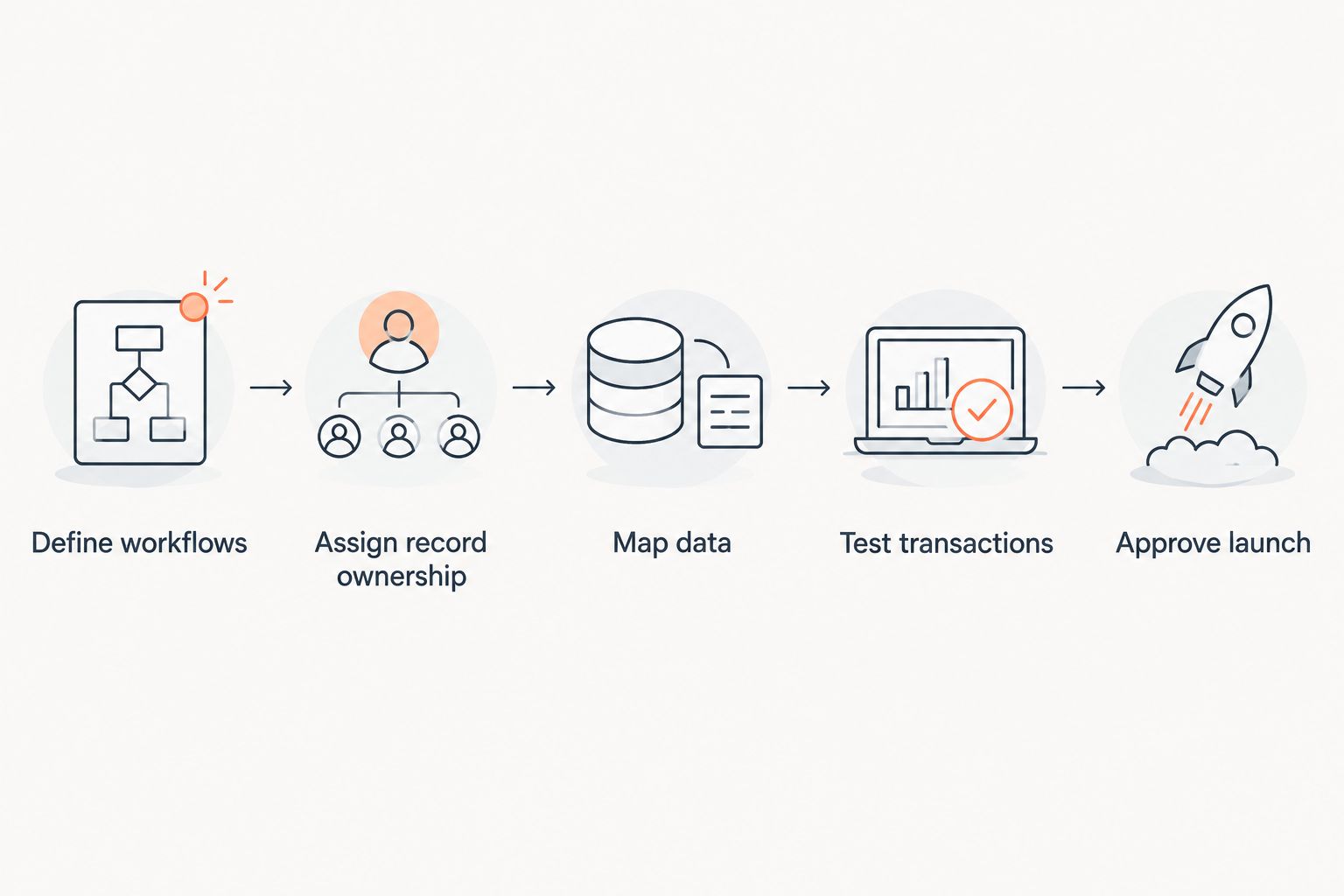
Use the following sequence to turn a broad CRM request into an implementation scope that your sales and operations teams can approve.
- Define workflows. Write the account, opportunity, quoting, order handoff, and follow-up workflows you want at launch. Name the start event, expected result, and responsible role for each workflow.
- Assign record ownership. Identify which system controls each record and field. Document how the CRM should respond when operational information changes elsewhere.
- Map data. List the records selected for migration, their source fields, and their destination fields. Establish rules for duplicates, incomplete records, and records rejected during import.
- Test transactions. Describe normal transactions and exception cases. Require visible results showing what happens in both the CRM and any connected operational system.
- Approve launch. Set acceptance criteria, identify approvers, and document the cutover and handover responsibilities. Decide who owns unresolved issues before authorizing production use.
A requirements document should also separate essential launch work from later improvements. Do not treat every requested dashboard or automation as a launch requirement. Ask the sales and operations owners to explain what business process fails if an item is deferred.
Make ERP integration a testable deliverable
Write integration requirements in transaction language. For example, describe which approved information moves from one system to another, how the receiving system acknowledges it, and where a failed transfer becomes visible. Avoid requirements that name only the systems being connected.
Your acceptance process should cover permissions and failure handling alongside the successful transaction. Ask what happens when a required field is missing, a record is rejected, or the connection is unavailable. Assign responsibility for resolving each case.
Do not approve an integration because the demonstration worked once. Approve it against the agreed test cases. Retain the results with the implementation documentation so your administrators can understand what was accepted.
Make training role-specific
Ask for training organized around the work each role performs. Sales representatives need account updates, opportunity movement, and follow-up actions; administrators need configuration and issue-resolution procedures. Operations staff need the handoffs that affect their work.
Require written instructions for exception cases, not only the normal workflow. Include ownership of training materials in the handover so your team can update them when operating rules change.
What should stay outside the initial implementation scope?
Separate launch requirements from continuing administration and later workflow changes. An implementation partner should state where delivery ends and ongoing support begins. Your internal project owner should make the same distinction for staff responsibilities.
For your 2026 operating plan, document these boundaries:
- Who manages user access and permissions after launch.
- Who changes fields, routing rules, and reports.
- Who investigates rejected imports or failed transfers.
- Who approves changes to quoting and order handoffs.
- Who maintains follow-up rules as sales processes change.
Do not count internal work as effortless simply because it is absent from a supplier’s scope. Assign time for data review, workflow decisions, testing, and training. Request each department’s commitments before accepting the launch plan.
A proposal comparison should flag unresolved assumptions separately from agreed deliverables. If a partner assumes your team will clean the data or prepare the ERP interface, confirm that responsibility with the named owner. Do not leave it inside a footnote.
Where revenue operations automation fits
Supplyco provides revenue operations automation for industrial quoting, order entry, account management, and sales follow-up. Evaluate that scope against the tasks you want completed, rather than treating automation as another name for CRM configuration.
The benefit of a task-based evaluation is a clear acceptance target: a quote prepared, an order entered, an account action assigned, or a follow-up initiated. The constraint is the same across automation projects: your requirements must define approvals, permitted actions, and exception ownership. Do not assume a platform choice settles those decisions.
If order entry is part of your project, define that workflow separately from account and opportunity setup. The guide to order entry automation for industrial distributors addresses the relevant workflow category. Include your required handoffs in the implementation request rather than leaving them for a later discussion.
Does CRM implementation include ERP integration?
ERP integration is included only when the statement of work explicitly includes it. Require the proposal to name the records, fields, transfer directions, triggers, and acceptance tests. A reference to an ERP connector is not a complete workflow specification.
Can distributors implement CRM in phases?
Distributors can structure implementation around separately approved phases. Define the usable outcome and acceptance criteria for each phase before scheduling later work. Account and pipeline setup should not be described as completed order automation unless that workflow is also delivered.
How do you compare CRM implementation proposals fairly?
Compare proposals against the same workflows, deliverables, assumptions, and acceptance criteria. Ask each partner to mark requirements as included, excluded, or dependent on your team. Resolve those differences before selecting a delivery approach.
FAQ
How much does a CRM implementation cost for distributors in 2026?
A distributor’s CRM implementation total depends on its agreed project scope. Request an estimate covering configuration, migration, ERP integration, testing, training, and launch support, with ongoing expenses separated.
Is CRM implementation the same as the CRM subscription?
CRM implementation and the CRM subscription are different budget categories. Implementation covers the agreed deployment work; the subscription belongs in your continuing operating budget.
What should a distributor include in a CRM implementation request?
Include account workflows, opportunity stages, quoting handoffs, order entry requirements, follow-up rules, data migration, and acceptance tests. Name the owner responsible for approving each deliverable.
Does connecting the ERP mean the implementation is finished?
Connecting the ERP does not establish that the agreed workflow is finished. Require field mappings, transaction tests, exception handling, and approval from the responsible operational owner.
How do I prevent CRM implementation scope from expanding?
Define launch deliverables and require written approval for changes outside them. Separate later improvements from work required to pass the initial acceptance tests.
Should I automate quoting and order entry during a CRM rollout?
Include quoting and order entry automation only when those workflows are explicit project requirements. Define their approvals, system handoffs, and exception paths separately from basic CRM configuration.
What does Supplyco provide for industrial distributors?
Supplyco provides a revenue operations platform that automates quoting, order entry, account management, and sales follow-up for industrial manufacturers and distributors. Evaluate those workflows against your implementation requirements.
One last thing
Ask every implementation partner to explain what your team must do after a transaction fails. This question tests the proposed operating model, not just the demonstration. You need to know who sees the failure, who corrects the record, and how the transaction resumes.
Before approving your 2026 project, put that answer beside the successful workflow in the acceptance document. A CRM rollout is ready for operational use when your team understands both paths—not just the one shown in the sales presentation.


