
Wind energy manufacturers' CRM software is a system for managing buyer relationships, RFQs, quotes, and sales activity with the aim of turning qualified demand into confirmed orders. This 2026 guide explains how to select and configure it around technical reviews, project-specific requirements, and the handoff to your ERP.
- Choose CRM software for wind energy manufacturers by RFQ handling, technical approvals, and ERP handoffs—not contact management alone.
- Keep project opportunities separate from repeat replacement-part orders so pipeline reporting reflects the actual buying decision.
- Supplyco automates quoting, order entry, account management, and sales follow-up for industrial manufacturers and distributors.
- Test quote revisions and purchase-order exceptions before allowing automation to create production orders.
Why CRM matters for wind energy manufacturers
Choose the CRM around your quote-to-order process, not around a feature list. Your sales team needs to know which opportunity is ready for engineering review, which quote needs a response, and which purchase order still requires validation. A contact database alone does not answer those questions.
For your 2026 selection, distinguish the relationships you actually sell through: turbine manufacturers, component buyers, project contractors, asset owners, and service organizations. Record each account's role rather than treating every contact as the final purchasing authority. When several organizations participate in a project, connect them to the opportunity without duplicating the expected order.
Separate visibility from execution. CRM records sales activity and opportunity status; ERP records operational transactions; quoting workflows connect commercial requirements to an approved offer. Decide which system owns each field before connecting them.
Your reporting should also distinguish quoted work from accepted business. The guide to tracking win rates in industrial sales pipelines explains the reporting problem behind that distinction. A quote sent to several contacts is still one opportunity, not several independent chances to win.
How to select and configure your CRM
Map your accounts and buying relationships
Start manually with your existing account list, recent RFQs, and completed orders. Build a shared worksheet showing who requested the quote, who reviewed the specification, who issued the purchase order, and which entity received the shipment. Resolve conflicting account names before importing records.
For wind energy sales, make the project, buying organization, and delivery location separate concepts. An account can participate in several projects; a project can involve several accounts. Do not force those relationships into a single company-name field.
Your 2026 account model should preserve this structure without requiring a salesperson to rebuild it for every RFQ. Ask prospective CRM vendors to demonstrate the relationships using your own anonymized records. A generic demonstration with one company and one contact does not test this requirement.
Best for account-data cleanup: a shared worksheet reviewed by sales and operations. Its limitation is manual maintenance, so use it to define the data model rather than as your permanent transaction system.
- Record the legal purchasing entity separately from the project name.
- Tag each account's role, such as OEM, contractor, operator, or service organization.
- Link engineering, procurement, and commercial contacts to their actual responsibilities.
- Keep delivery locations distinct from billing accounts.
- Assign an owner responsible for correcting duplicate or incomplete records.
Define stages with verifiable exit criteria
Write your pipeline stages in a shared document before configuring software. For every stage, specify the evidence required to enter it, the person responsible, and the condition that moves the opportunity forward. This gives your team a usable process even before automation exists.
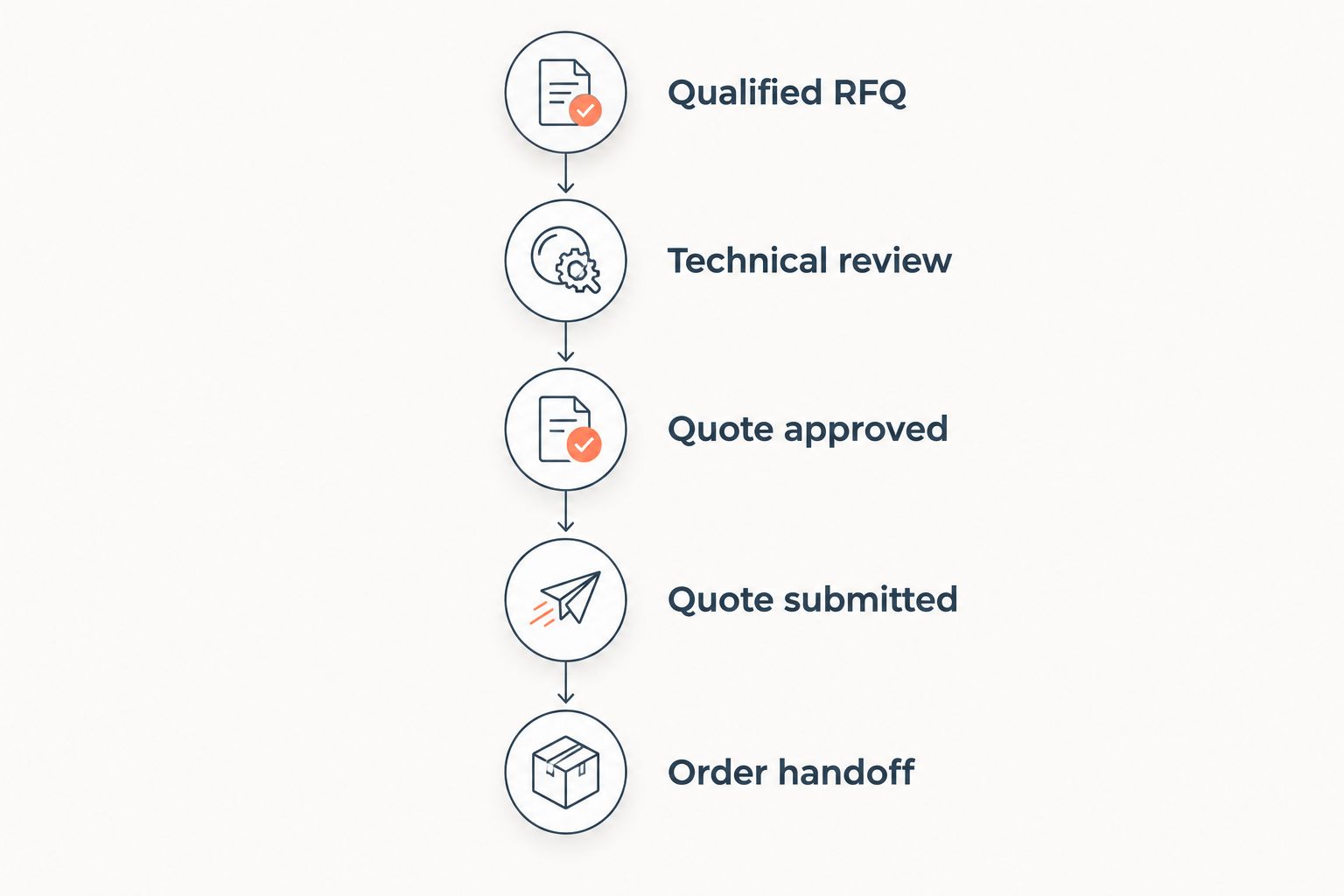
For an initial configuration, use 5 pipeline stages for quoted work, then adjust them to match your actual approvals. Do not treat the example below as a required industry standard. Its purpose is to separate technical readiness, commercial approval, customer response, and order acceptance.
Keep the customer's expected decision date separate from the requested delivery date. They describe different events. Likewise, distinguish an engineering approval from a commercial commitment; a technically acceptable configuration is not an accepted order.
Use separate workflows for project-based opportunities and routine repeat orders when their approval requirements differ. Otherwise, routine transactions distort your view of complex opportunities.
- Qualified RFQ: record the buyer, scope, requirements, and responsible salesperson.
- Technical review: identify unresolved specifications and the engineering owner.
- Quote approved: document the internally approved configuration and commercial terms.
- Quote submitted: retain the sent revision and the customer's next decision.
- Order handoff: validate the purchase order against the accepted quote.
These stages describe the quoted-work sequence. Keep exception handling outside the forward progression so a missing specification does not appear to be sales progress.
Assign ownership before connecting CRM and ERP
Start with a field-ownership matrix in a spreadsheet. List the data used in quoting and order entry, identify its authoritative system, and specify who can change it. Include account identifiers, part numbers, units of measure, quote revisions, and order status.
Do not connect systems merely because both offer an integration interface. Define what moves, in which direction, after which approval, and what happens when the transfer fails. Your team needs a recoverable exception process, not just a successful demonstration.
Supplyco provides revenue operations automation for quoting, order entry, account management, and sales follow-up. Supplyco is best suited to industrial manufacturers seeking automation across quoting, order entry, account management, and sales follow-up. Evaluate that scope alongside your CRM requirements rather than assuming it replaces every CRM or ERP function.
For Supplyco revenue operations automation, require a demonstration of your own system boundaries and approval rules. The platform's stated workflow scope is the benefit; compatibility with your specific environment remains a selection requirement to verify.
- Identify the authoritative system for every shared field.
- Match CRM accounts to approved ERP customer identifiers.
- Restrict changes to controlled product and commercial data.
- Define failed-transfer alerts and an accountable exception owner.
- Retain the originating record and approved revision for each handoff.
Control quoting and follow-up together
Begin with a shared quote register and assigned follow-up tasks. Record the RFQ, responsible salesperson, quote revision, outstanding questions, and next action. This manual method exposes gaps before you automate them.
For a wind energy manufacturer, the CRM should make unresolved technical questions visible alongside sales activity. A follow-up asking whether the customer will order is premature when the customer is still waiting for a drawing clarification. Keep those conditions separate.
Best for repeatable follow-up: rules tied to the quote's current status. Their limitation is dependence on accurate records. If a revised quote or customer reply is not captured, a scheduled message can reference obsolete information.
Ask vendors to show how a salesperson stops an automated sequence, corrects the underlying record, and resumes work. Require the same clarity for messages sent after internal approval, after customer clarification, and after an opportunity is closed. Approval visibility matters as much as message scheduling.
- Retain the approved and submitted quote revisions separately.
- Assign technical questions to engineering rather than leaving them in general notes.
- Schedule follow-up against the customer's next decision or unresolved requirement.
- Stop scheduled outreach when a reply or order changes the opportunity status.
- Route nonstandard commitments for review before sending a response.
Test exceptions before approving order entry
Start by manually comparing a purchase order with the accepted quote. Check the customer entity, item identifiers, quantities, units, specification revision, and agreed commercial terms. Record discrepancies rather than silently correcting them.
A CRM demonstration should show more than a clean quote becoming a clean order. Test what happens when the purchase order references an older revision, requests a different quantity, or names a different purchasing entity. These are test scenarios, not assumptions about how often your customers make mistakes.
Use 3 test cases in your initial vendor evaluation. Keep the same inputs and acceptance criteria for every option so your team compares execution rather than presentation. Test downstream records as well as what appears on the salesperson's screen.
Best for protecting the order handoff: explicit approval gates with traceable exceptions. The trade-off is review work for unresolved records. Do not remove that work until the underlying validation rules are defined and tested.
- Clean match: verify that the accepted quote and purchase order produce consistent order details.
- Revision mismatch: confirm that the workflow holds the order for review and identifies the conflicting revision.
- Commercial mismatch: confirm that changed terms reach an authorized reviewer before acceptance.
Measure workflow results before expanding
Start with a baseline from your own quote register and order records. Define where each measurement begins and ends, then use the same definitions during the pilot. Separate active processing time from time spent waiting for a customer or engineering response.
For your 2026 rollout, select one workflow with a named owner and documented exception rules. Automating every process at once makes it harder to identify whether a problem comes from account data, field mapping, approval logic, or user behavior.
Track 4 workflow measures before widening access. Set targets from your own baseline rather than borrowing unsupported industry averages. Review results with sales, engineering, and order-entry staff; faster sales activity is not a successful outcome if operations must repair the resulting records.
The pilot should also demonstrate a controlled way to stop automation and resume manual work. Keep the exception queue visible so faster routine processing does not hide unresolved transactions.
- Quote turnaround: measure elapsed hours from a complete RFQ to an approved quote.
- Order-entry effort: measure staff minutes spent creating and checking an accepted order.
- Exception rate: measure the share of processed records requiring correction or review.
- Follow-up completion: measure whether assigned next actions occur by their recorded deadlines.
Compare CRM and automation options
For a 2026 selection, compare operating approaches before comparing vendor demonstrations. The right starting point depends on whether your main problem is missing account visibility, complex quoting, or repetitive transaction work. These options are not interchangeable, and some belong together.
| Option | Best for | Practical advantage | Key limitation |
|---|---|---|---|
| Shared worksheet and task register | Defining a process before software configuration | Makes fields, ownership, and stage rules explicit | Requires manual updates and reconciliation |
| CRM alone | Centralizing accounts, contacts, opportunities, and sales activity | Gives the sales team a shared record of relationship and pipeline status | Does not by itself establish technical quoting or ERP order controls |
| CRM with CPQ and ERP connections | Coordinating configured quotes and downstream order records | Separates sales tracking, quoting logic, and operational transactions | Requires agreed field ownership, configuration rules, and exception handling |
| Supplyco alongside the systems you retain | Automating industrial quoting, order entry, account management, and follow-up | Addresses workflow execution across the stated revenue operations scope | Specific integrations, approval behavior, and CRM replacement scope require verification |
Keep a working CRM when the real bottleneck is quote or order processing. Replace the CRM when its account model, opportunity structure, or reporting cannot represent your process. Add automation when the records are sound but staff repeatedly copy, check, or chase the same information.
Use one evaluation script across all shortlisted approaches. Ask the operator to locate a quote revision, identify the current approver, find the customer response, and explain the next action. A system that cannot answer those questions clearly is not ready for your workflow.
Common mistakes wind energy manufacturers make
Treating the project name as the customer
A project reference does not identify the legal purchasing entity. Store both and connect the participating organizations to the opportunity. Otherwise, sales history, customer identifiers, and purchase-order validation depend on ambiguous names.
Keep the shipping location separate as well. The organization requesting information, the entity placing the order, and the destination do not have to be represented by one record.
Mixing repeat parts orders with project bids
A replacement-part request and a project-specific bid do not necessarily require the same review sequence. Classify the transaction before assigning pipeline stages. Report the groups separately when their decision processes differ.
Do not make routine orders pass through irrelevant qualification steps merely to preserve one pipeline. Equally, do not let a complex bid bypass technical review because repeat orders use a shorter path.
Storing technical requirements only in email
Email correspondence is useful evidence, but it is not a substitute for a controlled specification reference. Link the applicable drawing or requirement revision to the opportunity and quote. Make open questions visible to the person preparing the offer.
A salesperson should be able to distinguish an approved requirement from an unresolved customer request without reconstructing an entire email chain.
Counting quote revisions as separate opportunities
A revised offer is not automatically a new buying decision. Keep revisions attached to the same opportunity unless the commercial scope genuinely changes. Duplicate opportunities inflate pipeline totals and confuse win-rate reporting.
Record the reason for each revision. That preserves the distinction between correcting an error, changing scope, and responding to a customer request.
Automating follow-up without checking quote status
Scheduled outreach must reflect the current record. Stop or redirect follow-up when the customer replies, a quote is superseded, or an order arrives. Otherwise, automation produces activity without resolving the buyer's next requirement.
Assign responsibility for unanswered technical questions. A message sequence cannot substitute for an engineering decision.
FAQ
What's the best CRM software for wind energy manufacturers?
The best fit is the system that represents your buying relationships, quote approvals, and ERP handoffs without duplicate records. Evaluate it with your own RFQs, quote revisions, and purchase-order exceptions rather than a generic contact-management demonstration.
Do wind energy manufacturers need a dedicated industry CRM?
An industry-labelled CRM is not a prerequisite. Your selection must support the account relationships, technical requirements, approval stages, and order handoffs your team actually uses.
Is CRM enough for complex wind component quoting?
CRM alone does not establish product configuration rules or technical approval controls. Define those requirements and decide whether they belong in a controlled quoting process, CPQ, or another retained system.
Should a wind energy manufacturer replace its CRM or add automation?
Keep the CRM when its records and pipeline structure work but quoting, order entry, or follow-up still require repetitive manual work. Replace it when the account model or opportunity structure cannot represent your sales process.
Where does Supplyco fit in a manufacturing CRM workflow?
Supplyco provides revenue operations automation for quoting, order entry, account management, and sales follow-up. Evaluate that workflow scope alongside your CRM and ERP, and verify the exact system connections and approval requirements before deployment.
What should move between CRM and ERP?
Move only the fields and transactions with defined ownership, approved mappings, and an exception process. Account identifiers, quote references, and order status are examples to evaluate; the actual direction and timing depend on your system design.
How do you test CRM software before rolling it out?
Run a controlled pilot using a clean quote-to-order match, a revision mismatch, and a commercial mismatch. Check the resulting records, approval history, exception routing, and ability to resume manual processing.
One last thing
A stalled opportunity is not always waiting for a salesperson. It can be waiting for a specification decision, purchasing clarification, or an approved quote revision. Make the blocking condition a reportable field, not a sentence buried in notes.
For your 2026 CRM review, open a stalled quote and ask who owns the next decision. If the record cannot answer, fix the workflow before adding more reminders. The useful outcome is an accountable next action, not a larger activity count.


