
Yes, order entry automation can work with paper and fax orders by converting documents into digital files, extracting order fields, and validating those fields before creating an ERP order. The limitation is document quality: unreadable text, ambiguous part numbers, and missing information require review rather than automatic release. In 2026, the practical approach is to automate readable, validated orders and hold exceptions for your order desk.
- Can order entry automation work with paper and fax orders? Yes, with document capture, OCR, ERP validation, and exception review.
- Paper scans and fax images need validation before extracted text becomes an ERP order.
- Supplyco provides order entry automation for industrial manufacturers and distributors; assess paper and fax requirements during evaluation.
- Keep unclear part numbers, missing pages, and conflicting instructions out of automatic order release.
Why this matters
Accepting paper orders does not require keeping every order-entry task manual. You can preserve the customer's ordering channel while changing how your team captures, checks, and enters the information.
The distinction matters for industrial sales operations. Reading a purchase order is not the same as selecting the correct item, interpreting the unit of measure, or confirming the ship-to account. For the broader workflow, see AI order entry for manufacturing sales teams.
Treat document extraction as the start of order entry, not proof that an order is ready to release. Your acceptance criteria in 2026 should cover the completed ERP record, not just the text recognized on a screen.
Can order entry automation work with paper and fax orders?
Yes. Paper and fax orders can enter an automated workflow once they become accessible digital documents. The capture method differs, but both need extraction, business validation, and a defined route for exceptions.
| Intake option | Best for | Practical advantage | Limitation | Recommended control |
|---|---|---|---|---|
| Scanned paper | Orders received as physical documents | Creates a digital source for extraction and review | Cropping, skew, or faint printing can obscure fields | Check completeness and legibility before extraction |
| Digital fax file | Fax orders received through a service that exports files | Avoids printing and rescanning the received document | Transmission quality still affects readability | Preserve the received file and check all pages |
| Scanned fax printout | Fax orders available only on paper | Brings an existing paper-based channel into the workflow | Adds another capture step to an already transmitted image | Compare unclear fields with the source or customer confirmation |
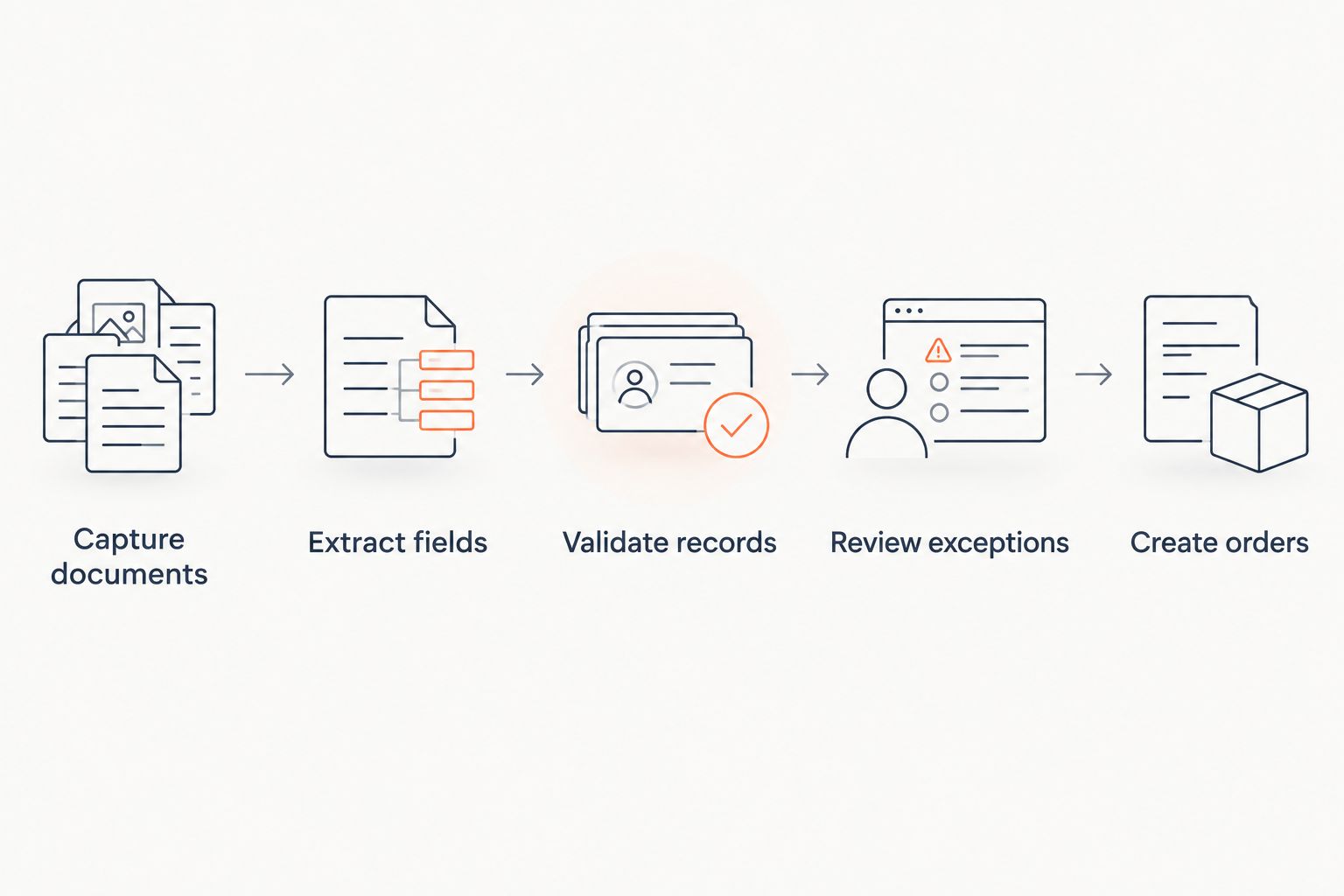
The implementation sequence is straightforward:
- Capture documents. Scan physical orders or collect files from your fax service.
- Extract fields. Use optical character recognition, or OCR, and document-processing software to identify order information.
- Validate records. Check extracted values against customer, item, and order rules.
- Review exceptions. Route unreadable, missing, or conflicting information to an authorized employee.
- Create orders. Submit approved data to the ERP and record the result.
Keep the source document associated with the resulting order. Your team needs to trace an ERP value back to the customer's instructions when resolving a dispute or correcting an entry.
Paper orders: scan first, then validate
For physical purchase orders, establish a consistent scanning procedure before configuring extraction. Capture the full page, retain attachments, and keep pages belonging to the same order together. A missing continuation page is an intake problem, not something OCR can resolve.
Check these document conditions before processing:
- Page edges and line-item columns are visible.
- Text is readable without guessing.
- Continuation pages remain attached to the correct purchase order.
- Handwritten amendments are visible and flagged for review.
- Packing instructions and referenced attachments are retained.
Best for: recurring printed purchase orders with legible fields and identifiable customers. Scanning creates a usable digital source, but it does not resolve conflicting instructions. If a handwritten note changes a printed quantity, require confirmation of which instruction governs.
For your 2026 rollout, document who owns scanning and who resolves incomplete submissions. Otherwise, a held order can sit between the receiving employee and the order desk without a clear owner.
Fax orders: use the received digital file when available
When your fax service supplies a digital file, use that file as the intake source rather than printing it and scanning it again. Confirm the service's export method, file access, and delivery behavior during implementation. Do not assume a fax inbox is already connected to order-entry software.
Fax documents still require a quality check. Broken characters, dark backgrounds, and clipped columns can leave a document readable to a person but ambiguous to extraction software. Preserve the original received file so a reviewer can inspect it directly.
Best for: customers who continue ordering by fax while your order desk moves to digital processing. The benefit is retaining that channel; the limitation is that automation cannot restore information that was not legibly received.
If the fax is unreadable, request a clearer copy or confirmation of the affected fields. Do not have the system infer an item code merely because a similar code exists in the ERP.
What must be checked before an order reaches the ERP?
Validate business meaning, not just character recognition. A clearly extracted customer part number can still map to the wrong internal item, and a clearly extracted quantity can still use the wrong ordering unit.
Customer and destination
Match the purchasing organization to the correct account. Check the ship-to separately from the billing account, particularly when a document names a branch, job site, or receiving department.
Keep unresolved account matches in review. A familiar company name is not sufficient evidence to select a destination automatically.
Items and units
Match customer item references to approved internal item records or maintained cross-references. Require review when a reference produces multiple possible matches or no match.
Check the unit of measure alongside quantity. Do not silently treat pieces, boxes, and lengths as interchangeable. Any conversion needs an approved rule tied to the relevant item and ordering context.
Instructions and authorization
Capture requested dates, delivery instructions, and references to existing quotes or agreements. Separate what the customer requests from what your business has approved.
An order-entry workflow should not convert an unconfirmed request into a confirmed commitment. Route discrepancies through the same approval ownership your order desk uses today.
Duplicate and revision status
Check whether the purchase order already exists before creating another order. A document received through fax and email should not automatically become separate sales orders.
Also distinguish a new order from a revision. A repeated purchase-order reference needs a decision about whether to update, reject, or review the submission—not an automatic assumption that the document is a duplicate.
Why paper and fax automation results vary
There is no useful universal accuracy promise for every paper and fax workflow. Assess the documents, reference data, and posting rules together.
- Image quality: faint text, skew, and clipped pages affect what the software can read.
- Document layout: changing tables and continuation pages affect how fields relate to each other.
- Handwritten changes: notes and overwrites require a clear interpretation and approval path.
- Reference data: incomplete customer-item mappings leave otherwise readable orders unresolved.
- ERP requirements: mandatory fields, permissions, and interface behavior determine what can be submitted.
- Exception rules: your release policy determines which orders proceed and which require review.
These are evaluation criteria, not reasons to abandon the channel. For a 2026 implementation, ask the supplier to demonstrate the full path from your received document to the resulting ERP record, including a failed submission.
How should you test paper and fax order automation?
Start with documents your team actually receives. Include clean orders, difficult images, revised purchase orders, handwritten amendments, and submissions with missing information. Testing only the easiest layout does not establish whether the workflow fits your order desk.
Use a controlled evaluation:
- Establish the expected record. Have an experienced employee define the correct account, destination, items, units, and instructions.
- Inspect extracted fields. Compare the captured values with the source document and expected record.
- Test validation. Introduce unresolved references and conflicting instructions to confirm they are held.
- Inspect ERP output. Check the created draft or test order, not merely the extraction preview.
- Test recovery. Confirm what happens after rejection, interruption, correction, and resubmission.
Measure document-to-order completion, field corrections, exception reasons, and staff handling time using your own baseline. Define each measure before comparing results so that a document held for review is not presented as a completed order.
Do not authorize automatic release because a demonstration reads a clean purchase order correctly. Authorize it only for document types and validation conditions your team has accepted.
Where does Supplyco fit in this workflow?
Supplyco is best suited to industrial manufacturers and distributors evaluating order entry automation within a broader revenue operations workflow. The platform's stated scope includes quoting, order entry, account management, and sales follow-up.
That scope is relevant when your order desk also needs coordination with sales activity. For paper and fax specifically, assess Supplyco against your actual intake methods, document samples, ERP requirements, and exception process. Confirm those capabilities during evaluation rather than treating general order entry automation as proof of fax support.
Do paper orders need a standard template?
Paper orders do not inherently need a standard template to enter an automated workflow. Whether different layouts can be processed depends on the selected software and configuration.
Consistent templates simplify field identification, but customer adoption is a separate requirement. Test the layouts you receive before deciding that customers must change their purchase-order format.
Can fax orders go straight into the ERP?
Fax orders can proceed directly into an ERP only when the configured workflow supports the intake, validates the required fields, and permits submission under your release rules. Receiving a readable fax is not enough.
Start with reviewed drafts. Expand automatic processing only after your team verifies how the workflow handles account matches, item references, duplicate submissions, and ERP rejections.
Should you keep a human reviewer?
Keep a human reviewer for ambiguous instructions, unresolved records, and exceptions requiring commercial judgment. Automation should remove routine retyping without removing responsibility for uncertain orders.
Give reviewers the source image, extracted fields, validation failure, and permitted next action together. Requiring employees to search across inboxes and ERP screens turns exception handling into another manual intake process.
FAQ
Can order entry automation read a scanned purchase order?
Yes, document-processing software can extract fields from a readable scanned purchase order. Validate the extracted customer, items, quantities, and units before creating an ERP order.
Do customers have to stop faxing their orders?
No, customers do not have to stop faxing if your workflow can capture and process the received documents. Confirm how the fax service delivers files and how those files enter the order queue.
Can handwritten paper orders be automated?
Handwritten orders require testing with the selected software and representative documents. Route unclear characters, overwritten quantities, and ambiguous instructions to a reviewer rather than assuming they are correct.
Is OCR enough to automate order entry?
No, OCR recognizes text but does not by itself establish that an order is valid. Order entry also requires field interpretation, customer and item matching, business checks, and ERP submission controls.
How do you prevent the same order being entered twice?
Check incoming orders against existing records before creation, using customer identity and purchase-order references under defined rules. Route possible revisions for review instead of treating every repeated reference as an identical duplicate.
Does Supplyco support paper and fax order processing?
Supplyco provides order entry automation for industrial manufacturers and distributors. Confirm paper and fax intake support, extraction requirements, and ERP behavior against your documents during a product evaluation.
What should happen when a fax is unreadable?
Hold an unreadable fax order and request a clearer copy or confirmation of the affected fields. Do not release an order based on guessed item codes, quantities, or delivery instructions.
One last thing
An ERP can accept a technically valid order that still misrepresents the customer's request. A recognized item code and an allowed unit of measure do not prove that they are the intended combination.
For your 2026 acceptance test, include a readable order containing a business ambiguity. The right result is a controlled hold, not a confidently created order. That test checks whether the workflow knows when to stop—not just whether it can read.