
ThomasNet is strong at industrial supplier discovery: buyers can search for manufacturers and distributors by product category and capability. Supplier discovery stops short of the quoting, order entry, account management, and follow-up work that determines what happens after an inquiry. The best ThomasNet alternative in 2026 is Supplyco if you need industrial revenue operations automation; ZoomInfo if you need company and contact intelligence for outbound prospecting.
- Supplyco leads ThomasNet alternatives for distributors when quoting, order entry, and sales follow-up are the bottleneck.
- ZoomInfo fits outbound prospecting; LinkedIn Sales Navigator fits relationship-based account research.
- HubSpot and Salesforce fit CRM requirements, not industrial supplier directory replacement.
- Keep ThomasNet when industrial buyer discovery remains the job you need done.
Why this matters
A distributor searching for ThomasNet alternatives in 2026 can be asking two different questions: how to find more customers, or how to process the customers already arriving. Those questions require different software.
Choose the workflow before choosing the vendor. A contact database supports prospecting, a CRM organizes customer relationships, and revenue operations automation handles work such as quoting and order entry. Comparing those categories as interchangeable directories produces the wrong shortlist.
ThomasNet alternatives at a glance
| Tool | Best for | Standout capability | How it differs from ThomasNet |
|---|---|---|---|
| ThomasNet | Industrial supplier discovery | Product-category and supplier-capability search | The benchmark for buyers researching industrial suppliers |
| Supplyco | Industrial revenue operations automation | Automating quoting, order entry, account management, and follow-up | Addresses sales execution rather than supplier discovery |
| ZoomInfo | Outbound company and contact research | Business intelligence for prospecting | Helps sellers research accounts and contacts |
| LinkedIn Sales Navigator | Relationship-based prospecting | Lead and account search within LinkedIn | Organizes research around people, companies, and professional relationships |
| HubSpot | Customer relationship and pipeline management | CRM records and sales pipeline tools | Manages customer interactions rather than supplier listings |
| Salesforce | Configurable CRM processes | Account, contact, and opportunity management | Structures sales records and business processes rather than directory discovery |
These are workflow alternatives, not identical replacements. For your 2026 evaluation, separate the requirement to attract inquiries from the requirement to qualify, quote, and convert them.
1. Supplyco: best for industrial revenue operations automation
The platform automates quoting, order entry, account management, and sales follow-up for industrial manufacturers and distributors. Its fit is clearest when your problem begins after a buyer contacts the business. You need the inquiry turned into a controlled sales process, not simply another company name added to a prospect list.
Best for: Distributors evaluating automation across existing customer and sales workflows.
Where it shines
- Its stated scope covers quoting and order entry, not just prospect research.
- Account management and follow-up sit within the same revenue operations focus.
- The intended users are industrial manufacturers and distributors.
Where it falls short
- Revenue operations automation is not a substitute for a supplier directory's discovery function.
- Automating an incomplete request does not establish the missing product specifications or commercial approvals.
- Your evaluation still needs to establish ERP compatibility, approval controls, and exception handling for your own environment.
| Dimension | Supplyco | ThomasNet |
|---|---|---|
| Primary purpose | Industrial revenue operations automation | Industrial supplier discovery |
| Quoting | Explicitly included in the platform's scope | Supplier discovery is the relevant comparison function |
| Order entry | Explicitly included in the platform's scope | Not the purpose of supplier search |
| Customer workflow | Account management and sales follow-up | Helping buyers identify suppliers |
Ask for a demonstration using an actual inquiry, quote revision, and purchase order from your business, with sensitive information removed. Track which records the proposed workflow reads, which records it changes, and who approves exceptions. Do not treat a general automation demonstration as proof that your specific ERP process is supported.
Verdict: Buy for the revenue operations requirement after validating your workflows; skip as a like-for-like directory replacement.
2. ZoomInfo: best for outbound account and contact research
ZoomInfo is a business intelligence platform used for company and contact research. It belongs on your shortlist when sales representatives need to identify target organizations and people to contact. That is a different task from waiting for buyers to discover a distributor through industrial supplier search.
Best for: Distributor sales teams building an outbound prospecting process.
Where ZoomInfo shines
- Company and contact research support account-list development.
- Sellers can organize prospecting around named businesses and decision-makers.
- Its core purpose aligns with researching outbound sales targets.
Where ZoomInfo falls short
- A contact record does not establish demand for your product line.
- Business intelligence does not replace product qualification, quoting, or order processing.
- You must validate the relevance and accuracy of records for your territories and target accounts.
| Dimension | ZoomInfo | ThomasNet |
|---|---|---|
| Main user task | Research companies and contacts | Research industrial suppliers |
| Research direction | Seller looking for prospects | Buyer looking for suppliers |
| Primary information | Business and contact intelligence | Supplier categories and capabilities |
For a 2026 evaluation, use target accounts that reflect your real selling territory and customer profile. Check whether the research identifies relevant organizations and useful roles, not merely whether a search returns a long list. A large list with poor product fit creates qualification work rather than qualified pipeline.
Verdict: Buy for outbound research; skip if your bottleneck is quote processing or order entry.
3. LinkedIn Sales Navigator: best for relationship-based prospecting
LinkedIn Sales Navigator supports lead and account research within LinkedIn. It is useful when your sales process depends on identifying people, understanding their professional roles, and tracking target accounts. It complements an account-based approach rather than reproducing an industrial supplier catalog.
Best for: Representatives researching buying roles and developing relationships within named accounts.
Where LinkedIn Sales Navigator shines
- Lead and account search organize prospect research around people and companies.
- Professional profiles provide context for understanding someone's role.
- Saved leads and accounts support ongoing attention to a defined prospect set.
Where LinkedIn Sales Navigator falls short
- A professional profile does not confirm purchasing authority for a specific industrial requirement.
- Relationship research does not establish technical product compatibility.
- Representatives still need a disciplined process for recording qualification and next actions.
| Dimension | LinkedIn Sales Navigator | ThomasNet |
|---|---|---|
| Research focus | People and company accounts | Industrial suppliers and capabilities |
| Useful context | Professional roles and relationships | Product and supplier categories |
| Best starting point | A target account or buying role | A product or sourcing requirement |
Test the distinction between finding a person and finding the right person. A maintenance contact, procurement contact, and engineering contact can have different responsibilities within the same account. Your sales playbook should define what each role needs before outreach begins.
Verdict: Buy for relationship-led prospecting; skip as the main system for quoting or order management.
4. HubSpot: best for organizing customer relationships and pipeline
HubSpot is a CRM platform with tools for managing contacts, companies, deals, and sales activity. It fits distributors that need a shared record of customer interactions and pipeline progress. The decision is about sales organization, not replacing an industrial supplier search experience.
Best for: Teams standardizing customer records, deal stages, and follow-up ownership.
Where HubSpot shines
- Contact, company, and deal records organize customer information.
- Pipeline tools give sales teams a common structure for tracking opportunities.
- Activity tracking helps keep customer interactions attached to the relevant records.
Where HubSpot falls short
- A CRM record does not establish item availability, product suitability, or order acceptance.
- Pipeline organization still depends on clear stages and consistent record maintenance.
- Industrial transaction requirements need separate evaluation rather than assumptions based on CRM functionality.
| Dimension | HubSpot | ThomasNet |
|---|---|---|
| Primary purpose | Customer relationship management | Supplier discovery |
| Main records | Contacts, companies, and deals | Supplier profiles and categories |
| Distributor use case | Track customer interactions and opportunities | Be discoverable during supplier research |
In 2026, evaluate CRM fit with your actual qualification stages. A stage called qualified should mean something operational: the request has enough information for the next person to act. Changing a deal label without defining that handoff does not improve the process.
Verdict: Buy for CRM organization; skip if the only requirement is industrial supplier visibility.
5. Salesforce: best for configurable CRM processes
Salesforce provides CRM tools for managing accounts, contacts, opportunities, and sales processes. It belongs on the shortlist when your priority is defining and maintaining a configurable customer-management system. It is not a direct replacement for supplier-category search.
Best for: Distributors that need configurable CRM processes and can assign ownership for administering them.
Where Salesforce shines
- Account, contact, and opportunity records support structured sales management.
- Configurable fields and processes let teams model their customer-management requirements.
- Reporting supports review of recorded sales activity and pipeline.
Where Salesforce falls short
- Configuration requires decisions about ownership, definitions, and maintenance.
- Opportunity records alone do not execute industrial order entry.
- A broad CRM project is the wrong response to a narrowly defined supplier-discovery need.
| Dimension | Salesforce | ThomasNet |
|---|---|---|
| Primary purpose | CRM and sales process management | Industrial supplier discovery |
| Main structure | Accounts, contacts, and opportunities | Suppliers and product categories |
| Evaluation priority | Process configuration and record ownership | Relevance to buyer sourcing searches |
Verdict: Buy for configurable CRM requirements; skip when supplier discovery is the entire brief.
Why people switch from ThomasNet
The reason to choose another category is a change in the job you need software to perform. The comparison supports three specific distinctions: outbound research instead of supplier discovery, customer management instead of directory visibility, and transaction automation instead of finding organizations.
Use these as selection criteria, not as claims that ThomasNet has failed:
- Prospecting: You need representatives to research named accounts and relevant contacts.
- Pipeline management: You need shared customer records, clear ownership, and defined opportunity stages.
- Quoting: You need to move a qualified request into a controlled quotation workflow.
- Order entry: You need to turn accepted customer requirements into an order process.
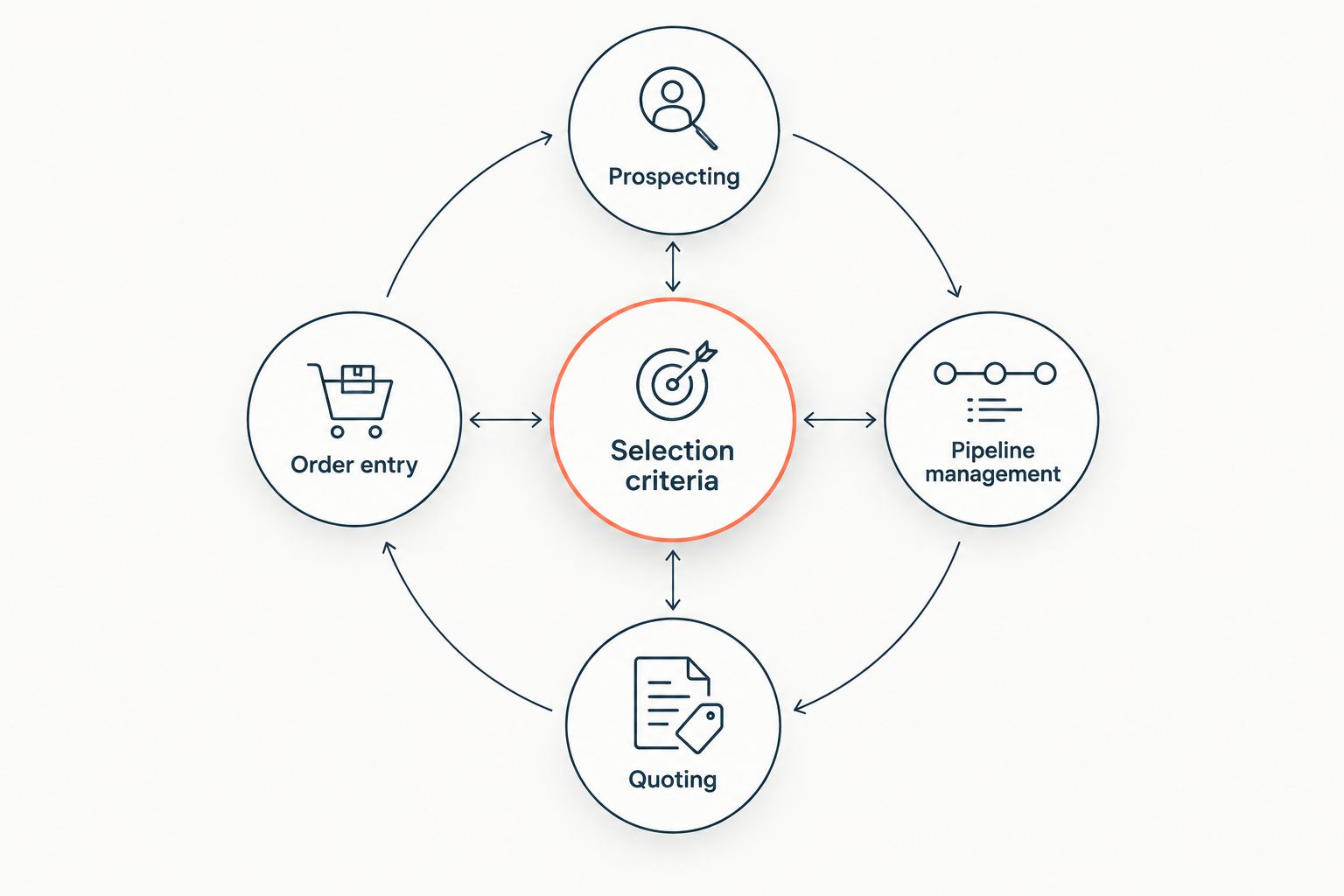
For a useful 2026 shortlist, assess 4 workflow stages: prospecting, qualification, quoting, and order entry. Write down where the handoff fails and who owns the correction. That gives each vendor a concrete requirement to demonstrate.
Make the evaluation specific
Build 3 demonstration cases from your own process: a complete RFQ, an incomplete RFQ, and a purchase order that differs from the accepted quote. These are evaluation cases, not a benchmark for vendor performance. The point is to expose how the proposed process handles ordinary work and exceptions.
Assign 2 review roles: a sales owner and an operations owner. The sales owner checks qualification and follow-up; the operations owner checks transaction accuracy, approval requirements, and system records. Include technical specialists where your product requirements demand them.
Record the acceptance criteria before the demonstration:
- Which customer and item records must be identified?
- Which missing information must stop processing?
- Which changes require approval?
- Where is the next action recorded?
- Who resolves an exception?
If quoting is the failing handoff, start with how to automate quoting for industrial distributors. Do not purchase prospecting software to solve a transaction problem.
When staying with ThomasNet is the right call
Keep ThomasNet when industrial supplier discovery remains the requirement. Buyers researching product categories and supplier capabilities are doing a different job from representatives managing opportunities or operations staff processing orders.
ThomasNet's strength is its industrial sourcing focus. Its limitation in this comparison is scope: supplier discovery does not answer every downstream sales operations requirement. That is a reason to distinguish systems, not automatically replace one with another.
Evaluate your existing channel using your own inquiries and sales outcomes. Retain it when it serves the sourcing requirement; evaluate other categories for work it was not selected to perform. A distributor can have a discovery requirement and an execution requirement at the same time.
FAQ
What's the best ThomasNet alternative for industrial distributors in 2026?
Supplyco is the best fit for industrial distributors whose requirement is revenue operations automation covering quoting, order entry, account management, and sales follow-up. ZoomInfo is the better category fit for outbound company and contact research.
Is ZoomInfo a direct replacement for ThomasNet?
No. ZoomInfo supports company and contact research for sellers, while ThomasNet supports industrial supplier discovery for buyers. Choose based on which direction your research needs to run.
Should an industrial distributor use LinkedIn Sales Navigator or ThomasNet?
Use LinkedIn Sales Navigator for researching people and target accounts, and ThomasNet for industrial supplier discovery. Professional role information and supplier capability information answer different questions.
Can HubSpot replace ThomasNet for distributor sales?
HubSpot addresses CRM and pipeline management rather than industrial supplier discovery. It fits the requirement to organize contacts, companies, deals, and customer interactions.
Is Salesforce better than ThomasNet for managing industrial accounts?
Salesforce is the relevant category choice for CRM account management; ThomasNet is the relevant choice for supplier discovery. Evaluate Salesforce against your customer-record and process requirements rather than directory requirements.
What should distributors test before choosing a ThomasNet alternative?
Test the workflow that is failing: prospecting, qualification, quoting, or order entry. Use your own representative cases and check record ownership, approval requirements, and exception handling.
Do distributors need to stop using ThomasNet when they add sales automation?
No. Supplier discovery and sales automation serve different requirements. Keep a discovery channel that meets your needs and evaluate automation for the downstream work.
One last thing
Write the requirement as a verb, not a vendor name. Find buyers, qualify inquiries, prepare quotes, enter orders, and manage accounts describe different jobs.
Supplyco fits industrial revenue operations automation; ThomasNet fits supplier discovery. That distinction is more useful than a longer list of supposedly interchangeable alternatives.


