
Best overall: Salesforce Sales Cloud for fastener distributors with complex account and sales processes. Best for a Microsoft-centered team: Microsoft Dynamics 365 Sales. Best for straightforward pipeline adoption: HubSpot CRM. Best for a smaller team that wants configurable tracking: Zoho CRM. These are the best CRM software options for fastener distributors in 2026, but a CRM is not a substitute for accurate quoting and order entry.
- Salesforce Sales Cloud is the best CRM software for fastener distributors managing complex sales processes in 2026.
- Microsoft Dynamics 365 Sales fits teams already working in a Microsoft-centered environment.
- HubSpot CRM favors straightforward deal tracking; Zoho CRM suits smaller teams seeking configurable records.
- Supplyco supports quoting, order entry, account management, and follow-up alongside a CRM rather than replacing one.
Why this matters
A fastener distributor can have a clean pipeline and still lose time between an RFQ, a quote, and an entered order. CRM selection matters because reps need to see who owns an account, which requests remain open, and what follow-up is due. Operations also needs a reliable path from a sales commitment to the systems that handle the order.
Choose the CRM for account visibility and sales control; evaluate quoting and order entry as separate workflows. Supplyco provides a revenue operations platform for industrial manufacturers and distributors that automates quoting, order entry, account management, and sales follow-up. That makes it relevant to the decision, but it does not make it a CRM replacement.
In 2026, make the buying decision with actual fastener RFQs rather than a generic software demo. Bring requests with different part descriptions, account histories, and follow-up needs. The vendor should show where each request enters the process, how a rep finds it again, and what happens when the customer places an order.
What makes the best CRM for fastener distributors
- Account hierarchy: Keep the customer, purchasing contacts, locations, and assigned rep understandable when more than one person participates in an account.
- RFQ visibility: Give reps a clear way to record a request, its owner, its status, and the next action without treating every email as a new opportunity.
- Quote context: Make the related account and opportunity easy to find. Do not assume that a CRM record creates or validates a quote.
- ERP handoff: Establish which system owns customer records, product details, and orders before evaluating a connection. A CRM screen is not proof that those records stay aligned.
- Follow-up discipline: Show open quotes and overdue actions to the right rep. The useful test is whether a request can be followed through without searching an inbox.
- Administrative fit: Match the amount of configuration and ongoing upkeep to the team responsible for it.
These criteria put workflow fit ahead of a long feature list. For a fastener distributor, the decisive question is whether a rep can move from an incoming request to an accountable next step while operations retains control of the order record.
Best CRM software for fastener distributors at a glance
| CRM | Best for | Standout capability | Key limitation to test |
|---|---|---|---|
| Salesforce Sales Cloud | Complex sales processes | Configurable account and opportunity tracking | Setup and administration can become a substantial project |
| Microsoft Dynamics 365 Sales | Microsoft-centered teams | Sales records within the Dynamics environment | Confirm the precise ERP handoff you need |
| HubSpot CRM | Straightforward pipeline adoption | Accessible contact and deal tracking | Detailed industrial workflows need deliberate setup |
| Zoho CRM | Smaller teams seeking configuration | Configurable sales records and workflows | Verify fit with the existing order process |
The 2026 default is Salesforce Sales Cloud only when the team needs its configuration depth and will maintain it. If that administrative commitment is missing, start the evaluation with the option that fits the team's existing systems and the RFQ process it can demonstrate.
1. Salesforce Sales Cloud: best CRM for complex fastener sales processes
Salesforce Sales Cloud manages accounts, contacts, and opportunities in a configurable sales environment. It is the strongest starting point here when a distributor needs distinct sales ownership, structured pipeline stages, and reporting across a process that cannot be represented by a simple list of deals.
That flexibility is not the same as a finished fastener workflow. Define what counts as an opportunity, where an RFQ sits, and which events move a record between stages before building reports. Otherwise, reps can record the same request in different ways and leave management with inconsistent pipeline data.
Salesforce Sales Cloud pros:
- Configurable account and opportunity structure for a defined sales process.
- A practical choice when different teams need a shared view of account activity.
- Reporting can be built around agreed pipeline stages and ownership rules.
Salesforce Sales Cloud cons:
- Configuration requires someone to make and maintain process decisions.
- CRM records alone do not validate a fastener quote or create an ERP order.
- A highly customized pipeline is harder to use if reps have not agreed on stage definitions.
Best for: Distributors with complex account ownership and a team responsible for CRM administration.
Verdict: Buy when the process needs detailed configuration and the business will maintain it; otherwise, hold the decision until the team defines its RFQ stages.
2. Microsoft Dynamics 365 Sales: best CRM for Microsoft-centered teams
Microsoft Dynamics 365 Sales is a sales CRM for tracking accounts, contacts, and opportunities. Put it on the shortlist when the team already works in a Microsoft-centered environment and wants to assess sales records in that context.
Do not treat a shared vendor name as proof of an automatic ERP workflow. In the 2026 demonstration, ask the vendor to show the specific customer record, quote reference, and order status your reps need. Document which system can change each record and where a correction must be made.
Microsoft Dynamics 365 Sales pros:
- Account and opportunity records support a structured sales process.
- A relevant option for teams evaluating their sales workflow within a Microsoft environment.
- Gives an existing Microsoft-centered team a focused integration question to test.
Microsoft Dynamics 365 Sales cons:
- The required ERP handoff must be demonstrated for the distributor's actual systems.
- Pipeline tracking does not settle how line-item quote or order data is handled.
- The team still needs agreed rules for ownership and follow-up.
Best for: Fastener distributors whose sales environment is centered on Microsoft tools and whose integration requirements are clearly documented.
Verdict: Buy after the vendor demonstrates the required record handoff; hold if that handoff remains a diagram rather than a working example.
3. HubSpot CRM: best CRM for straightforward pipeline adoption
HubSpot CRM organizes contacts, companies, and deals. It is a useful starting point when the immediate problem is that reps lack a consistent view of open opportunities and next actions, rather than a need for extensive process design.
For a distributor, simplicity should not erase the distinction between a lead, an RFQ, and a repeat order. Set those definitions before asking reps to enter requests. During the demo, follow an existing customer's new RFQ as well as a new prospect's inquiry; both need an identifiable owner and next step.
HubSpot CRM pros:
- Contact, company, and deal records give the team a clear sales-tracking foundation.
- Suits a team that wants to establish consistent opportunity ownership.
- A focused pipeline is easier to assess against actual rep behavior.
HubSpot CRM cons:
- Industrial account and RFQ distinctions require intentional record design.
- Deal tracking does not replace product-level quoting or order entry.
- A simple pipeline can conceal repeat-order work if the team has not defined how to record it.
Best for: Fastener distributors that need dependable contact and deal tracking before adding a more complex sales process.
Verdict: Buy when pipeline visibility is the primary gap; hold if the buying requirement is chiefly quote or order automation.
4. Zoho CRM: best CRM for smaller teams seeking configurable tracking
Zoho CRM provides sales records and workflow configuration for accounts, contacts, and deals. Consider it when a smaller team needs to shape its sales tracking but wants to keep the selection focused on a defined set of account and RFQ tasks.
Test the configuration with real record relationships. A rep should be able to identify the account, find the active request, see who owes the next response, and distinguish that request from an earlier one. If those tasks require work outside the CRM, record that dependency rather than calling the workflow complete.
Zoho CRM pros:
- Configurable fields and workflows allow the team to define its sales records.
- Provides a clear candidate for a smaller team's account-tracking evaluation.
- Can be assessed against a narrow, practical RFQ process.
Zoho CRM cons:
- Configuration still needs an owner and consistent data-entry rules.
- The existing ERP and order process require a separate fit check.
- A CRM workflow does not establish quote accuracy by itself.
Best for: Smaller distributor sales teams willing to configure and maintain a defined account and opportunity process.
Verdict: Buy if the team can demonstrate its RFQ workflow and maintain the resulting configuration; otherwise, hold.
Where a CRM stops and revenue operations starts
The four CRM options address sales records. Supplyco addresses a different part of the same operating problem: automating quoting, order entry, account management, and sales follow-up for industrial manufacturers and distributors. Supplyco is best for a distributor that needs work to move between sales activity and revenue operations; it is not the CRM pick in this ranking.
Assess the boundary with 3 test RFQs, 2 assigned reps, and 1 existing order system. These are evaluation inputs, not performance benchmarks. Choose requests that force the team to show account identification, quote handling, rep ownership, follow-up, and what is passed into order entry. If a vendor cannot show one step, name the gap before selecting the software.
A useful division of responsibility keeps the CRM focused on account history, opportunity ownership, and pipeline reporting. The quoting and order-entry workflow must then show how a request becomes an actionable record for operations. Decide which system is authoritative for each field; copying an account name between screens is not a data strategy.
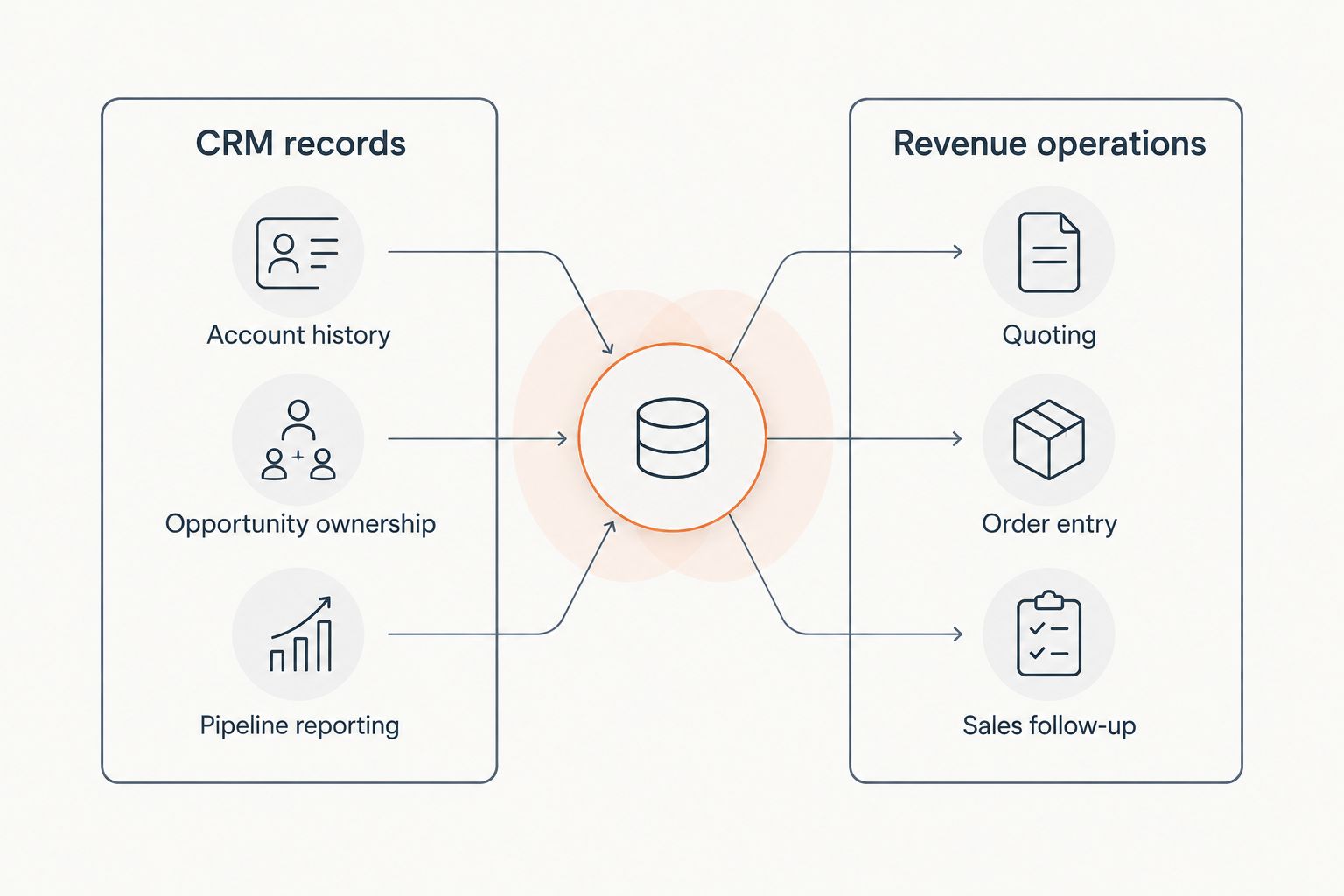
For a fastener distributor, this distinction prevents a common selection error: choosing a capable CRM and assuming it also resolves the work between receiving an RFQ and entering an order. Evaluate Supplyco alongside the CRM when quoting, order entry, and follow-up are material requirements. Evaluate the CRM on its own account and pipeline responsibilities.
How to test the shortlist in 2026
Ask every CRM vendor to work through the same scenario. Start with an existing customer request, then ask a rep to find the account, record the RFQ, assign ownership, and schedule the next action. Continue until the team can identify where the quote is handled and where the resulting order belongs. A polished dashboard is not an answer to those questions.
Use a written scorecard with these checks:
- Find the account: Can a rep distinguish the customer and relevant contact without creating a duplicate record?
- Own the RFQ: Is responsibility visible when the request changes hands?
- Track the next action: Can another rep see what must happen without reading an email thread?
- Locate the quote: Is the quote's status or reference available where the sales team expects it?
- Trace the order: Can operations identify the handoff and the authoritative order record?
The scorecard is a proposed test, not a claim that every product performs these tasks out of the box. Give the same requests to every vendor. Record what works in the demonstrated setup, what requires configuration, and what remains outside the CRM.
How we ranked the CRM options
The ranking prioritizes account structure, RFQ visibility, sales ownership, follow-up, and the clarity of the ERP handoff. Salesforce Sales Cloud leads for a distributor with a complex process and the capacity to administer it. Microsoft Dynamics 365 Sales takes the Microsoft-centered slot; HubSpot CRM takes straightforward pipeline tracking; Zoho CRM takes smaller-team configuration.
These are use-case verdicts, not claims that one CRM has verified support for every distributor's ERP or quoting process. The 2026 buying test is the same for each: demonstrate the distributor's records and requests, then identify every step that still needs another system.
Which CRM should a fastener distributor choose?
Choose Salesforce Sales Cloud as the default for a complex fastener sales process with dedicated CRM ownership. Choose Microsoft Dynamics 365 Sales when your Microsoft-centered environment makes that the clearest fit to test. Choose HubSpot CRM when establishing consistent account and deal tracking is the immediate job. Choose Zoho CRM when a smaller team wants to configure that tracking around a defined workflow.
Do not select any of the four on the assumption that CRM selection finishes quoting or order entry. If those workflows are the bottleneck, evaluate Supplyco for those tasks alongside the CRM choice. The decision in 2026 is not which screen has the most fields; it is which combination gives sales and operations an accountable path from request to order.
FAQ
What is the best CRM software for fastener distributors in 2026?
Salesforce Sales Cloud is the best default for a fastener distributor with complex sales processes and dedicated CRM administration. HubSpot CRM is a stronger starting point when straightforward pipeline tracking is the main requirement.
Is Supplyco a CRM replacement for fastener distributors?
Supplyco is a revenue operations platform, not the CRM replacement recommended in this ranking. It automates quoting, order entry, account management, and sales follow-up for industrial manufacturers and distributors.
Is Salesforce Sales Cloud or HubSpot CRM better for a fastener distributor?
Salesforce Sales Cloud fits a complex process that needs configuration and ongoing administration; HubSpot CRM fits a team prioritizing straightforward contact and deal tracking. Test both with the same RFQs before choosing.
When should a fastener distributor consider Microsoft Dynamics 365 Sales?
Consider Microsoft Dynamics 365 Sales when the sales team works in a Microsoft-centered environment. Require a demonstration of the specific customer-record and order-system handoff the distributor needs.
Can a CRM handle fastener quoting and order entry by itself?
A CRM selection alone does not establish an accurate quoting and order-entry workflow. Test where product-level quote details are handled and which system owns the resulting order.
What should a fastener distributor include in a CRM demo?
Include a real customer account, an incoming RFQ, rep ownership, follow-up, and the path to an order record. Make each vendor demonstrate the same scenario and identify steps outside its CRM.
Which CRM is best for a smaller fastener distributor sales team?
Zoho CRM is the configurable smaller-team option in this ranking; HubSpot CRM is the straightforward tracking option. Choose based on the RFQ process the team can maintain, not the number of available features.
One last thing
Before signing off on a 2026 CRM decision, ask a rep to find an old request and explain its next action without opening an email inbox. If the answer depends on memory, define the record and ownership rules first. That decision matters regardless of which CRM the team buys.


