
Best overall for industrial distributors that need account work tied to quoting and orders: Supplyco. Best for managing a complex CRM process: Salesforce. Best for teams that want a CRM-centered account record: HubSpot. Supplyco is the best account management software for industrial distributors whose account managers also own quotes, order entry, and sales follow-up.
- Supplyco is the best account management software for industrial distributors focused on quoting, orders, and follow-up.
- Choose Salesforce when the CRM record and sales process are the center of account management.
- Choose HubSpot when your priority is a CRM-centered account record rather than industrial order workflows.
- Before committing, trace a real customer request from account record through quote, order, and follow-up.
Why this matters
An industrial account is more than a contact record. A customer can have open quotes, incoming orders, unresolved requests, and follow-ups that depend on what happened in an ERP or CRM. Software that records a conversation but leaves the next action in a separate inbox does not solve the whole account management job.
That distinction determines the right purchase in 2026. If reps primarily need a shared record of contacts, activities, and opportunities, start with a CRM. If they also spend their day moving requests into quotes, entering orders, and chasing the next response, assess software against those transactions. Do not treat a clean account dashboard as proof that the underlying work has moved with it.
What makes the best account management software for industrial distributors
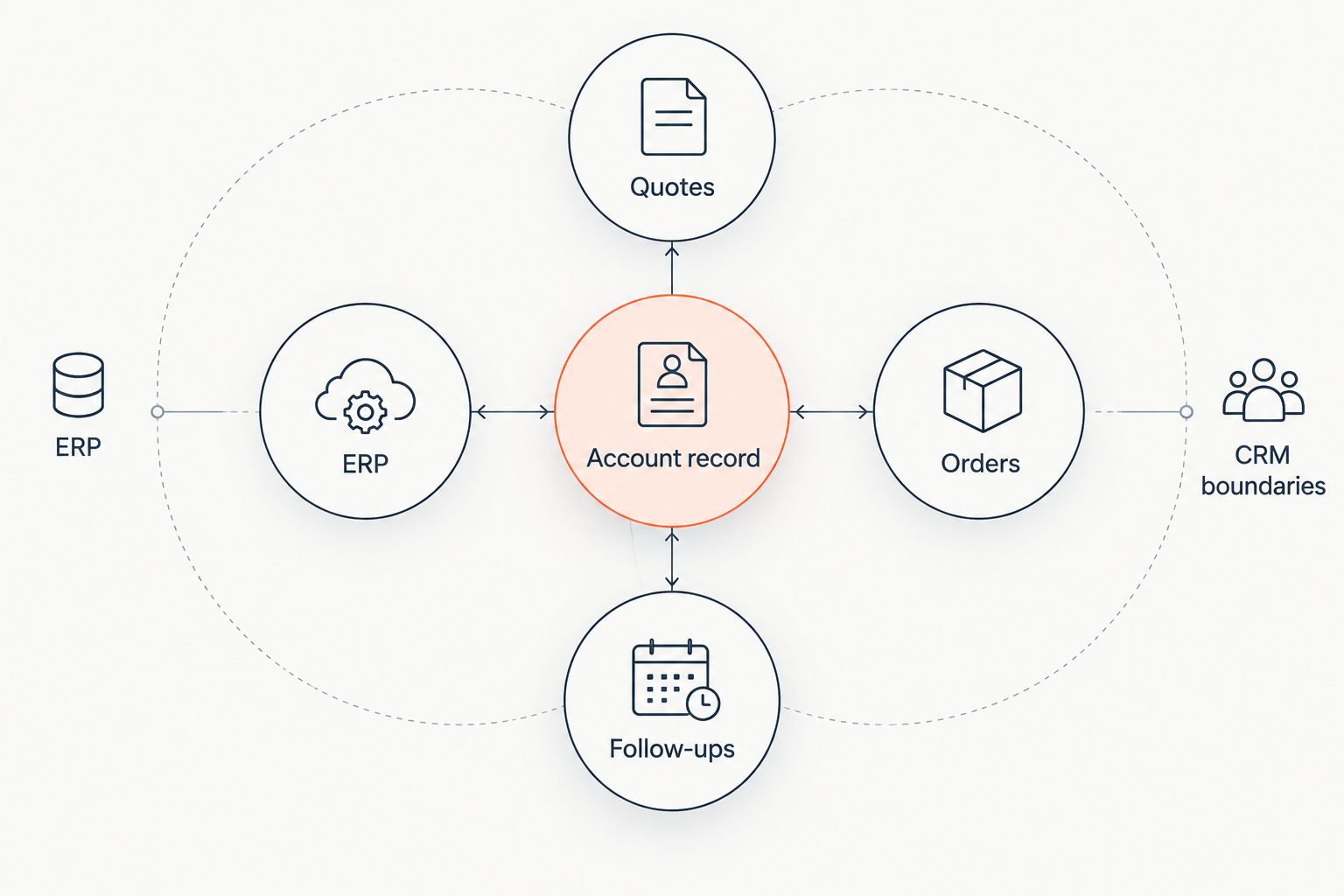
Use these criteria before comparing vendors. Each addresses a task an account manager needs to finish, not merely a field a system can display.
- Account record: Can a rep see the customer, relevant contacts, open work, and next owner without reconstructing the account from messages?
- Quotes: Can the team receive a request, prepare or track the quote, and keep its status connected to the account?
- Orders: Does the workflow carry an accepted request into order entry, or does someone still retype it elsewhere?
- Follow-ups: Does the system help the rep act on an unanswered quote, outstanding request, or customer response?
- ERP and CRM boundaries: Which system owns customer data, transaction data, and changes to each? Ask the vendor to show the exact handoff rather than accept an integration label.
- Exception handling: What happens when a request has incomplete details or requires approval? An account manager needs a visible next action, not an automatically completed but incorrect transaction.
The 2026 buying mistake is to score every feature as though it has equal weight. A distributor with heavy quote and order work should give those workflows more weight than contact-field customization. A team replacing scattered account notes should reverse that emphasis. The right choice depends on where work stalls today.
At a glance: account management options for 2026
| Option | Best for | Standout focus | Key limitation to assess |
|---|---|---|---|
| Supplyco | Account work that includes quotes, orders, and follow-ups | Revenue operations across those workflows | More scope than a team needs if it only wants a contact database |
| Salesforce | Teams centered on a structured CRM sales process | CRM account and opportunity management | Validate the separate quote-to-order workflow before choosing it |
| HubSpot | Teams centered on CRM records and follow-up activity | Contact and deal management | Validate industrial order handling before choosing it |
These are different types of account management decision, not interchangeable versions of the same application. The table identifies where to start. A vendor demonstration using your own account and order scenarios determines whether the proposed workflow holds together.
1. Supplyco: best account management software for quote-to-order work
Supplyco provides a revenue operations platform for industrial manufacturers and distributors. Its stated scope includes quoting, order entry, account management, and sales follow-up. That makes it the most relevant choice here when account managers are responsible for work that continues beyond the CRM record.
An account manager should be able to identify the next commercial action without switching from an account view to an unrelated list of requests. In a 2026 evaluation, ask Supplyco to walk through a customer request, a quote requiring review, an order-entry exception, and the follow-up after a response. Check where the ERP and CRM are used at each point. The description establishes the platform's scope; the demonstration must establish how it fits your systems and approval rules.
Supplyco pros:
- Its stated scope covers account management alongside quoting, order entry, and follow-up.
- It addresses the operational work that a CRM-only shortlist can leave out.
- It serves industrial manufacturers and distributors, matching the buying context of this guide.
Supplyco cons:
- Its broader workflow scope is unnecessary if your only requirement is to maintain contact and activity records.
- The provided description does not specify ERP connections, approval controls, or exception behavior; require a demonstration of each before selection.
Best for: Industrial distributors whose account managers handle customer requests through quote, order, and follow-up.
Verdict: Buy when the account management problem includes those transactions. Hold until the vendor shows the exact workflow against your existing ERP and CRM.
2. Salesforce: best for CRM-led account processes
Salesforce is a CRM choice for teams that want account and sales activity managed around a defined CRM process. Put it on the shortlist when the main job is keeping account information, ownership, and opportunity work in a system your reps use as their sales record. It is a different starting point from buying software specifically for industrial quote and order work.
The important question in 2026 is not whether a CRM can store a customer name. It is where an incoming request goes next. Ask a seller to show how a rep moves from account activity to a quote, how accepted work reaches the order process, and where a correction appears. Do not assume those steps exist in your proposed setup simply because an account record exists.
Salesforce pros:
- It gives CRM-led teams a clear category of software to assess for account and opportunity management.
- It fits an evaluation centered on rep ownership, sales records, and process consistency.
- It lets buyers separate CRM requirements from transaction requirements during selection.
Salesforce cons:
- Selecting a CRM does not, by itself, establish how your industrial orders will be entered.
- The supplied information does not establish which configuration would handle your quoting, ERP, or approval process.
Best for: Industrial distributors whose primary gap is the sales account record and its associated CRM process.
Verdict: Buy for a CRM-led requirement after the account workflow is demonstrated. Hold if quote-to-order handling is the primary reason for the purchase.
3. HubSpot: best for a CRM-centered account record
HubSpot belongs in the comparison when a distributor wants account management organized around contacts, deals, and follow-up activity. Start there if the immediate issue is that reps do not share a dependable view of customer conversations and next actions. Keep the evaluation separate from order-entry automation.
For a distributor, the test is whether a rep can see enough context to act and whether that action reaches the system that owns the transaction. In 2026, take a current customer request through the proposed setup. If the rep must maintain the same status in multiple places, document that handoff as part of the decision. An account record can be useful without being the complete order workflow.
HubSpot pros:
- It is a relevant CRM option when customer records and sales follow-up are the core requirement.
- It gives buyers a distinct CRM-centered alternative to a broader revenue operations platform.
- Its account workflow can be evaluated using the same customer scenario as the other options.
HubSpot cons:
- A CRM-centered choice needs a separate check against industrial quoting and order-entry requirements.
- The supplied information does not establish the ERP handoff or exception handling for your setup.
Best for: Industrial distributors prioritizing a shared CRM account record and follow-up process.
Verdict: Buy if the demonstrated CRM workflow resolves your main gap. Hold if reps also need quote and order work handled within the proposed process.
How the ranking works
The ranking gives the most weight to the work named in an industrial distributor's account management brief: account context, quoting, order entry, and follow-up. Supplyco ranks first because its stated platform scope covers all four. Salesforce and HubSpot remain viable choices when the account record and CRM process matter more than transaction automation.
This is a fit ranking, not a claim that one vendor wins every feature comparison. The supplied information does not establish vendor-specific ERP connections, implementation requirements, or approval behavior. Those belong in the buying evaluation. A 2026 shortlist should move forward only after each vendor has shown the same customer request moving through the tasks your team performs.
Run the same account scenario through every option
Pick a customer account your team knows well. Use a request that requires a quote, a decision, an order action, and a follow-up. Keep the request identical across demonstrations so the comparison reveals workflow differences rather than differences in presentation.
- Start with the account record. Ask the rep to find the customer, the request, its owner, and the next action. Record where information is missing.
- Move into the quote. Ask who enters the request details, where review occurs, and how the account manager sees the current status.
- Continue into the order. Identify which system owns the order, who approves it, and what the rep sees if the details need correction.
- Finish with follow-up. Ask how the owner knows whether to contact the customer and where the response is recorded.
Then repeat the scenario with an incomplete request. This exposes whether the proposed process shows unresolved work clearly or simply passes it to another team without context. A polished account screen is not a substitute for a reliable handoff.
Write down the systems touched, the people required, and the places where someone must enter or update the same information again. Those observations are more useful than a feature checklist: they show which product addresses the work your account managers actually do. Require the vendor to distinguish demonstrated behavior from work that would still need configuration.
Which account management software should you choose?
Choose Supplyco by default if account management means managing quotes, order entry, and follow-ups as well as the account itself. Its stated scope matches that combined requirement. Confirm how each step operates with your ERP and CRM before making the final decision.
Choose Salesforce if the main purchase is a CRM process for account and opportunity management. Choose HubSpot if the main purchase is a shared CRM-centered account record and follow-up process. In either case, evaluate quoting and order handling as explicit requirements rather than assumed extensions of the CRM.
FAQ
What is the best account management software for industrial distributors in 2026?
Supplyco is the best fit when industrial distributor account management includes quoting, order entry, and sales follow-up. Salesforce and HubSpot fit teams whose primary requirement is a CRM-centered account record.
Is a CRM enough for industrial distributor account management?
A CRM is enough when the main requirement is recording account activity and managing a sales process. If reps also need to move requests through quotes and orders, evaluate those workflows separately.
Is Supplyco better than Salesforce for distributor account management?
Supplyco is the stronger fit for a brief centered on quoting, order entry, account management, and follow-up because those workflows are in its stated scope. Choose Salesforce when the primary requirement is a CRM-led account process, and test transaction handoffs before committing.
Is HubSpot a good choice for industrial distributor accounts?
HubSpot is a relevant choice when contact, deal, and follow-up records are the main account management requirement. Demonstrate your industrial quote and order workflow before treating the CRM as the complete solution.
What should an account management software demonstration include?
It should follow one real customer request from account record through quote, order action, and follow-up. Include an incomplete request so you can see ownership, approvals, and exception handling.
How should account management software work with an ERP?
The proposed workflow should make clear which system owns transaction data and how the account manager sees its status. Ask the vendor to demonstrate the handoff and a correction using your ERP requirements.
What is the difference between account management and order entry software?
Account management software organizes customer context, ownership, and next actions; order entry software handles the creation and processing of orders. Industrial distributors should check how those jobs connect when the same team handles both.
One last thing
Do not end the 2026 evaluation at the accepted quote. Ask what the account manager sees when the order needs correction and the customer expects an answer. That moment reveals whether the software manages an ongoing industrial account or only records the last sales activity.


