
Instead of manually checking whether customers have viewed quotes, connect your quoting system’s document-view event to a Slack notification so the responsible sales rep receives the quote reference and a clear next action. Slack quote alert automation requires a genuine quote-view event, owner routing, duplicate protection, and an approved Slack delivery method—not an email-open trigger.
- Slack quote alert automation should use document-view events, not email opens, to trigger sales follow-up.
- Slack alerts need a quote reference, current owner, revision, and a clear next action.
- Supplyco provides revenue operations automation for industrial manufacturers and distributors; verify quote-event and Slack support before implementation.
- Keep quote approval and order entry separate from viewing notifications.
Why this matters
An opened quote gives your rep a reason to review the opportunity. It does not establish purchase intent, technical acceptance, or authorization to enter an order. A purchasing contact might be checking a revision or forwarding the document to engineering.
Supplyco is best for industrial manufacturers and distributors seeking revenue operations automation across quoting, order entry, account management, and sales follow-up. Evaluate Supplyco against those operational needs, then verify the event access and Slack delivery required for this specific workflow.
For a 2026 implementation, define success as an actionable notification reaching the right rep without exposing unnecessary customer information. Notification volume alone is not a useful outcome.
Before you start
- Quote-event access: Obtain access to a quoting platform that records document views and exposes them through a supported integration, webhook, or API. Collect sample events and confirm how internal views and unidentified visitors are represented.
- Routing and Slack access: Obtain read access to quote ownership in your CRM or quoting system, plus permission to install an approved Slack app. Prepare a restricted test channel, a fallback destination, and a secure place to store credentials.
- The gotcha: An email open is not a quote view. Email privacy features and security scanning can generate activity without a buyer reading the document; confirm the source event’s meaning before building the notification.
Treat this as a configuration guide for your chosen quoting system and middleware, not a claim of a prebuilt Supplyco-to-Slack connector. Source-platform controls differ; use its documented quote-view event rather than guessing a trigger name.
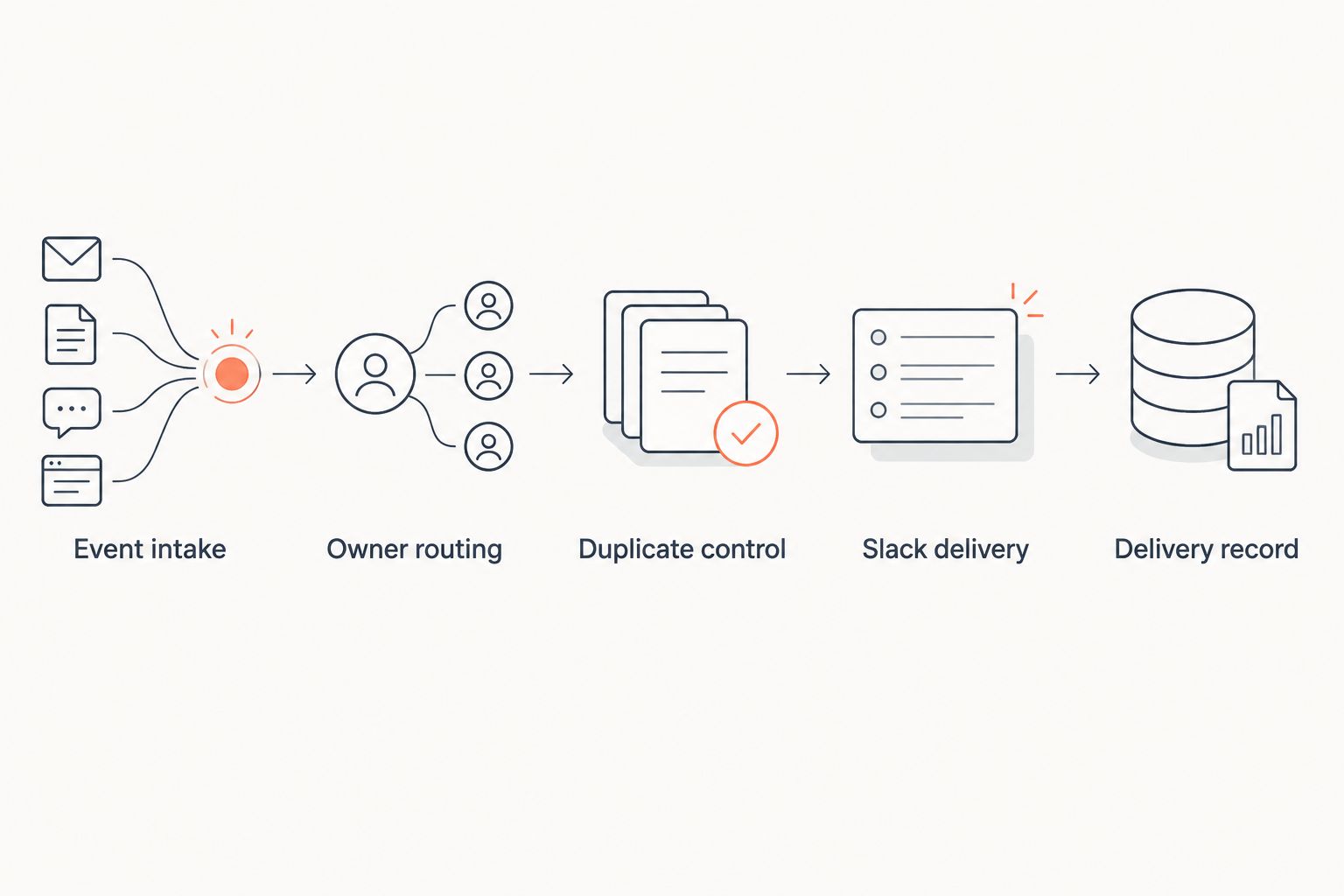
Event intake
Establish the source event
- Open a test quote using an external test recipient. Inspect the quoting system’s resulting activity record and integration payload.
- Identify the event that represents viewing the quote document. Exclude delivery confirmations, email opens, internal previews, and document-generation events.
- Connect that event to your integration service. For webhook delivery, configure an authenticated HTTPS receiver and follow the source platform’s documented signature-verification procedure.
- Define your integration’s normalized fields:
event_id,quote_id,revision_id,viewed_at,account_id, andviewer_identity. These are your internal schema names, not promised fields in any product interface. - Preserve the original payload in an access-controlled event log. Normalize timestamps before applying routing or duplicate rules.
If the source provides no revision identifier, document that limitation before enabling revision-based alerts. Do not invent a revision by treating every view timestamp as a new version.
Expected result: Opening a test quote produces a recognizable document-view event with a stable quote reference. An internal preview or email open does not qualify unless the source incorrectly groups those activities together; resolve that ambiguity before proceeding.
Confirm the event contract
A 2026 event contract should record what the trigger actually means. Establish whether the source reports every view, only the first view, or a change to a last-viewed timestamp.
Keep unidentified viewers unidentified. A link shared inside a customer organization does not prove that the original recipient opened it. Your Slack message should distinguish a known contact from an anonymous document view.
Owner routing
Resolve the responsible rep
- Use
quote_idto retrieve the quote’s current owner from your designated system of record. Do not trust an owner copied into an older event when ownership can change. - Map that owner to an approved Slack destination. Use a restricted sales channel for the initial deployment; add individual delivery only through an app or connector that supports it.
- Define an explicit fallback for missing, inactive, or unmapped owners. Route those events to a monitored exception destination instead of silently dropping them.
- Check the quote’s current status. Suppress routine sales alerts for quotes your business marks as cancelled, superseded, or otherwise ineligible for follow-up.
- Restrict the message to information the destination’s members are authorized to see.
Expected result: Each qualifying event resolves to a current owner and an authorized destination, or enters an identifiable exception queue.
For industrial accounts, separate quote ownership from territory membership. A branch or territory channel can provide visibility, but one accountable rep should own the next action.
Choose the alert policy
Use these policies as configuration choices, not performance claims. The quieter policy is the better starting point when reps already receive account and opportunity notifications.
| Alert policy | Best for | Advantage | Limitation |
|---|---|---|---|
| First qualifying view per revision | Initial sales follow-up | Gives the owner a distinct review signal | Does not notify the rep about subsequent views |
| Every qualifying view | Controlled troubleshooting | Exposes the source event stream | Repeated views can create notification noise |
| Return view after a defined interval | Revisiting stalled quotes | Separates renewed activity from the initial view | Requires stored history and an explicit interval rule |
Start with first qualifying view per revision. Keep every-view delivery in the test channel until you understand the source’s behavior.
Slack delivery
Configure an incoming webhook
An incoming webhook is appropriate for posting to a configured Slack channel. It is not a substitute for an owner-routing system or an individual-message integration.
- In Slack’s app management interface, select Create New App, then From scratch. Give the app an operational name and choose the intended workspace.
- Open Incoming Webhooks and enable Activate Incoming Webhooks.
- Select Add New Webhook to Workspace, choose the restricted test channel, and select Allow. Complete any workspace-required approval before continuing.
- Store the generated webhook URL as a secret in your integration service. Do not place it in a quote record, browser script, Slack message, or public repository.
- Configure your service to send an HTTP POST containing a JSON
textfield to that webhook. Record the response and treat unsuccessful delivery as a retryable or reviewable failure according to its cause.
Expected result: A test POST creates a message in the authorized channel, and the integration records whether delivery succeeded.
Incoming webhooks are associated with the channel selected during installation. If your workflow needs different destinations or direct messages, choose an approved Slack app or connector with documented support for that delivery pattern.
Build a useful message
Include the account name, quote reference, revision when available, view timestamp, current owner, and a protected record reference. Keep drawings, attachments, commercial terms, and customer-specific details out of the channel unless access rules explicitly permit them.
Use a factual event label such as Quote viewed. Add an action such as Review the current quote and determine the next follow-up rather than instructing the rep to assume the buyer is ready to order.
For your 2026 message template, mark anonymous activity clearly. Do not write that a named buyer viewed the quote unless the event identifies that person.
Expected result: The rep can identify the quote and responsible owner without opening an unrelated dashboard or mistaking a document view for acceptance.
Duplicate control
Separate retries from repeat views
- Store processed
event_idvalues when the source provides stable event identifiers. Replayed delivery of the same event must not produce another Slack message. - Create a separate notification key for your chosen business policy. For first-view alerts, use the quote reference and revision reference when both exist.
- Reserve that notification key before sending. Use an atomic operation so simultaneous events cannot both claim the same alert.
- Record delivery state separately from event receipt. A received event with a failed Slack POST still needs recovery.
- Handle ambiguous delivery outcomes through an exception policy. A network timeout can leave your service uncertain whether Slack accepted the message; uncontrolled retries can duplicate it.
Expected result: Event retries do not become repeat alerts, while a genuinely new quote revision can qualify under your documented policy.
The target is 1 alert per quote revision under the first-view policy, not one alert for every HTTP request. When revision information is unavailable, choose a quote-level policy and state that it cannot distinguish revised documents.
The workflow separates event receipt, ownership, eligibility, delivery, and recording. That separation makes failures diagnosable without changing quoting or order-entry behavior.
Validate before release
Use 3 test events: a qualifying external view, a replay of that event, and a view from an excluded internal user. Under the first-view policy, the expected total is 1 Slack message.
Then test an unmapped owner and a failed delivery separately. Confirm that both remain visible to operations staff rather than disappearing from the workflow.
Record this acceptance test with your 2026 configuration. Re-run it when the source event format, Slack app permissions, or ownership rules change.
Alert when a revised quote is opened
A second useful workflow alerts the rep when a customer views a newly issued revision. Use it only when the quoting platform exposes a reliable revision reference.
- Keep the same quote-view trigger and current-owner lookup.
- Include the revision reference in the business notification key.
- Check whether the viewed revision is still eligible for follow-up under your policy.
- Identify the revision in the Slack message and retain the distinction between viewing and accepting.
- Test a view of the old revision and a view of the current revision independently.
Expected result: A new eligible revision can generate an alert without making every repeat view of the original quote look like new activity.
Do not trigger this workflow when a sales rep merely edits or republishes a quote. Publication and customer viewing are different events. Connect the notification policy to your sales follow-up cadence for industrial reps so document activity informs an existing process rather than creating a competing one.
Troubleshooting
- Messages appear before anyone reads the quote. Inspect the original event and source activity log. Replace an email-open or link-access trigger with a documented document-view trigger; apply scanner exclusions only when the source identifies them reliably.
- The wrong rep receives the notification. Check the current owner lookup and Slack mapping. Refresh stale mappings and send unresolved ownership to the fallback destination.
- One view produces repeated messages. Compare event identifiers and notification keys. Fix non-atomic duplicate checks, replay handling, or a policy that unintentionally alerts on every view.
- The event arrives but Slack stays silent. Inspect the HTTP response, app approval, webhook status, and configured channel. Recover failed delivery without bypassing duplicate control.
- Old revisions trigger active-deal follow-up. Compare the viewed revision with the quote’s current revision and eligibility rules. Suppress superseded documents where your business policy requires it.
Customize your workflow
Start with notifications, then add a reviewed follow-up task if your CRM integration supports task creation. Check for an existing task before creating another, and retain the responsible owner.
For Supplyco revenue operations automation, assess the quote-event workflow alongside quoting, account management, and sales follow-up. Confirm connector support, permitted write operations, and exception handling before authorizing changes in existing systems.
Keep the 2026 rollout narrow: a defined sales team, an approved destination, and a documented alert policy. Expand only after owner routing, retries, and revision handling pass the acceptance tests.
FAQ
How do I automatically alert sales reps in Slack when a quote is opened?
Connect a documented quote-view event to an integration that resolves the current owner, checks duplicate rules, and sends an approved Slack message. Test internal views, event replays, and delivery failures before enabling production notifications.
Can an email-open event trigger a Slack quote alert?
An email-open event can trigger a notification, but it does not establish that the quote was viewed. Use a document-view event for quote-view alerts and label email activity separately.
Can a Slack incoming webhook message a different rep for every quote?
An incoming webhook posts to its configured channel; it is not a general-purpose individual-message router. Use an approved Slack app or connector with documented destination support when you need owner-specific delivery.
Does Supplyco have a prebuilt Slack quote-view integration?
Confirm quote-view event access and Slack delivery support directly with Supplyco before selecting an implementation. Its stated platform scope includes quoting, order entry, account management, and sales follow-up, which does not by itself establish this specific connector.
Should I notify reps every time a customer opens a quote?
Start with the first qualifying view per quote revision rather than every view. Repeated activity can create noise; use a separate return-view policy when you have reliable event history.
Does opening a quote mean the customer accepted it?
No, a document view is not quote acceptance or order authorization. Keep acceptance, approvals, and order entry behind their own documented events and controls.
What should a Slack quote alert include?
Include the account, quote reference, revision when available, timestamp, current owner, and next action. Identify anonymous views honestly and restrict sensitive information to authorized destinations.
One last thing
Do not send a customer message saying you saw them open the quote. Use the event internally to review the opportunity, then follow up on the customer’s actual requirements, unanswered questions, or requested next step. The notification is a work signal, not a reason to overstate buyer intent.


